
Goplus Walking Pad, Under Desk Treadmill
Goplus Walking Pad Under Desk Treadmill User Manual
Model: Walking Pad, Under Desk Treadmill
Brand: Goplus
1. Introduction
Welcome to the Goplus Walking Pad Under Desk Treadmill user manual. This guide provides essential information for the safe and effective operation, maintenance, and troubleshooting of your new fitness equipment. Designed for home and office use, this compact treadmill allows you to integrate physical activity into your daily routine, promoting a healthier lifestyle.
2. Key Features
The Goplus Walking Pad Under Desk Treadmill is equipped with several features designed for convenience, performance, and user safety:
- 7-Layer Robust Running Belt: The shock-absorbing and non-slip running belt features 7-layer construction and a diamond-textured surface, reducing impact on joints and knees while providing a stable and secure space for walking or jogging.
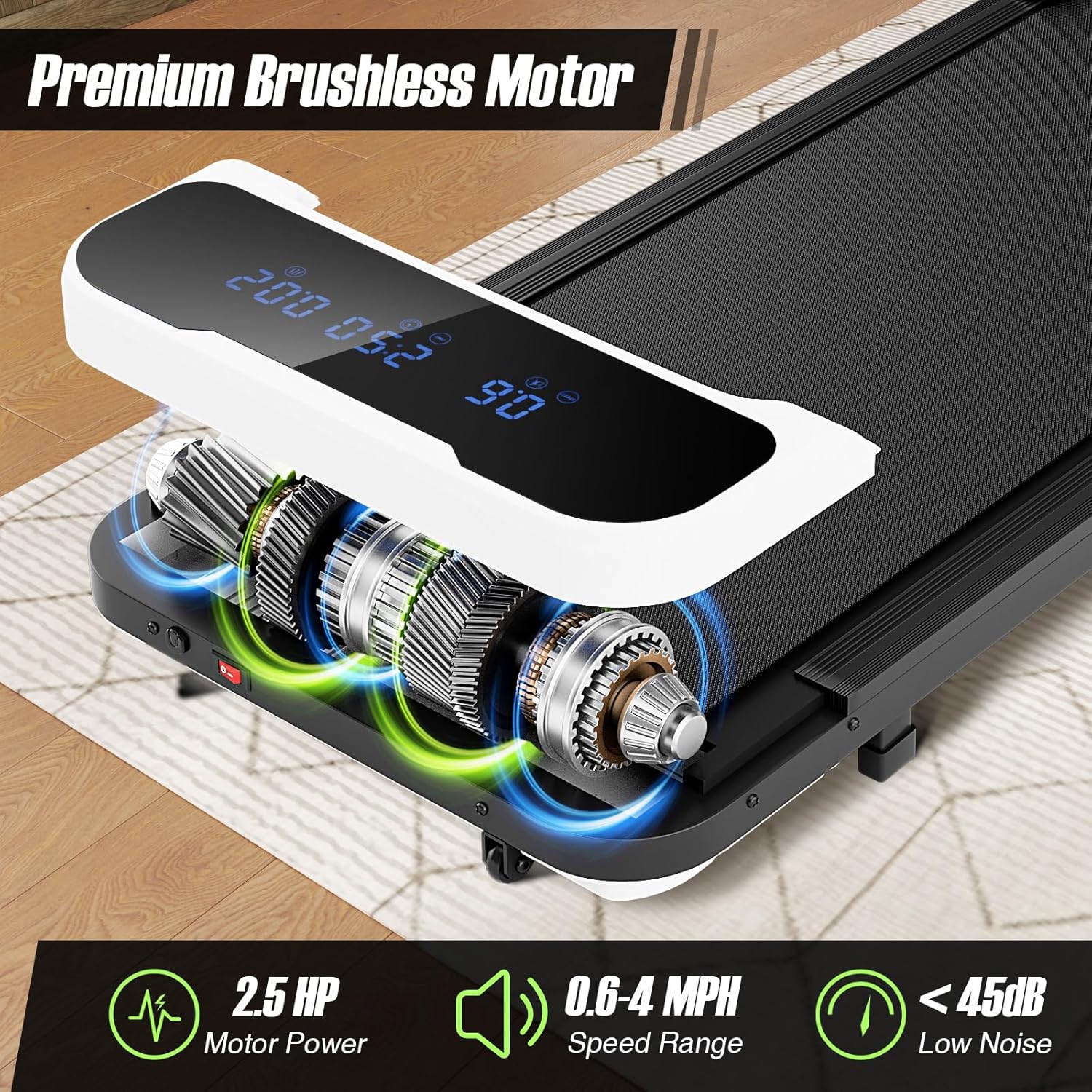
- Premium Brushless Motor: A powerful yet quiet 2.5 HP brushless motor ensures smooth operation and extends the machine's lifespan, maintaining low-noise operation under 45 dB.
- Clear Data Feedback: An integrated LED display clearly shows real-time fitness data including speed, distance, time, and calories burned. A remote control is included for convenient operation.
- Customized Fitness Intensity: The treadmill offers a speed range of 0.6-4 MPH, suitable for working (0.6-1.5 mph), walking (0.6-2.5 mph), and jogging (2.5-4 mph). It also includes 3 customized countdown programs (time 5-60 mins, distance 1-99 miles, and calories 20-990 cal) to meet personal fitness goals.
- Easy to Move & Store: With a compact 4.7-inch thickness and 2 built-in wheels, this treadmill is designed for easy movement and space-saving storage. No assembly is required.
3. Setup
Your Goplus Walking Pad is designed for immediate use with no assembly required. Follow these simple steps to get started:
- Unpacking: Carefully remove the walking pad from its packaging. Ensure all components are present: 1 x Walking Pad, 1 x Remote Control, 1 x Treadmill Lubricant, and this Instruction Manual.
- Placement: Place the walking pad on a flat, stable, and non-slip surface. Ensure there is adequate clear space around the unit (at least 2 feet from walls or furniture) for safe operation and to prevent obstructions.
- Power Connection: Connect the power cord securely to the treadmill's power input port, then plug the other end into a standard AC 110V (50/60Hz) grounded electrical outlet.
4. Operating Instructions
Familiarize yourself with the controls and display to effectively use your walking pad.
4.1 Power On/Off
- To power on, ensure the treadmill is plugged in, then press the power button on the remote control.
- To power off, press the power button on the remote control again.
4.2 Using the Remote Control
The remote control allows you to manage all functions of the walking pad:
- Power Button: Turns the treadmill on or off.
- Speed +/- Buttons: Adjusts the speed in increments of 0.1 MPH.
- Mode Button: Cycles through the display modes (Time, Distance, Calories) or activates countdown programs.
4.3 Understanding the LED Display

A detailed view of the Goplus Walking Pad's LED display, which provides real-time feedback on your workout metrics including speed, elapsed time, distance covered, and calories burned, for effective progress tracking.
The LED display provides real-time feedback on your workout:
- Speed: Current walking/jogging speed (0.6-4 MPH).
- Time: Duration of your workout.
- Distance: Total distance covered.
- Calories: Estimated calories burned.
4.4 Speed Adjustment and Modes

This image illustrates the versatile speed ranges of the Goplus Walking Pad, allowing users to work at 0.6-1.5 MPH, walk at 0.6-2.5 MPH, and jog at 2.5-4 MPH, adapting to various fitness needs.
Adjust your workout intensity to match your needs:
- Working Mode: 0.6-1.5 MPH, ideal for light activity while working at a standing desk.
- Walking Mode: 0.6-2.5 MPH, suitable for a brisk walk.
- Jogging Mode: 2.5-4 MPH, for a light jog.
4.5 Customized Countdown Programs
The Goplus Walking Pad offers three customizable countdown programs: by time (5-60 minutes), by distance (1-99 miles), and by calories (20-990 calories), enabling users to set specific fitness goals for their workouts.
Set specific goals for your workout using the countdown modes:
- Time Countdown: Set a target workout duration (5-60 minutes).
- Distance Countdown: Set a target distance to cover (1-99 miles).
- Calories Countdown: Set a target number of calories to burn (20-990 calories).
To activate a countdown program, press the Mode button on the remote control until the desired mode is selected, then use the speed +/- buttons to adjust the target value. The treadmill will stop once the target is reached.
4.6 Safety Guidelines During Operation
- Always step onto the belt only after it has started moving at a slow speed.
- Do not exceed the maximum weight capacity of 220 lbs.
- Wear appropriate athletic footwear.
- Keep children and pets away from the treadmill during operation.
- If you feel dizzy or unwell, stop your workout immediately.
5. Maintenance
Regular maintenance ensures the longevity and optimal performance of your Goplus Walking Pad.
5.1 Lubrication
The running belt requires periodic lubrication to reduce friction and extend its lifespan. A treadmill lubricant is included with your purchase.
- Frequency: Lubricate the belt every 3-6 months, or after approximately 50 hours of use, depending on usage frequency.
- Procedure: Turn off and unplug the treadmill. Lift the edge of the running belt and apply a small amount of lubricant directly onto the center of the deck, underneath the belt. Start the treadmill at a low speed for a few minutes to distribute the lubricant evenly.
5.2 Cleaning
Keep your walking pad clean to prevent dust and debris buildup.
- Wipe down the surface of the treadmill and LED display with a soft, damp cloth. Avoid using abrasive cleaners or solvents.
- Regularly vacuum around and under the treadmill to remove dust and lint.
5.3 Running Belt Inspection

This image highlights the advanced 7-layer construction of the Goplus Walking Pad's running belt, featuring a diamond-textured surface for superior shock absorption and non-slip performance, ensuring comfort and knee protection during exercise.
Periodically inspect the running belt for signs of wear or damage. Ensure it is centered and not rubbing against the sides of the treadmill. If adjustment is needed, refer to the troubleshooting section or contact customer support.
6. Troubleshooting
If you encounter any issues with your Goplus Walking Pad, refer to the common problems and solutions below. For problems not listed, please contact customer support.
| Problem | Possible Cause | Solution |
|---|---|---|
| Treadmill does not power on. | Power cord not securely plugged in; outlet not functional. | Ensure the power cord is fully inserted into the treadmill and the wall outlet. Test the outlet with another device. |
| Running belt slips or hesitates. | Belt requires lubrication; belt tension is too loose. | Apply treadmill lubricant as per maintenance instructions. If slipping persists, contact customer support for belt tension adjustment guidance. |
| Unusual noise during operation. | Loose components; foreign object under the belt. | Inspect the treadmill for any loose screws or parts. Turn off and unplug the unit, then carefully check under the belt for any foreign objects. |
| Remote control not responding. | Battery low or dead; remote out of range. | Replace the battery in the remote control. Ensure you are within effective range of the treadmill's receiver. |
7. Specifications
Detailed technical specifications for the Goplus Walking Pad Under Desk Treadmill:

A clear diagram detailing the compact dimensions of the Goplus Walking Pad: 43 inches in length, 19 inches in width, and a slim 4.7 inches in height, along with key electrical specifications.
| Feature | Specification |
|---|---|
| Color | White |
| Material | Metal, ABS, PVC, MDF |
| Overall Dimensions (L x W x H) | 43" x 19" x 4.7" |
| Running Belt Size (L x W) | 36" x 15" |
| Length of Power Cord | 5.6 ft |
| Net Weight | 36 lbs |
| Weight Capacity | 220 lbs |
| Motor Power | 2.5 HP (Brushless) |
| Current | 5A |
| Voltage | AC 110V |
| Frequency | 50/60Hz |
| Speed Range | 0.6-4 MPH |
| Number of Programs | 3 (Countdown Modes) |
| Assembly Required | No |
8. Warranty and Support
Your Goplus Walking Pad Under Desk Treadmill comes with a limited warranty to cover manufacturing defects.
- Warranty Period: 90 Days from the date of purchase.
- Coverage: This warranty covers defects in materials and workmanship under normal use. It does not cover damage resulting from misuse, accidents, unauthorized modifications, or improper maintenance.
For technical support, warranty claims, or to inquire about replacement parts, please contact Goplus customer service. Please have your purchase receipt and product model information ready when contacting support.
Contact information can typically be found on your purchase documentation or the Goplus official website.
Related Documents - Walking Pad, Under Desk Treadmill
 |
Goplus Electric Walking Treadmill SP36877 User Manual User manual for the Goplus Electric Walking Treadmill, model SP36877. This guide provides product instructions, safety precautions, parameter details, assembly guidance, exercise advice, operating instructions, maintenance tips, troubleshooting solutions, and warranty information. |
 |
Goplus 3-in-1 Treadmill User Manual and Assembly Guide Comprehensive user manual for the Goplus 3-in-1 Treadmill, covering safety precautions, technical specifications, assembly instructions, control panel operation, and maintenance. |
 |
GoPlus SP36921 Motorized Treadmill User Manual User manual for the GoPlus SP36921 Motorized Treadmill, covering safety precautions, technical specifications, assembly, console operation, folding, maintenance, and troubleshooting. |
 |
GoPlus Motorized Treadmill SP35368 User Manual User manual for the GoPlus Motorized Treadmill, model SP35368. Includes safety information, assembly instructions, belt adjustment, maintenance, lubrication, control panel functions, and technical specifications. |
 |
Goplus SP0590 Folding Seat Crutch User Manual and Instructions Detailed instructions and safety information for the Goplus SP0590 Folding Seat Crutch. Learn how to use, assemble, and care for your multipurpose crutch with a built-in seat. |
 |
GOPLUS 4-in-1 Kids Playset Assembly Instructions Detailed assembly guide for the GOPLUS 4-in-1 kids playset, including slide, swing, and basketball hoop. Learn how to put together your children's garden playground. |