
1. Introduction
This manual provides essential information for the safe and effective use of your Buvizas 20000mAh 7.4V Heated Vest Battery Pack, Model RTAX-018S. Please read these instructions thoroughly before operating the device and retain them for future reference.
2. Product Overview
The Buvizas 20000mAh 7.4V Battery Pack is designed to power 7.4V heated apparel and serve as a portable power bank for various electronic devices. It features a digital display for accurate power indication and multiple safety protections.

Figure 2.1: Buvizas 20000mAh 7.4V Heated Vest Battery Pack. This image displays the main battery unit, two DC adapter cables, and icons representing heated vests and pants, indicating its primary use.
2.1. Key Features
- High Capacity: 20000mAh for extended use.
- Dedicated Output: 7.4V DC output specifically for heated vests, jackets, and pants.
- Universal Charging: USB-A and USB-C ports for charging other electronic devices.
- Digital Display: Accurate 1% to 100% power level indication.
- Safety Certified: UL/CE certified with multiple protection mechanisms.
2.2. Package Contents
- Buvizas 20000mAh Portable Battery Pack (x1)
- Charging Cable (x1)
- DC Adapter (4.0mm to 3.5mm) (x1)
- DC Adapter (4.0mm to 3.8mm) (x1)
- User Manual (x1)
3. Safety Information
Your Buvizas battery pack incorporates advanced safety features. Adhere to the following guidelines to ensure safe operation:
- Do not expose the battery pack to extreme temperatures, direct sunlight, or fire.
- Avoid dropping or subjecting the battery pack to severe impacts.
- Do not disassemble, modify, or attempt to repair the battery pack.
- Keep away from water and other liquids.
- Use only the provided charging cable or a certified USB-C cable for charging.
- Ensure compatibility with your heated device (7.4V only; not suitable for 5V or 12V devices).
- The battery pack is UL/CE certified, featuring protection against overcharge, over-discharge, over-current, over-voltage, temperature fluctuations, and short circuits.

Figure 3.1: Multiple Safety Protections. This image illustrates the battery pack being charged and highlights its built-in safety features, including temperature, over-discharge, over-charge, over-current, over-voltage, and short circuit protection.
4. Setup and Charging
4.1. Charging the Battery Pack
- Connect the provided USB-C charging cable to the USB-C input/output port on the battery pack.
- Connect the other end of the USB-C cable to a compatible USB power adapter (not included).
- The digital display will show the charging progress, indicating the battery percentage from 1% to 100%.
- Once fully charged, the display will show 100%. Disconnect the battery pack from the power source.
The battery pack will automatically enter sleep mode when not in use to conserve power.

Figure 4.1: Battery Pack Ports and Display. This image provides a detailed view of the battery pack's ports, including the USB-C input/output, USB-A output, DC output, and the digital power display.
5. Operation
5.1. Powering Heated Apparel (7.4V)
- Identify the DC plug size of your heated apparel. The battery pack's DC interface is 4.0mm.
- For 4.0mm DC plugs (e.g., ORORO heated clothing): Connect the heated apparel's DC cable directly to the battery pack's 7.4V DC output port.
- For 3.5mm DC plugs (e.g., some Venustas heated clothing): Use the provided 4.0mm to 3.5mm DC adapter. Connect the adapter to the battery pack, then connect your heated apparel to the adapter.
- For 3.8mm DC plugs (e.g., some Venustas heated clothing): Use the provided 4.0mm to 3.8mm DC adapter. Connect the adapter to the battery pack, then connect your heated apparel to the adapter.
- Press the power button on the battery pack to activate the output. The digital display will illuminate.
- Refer to your heated apparel's manual for instructions on activating its heating elements.
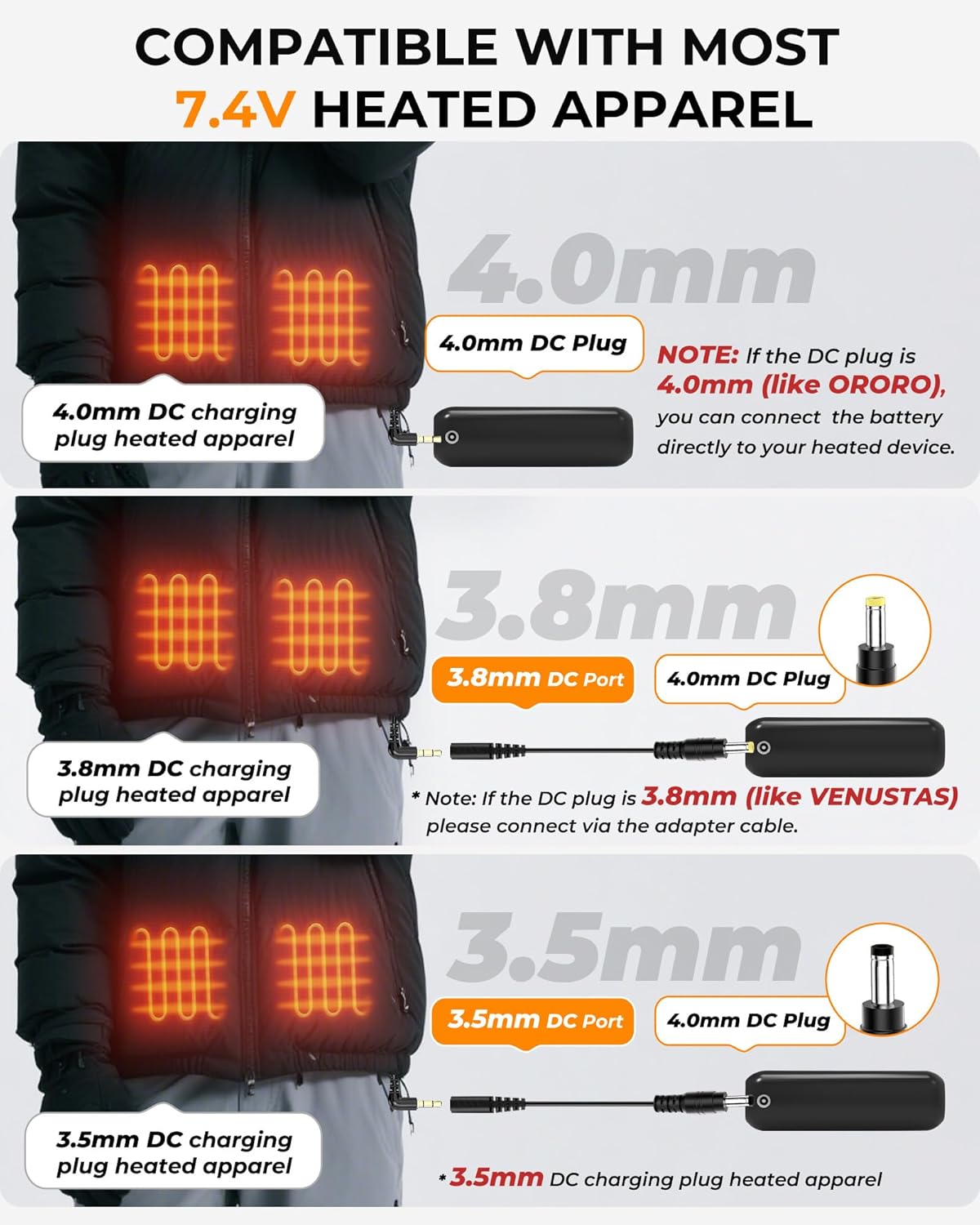
Figure 5.1: DC Plug Compatibility. This diagram illustrates how to connect the battery pack to heated apparel with different DC plug sizes (4.0mm, 3.8mm, 3.5mm) using the included adapters.
5.2. Estimated Run Times for Heated Apparel
Actual run times may vary based on the specific heated apparel, ambient temperature, and usage conditions.
- High Temperature Setting: Approximately 5-7 hours
- Medium Temperature Setting: Approximately 6-10 hours
- Low Temperature Setting: Approximately 11-15 hours

Figure 5.2: Estimated Run Times. This image shows a person using heated apparel and provides estimated battery life for different heat settings (High, Medium, Low).
5.3. Using as a Power Bank (USB Output)
The battery pack can charge various 5V USB-powered devices.
- Connect your device's charging cable to either the USB-A output port or the USB-C input/output port on the battery pack.
- Connect the other end of the cable to your electronic device (e.g., smartphone, tablet, earbuds).
- Press the power button on the battery pack to initiate charging.

Figure 5.3: Wide Device Compatibility. This image demonstrates the battery pack's ability to charge various smart devices, including smartphones, tablets, and wireless earbuds.
6. Maintenance and Storage
- Clean the battery pack with a dry, soft cloth. Do not use harsh chemicals or abrasive materials.
- Store the battery pack in a cool, dry place away from direct sunlight and extreme temperatures.
- For long-term storage, charge the battery pack to approximately 50-75% every three months to maintain battery health.
- Avoid fully discharging the battery pack frequently, as this can reduce its lifespan.
7. Troubleshooting
| Problem | Possible Cause | Solution |
|---|---|---|
| Battery pack not charging | Charging cable faulty; Power adapter insufficient; USB-C port damaged. | Try a different USB-C cable and power adapter. Ensure the connection is secure. |
| Heated apparel not powering on | Incorrect DC adapter; Loose connection; Heated apparel fault; Battery pack discharged. | Verify correct DC adapter (3.5mm, 3.8mm, or 4.0mm). Ensure all connections are firm. Check battery charge level. Test heated apparel with another compatible battery if possible. |
| Other devices not charging via USB | USB cable faulty; Device incompatibility; Battery pack discharged. | Try a different USB cable. Ensure your device is compatible with 5V USB charging. Check battery charge level. |
| Battery drains quickly when connected but not in use | Device drawing standby power; Battery not fully charged. | Ensure the heated apparel or connected device is completely powered off or disconnected when not in active use. Fully charge the battery pack before use. |
8. Specifications
| Feature | Detail |
|---|---|
| Model Number | RTAX-018S |
| Battery Capacity | 20000mAh |
| Voltage | 7.4 Volts |
| DC Output | 7.4V/3A (4.0mm port) |
| USB-A Output | 5V/3A, 9V/2A, 12V/1.5A |
| USB-C Input/Output | 5V/3A, 9V/2A, 12V/1.5A |
| Item Weight | 12.3 ounces (approximately 348 grams) |
| Package Dimensions | 3.78 x 3.54 x 1.42 inches |
| Manufacturer | Shenzhen R-TAX Technology Co., Ltd |
9. Warranty and Support
Buvizas provides customer support for its products. If you encounter any issues with your battery pack, please refer to the troubleshooting section first. For further assistance or warranty inquiries, contact Buvizas customer service. Contact information is typically found on the product packaging or the official Buvizas website.