
1. Introduction
This manual provides essential information for the safe and efficient operation of your TheTechWave Antminer L7 Scrypt Miner (9500 MH). The Antminer L7 is an Application-Specific Integrated Circuit (ASIC) mining machine designed for mining Scrypt-based cryptocurrencies such as Litecoin (LTC) and Dogecoin (DOGE). It offers a high hash rate for cryptocurrency mining operations.
Please read this manual thoroughly before operating the device and retain it for future reference.
2. Safety Information
Observe the following safety precautions to prevent damage to the device or personal injury:
- Power Supply: Use only the provided Power Supply Unit (PSU) or a compatible, certified PSU. Ensure the power outlet is properly grounded and can handle the specified power consumption (3425 Watts).
- Ventilation: Ensure adequate airflow around the miner. Do not block ventilation openings. Operate in a well-ventilated area to prevent overheating.
- Environment: Avoid operating the miner in environments with high humidity, dust, or extreme temperatures. Keep away from water and flammable materials.
- Electrical Safety: Do not open the miner casing. There are no user-serviceable parts inside. Disconnect power before cleaning or moving the device.
- Handling: The unit is heavy (38 pounds). Exercise caution when lifting or moving to prevent injury.
3. Package Contents
Verify that all items are present in the package:
- Antminer L7 Scrypt Miner (9500 MH)
- Power Supply Unit (PSU)
- Power Cable (region-specific)
- Ethernet Cable
- User Manual (this document)
4. Product Overview
The Antminer L7 is designed for high-performance Scrypt mining. Below is an image of the device, highlighting its general appearance.
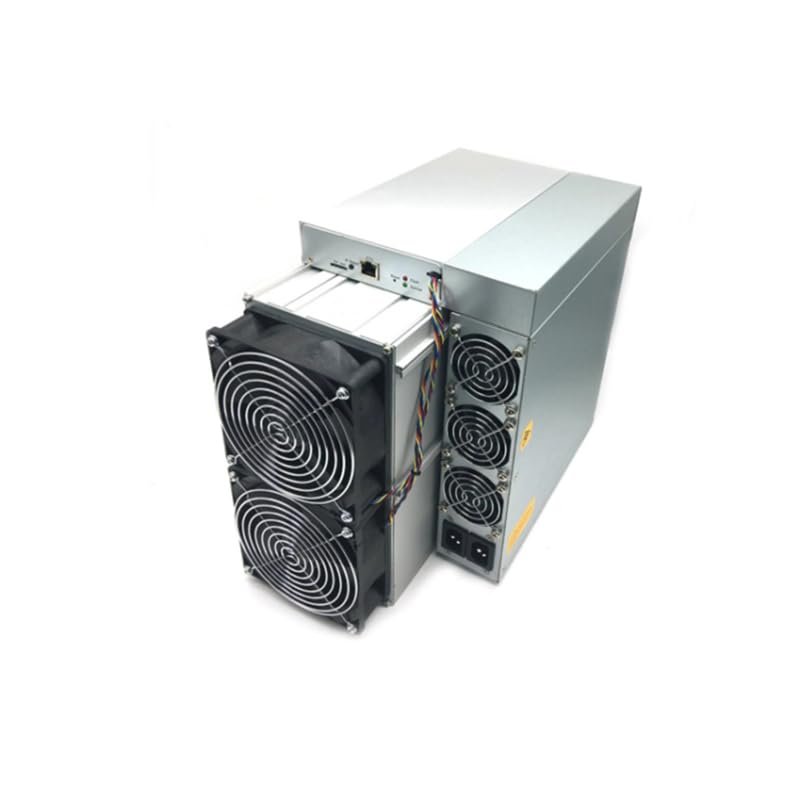
Figure 4.1: Front view of the Antminer L7 Scrypt Miner. This image shows the compact design and ventilation grilles of the mining unit.
The miner features multiple ports for connectivity and indicators for operational status. Specific port locations and indicator functions are detailed in the setup section.
5. Setup
5.1. Placement
Place the Antminer L7 on a stable, flat surface in a well-ventilated area. Ensure there is at least 20 cm of clear space around all sides of the miner for optimal airflow. Avoid enclosed spaces or areas with high ambient temperatures.
5.2. Power Connection
- Connect the PSU to the Antminer L7 using the provided power cables. Ensure all connectors are securely seated.
- Plug the power cable into the PSU.
- Connect the other end of the power cable to a grounded electrical outlet.
- Do not power on the device until all network connections are established.
5.3. Network Connection
The Antminer L7 requires an Ethernet connection to access the mining pool.
- Connect one end of the Ethernet cable to the Ethernet port on the Antminer L7.
- Connect the other end of the Ethernet cable to your router or network switch.
- Ensure your network provides a stable internet connection.
5.4. Initial Configuration
After connecting power and network, power on the miner. The device will obtain an IP address automatically via DHCP. To access the miner's web interface for configuration:
- Use an IP scanner tool on your network to find the miner's IP address.
- Open a web browser and enter the miner's IP address into the address bar.
- Log in using the default credentials (refer to the manufacturer's documentation for default username and password, typically 'root' for both).
- Navigate to the 'Miner Configuration' or 'Network Settings' section to set up your mining pool details (URL, Worker Name, Password).
- Save the settings and restart the miner if prompted.
6. Operating Instructions
6.1. Starting Mining
Once configured with your mining pool details, the Antminer L7 will automatically begin mining upon startup. You can verify its operation through the web interface.
- Access the miner's web interface.
- Go to the 'Miner Status' or 'Dashboard' page.
- Monitor the hash rate, temperature, and fan speed to ensure stable operation.
6.2. Monitoring Performance
Regularly check the miner's performance to ensure optimal efficiency:
- Hash Rate: Compare the reported hash rate with the expected 9500 MH/s. Fluctuations are normal, but significant drops may indicate an issue.
- Temperature: Maintain operating temperatures within recommended ranges to prolong the lifespan of the hardware. Excessive heat can lead to performance degradation or damage.
- Fan Speed: Ensure fans are operating correctly and not obstructed.
7. Maintenance
7.1. Cleaning
Regular cleaning helps maintain optimal performance and extends the miner's lifespan.
- Frequency: Clean the miner every 1-3 months, depending on the operating environment.
- Procedure:
- Disconnect the power cable from the electrical outlet.
- Use compressed air to remove dust from the fans and ventilation grilles.
- Wipe the exterior with a dry, soft cloth. Do not use liquid cleaners.
7.2. Firmware Updates
Periodically check the manufacturer's website for firmware updates. Updates can improve performance, stability, and security.
- Download the latest firmware from the official TheTechWave support page.
- Access the miner's web interface and navigate to the 'System' or 'Firmware Update' section.
- Follow the on-screen instructions to upload and install the firmware. Do not interrupt the update process.
8. Troubleshooting
| Problem | Possible Cause | Solution |
|---|---|---|
| Miner does not power on. | Loose power connection, faulty PSU, power outlet issue. | Check all power cables. Ensure the power outlet is functional. Test with a different power cable or outlet if possible. |
| No network connection. | Loose Ethernet cable, router/switch issue, incorrect network settings. | Verify Ethernet cable is securely connected. Check router/switch status. Confirm network settings in the miner's web interface. |
| Low hash rate. | Overheating, outdated firmware, mining pool issues, network instability. | Ensure proper ventilation. Check for firmware updates. Verify mining pool status and configuration. Check network stability. |
| Miner is overheating. | Poor ventilation, dust accumulation, fan malfunction. | Improve airflow around the miner. Clean dust from fans and grilles. Check if fans are spinning correctly. |
9. Specifications
| Feature | Detail |
|---|---|
| Model Name | L7 |
| Hash Rate | Up to 9500 MH/s (Scrypt) |
| Power Consumption | Approximately 3425 Watts |
| Item Weight | 38 Pounds (17.24 kg) |
| Connectivity Technology | Ethernet, USB |
| Hardware Interface | Ethernet, USB |
| Specific Uses For Product | Cryptocurrency Mining (Litecoin, Dogecoin) |
| Manufacturer | TheTechWave |
10. Warranty and Support
The Antminer L7 (9500 MH) comes with a manufacturer's warranty. Please refer to the warranty card included with your product or visit TheTechWave's official website for detailed warranty terms and conditions.
For technical support, troubleshooting assistance, or warranty claims, please contact TheTechWave customer service through their official website or the contact information provided in your purchase documentation.
Online Resources: For additional resources, FAQs, and community forums, visit the official TheTechWave support portal.