
Introduction to the iClean Mini
The TERSANO iClean Mini is an innovative, award-winning device designed to revolutionize your cleaning routine. It transforms ordinary tap water into a powerful, all-purpose cleaning solution using advanced technology. This manual provides comprehensive instructions for setup, operation, maintenance, and troubleshooting to ensure optimal performance and longevity of your iClean Mini.

The iClean Mini, a compact and portable device, is shown on a countertop, emphasizing its role in creating a safer home environment.

Recognition of the iClean Mini as TIME Magazine's Best Invention of the Year, highlighting its safety certifications and global adoption.
The iClean Mini utilizes an electrolytic cell to add an extra oxygen atom to tap water, instantly turning it into aqueous ozone, a naturally powerful all-purpose cleaner. This process eliminates the need for harsh chemicals, making it safe for various surfaces and environments.
1. Setup and First Use
Before using your iClean Mini for the first time, please follow these steps:
- Charge the Device: Connect the iClean Mini to its charging cable and plug it into a power source. Ensure the device is fully charged before initial use. The indicator light will show charging status.
- Fill with Water: Remove the top section of the iClean Mini. Fill the base reservoir with cold tap water. Do not use distilled or purified water, as the device requires minerals present in tap water for the ozone generation process.
- Assemble: Reattach the top section securely to the base. Ensure a tight seal to prevent leaks.

Visual guide illustrating the simple three-step process to prepare and use the iClean Mini.
2. Operating Instructions
The iClean Mini is designed for effortless cleaning across a multitude of surfaces. Once charged and filled, it's ready for use.
Generating Cleaning Solution:
- Press the power button on the device. The iClean Mini will begin the process of converting tap water into aqueous ozone. This typically takes a few seconds.
- The indicator light will change to confirm the solution is ready for use.
Application:
- Point the spray nozzle towards the surface you wish to clean.
- Press the spray trigger to dispense the aqueous ozone solution.
- Wipe the surface clean with a cloth or sponge. For best results, use a microfiber cloth.
- No rinsing is required, as the solution naturally reverts to water and oxygen.
Versatile Cleaning Applications:
The iClean Mini is safe and effective for a wide range of surfaces, including:
- Kitchen: Countertops (granite, marble, laminate, quartz), appliances (stainless steel, glass), sinks, cutting boards, produce.
- Bathroom: Sinks, toilets, showers, tiles, mirrors.
- Living Areas: Glass, windows, mirrors, furniture, floors (wood, tile), rugs, fabrics.
- Other: Pet areas (for odor elimination), toys, car interiors.

The iClean Mini's versatility for cleaning various household surfaces and items.

Demonstration of the iClean Mini being used to clean a glass surface.
3. Maintenance
Proper maintenance ensures the longevity and effectiveness of your iClean Mini.
SAO Cartridge Replacement:
The iClean Mini contains an SAO (Stabilized Aqueous Ozone) cartridge that filters impurities from the water and is crucial for the ozone generation process. This cartridge has a limited lifespan and will need periodic replacement.
- The device will indicate when the cartridge needs replacement (refer to the user manual for specific indicator light patterns).
- To replace, unscrew the base of the device and carefully remove the old cartridge.
- Insert a new, genuine TERSANO SAO replacement cartridge, ensuring it is seated correctly.
- Screw the base back on securely.
Cleaning the Device:
- Wipe the exterior of the iClean Mini with a soft, damp cloth. Do not submerge the device in water.
- Ensure the spray nozzle is clear of any debris. If clogged, gently clean with a soft brush.
- Periodically clean the water reservoir with a mild soap and water solution, then rinse thoroughly.
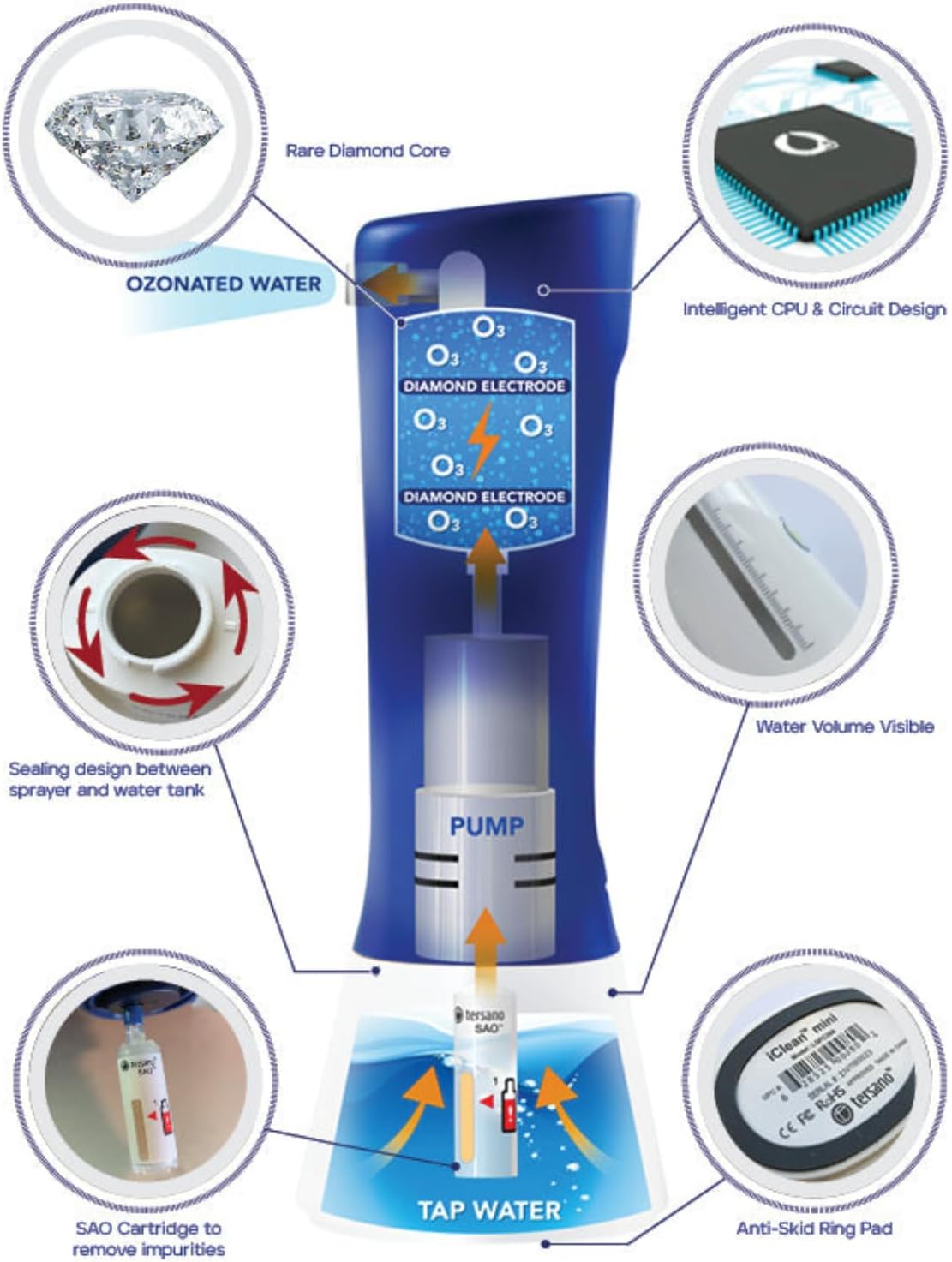
Anatomy of the iClean Mini, showing key components like the SAO cartridge and diamond electrode.

The iClean Mini displayed with its replacement SAO cartridges, emphasizing the importance of maintenance.
4. Troubleshooting
If you encounter issues with your iClean Mini, refer to the following common problems and solutions:
| Problem | Possible Cause | Solution |
|---|---|---|
| Device not turning on. | Low battery or no charge. | Ensure the device is fully charged. Connect to power and wait for the charging indicator. |
| No spray or weak spray. | Low water level, clogged nozzle, or air in the pump. | Refill the water reservoir. Clean the spray nozzle. Prime the pump by pressing the spray trigger several times. |
| Solution not effective. | SAO cartridge needs replacement or incorrect water type. | Replace the SAO cartridge. Ensure you are using cold tap water, not distilled or purified water. |
| Device leaking. | Improper assembly or damaged seal. | Disassemble and reassemble the device, ensuring all parts are securely tightened. Check seals for any visible damage. |
If the problem persists after attempting these solutions, please contact TERSANO customer support for further assistance.
5. Specifications
- Model: iClean Mini
- Brand: TERSANO
- Item Form: Spray
- Scent: Unscented
- Specific Uses: All Purpose Cleaning, Appliances, Countertop, Furniture, Produce
- Material Feature: Eco-Friendly, Fragrance Free, Non-Toxic, Unscented
- Package Dimensions: 11.19 x 5.71 x 3.11 inches
- Item Weight: 1.42 Pounds
- Manufacturer: Tersano
- First Available: November 15, 2024
6. Warranty and Support
For information regarding warranty coverage, repair services, or any other product-related inquiries, please contact TERSANO customer support directly. Keep your purchase receipt as proof of purchase.
TERSANO Customer Support: Please refer to the contact information provided on the TERSANO official website or product packaging for the most up-to-date support channels.