
Introduction
This manual provides essential instructions for the safe and efficient use of your Giauco 2200mAh Keychain Portable Charger. Please read this manual thoroughly before operating the device and retain it for future reference.
Package Contents
- 1 x Giauco Portable Charger (Model D97)
- 1 x USB Charging Cable
- 1 x User Manual

Image: The Giauco Keychain Portable Charger, USB charging cable, and user manual as included in the package.
Setup and Charging the Power Bank
- Initial Charge: Before first use, fully charge the portable charger. Connect the provided USB charging cable to the charger's input port (USB-C) and a compatible USB power adapter (not included).
- Charging Indicator: The LED indicator light will flash red while the power bank is charging. Once fully charged, the red light will stop flashing and remain steadily lit.

Image: The Giauco portable charger connected to a USB-C cable for charging.
Operating Instructions
Charging Your Mobile Device:
- Prepare the Charger: Locate the built-in connector on the portable charger. If it is retracted, slide up the telescopic switch to extend the connector.
- Remove Phone Case: For optimal connection and charging efficiency, it is recommended to remove your phone case before connecting the portable charger. Charging with a phone case on may lead to a loose connection and prevent proper charging.
- Connect to Phone: Directly plug the built-in connector of the portable charger into your phone's charging port. The charger is designed for direct connection without an additional cable.
- Charging Indication: The blue LED light on the portable charger will illuminate when it is actively charging your device.
- Emergency Use: This charger is primarily designed for emergency backup use, especially when your phone's battery is below 10%, to prevent unexpected shutdowns.

Image: The Giauco portable charger directly connected to a smartphone for charging.

Image: An illustration showing the importance of removing the phone case for a secure connection during charging.
Pass-Through Function:
The charger supports pass-through charging, allowing you to charge the power bank itself while it is simultaneously charging your phone. This feature enables continuous power delivery to your phone even when the power bank is being recharged.
Care and Maintenance
- Keep the device dry. Avoid exposure to moisture or liquids.
- Do not expose to extreme temperatures (hot or cold).
- Clean the device with a soft, dry cloth. Do not use harsh chemicals or abrasive cleaners.
- Store in a cool, dry place when not in use.
- The retractable button protects the charging port from dust and damage when not in use. Ensure it is retracted for storage.

Image: The Giauco portable charger highlighting the retractable button feature for port protection.
Troubleshooting
| Problem | Possible Cause | Solution |
|---|---|---|
| Charger not charging phone. |
|
|
| Charger LED light not turning off after charging. | Charger may still be connected to a power source or has an internal issue. | Disconnect the charger from all power sources. If the issue persists, contact customer support. |
| Charger overheating during use. | Prolonged use or environmental factors. | Disconnect the charger and allow it to cool down. Avoid charging in direct sunlight or enclosed spaces. If overheating is severe or persistent, discontinue use and contact customer support. |
Product Specifications
- Model Number: D97
- Battery Capacity: 2200 mAh
- Item Weight: Approximately 1.4 Oz (2.08 ounces)
- Dimensions: 2.75 x 1.57 x 0.70 inches (70mm x 40mm x 17.7mm)
- Connectivity: Built-in connector (for iOS devices), USB-C input for charging the power bank.
- Special Features: Lightweight Design, Portable, Ultra Small, Ultra Thin, Retractable Connector.
- Manufacturer: Shenzhen Angliyou Technology Co., Ltd
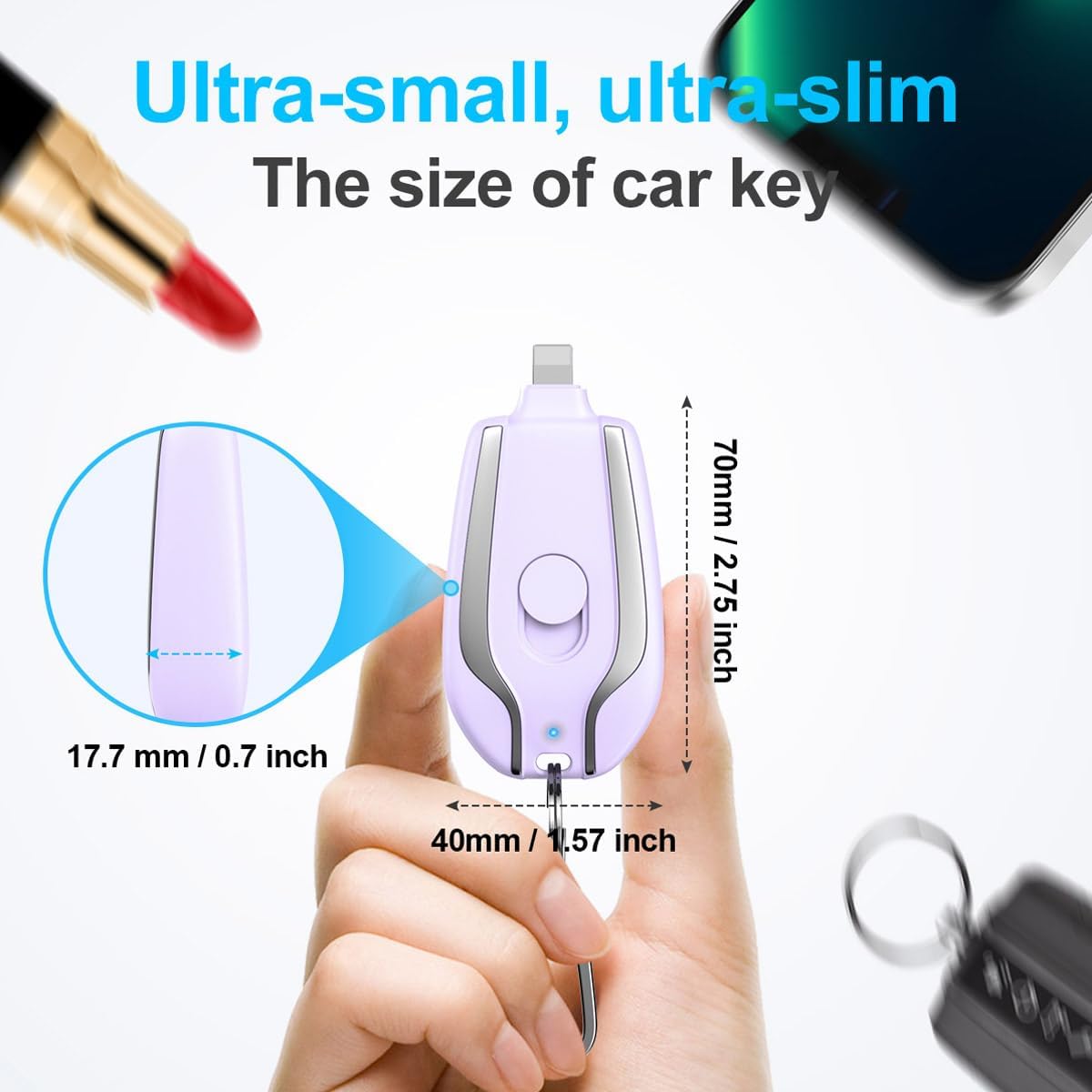
Image: Diagram illustrating the ultra-small and ultra-slim dimensions of the Giauco portable charger, comparable to a car key.

Image: Visual representation of the 2200mAh battery capacity of the Giauco portable charger, designed for iOS devices.
Compatibility
This portable charger is compatible with various iOS devices, including but not limited to:
- iPhone 14 series (14/14 Plus/14 Pro/14 Pro Max)
- iPhone 13 series (13/13 Pro/13 Pro Max/13 Mini)
- iPhone 12 series (12/12 Pro/12 Pro Max/12 Mini)
- iPhone 11 series (11/11 Pro/11 Pro Max)
- iPhone XS / XS Max / X / XR
- iPhone SE (2015/2020)
- iPhone 8 / 8 Plus
- iPhone 7 / 7 Plus
- iPhone 6 / 6 Plus / 6s / 6s Plus
- iPhone 5 / 5c / 5s / 4 / 4s
Safety Information
- Do not disassemble, modify, or repair the device yourself.
- Avoid dropping or subjecting the device to strong impacts.
- Keep out of reach of children.
- Dispose of the product responsibly according to local regulations. Do not dispose of with household waste.
- The safe circuit design protects against over-charge, over-discharge, short-circuit, and overload.
Customer Support
If you have any questions or encounter issues with your Giauco Keychain Portable Charger, please refer to the contact information provided with your purchase or visit the official Giauco website for support.