
Introduction
This manual provides essential information for the safe and effective use of your OatXtorpor 12V AC Adapter. This power supply is specifically designed for compatibility with Levoit Core Mini Air Purifier models LAP-C161-WUS and LAP-C161-KUS. Please read these instructions carefully before use and retain them for future reference.

The OatXtorpor 12V AC Adapter, featuring a standard US plug and a white power cord terminating in a barrel connector, designed for reliable power delivery.
Safety Information
To ensure safe operation and prevent damage, observe the following precautions:
- Use the adapter only with compatible devices as specified.
- Do not expose the adapter to water, moisture, or extreme temperatures.
- Avoid dropping or subjecting the adapter to strong impacts.
- Do not attempt to disassemble or modify the adapter.
- Ensure the power outlet is easily accessible and properly grounded.
- Unplug the adapter during lightning storms or when unused for extended periods.
Built-in Protections
This AC adapter incorporates multiple safety features to protect your device and the adapter itself:
- Short Circuit Protection: Prevents damage from electrical shorts.
- Temperature Control: Regulates internal temperature to prevent overheating.
- Overvoltage Protection: Shields against excessive voltage input.
- Overcurrent Protection: Protects against excessive current flow.

A visual representation of the AC adapter's built-in safety features, including short circuit protection, temperature control, overvoltage protection, and overcurrent protection, ensuring safe operation.
Setup and Installation
Follow these steps to properly set up your OatXtorpor 12V AC Adapter:
- Unpack the Adapter: Carefully remove the AC adapter from its packaging. Inspect it for any visible damage.
- Verify Compatibility: Ensure your device is a Levoit Core Mini Air Purifier (models LAP-C161-WUS or LAP-C161-KUS) to guarantee proper function and safety.
- Connect to Air Purifier: Locate the power input port on your Levoit Core Mini Air Purifier. Insert the barrel connector of the OatXtorpor AC Adapter firmly into this port.
- Plug into Power Outlet: Insert the AC adapter's plug into a standard 100-240V wall outlet.

Illustration demonstrating the OatXtorpor 12V AC Adapter plugged into a wall outlet and connected to a Levoit Core Mini Air Purifier (model LAP-C161-WUS), highlighting product compatibility.
Operation
Once properly connected, the OatXtorpor 12V AC Adapter will supply power to your Levoit Core Mini Air Purifier. The air purifier should power on or indicate power reception according to its own operational design.
- The adapter is designed for continuous use within its specified voltage and current limits.
- No additional controls are present on the adapter itself; power management is handled by the connected air purifier.

A Levoit Core Mini Air Purifier, powered by the OatXtorpor AC Adapter, positioned on a desk next to a laptop, illustrating a typical usage scenario.
Maintenance and Care
Proper maintenance ensures the longevity and optimal performance of your AC adapter:
- Cleaning: Disconnect the adapter from the power outlet and the device before cleaning. Use a soft, dry cloth to wipe the exterior. Do not use liquid cleaners or abrasive materials.
- Storage: When not in use, store the adapter in a cool, dry place, away from direct sunlight and extreme temperatures. Avoid tightly coiling the cable to prevent damage.
- Inspection: Periodically inspect the cable and connector for any signs of wear, fraying, or damage. If damage is observed, discontinue use and replace the adapter.

An infographic showcasing the durable shell, the cable's ability to withstand over 10,000 bending tests, and the use of a copper core for enhanced conductivity and longevity.
Troubleshooting
If you encounter issues with your AC adapter, refer to the following common solutions:
- Device Not Powering On:
- Ensure the adapter is securely plugged into both the wall outlet and the air purifier.
- Verify the wall outlet is functional by testing it with another device.
- Check the air purifier's power button or settings.
- Loose Connection:
- If the connection to the air purifier feels loose, gently adjust the barrel connector to ensure it is fully seated. Some Levoit Core Mini Air Purifier models may have a slightly less secure fit with certain barrel connectors.
- Avoid placing strain on the cable or connector.
- Adapter Feels Hot:
- It is normal for power adapters to feel warm during operation. However, if it becomes excessively hot to the touch, unplug it immediately and contact customer support.
- Ensure adequate ventilation around the adapter.
Specifications
| Model Number | ML-120100A0116 |
| Brand | OatXtorpor |
| Input | 100-240V ~ 50/60Hz, 0.5A Max |
| Output | 12V DC, 1A (12 Watts) |
| Connector Type | Barrel Connector |
| Compatible Devices | Levoit Core Mini Air Purifier (LAP-C161-WUS, LAP-C161-KUS, LAPC161WUS, LAPC161KUS) |
| Color | White |
| Item Weight | 3.52 ounces |
| Package Dimensions | 4.53 x 3.5 x 1.26 inches |
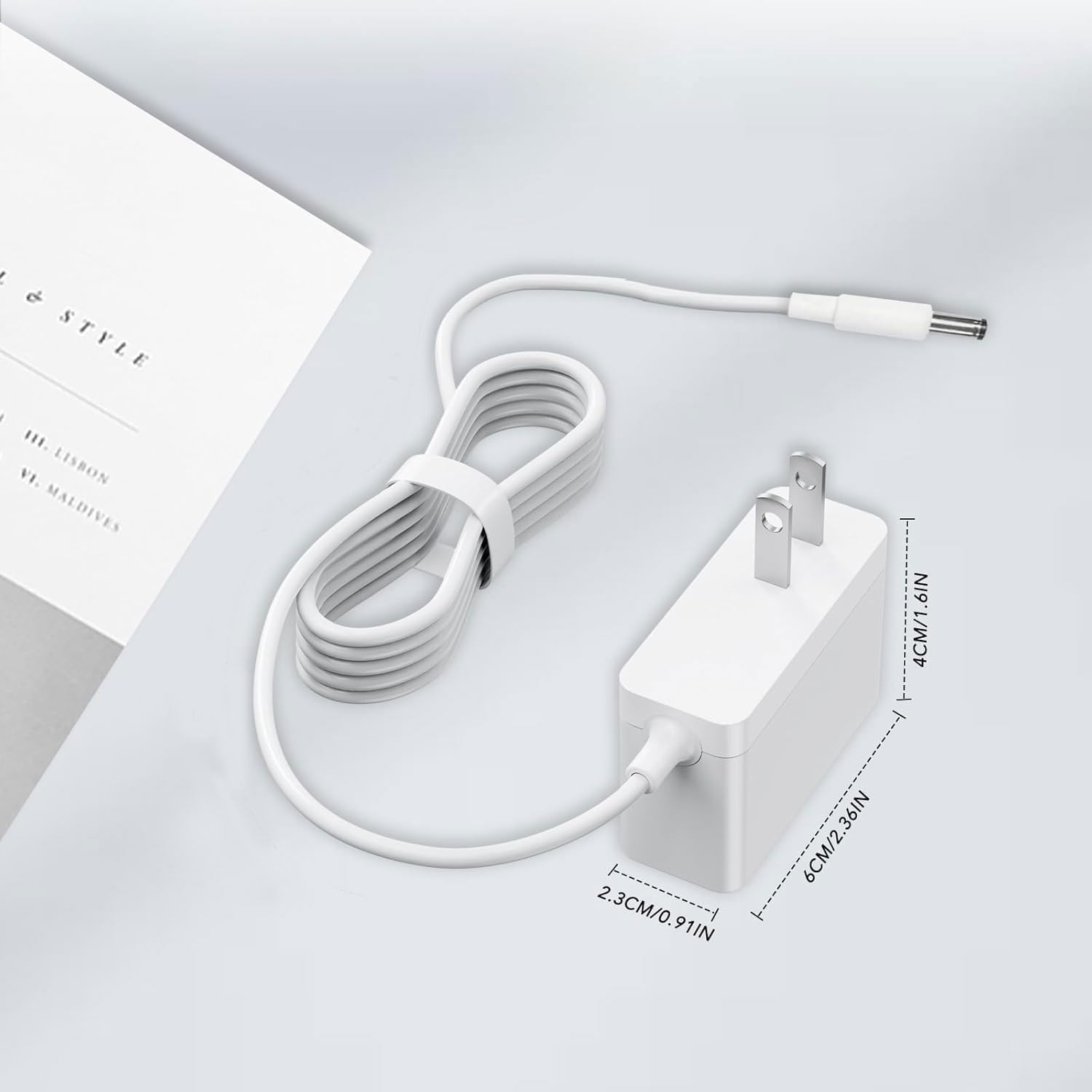
Detailed view of the AC adapter with its compact dimensions: 6cm (2.36in) length, 4cm (1.6in) height, and 2.3cm (0.91in) width, illustrating its portable design.

The compact AC adapter being easily stored in a bag, demonstrating its suitability for travel and portability.
Customer Support
For any questions, concerns, or assistance with your OatXtorpor 12V AC Adapter, please contact our customer service team. We offer 24-hour customer support to address your needs promptly.
Please refer to your purchase documentation or the seller's contact information for specific support channels.