
Introduction
Thank you for choosing the Tech Drive 110 CFM Bathroom Exhaust Fan with Dimmable 5CCT LED Light. This manual provides essential information for the safe installation, operation, and maintenance of your new ventilation fan. Please read these instructions thoroughly before installation and retain them for future reference.
Important Safety Information
To reduce the risk of fire, electric shock, or injury to persons, observe the following:
- Read all instructions before installing or servicing this fan.
- Use this unit only in the manner intended by the manufacturer. If you have questions, contact the manufacturer.
- Before servicing or cleaning, switch power off at the service panel and lock the service disconnecting means to prevent power from being switched on accidentally. When the service disconnecting means cannot be locked, securely fasten a prominent warning device, such as a tag, to the service panel.
- Installation work and electrical wiring must be done by qualified person(s) in accordance with all applicable codes and standards, including fire-rated construction codes and standards.
- Sufficient air is needed for proper combustion and exhausting of gases through the flue (chimney) of fuel-burning equipment to prevent back-drafting. Follow the heating equipment manufacturer’s guideline and safety standards such as those published by the National Fire Protection Association (NFPA), and the American Society for Heating, Refrigeration and Air Conditioning Engineers (ASHRAE), and the local code authorities.
- When cutting or drilling into wall or ceiling, do not damage electrical wiring and other hidden utilities.
- Ducted fans must always be vented to the outdoors.
- Acceptable for use over a bathtub or shower when installed in a GFCI-protected branch circuit.
- This unit is designed for general ventilating use only. Do not use to exhaust hazardous or explosive materials and vapors.
Package Contents
Verify that all components are present before beginning installation:

Image Description: This image displays the various components included in the product package. It shows the main fan housing, a printed installation manual, a set of screws and mounting brackets, and the decorative grille with integrated LED light.
- Fan Housing
- Installation Manual
- Screws and Brackets
- Grille with LED Light
Specifications

Image Description: This graphic highlights the main features and dimensions of the Tech Drive 110 CFM Bathroom Exhaust Fan. It indicates an airflow capacity of 110 CFM, a quiet operation at 1.2 Sones, a 1000 Lumen dimmable LED light with 5 CCT options, and certifications including Energy Star, HVI, and UL. The housing dimensions are 9 inches by 8.5 inches by 5.9 inches with a 4-inch duct, and the grille measures 11.8 inches by 11.8 inches.
| Feature | Detail |
|---|---|
| Model Name | 5CCT led light |
| Air Flow Capacity | 110 Cubic Feet Per Minute (CFM) |
| Noise Level | 1.2 Sones |
| LED Light Output | 1000 Lumens |
| Color Temperature (CCT) | 5 Selectable (2700K/3000K/3500K/4000K/5000K) |
| Dimmable | Yes (with compatible dimmer switch) |
| Night Light Mode | Yes |
| Housing Dimensions | 9in (W) x 8.5in (D) x 6in (H) |
| Ceiling Mounting Opening | 9.25in x 8.9in |
| Duct Size | 4 inches |
| Power Source | AC 120 Volts, 27 Watts |
| Certifications | Energy Star, UL, HVI Certified |
| Motor Lifespan | At least 25,000 hours |
| Motor Construction | 100% Copper, Silicon Steel for Stator and Rotor, Ball Bearing |

Image Description: This image provides a close-up view of the internal motor components of the exhaust fan, emphasizing its robust construction. It shows a copper winding, a motor casing, and a shaft with ball bearings, illustrating the use of 100% copper, silicon steel for the stator and rotor, and ball bearings for enhanced durability and performance.
Installation Instructions
This fan offers two primary installation methods: for new construction and for existing construction without attic access. It is recommended to use two switches to control the light and fan separately for optimal functionality.
Method 1: New Construction Installation
For new construction, the fan housing can be attached directly to ceiling joists. If joist spacing is between 16 inches and 24 inches, suspension brackets can be used.
- Ensure power is disconnected at the circuit breaker.
- Position the fan housing between ceiling joists.
- Secure the housing to the joists using appropriate screws or the provided suspension brackets if needed.
- Connect the 4-inch ductwork to the fan's exhaust port and route it to the exterior.
- Complete electrical wiring according to local codes, ensuring a GFCI-protected branch circuit if installed over a bathtub or shower.
- Install the grille with the LED light after the ceiling is finished.
Method 2: Existing Construction Installation (No Attic Access)
This method allows for installation entirely from the room-ceiling side, replacing most existing bathroom fans.

Image Description: This diagram demonstrates the installation process for the exhaust fan without requiring attic access. It depicts the fan housing being installed from below the ceiling, with the motor and fan assembly shown separately, indicating it can be removed to facilitate easier placement of the housing into the ceiling opening.

Image Description: This image illustrates the "Installation can be done below" feature, showing the fan housing and connected ductwork being installed from the room side of the ceiling. This highlights the convenience of not requiring attic access for installation.
- Ensure power is disconnected at the circuit breaker.
- Carefully remove the existing fan unit from the ceiling.
- Measure the existing opening. The Tech Drive fan requires a ceiling mounting opening of 9.25in x 8.9in. Adjust the opening if necessary.
- Disconnect the motor assembly from the new fan housing for easier installation.
- Insert the fan housing into the ceiling opening.
- Secure the housing to the ceiling structure using the provided screws and brackets.
- Connect the 4-inch ductwork. If replacing a 3-inch duct, a reducer will be required (not included).
- Reconnect the motor assembly to the housing.
- Complete electrical wiring according to local codes, ensuring a GFCI-protected branch circuit if installed over a bathtub or shower.
- Install the grille with the LED light.
Note: The vent outlet is plastic. Exercise caution during installation to avoid damaging the tabs that hold it in position. Ensure the damper flap closes when the fan is off and opens when the fan is on to prevent backdrafting.
Operation
Your Tech Drive exhaust fan features a powerful 110 CFM fan and a versatile 1000 Lumen LED light with adjustable color temperature and a night light mode.
Fan Operation
The fan operates independently of the light. It is recommended to wire the fan to a separate wall switch for independent control. Turn the switch ON to activate the fan and OFF to deactivate it.
LED Light Operation (5CCT Selection)
The integrated LED light offers five selectable color temperatures (CCT) to suit your preference:
- 2700K (Warm White)
- 3000K (Soft White)
- 3500K (Natural White)
- 4000K (Bright White)
- 5000K (Daylight)
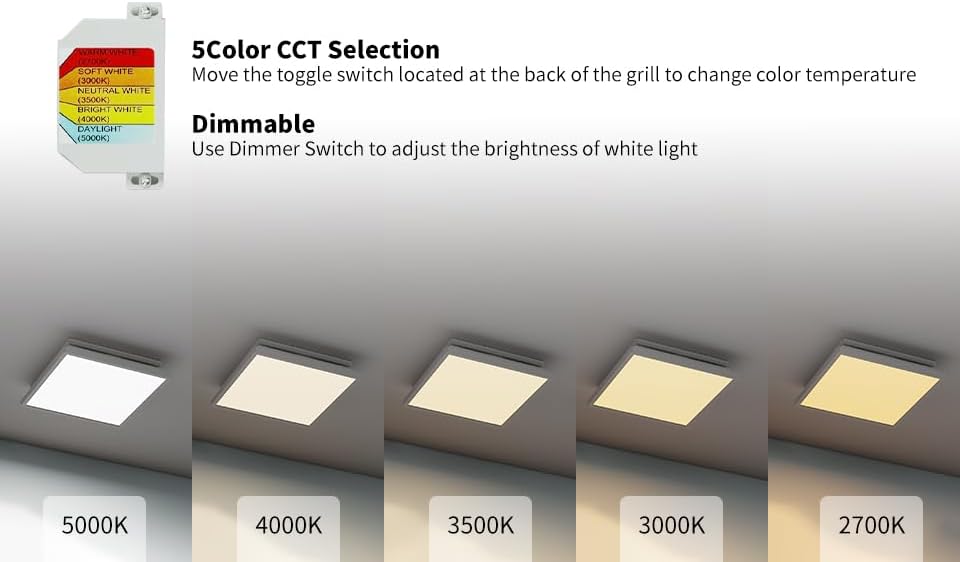
Image Description: This image illustrates the 5-Color CCT Selection feature. It shows a toggle switch located on the back of the fan grille, allowing users to select between five different color temperatures: 2700K, 3000K, 3500K, 4000K, and 5000K. Below the switch, five separate images demonstrate how the light appears at each of these color temperatures.
To change the color temperature:
- Before installing the grille, locate the toggle switch at the back of the grille.
- Slide the switch to select your desired CCT (2700K, 3000K, 3500K, 4000K, or 5000K).
- Once selected, install the grille. The light will operate at the chosen CCT.
Dimmable Function
The white light of the LED is dimmable. To adjust brightness, use a compatible dimmer switch (not included) wired to the light circuit.
Night Light Mode
The fan also features a night light mode. To activate it:
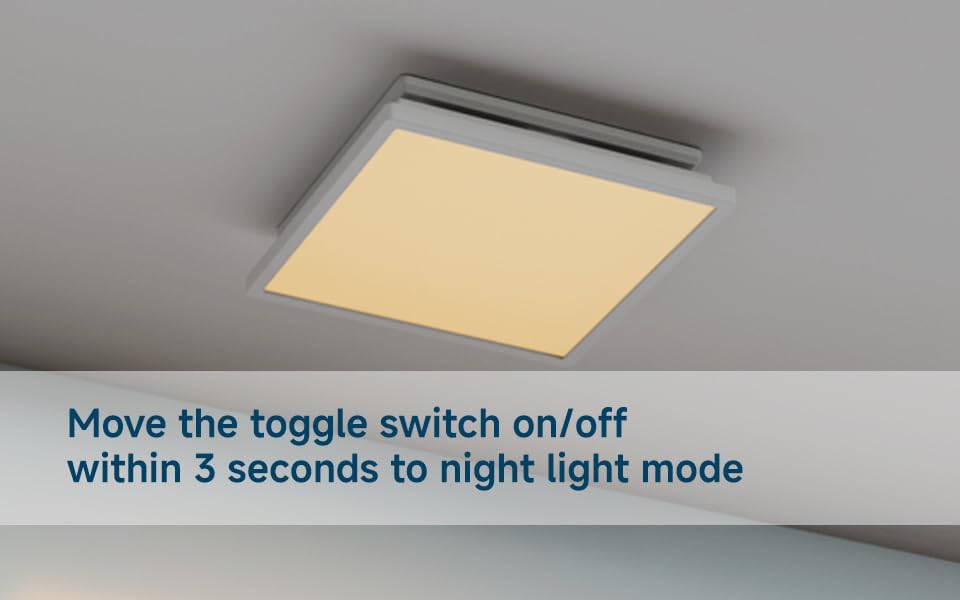
Image Description: This image displays the exhaust fan's light operating in night light mode, emitting a gentle, warm illumination. An accompanying graphic highlights a standard wall switch and provides instructions: "move the wall switch on/off within 3 seconds to night light mode," indicating how to activate this feature.
- Ensure the light is currently OFF.
- Quickly toggle the wall switch ON and OFF within 3 seconds.
- The light will then enter night light mode.
- To return to normal light operation, simply turn the switch OFF and then ON again normally.
Product Video: 5CCT LED Light Features
Video Description: This video demonstrates the various features of the Tech Drive bathroom fan's 5CCT LED light. It shows how to adjust the color temperature settings and activate the night light mode, providing a visual guide to the light's functionality.
Maintenance
Regular maintenance ensures optimal performance and longevity of your exhaust fan.
Cleaning the Grille and Fan Housing
- WARNING: Ensure power is disconnected at the circuit breaker before cleaning.
- Remove the grille from the fan housing.
- Wipe the grille with a damp cloth. Do not use abrasive cleaners.
- Carefully vacuum or wipe the fan blades and interior of the housing to remove dust and debris.
- Reattach the grille securely.
Motor Maintenance
The motor is designed for long-term operation (at least 25,000 hours) and typically does not require lubrication. If unusual noises occur, ensure the fan blades are free of obstructions.
Troubleshooting
| Problem | Possible Cause | Solution |
|---|---|---|
| Fan does not operate. | No power to the unit; loose wiring; motor failure. | Check circuit breaker and wall switch. Verify wiring connections. If motor failure is suspected, contact customer support. |
| Light does not turn on. | No power to the light circuit; LED module failure. | Check wall switch and wiring. If LED module failure is suspected, contact customer support. |
| Fan is noisy. | Loose mounting; debris in fan blades; motor issue. | Ensure fan housing is securely mounted. Clean fan blades. If noise persists, contact customer support. |
| Poor ventilation. | Blocked ductwork; improper duct size; fan blades dirty. | Check ductwork for obstructions. Ensure 4-inch duct is used. Clean fan blades. |
| Light CCT does not change. | CCT selection switch not set. | Turn off power, remove grille, and adjust the toggle switch on the back of the grille to the desired CCT. |
| Night light mode not activating. | Incorrect switch sequence. | Ensure the light is off, then quickly toggle the wall switch ON and OFF within 3 seconds. |
Warranty Information
This Tech Drive product is manufactured to high-quality standards and is warranted to be free from defects in materials and workmanship. Specific warranty terms may vary. Please refer to the product packaging or contact Tech Drive customer support for detailed warranty information.
Extended protection plans may be available for purchase from third-party providers, such as 3-Year or 4-Year Protection Plans. These are separate from the manufacturer's warranty.
Customer Support
For technical assistance, troubleshooting, or warranty inquiries, please contact Tech Drive customer support through the retailer where the product was purchased or visit the official Tech Drive website for contact information.
Please have your product model number (5CCT led light) and purchase date available when contacting support.
