
1. Introduction
This manual provides detailed instructions for the installation, operation, and maintenance of your QDVOPHZA 4K 8MP HD Tuya Smart Life POE NVR CCTV System. This system offers high-definition video surveillance with advanced features for comprehensive security monitoring.
2. Package Contents
Please verify that all items listed below are included in your package. If any items are missing or damaged, contact customer support.
- 1 X 8CH 4K TUYA POE NVR Network Video Recorder
- 8 X HD POE IP 8.0MP cameras (for 8XCAM variant)
- 1 X Power Supply for NVR
- 1 X USB Mouse for NVR
- Hard Disk (Optional, depending on purchase)
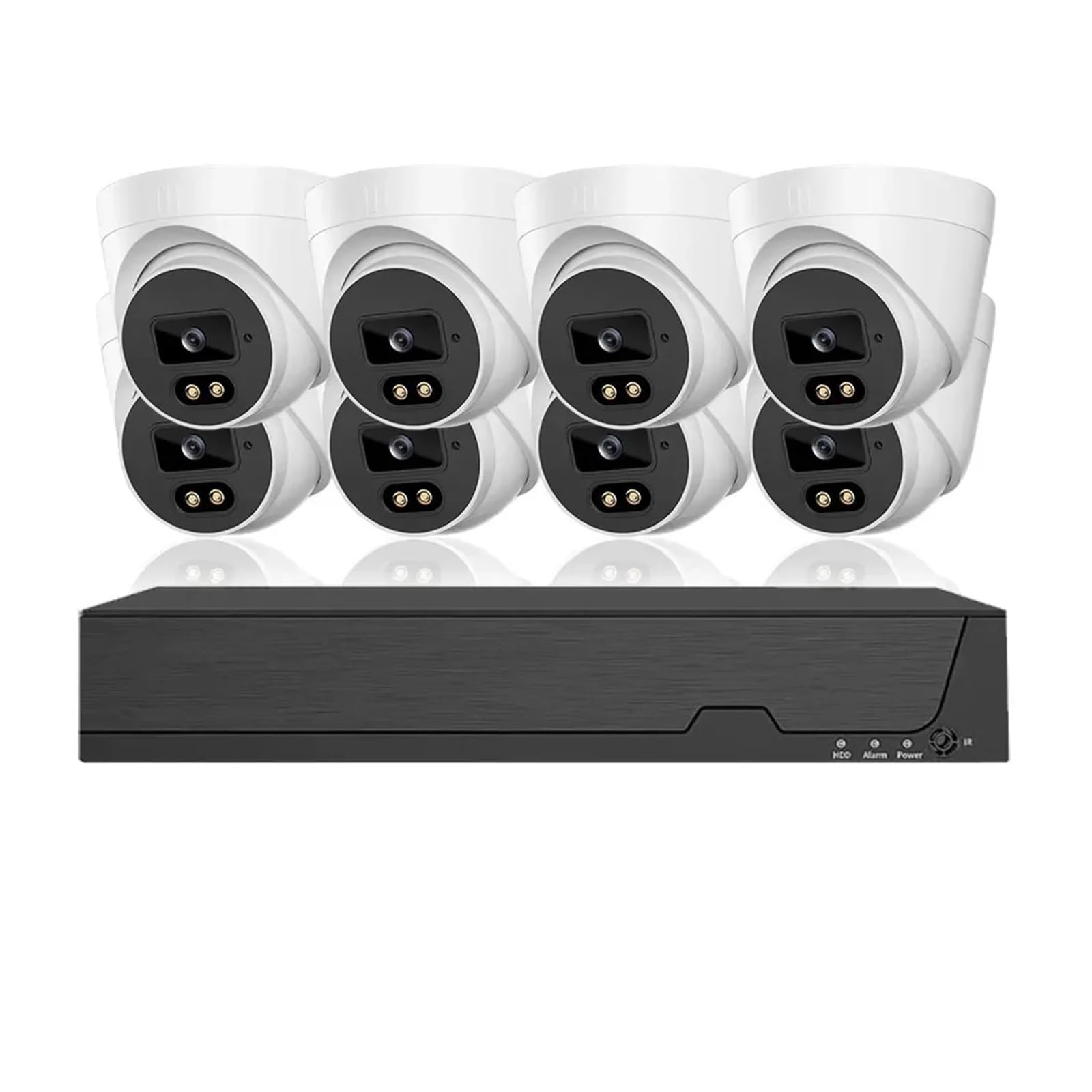
Figure 2.1: Overview of the QDVOPHZA 4K 8MP HD Tuya Smart Life POE NVR CCTV System components.
3. Product Overview
3.1 Key Features
- 4K 8MP Resolution: Equipped with 8 million pixel HD cameras, supporting 4K resolution recording for detailed video.
- Tuya Smart Life Integration: Built-in platform for linkage with smart home devices and remote viewing via mobile app.
- Power Over Ethernet (POE): Single network cable for both data transmission and power, simplifying installation.
- Advanced Night Vision: Provides clear surveillance in low-light or dark conditions.
- 8-Channel Audio Recording: Simultaneous video and audio recording for comprehensive monitoring.
- H.265 Video Compression: Efficient compression for reduced storage and bandwidth usage.
- Human Detection & Smart Playback: Intelligent features for enhanced monitoring and review.
- IP66 Waterproof Cameras: Durable metal cameras suitable for indoor and outdoor use.
- Motion Detection & Email Alerts: Configurable motion detection with instant email notifications.
- Remote Access: Access your system from anywhere, anytime.
4. Setup Instructions
4.1 System Connection Diagram
The QDVOPHZA POE NVR system utilizes Power Over Ethernet (POE) technology, simplifying the wiring process. Follow the diagram below for proper connection.
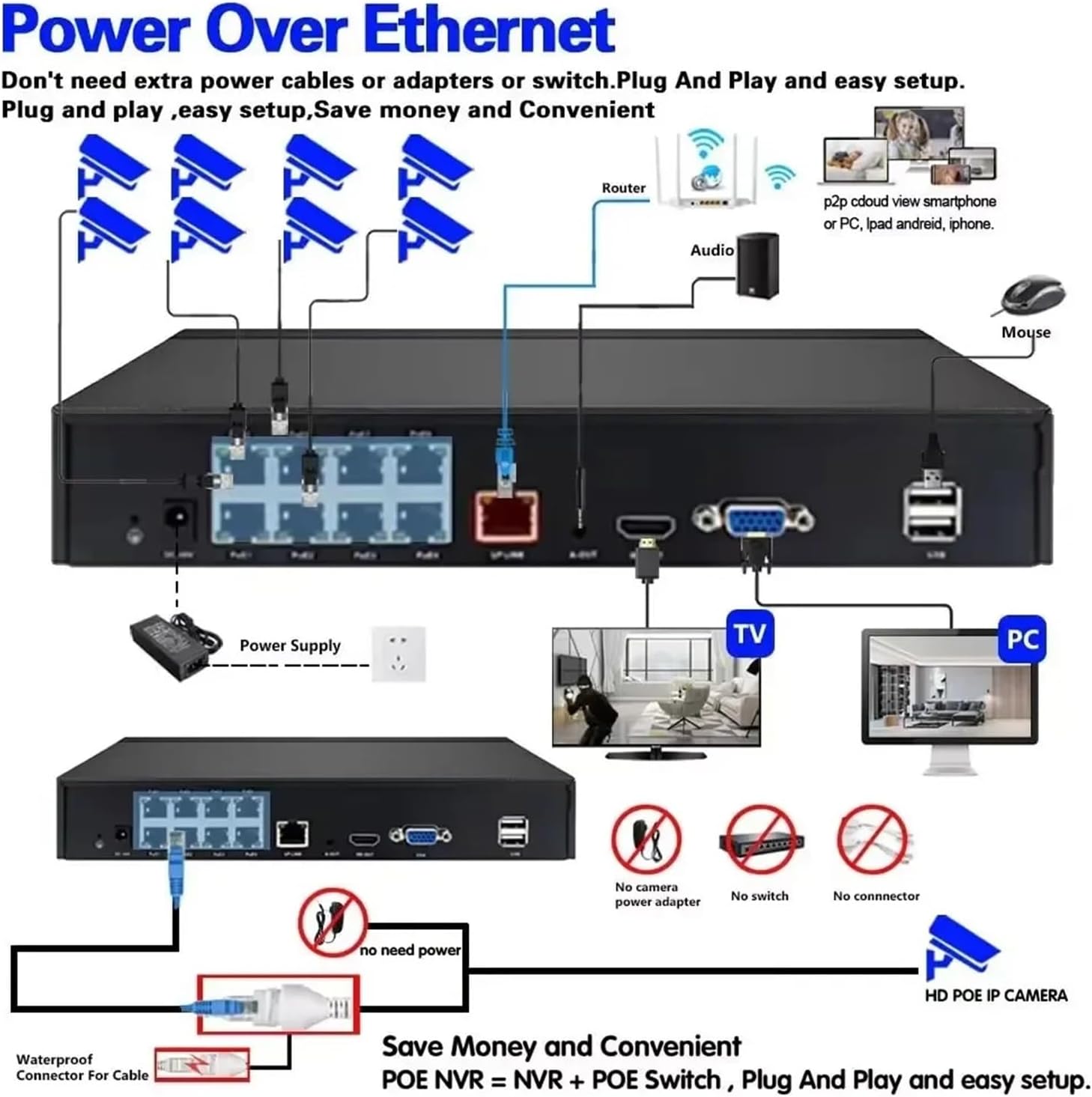
Figure 4.1: POE NVR System Connection Diagram. Connect cameras to NVR POE ports, NVR to router, and NVR to a monitor and mouse.
4.2 Initial Setup Steps
- Connect Cameras: Connect each POE IP camera to the POE ports on the NVR using Ethernet cables. The cameras will receive power and data through these cables.
- Connect NVR to Network: Connect the NVR's LAN port to your router using an Ethernet cable for internet access and remote viewing capabilities.
- Connect Display: Connect a monitor or TV to the NVR's HDMI or VGA output port.
- Connect Mouse: Plug the included USB mouse into a USB port on the NVR for navigation.
- Power On: Connect the NVR to the power supply and plug it into an electrical outlet. The system will power on.
- Initial Configuration: Follow the on-screen prompts to complete the initial setup, including setting up a password, network settings, and hard disk initialization (if applicable).
- Mobile App Setup: Download the Tuya Smart Life app on your smartphone. Register an account and add your NVR system by scanning the QR code displayed on the NVR's monitor or by manual input.
5. Operating Instructions
5.1 Live View and Playback
- Live View: After successful setup, the NVR will display live feeds from all connected cameras on the monitor.
- Playback: Use the NVR interface or the mobile app to access recorded footage. The system supports smart playback to easily find events.
5.2 Motion Detection and Email Alerts
Configure motion detection zones and sensitivity to trigger recordings and send email alerts when activity is detected.

Figure 5.1: Motion Detection and Email Alarm configuration. Define detection areas and set up email notifications.
5.3 Night Vision
The cameras are equipped with advanced night vision technology, automatically switching to infrared mode in low light conditions to provide clear black and white images.

Figure 5.2: Example of Day and Night Vision capabilities.
5.4 Audio Recording
The 8MP cameras include built-in microphones for audio recording, providing a more comprehensive surveillance record.

Figure 5.3: Audio recording feature with built-in microphone.
5.5 H.265 Video Compression
The system utilizes H.265 video compression, which significantly reduces file sizes and bandwidth requirements compared to older H.264 compression, without compromising video quality.
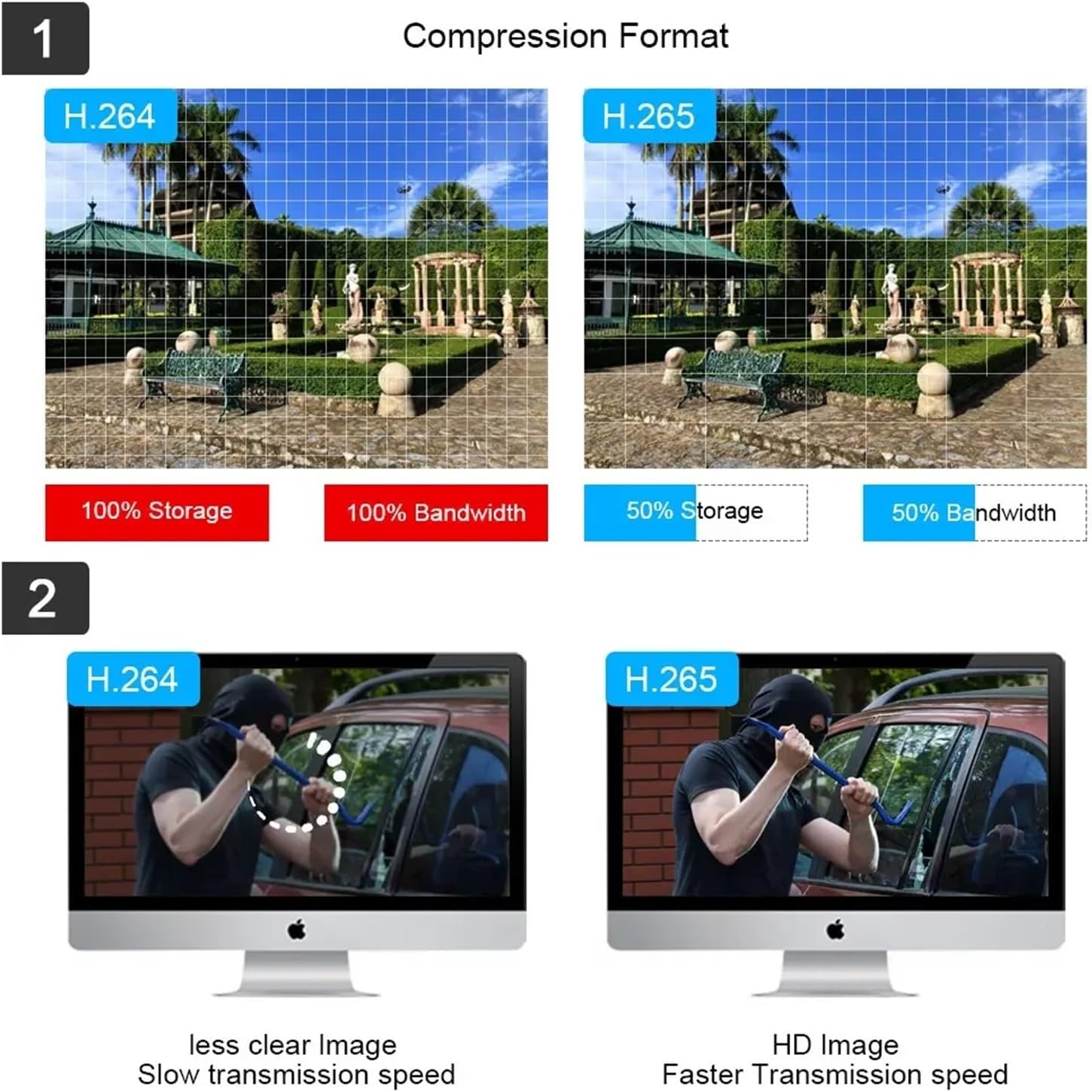
Figure 5.4: H.265 compression benefits over H.264.
6. Maintenance
- Regular Cleaning: Periodically clean camera lenses with a soft, damp cloth to ensure clear image quality.
- Firmware Updates: Check the manufacturer's website or the Tuya Smart Life app for available firmware updates to ensure optimal performance and security.
- Hard Drive Management: If using a local hard drive, ensure it has sufficient space. Configure overwrite settings if continuous recording is desired.
- Cable Inspection: Regularly inspect all cables for wear or damage, especially outdoor cables, to prevent connection issues.
- Power Supply: Ensure the NVR's power supply is stable and free from interruptions.
7. Troubleshooting
| Problem | Possible Cause | Solution |
|---|---|---|
| No video display on monitor. | Loose cable connection, NVR not powered, incorrect input source on monitor. | Check HDMI/VGA cable connections. Ensure NVR is powered on. Select correct input source on monitor. |
| Cameras not showing video. | POE cable issue, camera not powered, camera fault. | Verify POE cable connections. Ensure NVR POE ports are active. Try connecting camera to a different POE port. |
| Cannot access system remotely via app. | NVR not connected to internet, incorrect network settings, app configuration issue. | Ensure NVR is connected to router. Check NVR network settings. Re-add NVR to Tuya Smart Life app. |
| Motion detection not working. | Motion detection disabled, sensitivity too low, incorrect zone setup. | Enable motion detection in NVR settings. Adjust sensitivity. Redraw detection zones. |
| Poor night vision quality. | Dirty camera lens, IR illuminators blocked, insufficient ambient IR light. | Clean camera lens. Ensure no obstructions are blocking the camera's view or IR LEDs. |
8. Specifications
- Brand: QDVOPHZA
- Model Number: w0u5903wei
- ASIN: B0DN67H5KB
- Camera Resolution: 8MP (4K)
- Video Compression: H.265
- NVR Channels: 8-Channel POE
- Connectivity: Power Over Ethernet (POE)
- Features: Tuya Smart Life Integration, Human Detection, Smart Playback, Night Vision, Audio Record, Motion Detection, Email Alerts, Remote Access
- Camera Material: Metal
- Waterproof Rating: IP66
- Item Weight: 1.76 ounces (for the current variant)
- Package Dimensions: 0.39 x 0.39 x 0.39 inches (for the current variant)
9. Warranty and Support
For warranty information and technical support, please refer to the documentation provided with your purchase or contact the manufacturer directly. Contact details are typically available on the product packaging or the manufacturer's official website.