
BORGOVA BF-02/700W
BORGOVA Fog Machine BF-02/700W User Manual
Model: BF-02/700W | Brand: BORGOVA
1. Introduction
This manual provides comprehensive instructions for the safe and efficient operation of your BORGOVA Fog Machine BF-02/700W. Please read all instructions carefully before use to ensure optimal performance and user safety.
2. Important Safety Information
- Always disconnect power before changing fuses or performing maintenance.
- Use only with adult supervision.
- Operate only with approved fog liquid. Indoor use only.
- Keep dry. Do not direct the fog machine towards people.
- Ensure the fog liquid tank is adequately filled to prevent overheating. The machine features two temperature controllers to safeguard against overheating.
- To reduce the risk of fire, replace fuses only with the same size and type.
3. Package Contents
Verify that all items listed below are included in your package:
- Machine Body: 1 unit
- Power Cable: 1 unit
- Iron Handle: 1 unit
- Screws: 2 sets
- Wireless Remote: 1 unit
- Manual Controller: 1 unit
- User Guide: 1 unit
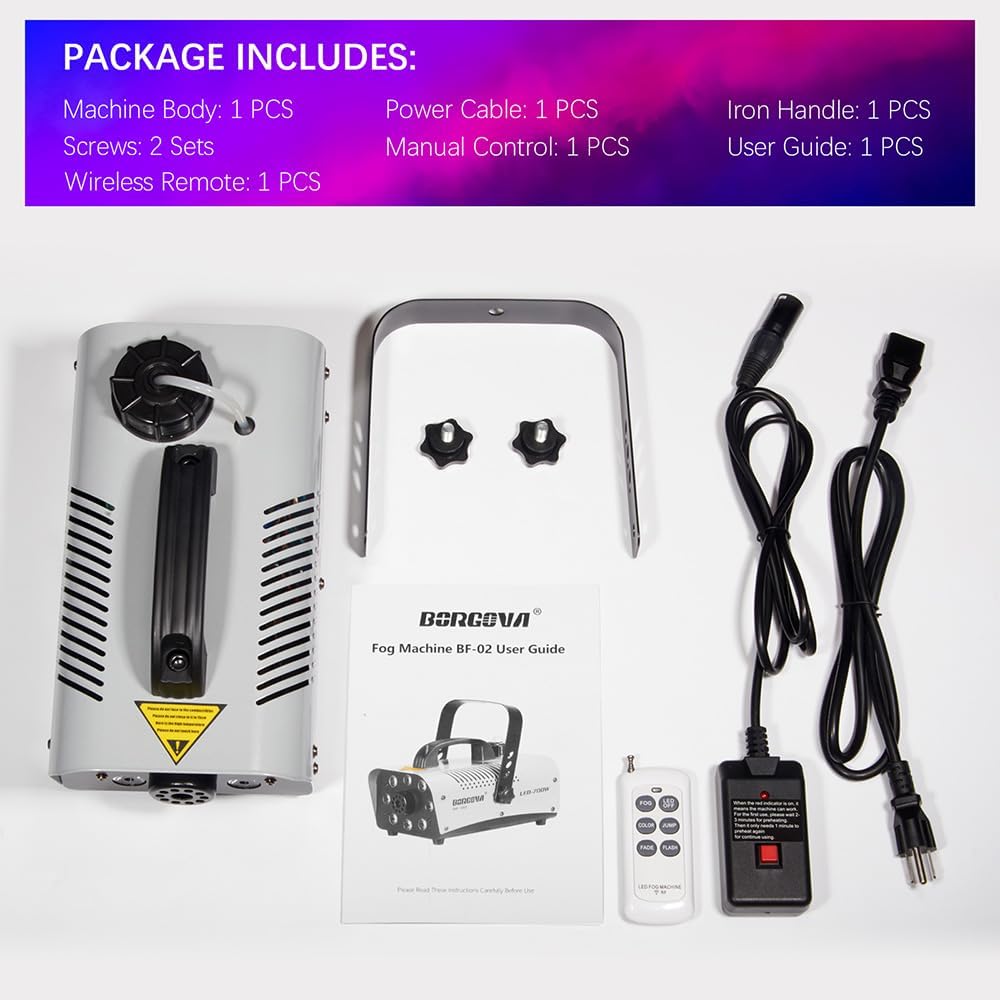
Image: All components included in the BORGOVA Fog Machine BF-02/700W package, laid out on a white surface.
4. Product Overview
The BORGOVA Fog Machine BF-02/700W is designed to produce dense fog with integrated LED lighting effects. Familiarize yourself with the main components:

Image: Labeled diagram highlighting key parts of the fog machine, including the iron handle, plastic handle, 1W RGBW LED beads, fog nozzle, fog juice pipe, fog juice tank, power switch, manual control socket, power cable socket, and fuse.
5. Technical Specifications
| Specification | Value |
|---|---|
| Model Number | BF-02/700W |
| Power | 700 Watts |
| Voltage | AC 90-130 Volts 50/60 Hertz |
| Output (CFM) | Approximately 3000 CFM |
| Output Distance | 4-6m (13-20 ft) |
| First Warm-up Time | 2-3 minutes |
| Tank Capacity | 0.5 liter |
| Item Weight | 2.6 kg (5.79 lbs) |
| Package Dimensions | 13.18 x 7.7 x 7.5 inches |
| LED Lights | 8 RGBW 1-watt LEDs (9 colors, 3 modes: Fade, Jump, Flash) |

Image: Visual representation of the fog machine's dimensions and key specifications.
6. Setup
- Install the Handle: Attach the provided iron handle to the top of the machine using the included screws. Ensure it is securely fastened.
- Fill the Fog Liquid Tank: Unscrew the cap of the fog juice tank located on top of the machine. Carefully pour approved fog liquid into the tank. Ensure the metal nozzle is fully immersed in the liquid. Do not overfill.
- Connect Power: Insert the power cable into the power cable socket at the rear of the machine, then plug it into a suitable power outlet (AC 90-130V 50/60Hz).
- Connect Controllers:
- For manual operation, connect the 5-foot manual controller to the "MANUAL CONTROL" socket.
- The wireless remote control operates wirelessly and does not require a physical connection to the machine.

Image: Visual guide demonstrating the steps to fill the tank, connect power, and use the wired and wireless controls.
7. Operating Instructions
- Power On: Flip the "POWER" switch to the "ON" position. The machine will begin its warm-up process.
- Warm-up Time: Allow 2-3 minutes for the machine to preheat. The red indicator light on the manual controller will illuminate when the machine is ready for use.
- Fog Emission:
- Using Wireless Remote: Press the "FOG" button on the wireless remote to emit fog. Press again to stop.
- Using Manual Controller: Press the red button on the 5-foot manual controller to emit fog.
- Automatic Mode: Press the "AUTO MODE" button on the manual controller to enable automatic preheating and smoke emission at regulated intervals.
- LED Light Control:
- Flip the "LED" switch to "ON" to activate the LED lights.
- Use the wireless remote to select from 9 colors and 3 lighting modes (Fade, Jump, Flash). You can also select specific colors for strobing effects.
- When the smoke function is off, the LED lights can be used independently as stage par lights.

Image: The wireless remote control displaying various color and lighting mode options for the integrated LED par lights.
Video: Official BORGOVA video demonstrating the 700W Party Fog Machine in operation, showcasing its fog output and LED lighting effects.

Image: The fog machine creating atmospheric effects in different event scenarios, including clubs, Halloween, parties, and Christmas celebrations.
8. Maintenance
Regular maintenance ensures the longevity and optimal performance of your fog machine.
- Cleaning: After each use, it is recommended to run distilled water through the machine to prevent clogs. For thorough cleaning, use a specialized fog machine cleaning solution.
- Storage: Store the machine in a dry, cool place. Ensure the fog liquid tank is empty or securely sealed to prevent leaks.
- Fuse Replacement: If the machine fails to power on, check the fuse. Disconnect power before changing the fuse. Replace only with a fuse of the same size and type.
9. Troubleshooting
If you encounter issues with your fog machine, refer to the following common troubleshooting tips:
- No Fog Output:
- Check if the machine has completed its warm-up cycle (red indicator light on).
- Ensure the fog liquid tank is not empty and the nozzle is fully immersed.
- Verify that the power cable and controller are securely connected.
- Machine Overheating: The machine is equipped with two temperature controllers for safety. If it overheats, it will automatically shut off. Allow it to cool down before attempting to use it again. Ensure proper ventilation around the machine.
- Electrical Trip: If the machine trips a GFI switch, check for any loose connections or potential electrical faults. Ensure the power supply meets the machine's requirements.
10. Warranty and Support
For warranty information or technical support, please contact BORGOVA customer service. Refer to the product packaging or the official BORGOVA website for contact details.
Related Documents - BF-02/700W
 |
BelFone Products Series Quick Guide: Professional Trunking Communication Solutions Explore BelFone's comprehensive range of professional trunking communication solutions, including DMR, PoC, and analog radios, base stations, repeaters, and integrated systems designed for efficiency and safety. |
 |
GIVI S322/KS322 LED Fog Lights - Motorcycle Installation Guide Comprehensive mounting instructions and part details for GIVI S322/KS322 LED supplementary fog lights. Learn about installation, electrical connections, and specifications for your motorcycle. |
 |
Stage Lights Control Methods and Operation Guide This document outlines the control methods for stage lights, including digital display, console control, and remote control. It details button functions, DMX modes, and channel value descriptions for various lighting effects. |
 |
Betop-per LPC008S Par Light User Manual User manual for the Betop-per LPC008S Par Light, detailing its functions, safety tips, technical specifications, and DMX channel functions. |
 |
User Manual for PAR LIGHT SET This user manual provides comprehensive instructions for the operation, safety, and technical specifications of the PAR LIGHT SET, including DMX control, sound-activated modes, and remote functions. |
 |
AUXBEAM LED Fog Lights Installation Guide & Wiring Diagram Detailed installation guide and wiring diagram for AUXBEAM LED Fog Lights, compatible with Ford F150 models from 2015 to 2020. Learn how to safely install, wire, and aim your new fog lights for optimal performance and visibility. Includes troubleshooting tips and brand introduction. |
Ask a question about this manual
Ask about setup, troubleshooting, compatibility, parts, safety, or missing instructions. Manuals+ will review the question and use this page’s manual context to help answer it.