
1. Introduction
The Newise Graphene Warming Mat is an advanced electric warming tray designed to keep food at optimal serving temperatures. Utilizing cutting-edge graphene heating technology, it provides fast and even heat distribution, making it ideal for various occasions from family dinners to large buffets. This manual provides essential information for the safe and effective operation of your warming mat.

Image 1.1: The Newise Graphene Warming Mat in use, showcasing its capacity for multiple dishes.
2. Safety Information
- Hot Surface: The mat surface becomes hot during operation. Avoid direct contact with bare skin.
- Caution: Always use heat-resistant cookware. Do not place plastic or other non-heat-resistant materials directly on the heated surface.
- No Touching: Do not touch the heating surface with sharp objects or utensils that could damage the silicone.
- No Washing: The mat is not submersible. Do not wash it under running water or in a dishwasher. Clean by wiping only.
- Child Lock: The device includes a child lock feature to prevent accidental changes to settings. Activate by pressing and holding the designated button for 3 seconds.
- Heat-Resistant Edges: The mat features heat-resistant edges to protect users from accidental burns.
- Countertop Protection: Silicone feet on the underside protect your countertop or tabletop from heat damage.

Image 2.1: Underside view of the warming mat, highlighting the protective silicone feet.
3. Product Features
- Graphene Heating Technology: Ensures fast and even heat distribution across the entire surface.
- Rapid Heating: Heats up in just 10 seconds, reaching desired temperatures quickly.
- 6 Temperature Modes: Adjustable settings from 122°F (50°C) to 212°F (100°C).
- 6-Hour Timer Control: Set the operating time from 0 to 6 hours.
- Touch Screen Design: Intuitive controls for easy temperature and timer adjustments, with real-time temperature display.
- Food-Grade Silicone: Made from non-toxic, heat-resistant, and stain-proof material.
- Portable & Rollable: Flexible design allows for compact storage and easy transport.
- Safety Features: Includes child lock and heat-resistant edges.

Image 3.1: Cross-section diagram showing the food-grade silicone layer, graphene heating layer, and anti-slip silicone layer.

Image 3.2: Visual comparison highlighting the advantages of graphene heating over traditional wire heating.
4. Package Contents
- 1 x Newise Graphene Warming Mat (Model: RFW002)
- 1 x Power Cord
- 1 x Storage Bag
- 1 x User Manual (this document)
5. Setup
- Unroll the Newise Graphene Warming Mat on a flat, stable, and heat-resistant surface. Ensure the silicone feet are properly positioned to protect your countertop.
- Connect the power cord to the designated port on the control panel of the mat.
- Plug the power cord into a standard electrical outlet.
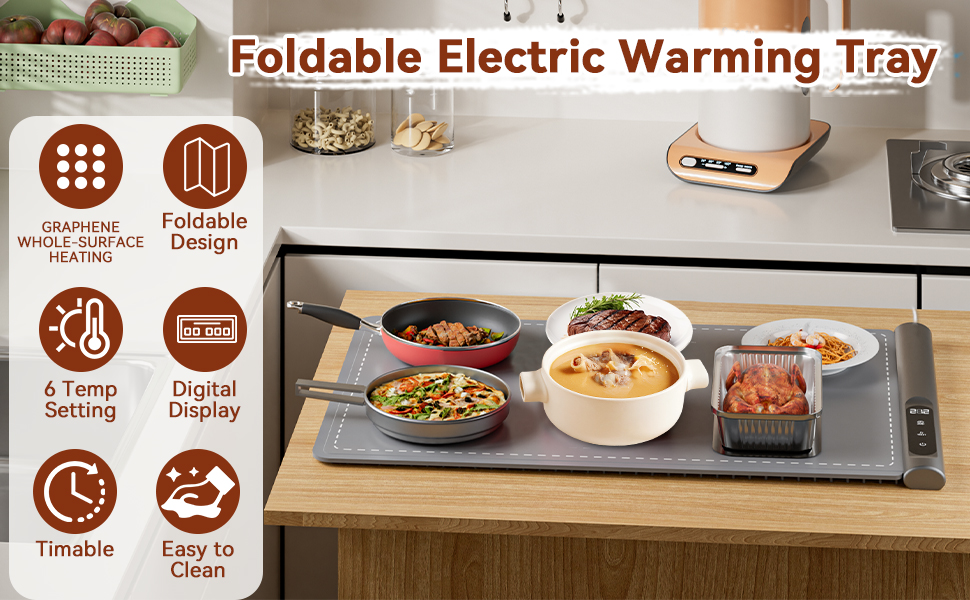
Image 5.1: The warming mat laid out and ready for use on a kitchen counter.
6. Operating Instructions
- Power On: Press the power button (⏻) on the control panel. The display will illuminate.
- Adjust Temperature: Press the temperature button (TEMP) to cycle through the 6 available temperature settings (122°F, 140°F, 158°F, 176°F, 194°F, 212°F). The real-time temperature will be displayed.
- Set Timer: Press the timer button (TIME) to select the desired operating duration from 0 to 6 hours.
- Activate Child Lock: To prevent accidental changes, press and hold the child lock button (🔒) for 3 seconds. The lock icon will appear on the display. Repeat the action to deactivate.
- Power Off: Press the power button (⏻) again to turn off the mat. Always unplug the mat when not in use.

Image 6.1: Detailed view of the control panel with temperature and timer settings.
7. Multi-functional Uses
The Newise Graphene Warming Mat is versatile and can be used for various purposes beyond just keeping food warm:
- Food Warming: Keep main dishes, side dishes, and appetizers warm during gatherings, parties, or buffets.
- Plate Warming: Use it to pre-warm plates before serving to ensure food stays hot longer.
- Thawing Frozen Foods: Gently thaw frozen items at a controlled temperature.
- Dough Fermentation: Provide a consistent warm environment for dough to rise.
- Heating Skincare Masks: Warm up skincare masks for a more relaxing application.
- Beverage Warming: Keep coffee pots or other beverages warm.
The mat is compatible with all types of cookware, including ceramic, glass, and metal.

Image 7.1: Examples of the warming mat's diverse applications.
8. Care and Maintenance
- Cleaning: The food-grade silicone surface is water-resistant, oil-resistant, and stain-resistant. To clean, simply wipe the surface with a damp cloth. Do not immerse the mat in water or place it in a dishwasher.
- Storage: The flexible design allows the mat to be rolled up for compact storage. Use the included storage bag and Velcro strap to keep it secure and protected when not in use.

Image 8.1: Visual guide for easy cleaning and compact storage of the mat.
9. Troubleshooting
- Mat not heating: Ensure the power cord is securely connected to both the mat and a functional electrical outlet. Check if the power button is pressed and the desired temperature is set.
- Uneven heating: While graphene technology ensures even heating, ensure cookware is placed flat on the mat. Avoid stacking items that could obstruct heat transfer.
- Controls unresponsive: Check if the child lock feature is activated. Deactivate it by pressing and holding the child lock button for 3 seconds.
10. Specifications
| Brand | Newise |
| Model Number | RFW002 |
| Product Dimensions | 23"D x 15"W x 0.5"H |
| Material | Silicone & Graphene |
| Wattage | 500 watts |
| Controls Type | Touch |
| Special Feature | Portable, Temperature Control |
11. Warranty and Support
For warranty information or product support, please refer to the contact details provided with your purchase or visit the official Newise website. Keep your purchase receipt for warranty claims.