
1. Introduction
This manual provides detailed instructions for the installation, operation, and maintenance of your ANNTLENT C50-V Cell Phone Booster for RV. This device is designed to enhance 5G, 4G, and LTE cellular signals for all major U.S. carriers, including Verizon, AT&T, and T-Mobile, across frequency bands 2, 4, 5, 12, 13, and 17. Please read this manual thoroughly before installation to ensure optimal performance and safety.
2. Product Overview and Features
The ANNTLENT C50-V is specifically engineered for mobile environments such as RVs, campers, and trailers, providing reliable signal strength even in remote areas. Key features include:
- APP-Assisted Installation: A user-friendly application guides you through the setup process.
- Wide Carrier Compatibility: Boosts signals for all U.S. carriers on bands 2, 4, 5, 12, 13, and 17.
- Multi-User & Multi-Device Support: Enhances connectivity for multiple users and devices simultaneously.
- Durable & Compact Design: Built for travel with a robust and portable form factor.
- FCC Approved: Certified to operate without interfering with carrier signals.

Image: The ANNTLENT C50-V Cell Phone Booster kit, including the booster unit, indoor antenna, outdoor antenna, and associated cables.
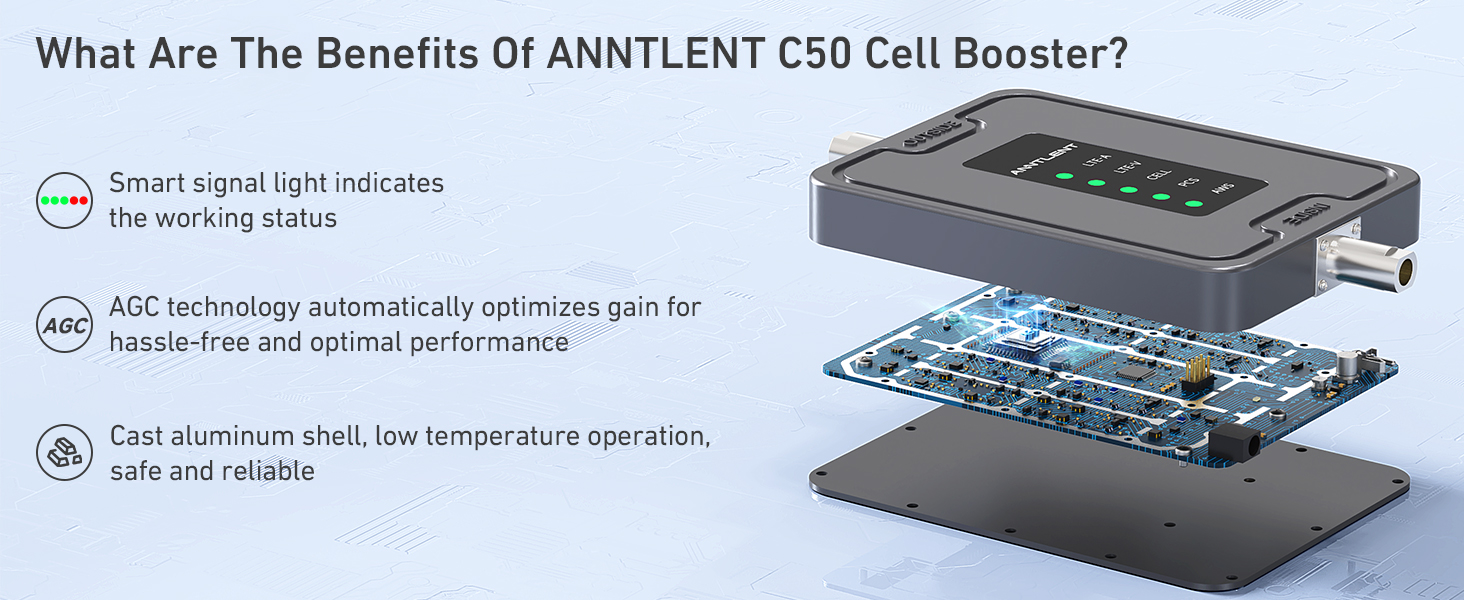
Image: An exploded view of the ANNTLENT C50-V booster, highlighting its internal components, smart signal light, AGC technology, and cast aluminum shell for durability and low temperature operation.
3. Setup and Installation
Follow these steps for proper installation of your ANNTLENT C50-V booster. The 'Signal Advisor' app is recommended for assistance.
3.1 Pre-Installation Checks
- Check Frequency Compatibility: Ensure your phone's frequency bands (2, 4, 5, 12, 13, 17) are compatible with the booster.
- Check Outside Signal Strength: The booster amplifies existing signals; it does not create them. You need at least one bar of usable signal outside your RV for the booster to function effectively.
3.2 Installation Steps
- Install the Outdoor Omni-Directional Antenna: Mount the outdoor antenna on the roof of your RV. This antenna captures signals from various directions, making it ideal for moving vehicles. Ensure it is positioned as high as possible and away from obstructions.
- Install the Internal Magnetic Antenna: Place the indoor antenna in the center of the area where you need improved signal coverage within your RV. Ensure there is sufficient separation between the indoor and outdoor antennas to prevent oscillation (feedback).
- Connect the Booster Unit: Connect the outdoor antenna cable to the 'OUTSIDE' port on the booster unit and the indoor antenna cable to the 'INSIDE' port. Ensure all connections are secure.
- Power On: Connect the power adapter to the booster unit and plug it into an electrical outlet. The booster will power on, and LED indicators will illuminate.

Image: A diagram illustrating the operational flow of the C50 RV Cell Phone Booster: the outdoor antenna receives signal, the booster amplifies it, and the indoor antenna rebroadcasts it throughout the RV.
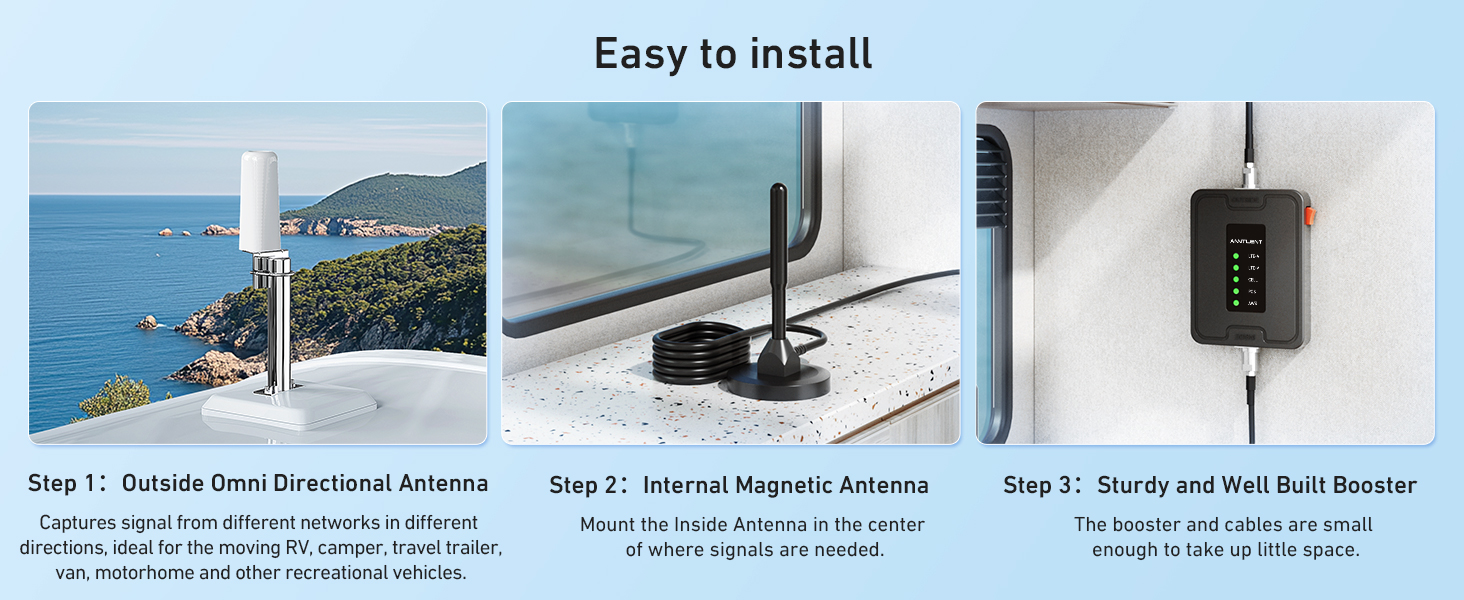
Image: A visual guide to the easy installation process, showing the outdoor omni-directional antenna, the internal magnetic antenna, and the compact booster unit.
3.3 Using the 'Signal Advisor' App
The 'Signal Advisor' app simplifies setup and troubleshooting. It provides tools to:
- Watch installation videos.
- Find the nearest cell tower.
- Display real-time signal strength and band information.
- Access customer support.
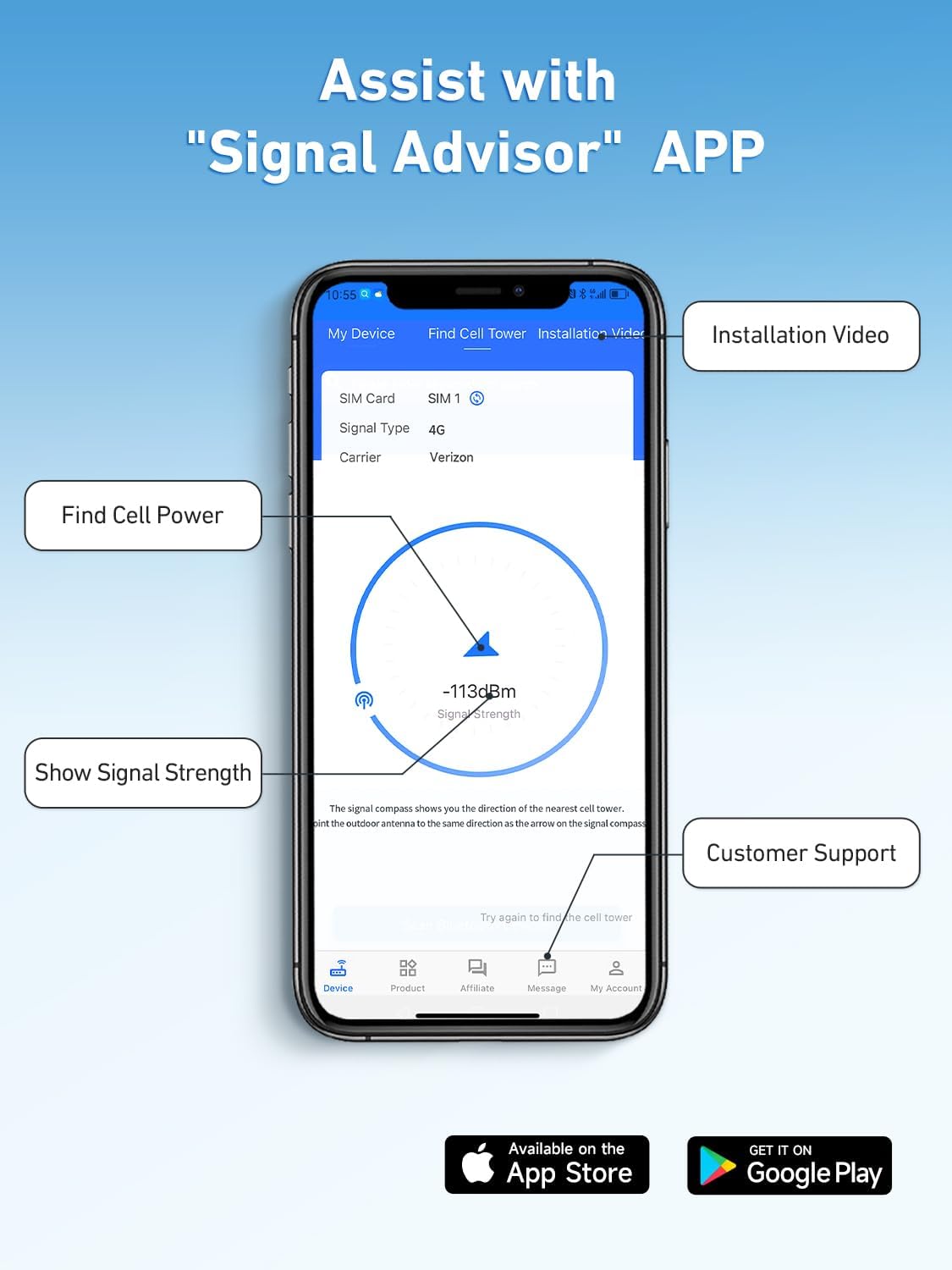
Image: A smartphone displaying the 'Signal Advisor' app, highlighting features like finding cell towers, showing signal strength, and providing installation videos and customer support access.
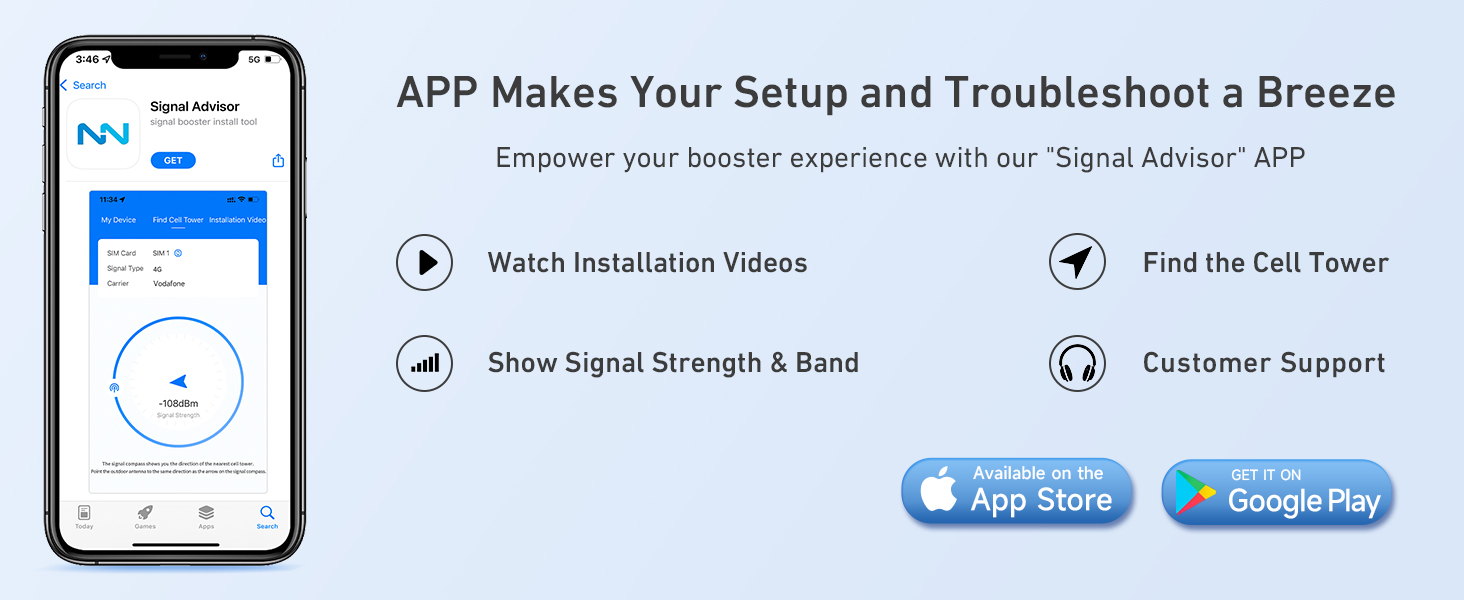
Image: A graphic detailing the benefits of the 'Signal Advisor' app, including installation videos, cell tower location, signal strength display, and customer support.
3.4 Testing Frequency Band Compatibility
To verify your phone's frequency band:
- For iOS: Dial *3001#12345#*, then click 'Serving Cell Info' and check 'Band Info'.
- For Android: Download 'Network Cell Info Lite', choose 'GAUGE', and check 'BAND'.
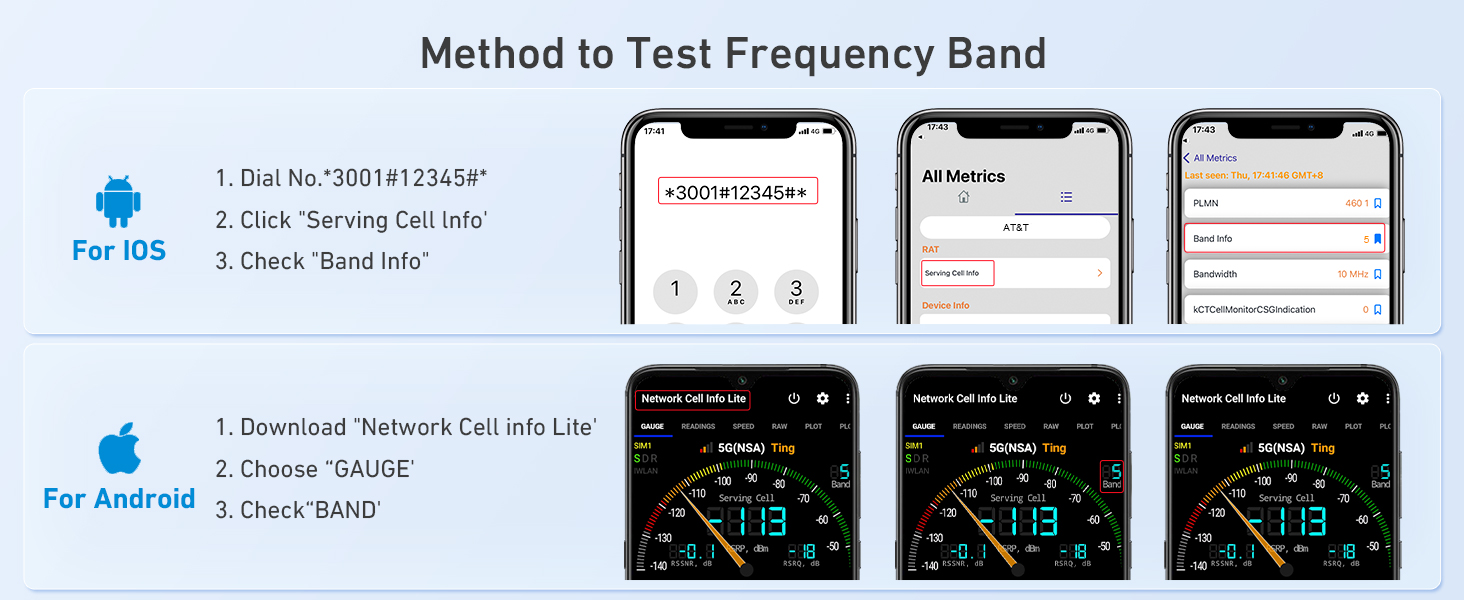
Image: A visual guide demonstrating how to check your phone's frequency band on both iOS and Android devices to ensure compatibility with the booster.
4. Operating Instructions
Once properly installed and powered on, the ANNTLENT C50-V booster operates automatically. The smart signal lights on the booster unit indicate its working status. Green lights typically signify optimal operation for each band (LTE-A, LTE-V, CELL, PCS, AWS).
The booster continuously monitors and amplifies incoming cellular signals, rebroadcasting them within your RV. It supports multiple users and devices simultaneously, ensuring enhanced call quality and faster data speeds for everyone inside the coverage area.

Image: A man comfortably using his phone inside an RV, illustrating the booster's compatibility with all major U.S. carriers and its ability to boost 3G, 4G, LTE, and 5G signals.

Image: A man engaged in a video call inside an RV, demonstrating the enhanced connectivity provided by the booster, resulting in no more dropped calls, faster data speeds, and reinforced voice quality.
5. Maintenance
The ANNTLENT C50-V booster requires minimal maintenance. To ensure longevity and optimal performance:
- Keep the booster unit and antennas clean and free from dust and debris.
- Periodically check all cable connections to ensure they are secure and free from damage.
- Avoid exposing the unit to extreme temperatures or direct moisture beyond its intended operating conditions.
6. Troubleshooting
If you experience issues with your ANNTLENT C50-V booster, consider the following:
6.1 No Signal Improvement
- Check Outside Signal: Confirm there is at least one bar of usable signal outside your RV. The booster cannot create a signal where none exists.
- Verify Connections: Ensure all cables are securely connected to the correct ports on the booster and antennas.
- Antenna Separation: Increase the physical separation between the indoor and outdoor antennas. Insufficient separation can cause oscillation, reducing booster effectiveness.
- Antenna Orientation: While the outdoor antenna is omni-directional, ensuring it has a clear line of sight to the sky can improve reception.
- Power Check: Ensure the booster is powered on and its LED indicators are active.
6.2 Flashing or Red LED Indicators
Refer to the 'Signal Advisor' app or the product's full manual for specific LED indicator meanings. Often, flashing or red lights indicate an issue such as oscillation or a problem with signal input/output. Adjusting antenna separation is a common solution for oscillation.
6.3 App Not Functioning Correctly
- Ensure your smartphone has a stable internet connection.
- Update the app to the latest version.
- Restart your phone and the booster unit.
For further assistance, utilize the customer support feature within the 'Signal Advisor' app.
7. Specifications
| Feature | Specification |
|---|---|
| Model Number | C50-V |
| Brand | ANNTLENT |
| Product Dimensions | 8 x 15 x 12 inches |
| Item Weight | 3.58 pounds |
| Color | Black |
| Wireless Communication Standard | Radio Frequency |
| Compatible Devices | Smartphones, Tablets, Cellular-enabled Devices |
| Frequency Bands Supported | 700 MHz, 850 MHz, 1900 MHz, 2100 MHz, 2600 MHz, 5G (Bands 2, 4, 5, 12, 13, 17) |
| Manufacturer | ANNTLENT Ltd. |

Image: The FCC certification label on the ANNTLENT C50-V booster, indicating compliance with regulatory standards and ensuring it won't interrupt or harm carrier signals.
8. Warranty and Support
ANNTLENT stands behind the quality of the C50-V Cell Phone Booster with the following:
- 30-Day Money Back Guarantee: If you are not satisfied with your purchase.
- 3-Month Replacement: For any manufacturing defects.
- Up to 3-Year Manufacturer Repair: For extended support and service.
For technical support, warranty claims, or any questions regarding your ANNTLENT C50-V booster, please use the customer support feature within the 'Signal Advisor' app or visit the official ANNTLENT website.