
1. Introduction
This manual provides detailed instructions for the assembly, operation, and maintenance of your Vabches Makeup Vanity Desk. Please read all instructions carefully before use to ensure proper function and safety.
2. Important Safety Information
Always unplug the vanity before assembly or disassembly. Be cautious of sharp edges and pinch points during assembly. Do not use the vanity if the electrical components are damaged or malfunctioning. Keep the vanity away from water and heat sources. Always follow the assembly instructions carefully to avoid injury or damage.
3. Package Contents
Ensure all components are present before beginning assembly:
- 1 Hair Dryer Rack
- 1 LED Lighted Mirror
- 1 Upholstered Stool
- 3 Power Outlets & 2 USB Ports (integrated)
- All necessary hardware and panels for assembly.
4. Assembly Instructions
For a comprehensive visual guide, please refer to the official assembly video below. Detailed step-by-step instructions are also provided.
Video Description: Official Vabches assembly guide for the Vanity Desk with Mirror and Chair Installation. This video demonstrates the complete installation process, including attaching the mirror, drawers, and cabinets. Follow along for a smooth assembly experience.
Step-by-Step Assembly Guide:
- Unpack and Identify Parts: Carefully unpack all components and hardware. Refer to the hardware list in your physical manual to identify each piece. The pieces are labeled alphabetically, and hardware by numbers.
- Assemble Base Sections: Begin by assembling the main base sections of the vanity desk, securing panels with the designated screws and dowels.
- Install Drawer Slides: Attach the drawer slides to the internal panels of the desk using the specified screws. Ensure they are aligned correctly for smooth drawer operation.
- Construct Drawers: Assemble the drawer boxes. Attach the drawer fronts and handles once the boxes are complete.
- Attach Side Cabinets: Secure the side cabinet panels and shelves. Install the cabinet doors using the provided hinges and handles.
- Mount Mirror Unit: Carefully attach the LED mirror unit to the main desktop. Ensure all electrical connections are properly routed and secured.
- Connect Power: Plug the vanity's power cord into a suitable electrical outlet.
- Final Adjustments: Check all connections and tighten any loose screws. Adjust cabinet doors if necessary for proper alignment.

Image Description: A fully assembled Vabches Makeup Vanity Desk in brown, showcasing the adjustable LED mirror, open shelves, wide desktop, storage drawers, multiple cabinets, hair dryer rack, and 5 built-in charging stations. This image highlights the comprehensive storage and integrated features of the vanity.
5. Product Features
- Multifunctional Vanity Set: Includes 1 LED mirror, 3 types of lights, a desk and chair, 3 drawers, and 2 cabinets of different heights. Dimensions: 43.2"L x 15.7"W x 55.3"H. Stool: 14.6"L x 14.6"W x 15.7"H.
- Smart Display Function: Built-in time and temperature display on the mirror for convenience.
- Customizable Lighting: 3 adjustable light modes (cool, natural, warm) and multiple brightness levels controlled by touch screen.
- Convenient Charging Design: 5 built-in charging stations (3 outlets and 2 USB ports) and a special hook for a hair dryer.
- Ample Storage: Drawers and shelves of various heights and widths for organizing cosmetics, skincare, and accessories.

Image Description: Close-up of the Vabches vanity mirror displaying the intelligent digital functions, including adjustable light, time display (10:38), and temperature display (-41°F). This image highlights the smart features of the mirror.

Image Description: Illustration showing the three adjustable light colors (Cold Light, Nature Light, Warm Light) and brightness levels (0% to 100%) of the Vabches vanity mirror. This image demonstrates the customizable lighting options.
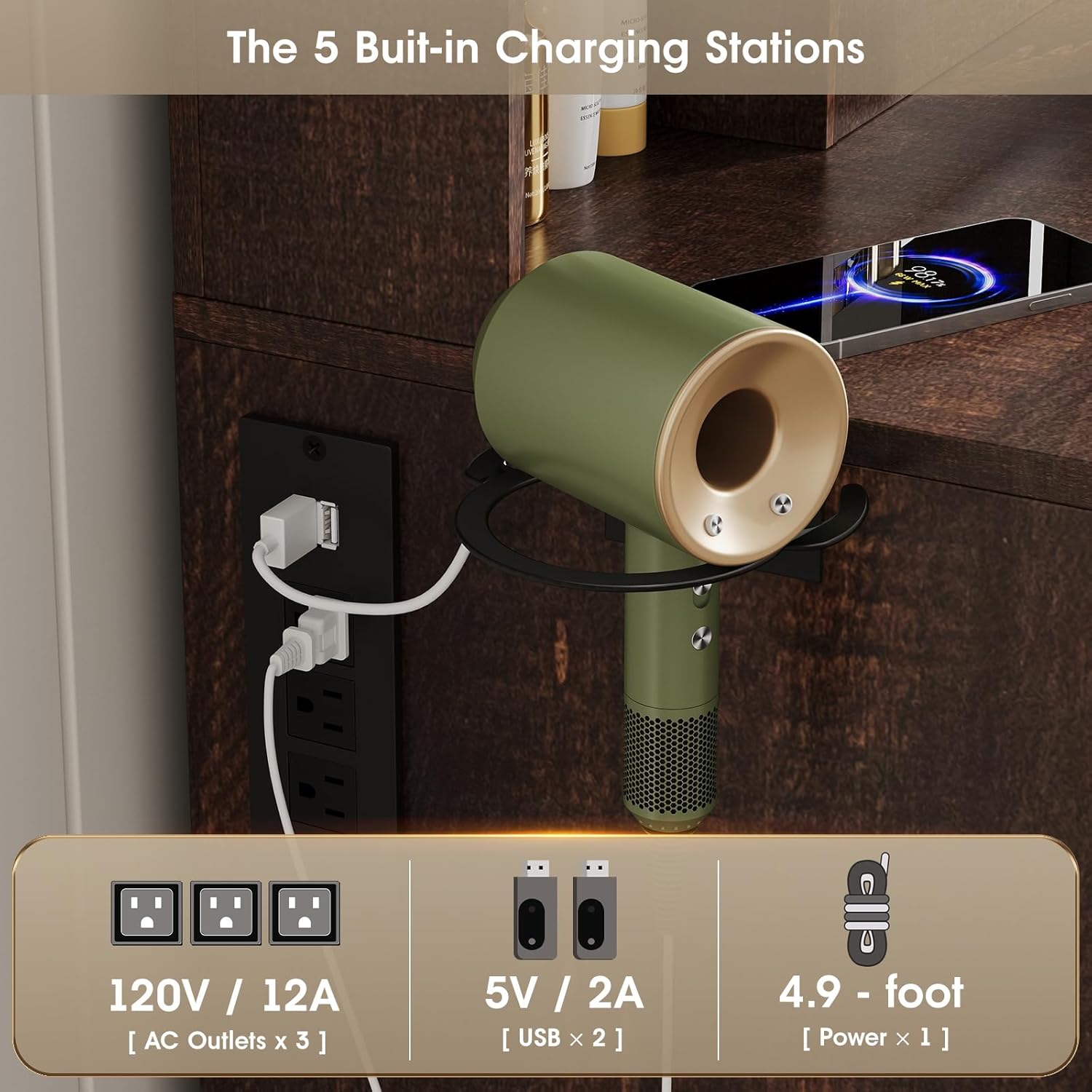
Image Description: Close-up of the Vabches vanity desk's built-in charging station, featuring 3 AC outlets (120V/12A) and 2 USB ports (5V/2A), along with a 4.9-foot power cord. A hair dryer is shown placed on the integrated hook, demonstrating the convenient charging and storage solutions.
6. Operating Instructions
6.1. LED Mirror Controls
The LED mirror features touch controls for lighting and display functions:
- Power Button: Touch to turn the mirror light on/off.
- Light Mode Adjustment: Touch the light mode icon to cycle through 3 different light colors: cool, natural, and warm light.
- Brightness Adjustment: Press and hold the light mode icon to adjust the brightness level. Release when desired brightness is achieved.
- Time and Temperature Display: The mirror automatically displays time and temperature. Touch the display area to switch between time and temperature views.
6.2. Charging Stations
The vanity desk includes 3 standard AC outlets and 2 USB ports for charging electronic devices. Simply plug your devices into the appropriate ports. The integrated hook is designed to hold a hair dryer or curling iron.
7. Care and Maintenance
- Cleaning: Wipe surfaces with a soft, damp cloth. Avoid harsh chemicals or abrasive cleaners that may damage the finish or mirror.
- Mirror Care: Use a glass cleaner specifically designed for mirrors. Do not spray cleaner directly onto the mirror; apply it to a cloth first.
- Electrical Components: Ensure all electrical components (mirror, outlets, USB ports) are kept dry. Unplug the unit before cleaning or if not in use for extended periods.
- Tighten Fasteners: Periodically check and tighten all screws and fasteners to ensure stability.
8. Troubleshooting
| Problem | Possible Cause | Solution |
|---|---|---|
| LED mirror light not working | Power cord not plugged in; power outage; faulty connection. | Ensure power cord is securely plugged into a working outlet. Check household circuit breaker. Contact customer support if problem persists. |
| Charging stations not working | Vanity not powered; device not properly connected; device fault. | Verify the vanity is powered on. Ensure devices are correctly plugged into the outlets/USB ports. Test with another device. |
| Drawers/cabinets not closing smoothly | Misaligned drawer slides/hinges; obstruction. | Check for obstructions. Adjust drawer slides or cabinet hinges as per assembly instructions. |
9. Product Specifications
| Feature | Detail |
|---|---|
| Brand | Vabches |
| Model Number | JY9939HT01A |
| Color | Brown |
| Material | Engineered Wood |
| Product Dimensions (L x W x H) | 43.2" x 15.7" x 55.3" |
| Stool Dimensions (L x W x H) | 14.6" x 14.6" x 15.7" |
| Item Weight | 107.8 Pounds |
| LED Mirror Features | 3 Lighting Modes (Cool, Natural, Warm), Adjustable Brightness, Time Display, Temperature Display |
| Charging Stations | 3 AC Outlets (120V/12A), 2 USB Ports (5V/2A) |
| Storage | 3 Large Drawers, 2 Cabinets, Open Shelves, Hair Dryer Rack |
| Assembly Required | Yes |
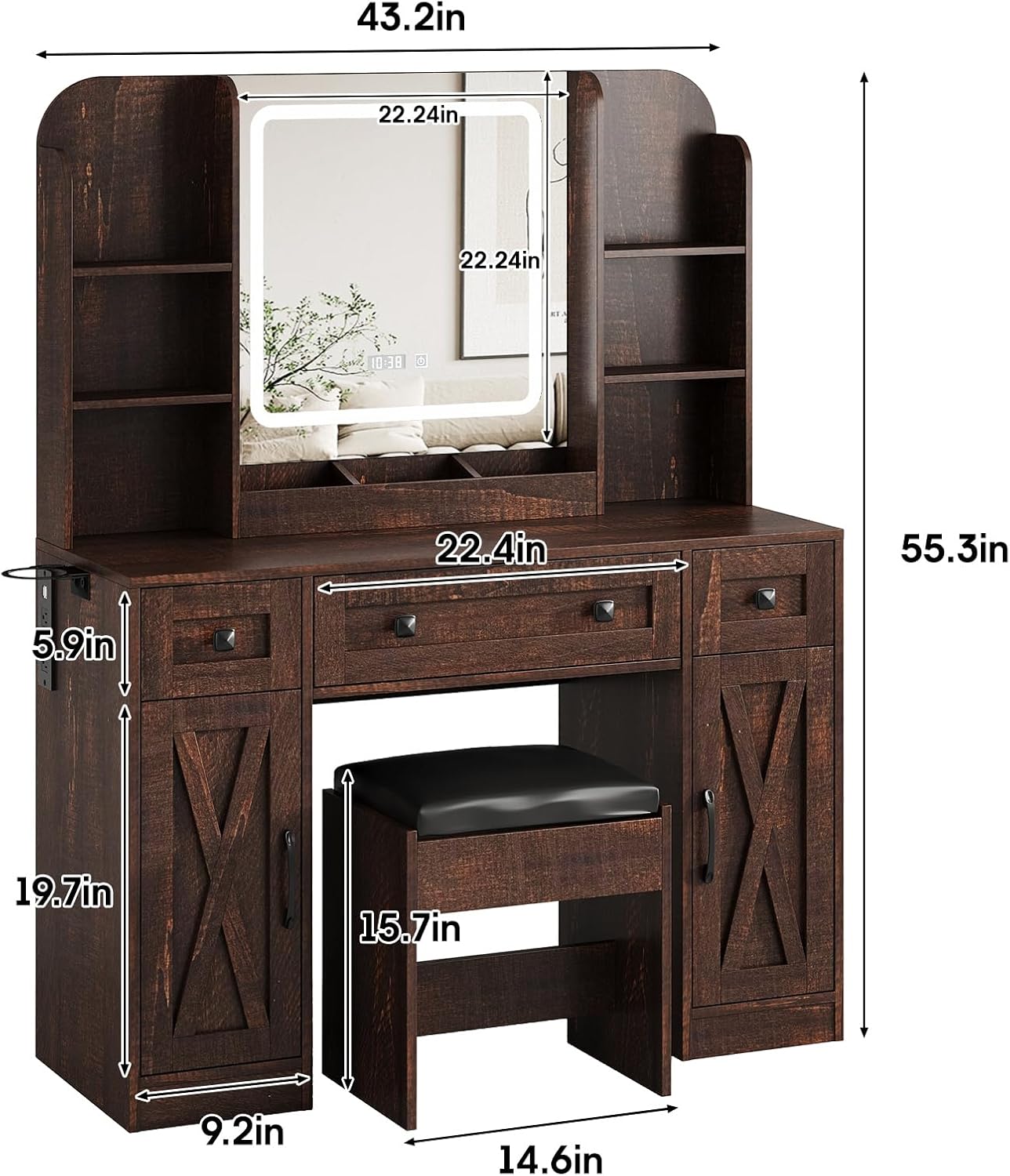
Image Description: A detailed diagram of the Vabches Makeup Vanity Desk, illustrating its various dimensions including length, width, and height of the overall unit, mirror, and individual storage components. This image provides precise measurements for planning and setup.
10. Warranty and Customer Support
For warranty information or customer support, please refer to the documentation included with your purchase or contact Vabches directly. Keep your purchase receipt for any warranty claims.
Contact Information: For assistance, please contact the seller Betemint via Amazon's messaging system or refer to the contact details provided in your product packaging.