
HONEYWHALE M2MAX-B
HONEYWHALE M2MAX-B Electric Scooter User Manual
Your guide to setting up, operating, and maintaining your HONEYWHALE M2MAX-B Electric Scooter.
Product Overview
The HONEYWHALE M2MAX-B Electric Scooter is designed for adult urban commuting, offering a powerful and comfortable riding experience. It features a 500W peak power motor, a long-range battery, and advanced safety features.
Key Features
- Powerful Motor & Long Battery Life: 500W peak power brushless hub motor for speeds up to 20mph. High-capacity 36V/10Ah lithium battery provides 17-25 miles of travel range.
- 10-Inch Pneumatic Tires & Dual Suspension: Large pneumatic tires offer superior traction and shock absorption. Equipped with both front and rear suspension for a comfortable ride.
- Multiple Braking Systems & Lighting: Features rear disc brake and front electric brake for enhanced safety. Includes front and rear lights, and turn signals for visibility.
- Cruise Control & Multiple Speed Modes: Convenient cruise control function and four distinct speed modes to adapt to various road conditions.
- App Control & Anti-Theft Features: Connects to a smartphone app for controlling riding modes, lighting, speed levels, cruise control, and startup options. Anti-theft lock with audible alert.
- Handlebar Controller & HD Display: Intuitive handlebar controls and a high-definition display showing real-time speed, battery level, and riding mode.
- Foldable Design: The scooter is foldable, and the seat can also be folded, making it compact and easy to transport. Weighs only 44 lbs.
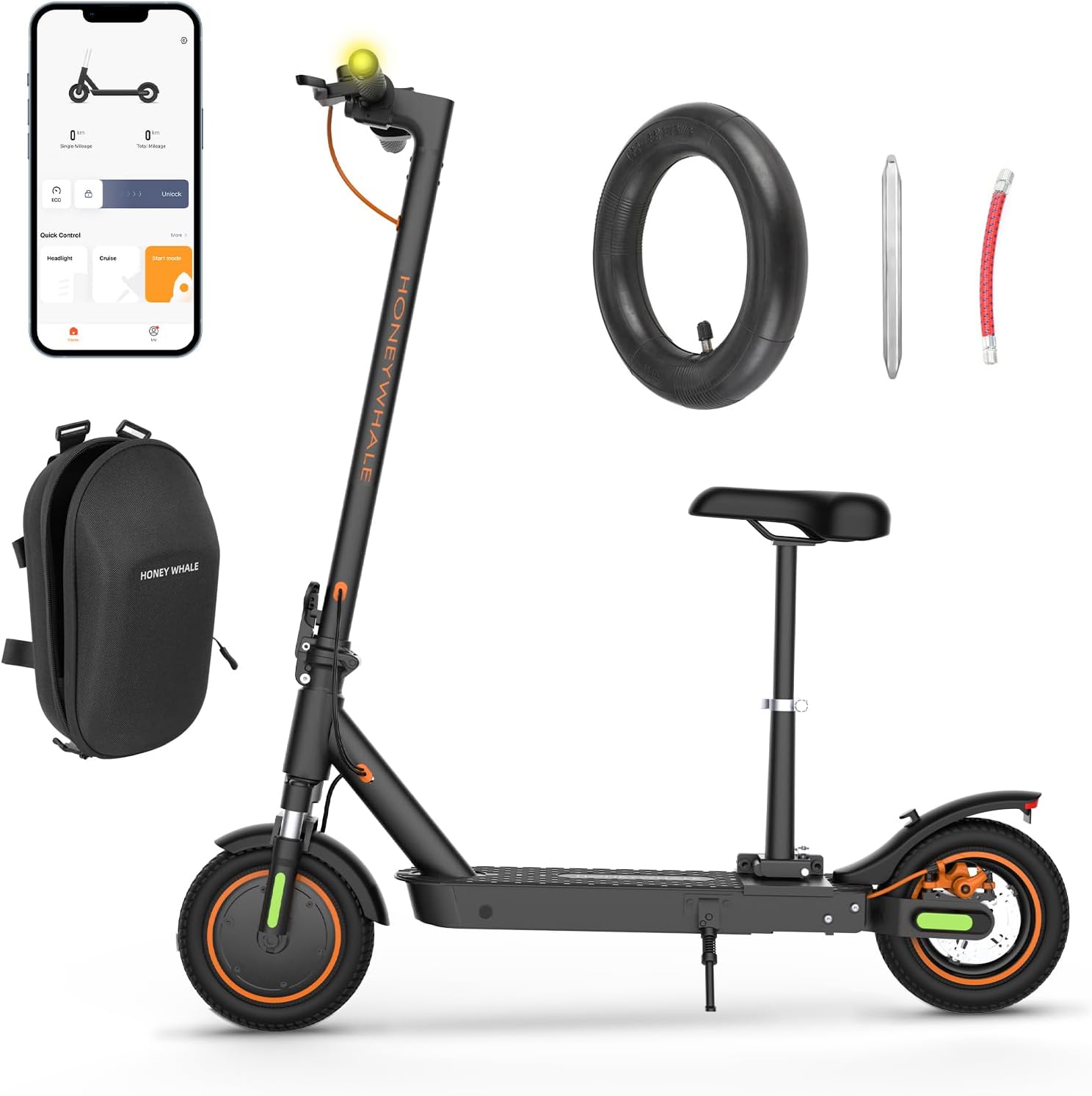
Figure 1: The HONEYWHALE M2MAX-B Electric Scooter with its main components and accessories.

Figure 2: Overview of the M2MAX-B Electric Scooter's performance specifications, including range, speed, and motor power.
Setup Guide
Unboxing and Initial Assembly
The M2MAX-B electric scooter comes with a one-piece pre-installation design, meaning minimal assembly is required upon receipt. Simply unfold the scooter and adjust the seat as needed.
- Carefully remove the scooter from its packaging.
- Unfold the main frame of the scooter until it locks securely into place.
- If using the seat, unfold and secure it to the designated mounting point. The seat is foldable and liftable for convenience.
Video 1: This official video demonstrates the unfolding process of the M2MAX-B electric scooter and the adjustability of its seat, showcasing its compact storage and portability.
Charging the Battery
Before first use, ensure the battery is fully charged. The scooter features a dust and splash-proof charging port.
- Locate the charging port on the scooter's deck.
- Open the protective cover of the charging port.
- Connect the charger to the scooter's charging port, then plug the charger into a power outlet.
- The charging indicator on the charger will change (e.g., from red to green) when charging is complete.
- Once fully charged, disconnect the charger and securely close the protective cover of the charging port to maintain its dust and splash-proof integrity.

Figure 3: The dust and splash-proof charging port, designed for durability and protection.
Operating Instructions
Controls and Display
The M2MAX-B features an intuitive handlebar design with an HD display and various controls for easy operation.
- Multi-function Button: Located on the display, this button controls power, headlights, speed modes, and measurement units.
- Electric Throttle: Located on the right handlebar, used to accelerate the scooter.
- Brake Levers: Located on both handlebars for activating the dual braking system.
- Turn Signal Buttons: Located on the left handlebar to activate the integrated turn signals.
- Bell: For alerting pedestrians and other riders.

Figure 4: The scooter's LCD display provides real-time information, while the handlebar controls allow for easy operation.

Figure 5: Detailed table outlining the functions of the multi-function button for power, headlights, speed modes, and unit changes.
Speed Modes and Cruise Control
The scooter offers multiple speed modes and a cruise control function for versatile riding.
- Switching Speed Modes: Press the multi-function button 2 times quickly to cycle through the four speed modes: Ped (0-3mph), ECO (0-9mph), Drive (0-15mph), and Sport (0-19mph).
- Activating Cruise Control: Tap the 'Cruise' button on the app to activate Cruise Control mode. Alternatively, accelerate to your desired speed and hold the throttle for 6-8 seconds.
- Disabling Cruise Control: While in Cruise Control, simply press the throttle or squeeze the brake to exit.

Figure 6: Illustration of the four available speed modes and instructions for switching between them.

Figure 7: Step-by-step guide on how to activate and deactivate the cruise control feature for a more relaxed ride.
Riding Safely
Always prioritize safety when operating your electric scooter.
- Braking: The scooter is equipped with a rear disc brake and a front electric brake. Apply both brakes smoothly for effective stopping.
- Lighting: Utilize the front headlight and rear lights for visibility, especially during low-light conditions. Turn signals are integrated into the handlebars and rear for indicating turns.
- Anti-slip Deck: Ensure your feet are firmly placed on the anti-slip deck for stability during your ride.

Figure 8: Visual representation of the dual braking system and integrated lighting for enhanced safety.

Figure 9: Detailed diagram illustrating the dual braking system components: Front Electronic Anti-Lock Brake and Rear Disc Brake.

Figure 10: Visual guide to the scooter's lighting system, including turn signals, headlight, and taillight, and how to operate them.

Figure 11: The textured anti-slip deck provides secure footing during rides.
Maintenance and Care
Tire Care
The 10-inch pneumatic tires require proper maintenance for optimal performance and safety.
- Tire Pressure: Regularly check and maintain tire pressure between 0.4 and 0.55 bar (approximately 5.8 to 8 PSI) for optimal daily performance and to prevent punctures.
- Puncture Prevention: Avoid riding over sharp objects. The scooter comes with a spare inner tube for convenience.

Figure 12: The 10-inch pneumatic tires and front hydraulic shock absorber contribute to a smooth ride.

Figure 13: The scooter is equipped with 10-inch pneumatic tires and includes a spare inner tube for maintenance.
Cleaning and Storage
- Cleaning: Wipe the scooter with a damp cloth. Avoid using high-pressure water jets or harsh chemicals.
- Storage: Store the scooter in a cool, dry place away from direct sunlight and extreme temperatures. Its foldable design makes storage convenient.
Battery Maintenance
- Regular Charging: Charge the battery regularly, even if not in use, to maintain its health. Avoid completely draining the battery.
- Temperature: Do not charge or store the battery in extreme temperatures.
Troubleshooting
This section addresses common issues you might encounter with your M2MAX-B Electric Scooter.
- Scooter not turning on: Ensure the battery is charged. Press and hold the power button for more than 2 seconds.
- Motor not engaging: Check if the scooter is in a valid speed mode. Ensure the anti-theft lock is disengaged via the app.
- Reduced range/speed: This can be affected by rider weight, terrain, and tire pressure. Ensure tires are properly inflated and consider riding in ECO mode for maximum range.
- App connectivity issues: Ensure Bluetooth is enabled on your smartphone and the scooter is powered on. Try restarting both the app and the scooter.
- Scooter beeps when moved: This indicates the anti-theft feature is active. Unlock the scooter using the app to disable the alarm.

Figure 14: The intelligent anti-theft system alerts you if the scooter is forcibly moved while locked via the app.
Product Specifications
| Feature | Specification |
|---|---|
| Brand | HONEYWHALE |
| Model Name | M2MAX-B |
| Color | Black |
| Motor Peak Power | 500W |
| Battery Capacity | 36V/10Ah Lithium |
| Maximum Speed | 20 MPH |
| Maximum Range | 17-25 Miles (conditions apply) |
| Climbing Ability | 15° Ramp |
| Tire Size | 10 Inches |
| Tire Type | Pneumatic |
| Suspension Type | Dual Suspension (Front Hydraulic, Rear Spring Dampening) |
| Brake Style | Front Electric Brake, Rear Disc Brake |
| Weight Limit | 265 Pounds |
| Product Dimensions (LxWxH) | 44"L x 19.5"W x 48"H |
| Net Weight | 44 lbs |
| Frame Material | Aluminum |

Figure 15: Detailed dimensions and net weight of the HONEYWHALE M2MAX-B Electric Scooter.

Figure 16: A summary of the M2MAX-B's core specifications, including power, range, and braking system.

Figure 17: Illustration of the scooter's dual suspension system, featuring both rear spring dampening and front hydraulic shock absorbers.
Warranty Information
HONEYWHALE provides a warranty for different parts of the M2MAX-B Electric Scooter to ensure your peace of mind.
- Body Frame: 12-month warranty covering main structural components, including the frame, handlebars, and seat.
- Other parts may have a 60-120 day warranty. Please refer to your purchase documentation for specific details on all components.
Optional protection plans may be available for extended coverage. Please check with your retailer for details.
Customer Support
For any questions, concerns, or technical assistance regarding your HONEYWHALE M2MAX-B Electric Scooter, please contact our customer support team.
- Seller: Honey Whale official
- Email Support: support@honeywhale.com
We are committed to providing timely and professional after-sales service to ensure your satisfaction.

Figure 18: The HD display provides essential riding information at a glance.

Figure 19: The folding locking ring ensures the handlebar is securely in place during operation.