Introduction
This manual provides essential information for the safe and effective operation, setup, and maintenance of your Generic 3699-087 Rechargeable Remote Control Car Toy. Please read it thoroughly before first use and retain it for future reference.
The 1:16 scale RC car is designed for off-road racing and rock climbing, capable of reaching speeds up to 20KM/h. It features an alloy shell for durability and deep-grain anti-skid tires for strong grip across various terrains.
Safety Information
Important Safety Guidelines:
- Always operate the RC car in open areas, away from people, pets, and obstacles.
- Do not operate near water or in wet conditions to prevent electrical damage.
- Keep fingers, hair, and loose clothing away from moving parts.
- Adult supervision is recommended for children operating the toy.
- Use only the provided charger and battery. Improper charging can lead to fire or injury.
- Do not attempt to modify or disassemble the product.
- To know the product(s) that require Bureau of Indian Standards (BIS) Marking, please refer to "Mandatory certifications in India" or search using "Know your standards".
What's in the Box
Upon unpacking, please ensure all the following components are present:
- 1 x RC Car (Model: 3699-087)
- 1 x Remote Control
- 1 x Rechargeable Lithium-Ion Battery (for car)
- 1 x USB Charging Cable
- 2 x AA Batteries (for remote control)

Image: The RC car, its remote control, the rechargeable car battery, and the USB charging cable are shown together.
Setup
1. Car Battery Installation and Charging
- Locate the battery compartment on the underside of the RC car.
- Open the battery compartment cover.
- Connect the rechargeable Lithium-Ion battery to the car's power connector.
- Place the battery inside the compartment and securely close the cover.
- To charge the car battery, connect the USB charging cable to the battery and plug the other end into a standard USB power adapter (not included) or a computer USB port.
- The charging indicator light on the USB cable will typically show red during charging and turn off or change color when fully charged.
- A full charge may take approximately 2-3 hours. Do not overcharge the battery.
2. Remote Control Battery Installation
- Locate the battery compartment on the back of the remote control.
- Open the battery compartment cover.
- Insert 2 AA batteries (included) into the compartment, ensuring correct polarity (+/-).
- Close the battery compartment cover securely.
Operating Instructions
1. Powering On
- Turn on the RC car by sliding the power switch (usually located on the car's chassis) to the "ON" position.
- Turn on the remote control by sliding its power switch to the "ON" position.
- The car and remote should automatically pair. An indicator light on the remote may stop flashing or turn solid once paired.
2. Remote Control Functions
- Throttle Trigger: Pull the trigger to move the car forward. Push the trigger forward to brake or reverse.
- Steering Wheel: Rotate the steering wheel left or right to control the car's direction.
- Trim Adjustments (if available): Some remotes have trim dials to fine-tune steering or throttle if the car pulls to one side or moves slightly without input.
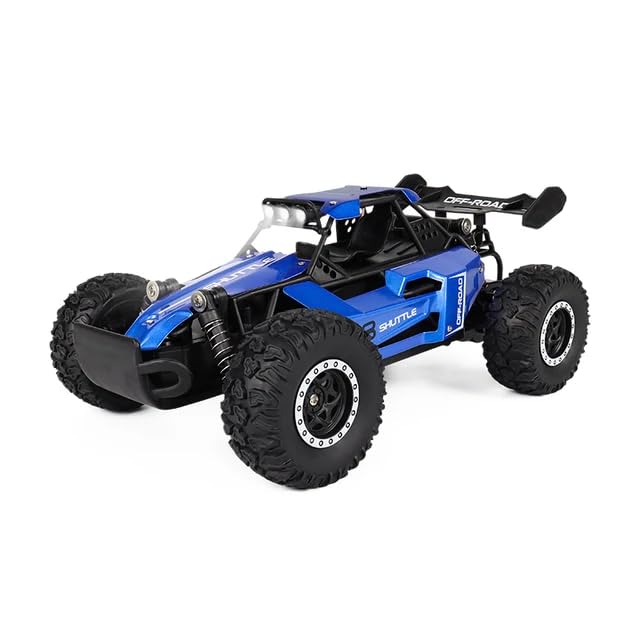
Image: The Generic 3699-087 RC car, highlighting its robust design suitable for various terrains.
3. Driving Tips
- Start by practicing in an open, flat area to get accustomed to the controls.
- The car is suitable for various terrains including sand roads, sandstone, grass, and highways due to its deep-grain anti-skid tires.
- Avoid driving into solid objects at high speeds to prevent damage to the alloy shell.
- The net sand head lights make operating at night more interesting, but ensure clear visibility.
- The remote control range is approximately 50 meters. Keep the car within this range for optimal control.
- Expected flight time (operation time) is about 20 minutes on a full charge.
Maintenance
1. Cleaning
- After each use, especially on dusty or dirty terrains, gently wipe the car with a soft, dry cloth.
- Remove any debris (grass, small stones) from the wheels and suspension components.
- Do not use water or chemical cleaners directly on the electronic components.
2. Storage
- When not in use for extended periods, remove batteries from both the car and the remote control.
- Store the car and remote in a cool, dry place, away from direct sunlight and extreme temperatures.
- Keep the product in its original packaging or a protective container to prevent damage.
Troubleshooting
If you encounter issues with your RC car, please refer to the following common solutions:
- Car Not Responding:
- Ensure both the car and remote control are powered on.
- Check if the car's rechargeable battery is fully charged and correctly connected.
- Verify that the AA batteries in the remote control are fresh and installed with correct polarity.
- Ensure the car and remote are within the operating range (approx. 50m) and there are no strong interferences.
- Car Not Moving Straight / Poor Control:
- Check for any debris or obstructions in the steering mechanism or wheels.
- If your remote has a steering trim adjustment, use it to fine-tune the car's straight-line tracking.
- Ensure the wheels are securely attached and not damaged.
- Short Operating Time:
- Ensure the car battery is fully charged before use.
- Battery performance can decrease over time; consider replacing the battery if it's old and holds less charge.
- Operating on challenging terrains (e.g., thick grass, steep inclines) consumes more power and reduces run time.
Specifications
| Model Number | 3699-087 |
| Scale | 1:16 Scale |
| Color | Blue |
| Material Type(s) | Metal (Alloy shell) |
| Product Dimensions (LxWxH) | 27 x 16 x 15 cm |
| Item Weight | 750 g |
| Max Speed | 20 KM/H |
| Remote Distance | Approx. 50 meters |
| Car Battery Type | Rechargeable Lithium-Ion (3.7V) |
| Remote Battery Type | 2 x AA batteries (included) |
| Flight Time (Operation) | About 20 minutes |
| Recommended Age | 3 years and up |
| Manufacturer | RR |
Warranty and Support
Specific warranty details for this product are not provided in the available information. For warranty claims or technical support, please contact the retailer or manufacturer directly using the contact information provided at the point of purchase.
Always retain your proof of purchase for any warranty-related inquiries.