
1. Introduction
This manual provides essential information for the safe and effective installation, operation, and maintenance of the JIANGFAN 63A 230V Din Rail Adjustable Over Under Voltage Protective Protector. This device is designed to safeguard electrical equipment from damage caused by voltage fluctuations, including over-voltage, under-voltage, and over-current conditions. It features a digital display for real-time monitoring and adjustable protection parameters.
2. Product Features
The JIANGFAN Voltage Protective Protector incorporates several key features to ensure reliable electrical protection:
- Digital Display: Provides real-time readings of voltage and current.
- Adjustable Protection: Allows users to set custom thresholds for over-voltage, under-voltage, and over-current.
- Din Rail Mounting: Designed for easy and secure installation in standard electrical distribution boxes.
- Intelligent Anti-Interference: Equipped with intelligent chips to enhance stability and resist external interference.
- Enclosed Design: Offers protection for internal components.

This image highlights the intelligent anti-interference capabilities of the voltage protector, its robust enclosed design, and internal components designed to resist battery interference, ensuring stable operation.
3. Setup and Installation
Safety Warning: Installation should only be performed by qualified personnel. Ensure the main power supply is disconnected before beginning any installation work to prevent electric shock.
- Mounting: Securely attach the protective device to a standard 35mm Din Rail within an electrical distribution box. Ensure it is firmly clipped into place.
- Wiring - Input: Connect the incoming live (L) and neutral (N) wires from the power source to the 'IN' terminals of the protector. The 'L' terminal is for the live wire, and the 'N' terminal is for the neutral wire.
- Wiring - Output: Connect the outgoing live (L) and neutral (N) wires to the 'OUT' terminals of the protector. These wires will then connect to the load (electrical equipment) you wish to protect.
- Verify Connections: Double-check all wiring connections to ensure they are tight and correctly aligned according to the 'IN' and 'OUT' markings and L/N polarity.
- Restore Power: Once all connections are verified and secure, restore power to the circuit. The device's digital display should illuminate.
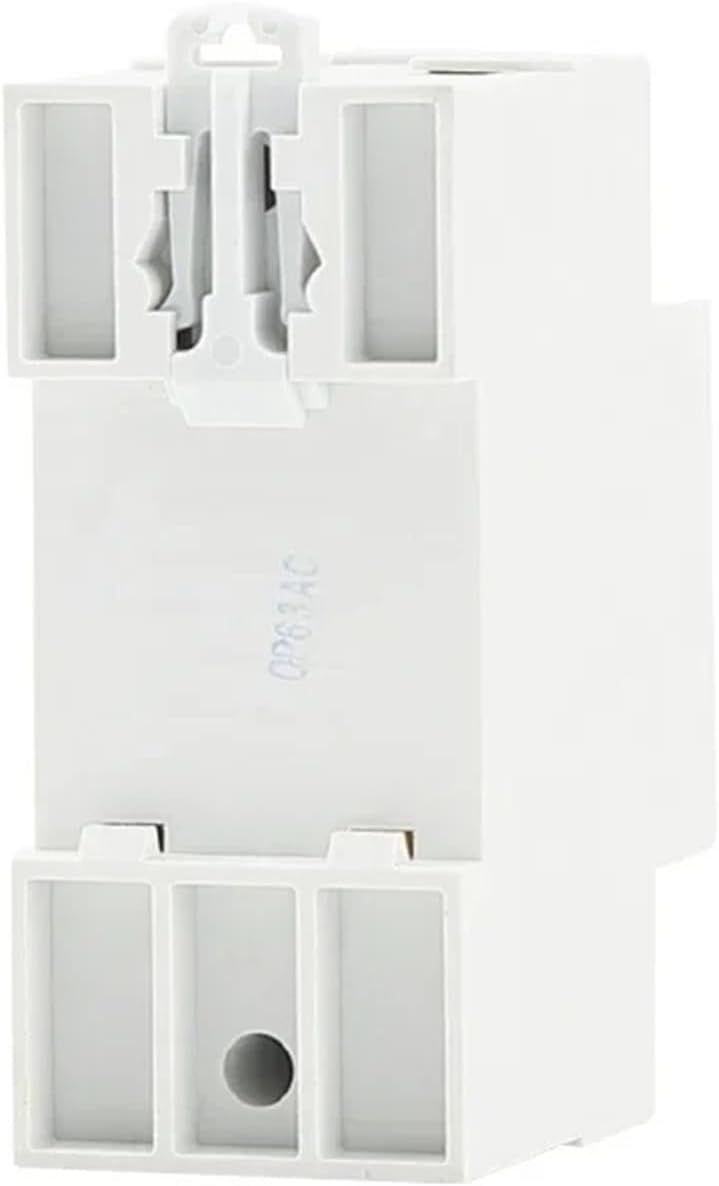
The back of the voltage protector features a standard Din Rail clip for secure and easy installation into electrical panels.
4. Operating Instructions
Upon successful installation and power-up, the device will display real-time voltage and current readings. Use the control buttons to adjust protection parameters.

The front panel of the voltage protector features a clear digital display for real-time voltage and current, along with intuitive buttons for adjusting protection parameters and power control.
4.1. Display Readings
- The upper display shows the current voltage (V).
- The lower display shows the current amperage (A).
- Indicators (e.g., >U, <U, >I) illuminate to signal over-voltage, under-voltage, or over-current conditions.
4.2. Setting Parameters
To adjust protection thresholds:
- Press the SET button to enter the setting mode. The first adjustable parameter will flash.
- Use the Up (▲) and Down (▼) buttons to increase or decrease the value.
- Press SET again to confirm the value and move to the next parameter.
- Repeat steps 2 and 3 for all desired parameters (e.g., over-voltage threshold, under-voltage threshold, over-current threshold, recovery delay time).
- After setting the last parameter, press SET one more time to save all changes and exit the setting mode. If no button is pressed for a few seconds, the device may automatically exit setting mode, saving the last confirmed value.
4.3. Power Control
- Press the Power (⏻) button to manually turn the output power ON or OFF.
5. Maintenance
The JIANGFAN Voltage Protective Protector requires minimal maintenance. Follow these guidelines to ensure optimal performance:
- Cleaning: Periodically wipe the exterior of the device with a dry, soft cloth. Do not use abrasive cleaners or solvents. Ensure the device is powered off before cleaning.
- Connection Check: Annually, or as needed, verify that all wiring connections are secure and free from corrosion. Ensure the device is powered off before checking connections.
- Environmental Conditions: Ensure the device is operated within its specified environmental conditions (temperature, humidity) to prevent premature failure.
6. Troubleshooting
If you encounter issues with your voltage protective protector, refer to the following common problems and solutions:
- No Display/No Power:
- Check the main power supply to the 'IN' terminals.
- Ensure all input wires are correctly connected and secure.
- Device Not Protecting:
- Verify that the set over-voltage, under-voltage, and over-current thresholds are appropriate for your application.
- Ensure the device is correctly wired to the load.
- Frequent Tripping:
- Review your set protection parameters; they might be too sensitive for your electrical environment.
- Check for unstable power supply from the grid.
- Inspect the connected load for faults or excessive current draw.
- Incorrect Readings:
- Ensure the device is operating within its specified voltage and current ranges.
- Verify that the wiring connections are clean and tight.
If problems persist, contact qualified electrical service personnel.
7. Specifications
| Type | Mini Voltage Relay |
| Model Number | OPS5VA-63 |
| Rated Voltage | 220V (230V nominal) |
| Rated Current (Max) | 63A (Adjustable, variant 40A available) |
| Contact Load | Low Power |
| Certification | CE |
| Mounting Type | Din Rail |
| Package Dimensions | 1.18 x 0.79 x 0.39 inches |
| Item Weight | 1.76 ounces |
| Manufacturer | JIANGFAN |