
1. Introduction
This manual provides detailed instructions for the installation, operation, and maintenance of your Lian Li EDGE1200W Fully Modular Low-Noise ATX Power Supply. Please read this manual thoroughly before installation and use to ensure proper functionality and safety.

Image 1.1: The Lian Li EDGE1200W Power Supply, showcasing its L-shaped modular connector panel.
2. Key Features
- USB/Fan Hub Integration: Features an EDGE Hub supporting four devices and up to eight downstream connections, ideal for RGB controllers and fan management. The hub includes six 4-pin connectors, each rated for 2A.
- 50/40 Series Ready: Equipped with a 12V-2x6 connector for NVIDIA GeForce RTX 50 and 40 Series graphics cards, including dual 8-pin to 12VHPWR connectors for broad compatibility.
- ATX 3.1 Compliant: Ensures stable and efficient power delivery for high-performance PC components, supporting PCIe 5.1 with enhanced resistance to transient power spikes.
- High Efficiency & Low Noise: Certified with 80 PLUS Gold and Cybenetics Gold for optimal efficiency and quiet operation.
- L-Shape Design: Unique form factor reorients connectors outward, simplifying cable management in various PC chassis.
- Magnetic Dust Filter Mesh: Easily removable for cleaning, ensuring hassle-free maintenance and quiet fan operation.

Image 2.1: Visual summary of key features including efficiency certifications and design elements.
3. Setup and Installation
3.1 Physical Installation
The L-shape design of the Lian Li EDGE1200W PSU is engineered to simplify installation and cable routing, particularly in dual-chamber or tower chassis. Install the PSU into the designated power supply bay of your PC case, ensuring proper alignment with mounting holes.

Image 3.1: The L-shape design facilitates easier cable management within a PC chassis.
3.2 Cable Management
The fully modular design allows you to connect only the necessary cables, reducing clutter. The PSU comes with braided-texture cables and cable combs for an organized and aesthetically pleasing build.

Image 3.2: Braided cables with combs for improved cable routing and aesthetics.
3.3 USB/Fan Hub Connection
The included EDGE Hub can be connected directly to the PSU or powered independently via a PCIe 8-pin cable. Its magnetic design allows for flexible placement within your case.
- Direct Connection: Remove the cap from the Edge Hub and attach it directly to the designated connector on the Edge PSU for power.
- Independent Power: Connect the hub to a PCIe 8-pin cable for independent operation if direct connection is not preferred or possible.

Image 3.3: Instructions for connecting the Edge Hub to the PSU.

Image 3.4: Example placement of the Edge Hub within a PC case.
3.4 Motherboard Signal Connection
The hub offers two options for motherboard USB signal connection to accommodate different configurations:
- USB Type-A: Connect using a standard USB Type-A cable.
- USB-USB: Connect using a USB-USB cable.
To synchronize fan speed, connect the fan 3-PIN to 3-PIN cable.

Image 3.5: Motherboard signal connection options for the USB/Fan Hub.
4. Operating Instructions
4.1 Powering On/Off
Ensure all components are correctly connected before powering on your system. Use the main power switch on the PSU to turn the unit on or off. Always power down your system and unplug the PSU from the wall outlet before performing any internal hardware changes or maintenance.
4.2 Fan Operation
The PSU features a 120mm PWM fan designed for optimal cooling and low noise. It operates in a fanless mode during low loads for quiet operation, and the fan speed adjusts automatically based on power output to maintain optimal temperatures.
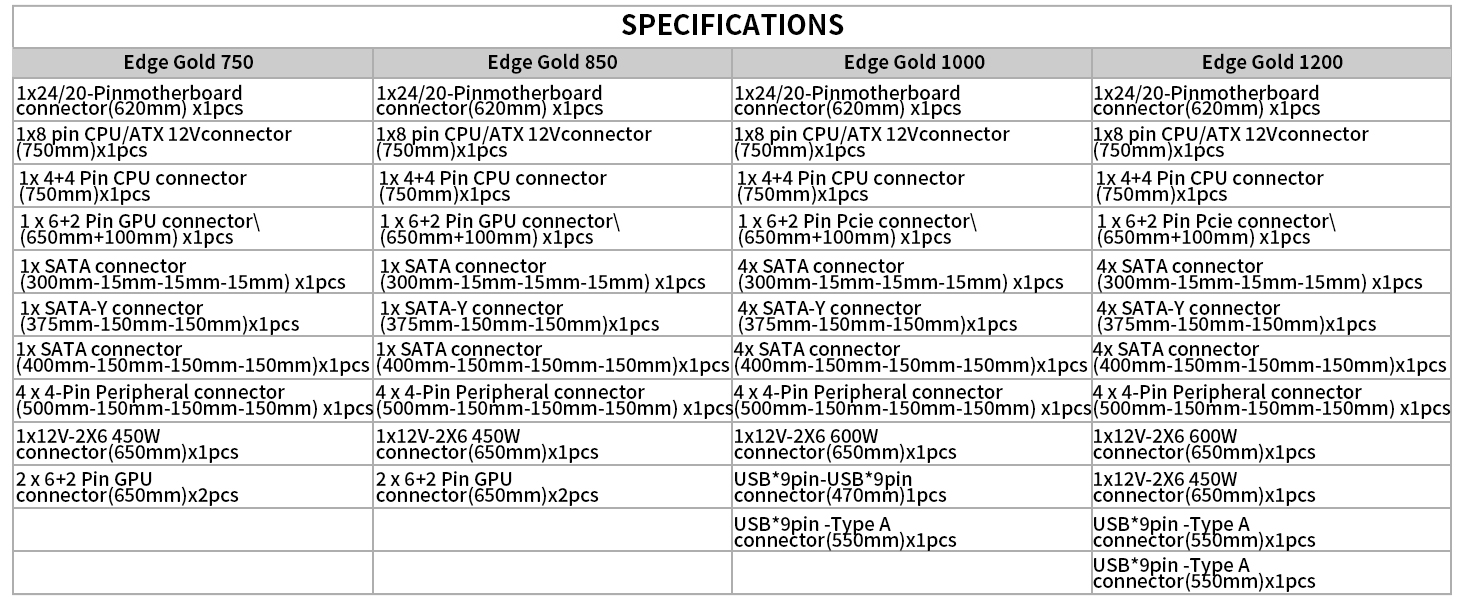
Image 4.1: Fan acoustic noise levels relative to power output. Note the fanless mode at low loads.
5. Maintenance
5.1 Magnetic Dust Filter Cleaning
The magnetic mesh dust filter on top of the fan can be easily removed for regular cleaning. This ensures dust-free operation, maintains ample ventilation, and extends the PSU's lifespan and reliability.
- Gently pull the magnetic dust filter upwards to remove it from the PSU.
- Clean the filter using a soft brush or compressed air to remove accumulated dust.
- Align the filter with the PSU's top panel and allow the magnets to secure it back in place.
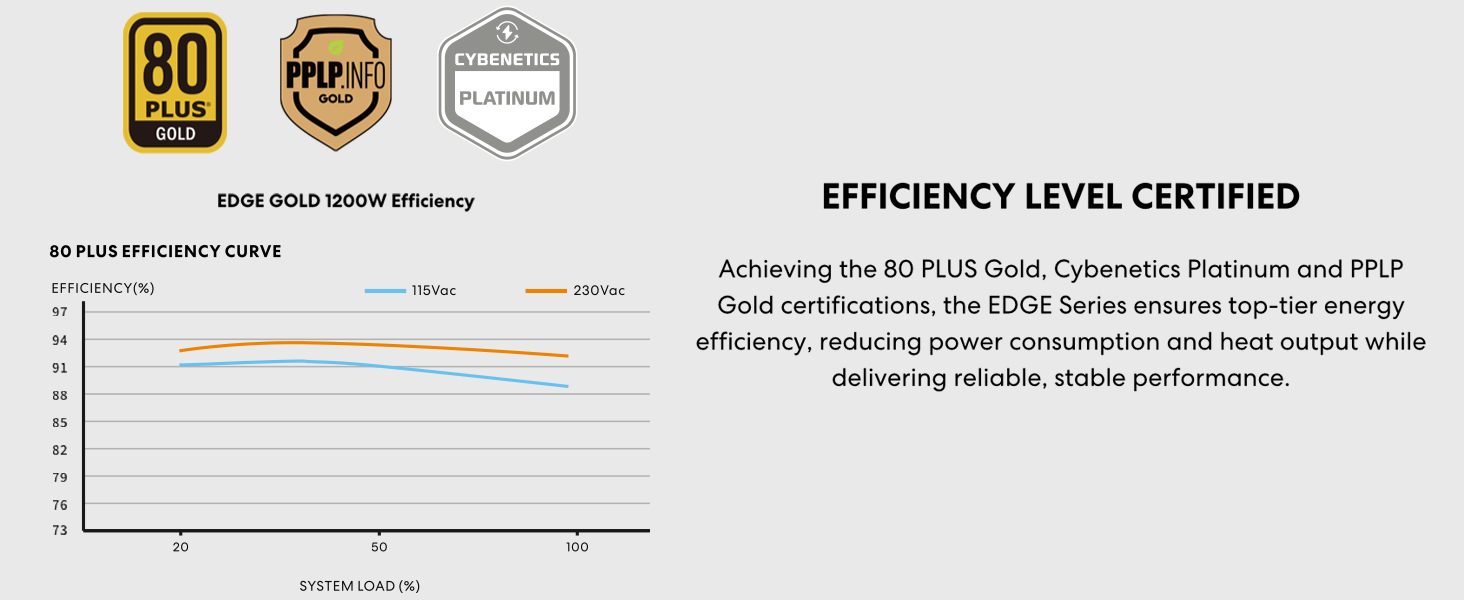
Image 5.1: The magnetic dust filter is easily removable for cleaning.
6. Specifications
The Lian Li EDGE1200W Power Supply adheres to ATX 3.1 standards and features industrial-grade capacitors for robust performance.

Image 6.1: Industrial-grade capacitors ensure stable and reliable power delivery.
6.1 General Specifications
| Attribute | Value |
|---|---|
| Product Dimensions | 7.17 x 3.39 x 5.91 inches |
| Item Weight | 8.16 pounds |
| Manufacturer | LIAN LI |
| Item Model Number | EG1200G.WH |
| Brand | Lian Li |
| Compatible Devices | Desktop |
| Connector Type | ATX |
| Output Wattage | 1200 Watts |
| Form Factor | ATX |
| Cooling Method | Air |
6.2 Efficiency and Certifications
The EDGE series is certified for high efficiency, reducing power consumption and heat output.
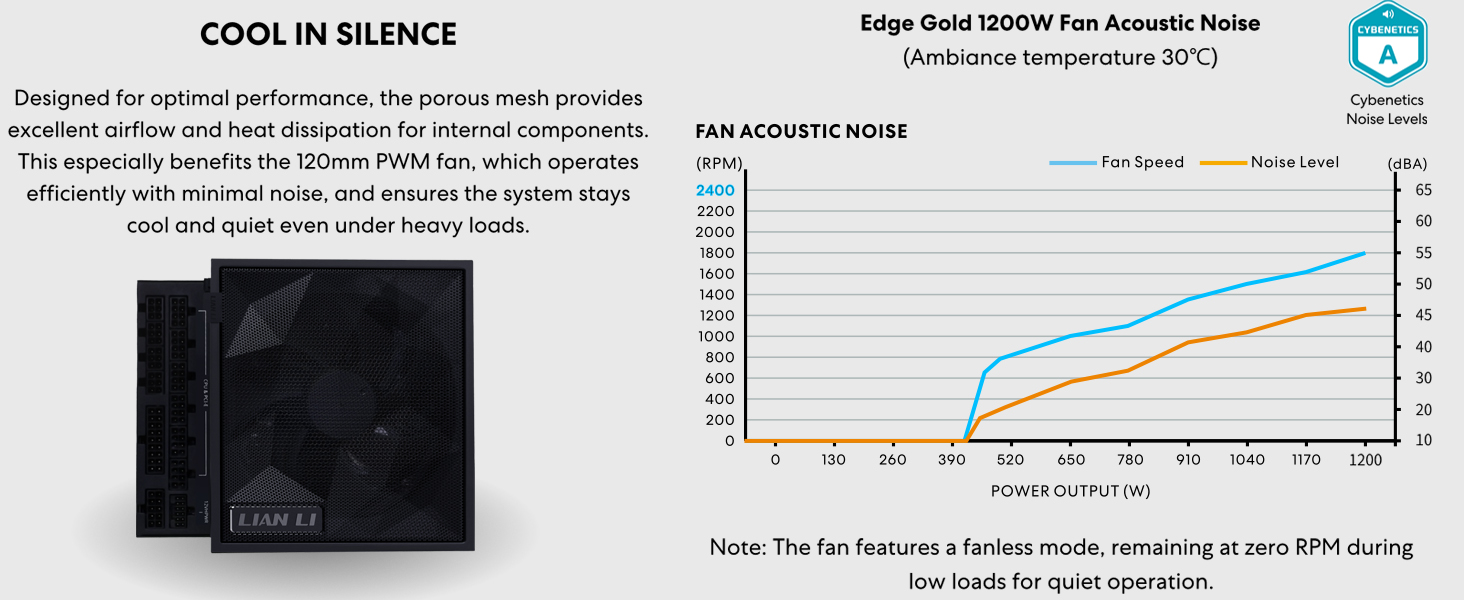
Image 6.2: Efficiency levels certified by 80 PLUS Gold, Cybenetics Platinum, and PPLP Gold.
6.3 Connector Details
The PSU features a high-quality 12V-2x6 dual-color connector with alloy copper soldered terminals for secure and efficient power delivery.

Image 6.3: Detailed view of the PCIe 5.1 connector design for enhanced stability and performance.
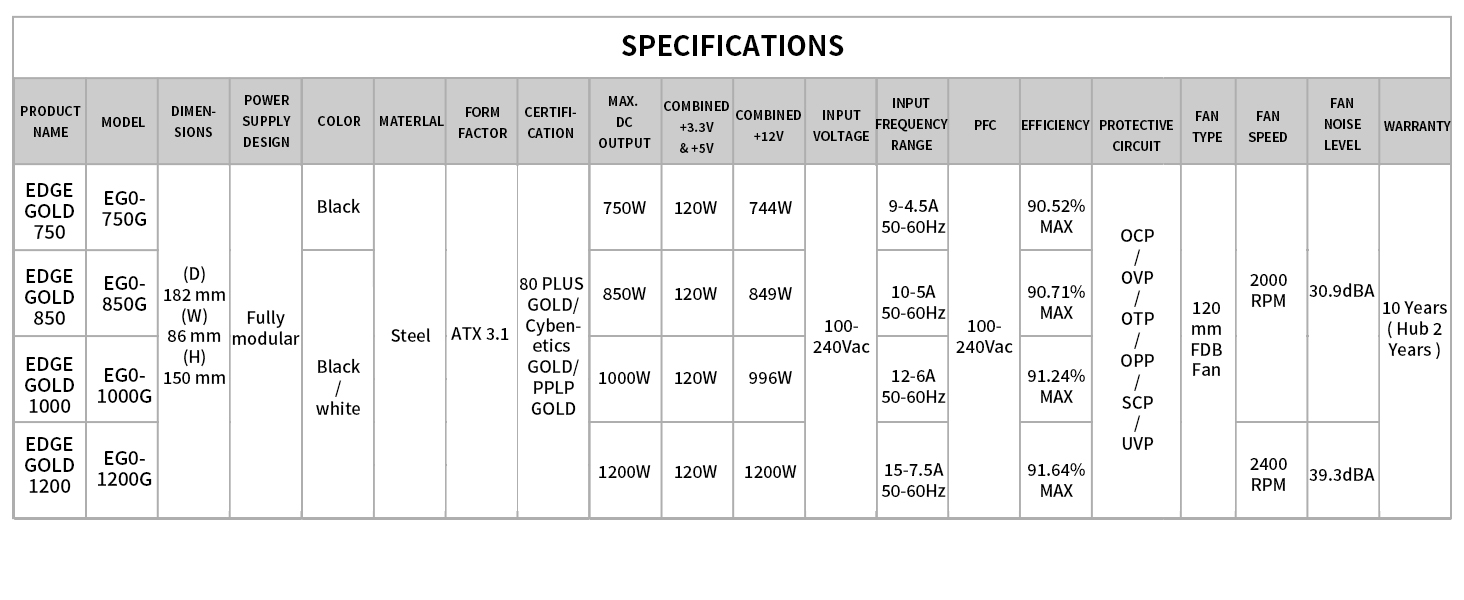
Image 6.4: Connector specifications for various Edge Gold PSU models.
7. Troubleshooting
If you encounter issues with your Lian Li EDGE1200W Power Supply, consider the following troubleshooting steps:
- No Power: Ensure the PSU's main power switch is in the 'ON' position and the power cable is securely connected to both the PSU and a working wall outlet. Verify that the motherboard's 24-pin and CPU power connectors are firmly seated.
- System Instability/Crashes: Check all power connections to components (GPU, storage drives, etc.) to ensure they are secure. If issues persist, test components individually if possible, or consult a qualified technician.
- Fan Noise: The PSU fan operates in a fanless mode at low loads. If the fan is constantly running loudly, ensure adequate airflow within your PC case and that the PSU's dust filter is clean.
- USB/Fan Hub Issues: Verify the hub is correctly connected to the PSU or independently powered. Check motherboard signal connections (USB Type-A or USB-USB) for proper data transfer.
For further assistance, please refer to the support section or contact Lian Li customer service.
8. Warranty and Support
The Lian Li EDGE1200W Power Supply comes with a 10-year warranty for the main power supply unit. The integrated USB/Fan Hub module is covered by a 2-year warranty.
For technical support, warranty claims, or additional product information, please visit the official Lian Li website or contact their customer service department.
Lian Li Official Website: www.lian-li.com