
1. Introduction
The Subsun 2024 Upgraded Walking Pad is a compact and versatile under-desk treadmill designed for home and office use. It features a foldable design for easy storage, automatic incline adjustments, and a user-friendly interface. This manual provides essential information for the safe and effective operation and maintenance of your treadmill.
2. Key Features
- Foldable Design with Compact Storage: Features a foldable handlebar and collapsible side handrails, allowing for easy storage in tight spaces. Folded dimensions are 53.9 x 27.2 x 5.5 inches. Equipped with transport wheels for convenient movement.
- 4-Level Automatic Incline: Offers automatic incline levels of 0%, 5%, 7%, and 9% to simulate varied terrain for diverse workouts, suitable for walking, jogging, or weight loss programs.
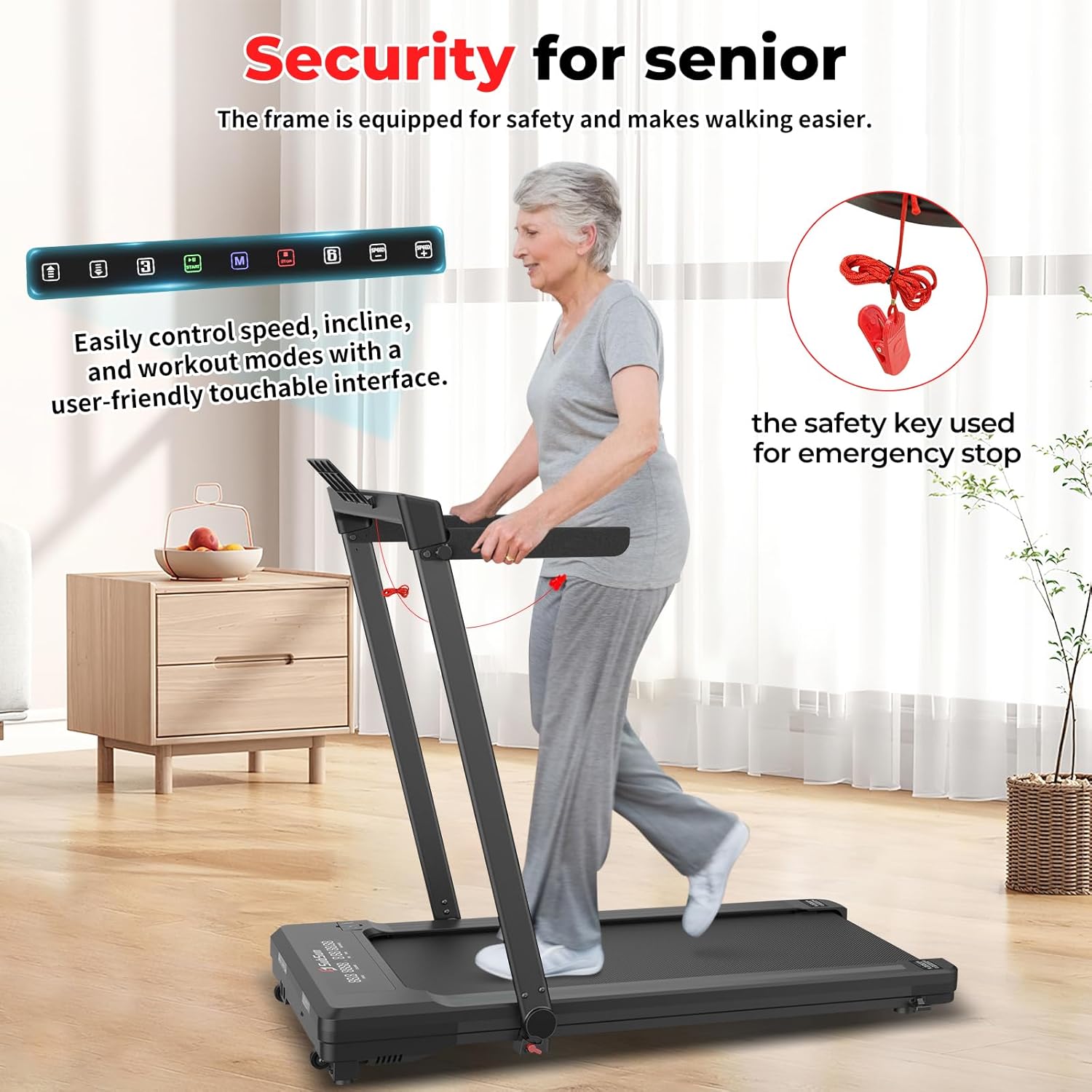
- User-Friendly Console with Touchable Controls: An intuitive touchable console on the handle provides quick access to speed, incline, and mode settings. The LCD display tracks speed, distance, time, incline, and calories burned.
- Spacious Running Surface and Quiet Operation: A 17.32 x 42.52-inch running area accommodates comfortable strides. The low-noise motor ensures a quiet workout. Speed range is 0.6-7.6 MPH, supporting up to 265 lbs.
- Safety and Convenience Features: Includes a safety key for emergency stops, a remote control for easy operation, and a table mount for devices.
3. Setup Instructions
3.1 Unpacking and Placement
- Carefully remove the treadmill from its packaging.
- Place the treadmill on a flat, stable surface. Ensure there is adequate space around the unit for safe operation.
- Unfold the handlebar and secure any collapsible side handrails if applicable.

3.2 Power Connection
- Connect the power cord to the treadmill and then to a grounded electrical outlet.
- Ensure the power switch (usually located near the power cord input) is in the 'ON' position.
4. Operating Instructions
4.1 Power On/Off
- To power on, press the main power button on the treadmill's console or the power button on the remote control. The LED display will illuminate.
- To power off, press the power button on the remote control or the main power button on the console. For complete shutdown, switch off the main power switch.
4.2 Using the Remote Control
- The remote control allows for convenient adjustment of speed and modes without bending down.
- Use the '+' and '-' buttons to increase or decrease the speed.
- Press the 'M' button to cycle through different workout modes (e.g., time, distance, calories).
- The play/pause button starts and stops the treadmill belt.

4.3 Speed and Incline Adjustment
- The treadmill offers a speed range of 0.6 to 7.6 MPH. Adjust speed using the remote control or console buttons.
- Utilize the 4-level automatic incline (0%, 5%, 7%, 9%) to vary your workout intensity. Adjust incline via the console or remote.


4.4 Safety Key
- Always attach the safety key clip to your clothing before starting a workout.
- In case of an emergency, pulling the safety key will immediately stop the treadmill.
5. Maintenance
5.1 General Cleaning
- Regularly wipe down the treadmill with a damp cloth to remove dust and sweat. Avoid using abrasive cleaners.
- Keep the area around the treadmill clean and free from obstructions.
5.2 Belt Lubrication
- The running belt requires periodic lubrication to ensure smooth operation and prolong its lifespan. Refer to the included lubricant and instructions for proper application frequency.


6. Troubleshooting
6.1 Common Issues and Solutions
- Treadmill not powering on: Check if the power cord is securely plugged into both the treadmill and the wall outlet. Ensure the main power switch is in the 'ON' position. Verify the safety key is correctly placed.
- Belt slipping or uneven: The running belt may require adjustment or lubrication. Refer to the maintenance section for lubrication instructions. For belt alignment, consult the detailed instructions in the full manual or contact customer support.
- Unusual noises: Check for any loose parts or foreign objects under the belt. Ensure the treadmill is on a level surface. If the noise persists, discontinue use and contact customer support.
- Remote control not responding: Check the batteries in the remote control and replace if necessary. Ensure there are no obstructions between the remote and the treadmill's receiver.
7. Specifications
| Feature | Detail |
|---|---|
| Brand | SubSun |
| Model Name | WT886774 |
| Product Dimensions (L x W x H) | 129D x 69.1W x 104H Centimetres |
| Folded Size | 53.9 x 27.2 x 5.5 inches |
| Item Weight | 28.52 Pounds (12.94 kg) |
| Maximum Weight Recommendation | 265 lbs (120.2 kg) |
| Maximum Speed | 7.6 Miles per Hour (12.2 km/h) |
| Speed Range | 0.6-7.6 MPH |
| Maximum Incline Percentage | 9% (4 levels: 0%, 5%, 7%, 9%) |
| Running Area | 17.32 x 42.52 inches |
| Maximum Horsepower | 2.5 Horsepower |
| Material | Metal, Acrylonitrile Butadiene Styrene (ABS) |
| Metrics Measured | Calories Burned, Distance, Incline, Speed, Time |
| Included Components | Lubricant, Power Cord, Remote Control, Safety Key, Tool Kit |
8. Warranty and Support
For warranty information, technical support, or service inquiries, please refer to the warranty card included with your product or contact SubSun customer service. Keep your purchase receipt as proof of purchase.
