

1. Introduction
This manual provides comprehensive instructions for the installation, operation, maintenance, and troubleshooting of your Aymzbd DZ41-CAN Electric Bike Display Unit. This display is specifically designed for electric bikes equipped with M500 and BBS0102 mid-drive motors, offering essential riding data and controls.
The DZ41-CAN display features a high-contrast, large-size color screen, ensuring clear visibility of data even during high-speed operation. Its compact and lightweight design, combined with robust PP and PC materials, provides a waterproof solution suitable for various environmental conditions and weather.

Figure 1.1: Front view of the Aymzbd DZ41-CAN Electric Bike Display Unit. This image shows the display screen with various indicators such as speed, battery level, and trip distance, along with the control buttons on the left side.
2. Setup and Installation
The DZ41-CAN display unit features an integrated design for straightforward installation. Follow these steps to properly mount and connect the display to your electric bike.
- Mounting: Securely attach the display unit to your bicycle handlebars using the provided mounting bracket. Ensure it is positioned for optimal visibility and accessibility during riding.
- Cable Connection: Connect the display's cable to the corresponding port on your e-bike's mid-drive motor system (M500 or BBS0102). Ensure the connection is firm and secure to prevent accidental disconnection during operation.
- Cable Management: Route the cable neatly along the bike frame, securing it with cable ties if necessary, to prevent interference with moving parts and protect it from damage.

Figure 2.1: Rear view of the DZ41-CAN display unit. This image highlights the mounting bracket attachment points and the cable connector, which is crucial for proper installation onto the electric bike's handlebars and wiring harness.
3. Operating Instructions
The DZ41-CAN display provides real-time information and control over your e-bike's functions. Familiarize yourself with the display interface and button operations.
3.1. Display Indicators
- Power: Indicates the current power output from the motor.
- Speed: Shows current riding speed (KM/H).
- Battery: Displays the remaining battery charge level.
- Headlights: Indicator for headlight status.
- Gears/PAS Level: Shows the current Pedal Assist System (PAS) level.
- Brakes: May indicate brake activation or status.
- Modes: Displays the current riding mode.
- Mileage: Shows trip distance (TRIP) and total mileage.
- Error Messages: Prompts for system errors or warnings.
3.2. Button Functions

Figure 3.1: Close-up view of the control buttons on the DZ41-CAN display. The image clearly shows the '+', 'M', and '-' buttons, which are used for navigating menus, adjusting settings, and controlling various functions of the e-bike.
- '+' Button: Typically used to increase values, navigate up in menus, or increase Pedal Assist System (PAS) level.
- '-' Button: Typically used to decrease values, navigate down in menus, or decrease Pedal Assist System (PAS) level.
- 'M' Button (Mode/Menu): Used to cycle through display modes (e.g., Trip, Odometer, Max Speed, Avg Speed) or to enter/exit the settings menu. A long press may turn the display on/off or activate specific functions.
Refer to your e-bike's specific motor system manual for detailed button press sequences and advanced settings, as display functionality can vary slightly based on the integrated system.
4. Maintenance
Proper maintenance ensures the longevity and optimal performance of your DZ41-CAN display unit.
- Cleaning: Wipe the display screen and body with a soft, damp cloth. Avoid using abrasive cleaners or solvents that could damage the plastic or screen coating.
- Waterproofing: The display features a waterproof design. However, avoid submerging the unit in water or exposing it to high-pressure water jets, which could compromise its seals.
- Storage: When not in use for extended periods, store the e-bike and display in a dry, cool place away from direct sunlight and extreme temperatures.
- Cable Inspection: Periodically check the connection cable for any signs of wear, fraying, or damage. Ensure it remains securely connected.
5. Troubleshooting
If you encounter issues with your DZ41-CAN display, refer to the following common problems and solutions:
| Problem | Possible Cause | Solution |
|---|---|---|
| Display does not turn on. | No power from battery; loose cable connection; display fault. | Check e-bike battery power. Ensure all cables are securely connected. If problem persists, contact support. |
| Incorrect speed/mileage reading. | Speed sensor issue; incorrect wheel circumference setting. | Check speed sensor for damage or misalignment. Consult e-bike motor manual for wheel circumference adjustment. |
| Error message displayed. | System malfunction; sensor error. | Note the error code. Refer to your e-bike motor system manual for specific error code meanings and troubleshooting steps. |
| Buttons unresponsive. | Dirt/debris under buttons; internal fault. | Clean around buttons. If unresponsive, contact support. |
For issues not covered here, or if solutions do not resolve the problem, please contact Aymzbd customer support or your e-bike dealer.
6. Specifications
Key technical specifications for the Aymzbd DZ41-CAN Electric Bike Display Unit:
- Model: DZ41-CAN
- Compatibility: Designed for M500 and BBS0102 mid-drive motors.
- Material: PP (Polypropylene) and PC (Polycarbonate).
- Dimensions: Approximately 6.7 cm (2.64 inches) x 5 cm (1.97 inches).
- Waterproofing: Yes, waterproof design.
- Display Type: High contrast, large-size color instrument display.
- Part Number: 54073180108810026
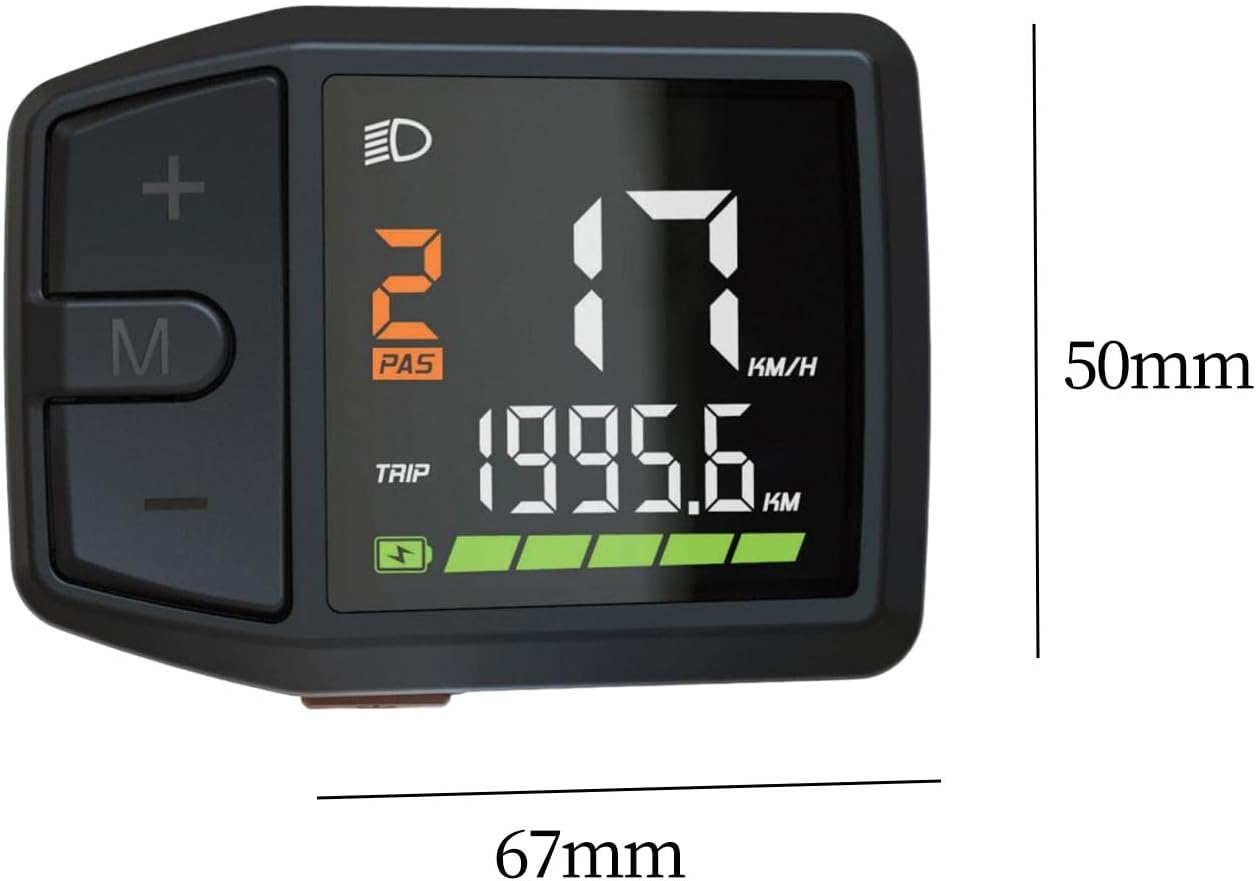
Figure 6.1: Dimensions of the DZ41-CAN display unit. The image illustrates the approximate measurements of 67mm in length and 50mm in height, providing a clear understanding of its compact size.
7. Warranty and Support
Aymzbd is committed to providing quality products. For specific warranty terms and conditions, please refer to the documentation included with your purchase or visit the official Aymzbd website. For technical support or inquiries, please contact Aymzbd customer service through the contact information provided on the product packaging or the official brand website.
Manufacturer: Aymzbd
Date First Available: November 13, 2024