
1. Introduction
The OMRON HEM-7144T2 Automatic Arm Blood Pressure Monitor is a reliable and easy-to-use device designed for accurate blood pressure measurement at home. It features a cuff wrap guide to ensure correct cuff placement and Bluetooth connectivity for seamless data transfer to the OMRON connect app on your smartphone. This manual provides essential information for safe and effective use of your monitor.
Package Contents
Verify that all components are present in your package:
- Automatic Arm Blood Pressure Monitor
- Universal Arm Cuff HEM-RML31-B (fits arm circumference 22 to 42 cm)
- 4 AA Batteries
- Storage Case
- OMRON connect Guide
- Instruction Manual (this document)
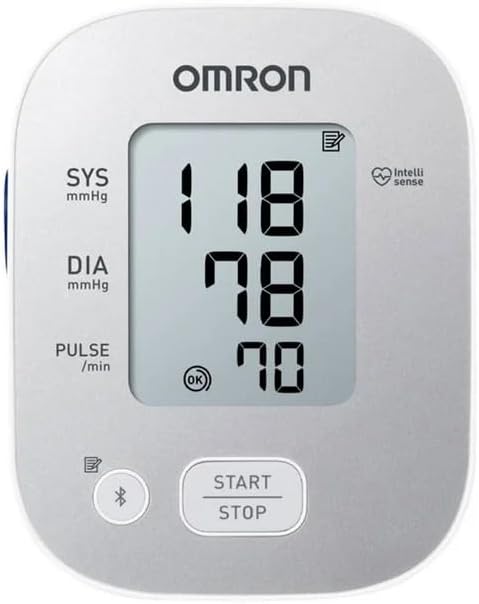
Image 1.1: OMRON HEM-7144T2 Blood Pressure Monitor, universal cuff, and retail box. This image shows the main components included in the product package, highlighting the monitor, cuff, and packaging design.
2. Setup
2.1 Battery Installation
- Open the battery cover located on the back of the monitor.
- Insert the 4 AA batteries according to the polarity indications (+/-) inside the battery compartment.
- Close the battery cover securely.
Note: Replace all four batteries simultaneously when the low battery indicator appears on the display.
2.2 Attaching the Arm Cuff
- Insert the air plug of the arm cuff into the air jack on the left side of the monitor.
- Wrap the cuff firmly around your upper left arm, approximately 1-2 cm above your elbow. Ensure the air tube runs down the center of your arm.
- The cuff wrap guide on the monitor display will indicate if the cuff is correctly applied. An "OK" symbol will appear when the cuff is properly positioned.
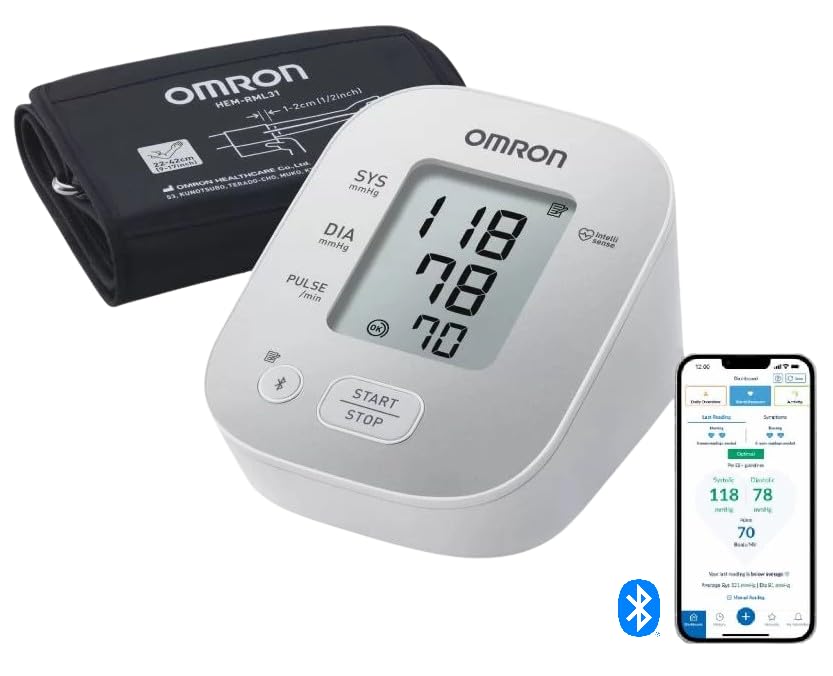
Image 2.1: Overview of OMRON HEM-7144T2 features. This diagram highlights key functionalities such as the cuff wrap guide, irregular heartbeat detector, movement error detector, hypertension symbol, and memory function.
2.3 Connecting to OMRON connect App (Bluetooth)
- Download the "OMRON connect" app from your smartphone's app store (available for iPhone and Android).
- Enable Bluetooth on your smartphone.
- Open the OMRON connect app and follow the on-screen instructions to pair your HEM-7144T2 monitor.
- Once paired, your measurement data will automatically transfer to the app after each reading.
3. Operating Instructions
3.1 Taking a Measurement
- Sit comfortably with your back supported and feet flat on the floor. Avoid talking or moving during the measurement.
- Place your arm on a table so the cuff is at heart level.
- Press the START/STOP button. The cuff will begin to inflate automatically.
- Remain still until the measurement is complete and the blood pressure readings (Systolic, Diastolic, and Pulse) are displayed.
- The monitor will automatically store the reading and, if connected, transfer it to the OMRON connect app.
- Press the START/STOP button again to turn off the monitor. It will automatically power off after two minutes of inactivity.
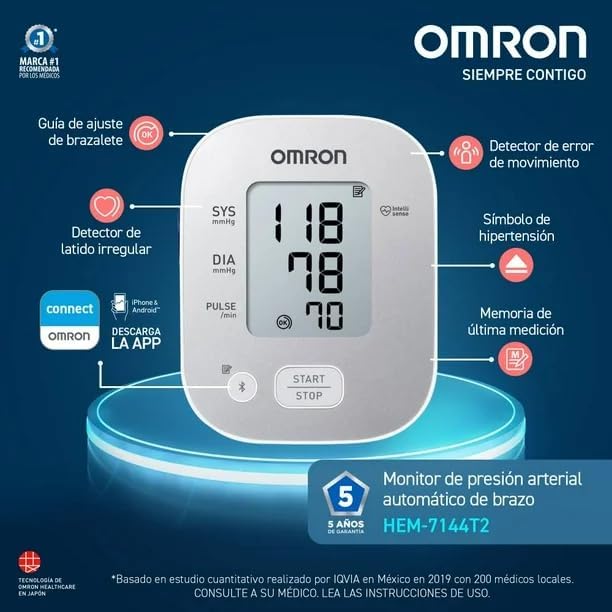
Image 3.1: User performing a blood pressure measurement. This image illustrates the proper setup for taking a reading, with the cuff on the arm and the OMRON connect app displaying results on a smartphone.
3.2 Understanding Display Symbols
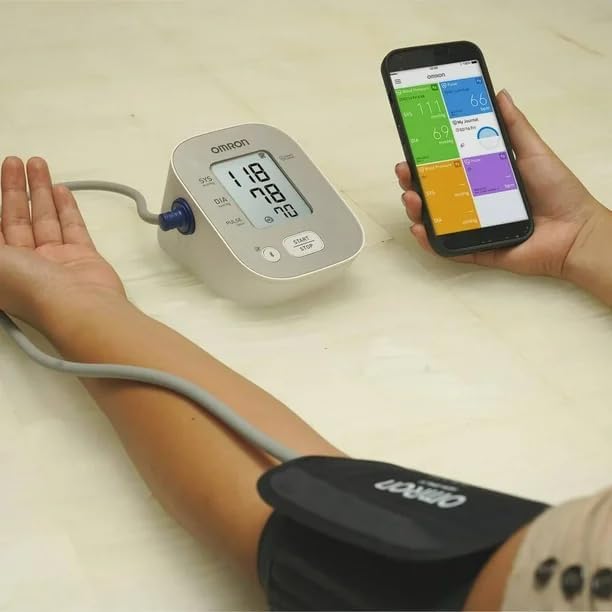
Image 3.2: Detailed view of the OMRON HEM-7144T2 display. This image shows the digital readings for systolic (SYS), diastolic (DIA), and pulse, along with indicators for cuff wrap guide (OK), irregular heartbeat, and IntelliSense technology.
- Hypertension Symbol: Appears if your systolic blood pressure is 135 mmHg or higher, and/or your diastolic blood pressure is 85 mmHg or higher. Consult a healthcare professional if this symbol frequently appears.
- Movement Error Detector: This symbol indicates that the reading was affected by excessive user movement during the measurement. Retake the measurement, ensuring you remain still.
- Irregular Heartbeat Detector: Alerts the user to the presence of potentially irregular heartbeats if detected two or more times during a measurement. If this symbol appears frequently, consult your doctor.
- Cuff Wrap Guide (OK): Confirms that the arm cuff has been applied correctly and securely.
- Memory Symbol: Indicates that the displayed reading is stored in the device's memory.
- Bluetooth Symbol: Indicates active Bluetooth connection or pairing mode.
4. Maintenance
4.1 Cleaning
- Wipe the monitor and cuff with a soft, dry cloth.
- If necessary, use a soft cloth lightly moistened with water or a mild detergent, then wipe dry.
- Do not use abrasive cleaners, alcohol, or benzene.
- Do not wash the cuff or immerse the monitor in water.
4.2 Storage
- Store the monitor and cuff in the provided storage case.
- Keep the device in a clean, dry place, away from direct sunlight, extreme temperatures, and humidity.
- Avoid storing the device where it may be exposed to strong vibrations or shocks.
4.3 Battery Replacement
When the low battery indicator appears on the display, replace all four AA batteries with new ones. Do not mix old and new batteries, or different types of batteries.
5. Troubleshooting
| Problem | Possible Cause | Solution |
|---|---|---|
| No power / Display blank | Batteries are dead or incorrectly inserted. | Replace all batteries with new ones, ensuring correct polarity. |
| "E" or "Err" symbol on display | Cuff not applied correctly, excessive movement, or other measurement error. | Re-apply the cuff correctly (check cuff wrap guide). Remain still and silent during measurement. If error persists, consult the full manual or support. |
| Irregular Heartbeat symbol appears frequently | Indicates frequent detection of irregular heartbeats. | This is an informational warning. Consult your doctor for diagnosis and advice. |
| Cannot connect to OMRON connect app | Bluetooth is off, app not installed, or pairing issue. | Ensure Bluetooth is enabled on your smartphone. Reinstall the app. Follow in-app pairing instructions. Restart both devices. |
| Inaccurate readings | Incorrect cuff placement, movement during measurement, or external factors. | Ensure correct cuff placement and arm position. Avoid talking or moving. Take measurements at the same time each day. Consult your doctor if you suspect consistent inaccuracies. |
6. Specifications
| Feature | Detail |
|---|---|
| Model Name | HEM-7144T2 |
| Brand | Omron |
| Power Source | 4 AA Batteries |
| Display Type | LCD |
| Cuff Type | Universal Arm Cuff HEM-RML31-B (22-42 cm) |
| Connectivity | Bluetooth (compatible with OMRON connect app) |
| Product Dimensions | 12.5l x 11.8w x 16.5h cm (approx.) |
| Product Weight | 627 Grams (approx.) |
| Age Range Description | Adult |
| UPC | 073796714420 |
7. Warranty Information
The OMRON HEM-7144T2 Blood Pressure Monitor comes with a 5-year limited warranty. This warranty covers defects in materials and workmanship under normal use. Please refer to the warranty card included in your package for full terms and conditions, or visit the official OMRON website for detailed information.
8. Support
For further assistance, technical support, or inquiries regarding your OMRON HEM-7144T2 Blood Pressure Monitor, please contact OMRON customer service. Contact information can typically be found on the OMRON website or in the documentation included with your product.
It is recommended to consult your healthcare professional for any medical concerns or interpretation of your blood pressure readings.


