
1. Introduction
The ZUIAI G6X Intelligent Voice Translator is a portable device designed to facilitate cross-language communication. It supports real-time voice, text, and photographic translation across more than 40 languages with high accuracy. This manual provides essential information for setting up, operating, and maintaining your G6X translator.
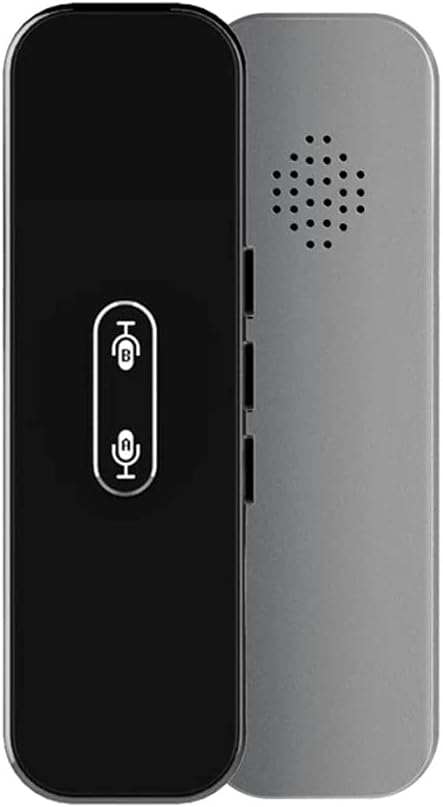
Image 1.1: Front and back view of the ZUIAI G6X Intelligent Voice Translator. The front is black with two microphone buttons, and the back is silver-gray with a speaker grille.
2. Package Contents
Please verify that all items are present in your package:
- 1x ZUIAI G6X Voice Translator
- 1x Charging Cable
- 1x User Manual (this document)
3. Setup
3.1 Charging the Device
Before first use, fully charge the translator. The device features a built-in 3.7V 800mAh rechargeable battery.
- Connect the provided charging cable to the translator's charging port.
- Connect the other end of the charging cable to a standard USB power adapter (not included) or a computer's USB port.
- Charging typically takes approximately 2 hours. The device will indicate charging status (e.g., an indicator light).

Image 3.1: Illustration showing the ZUIAI G6X Translator being charged via a USB cable, with a battery icon indicating charging status.
3.2 Connecting to a Smartphone
The G6X translator connects to your smartphone via Bluetooth for full functionality.
- Ensure your smartphone has Bluetooth enabled.
- Turn on the G6X translator.
- On your smartphone, search for available Bluetooth devices and select the G6X translator to pair. The Bluetooth version is BT4.2.
- Download and install the dedicated translation application on your smartphone. The application supports Android 4.3 or iOS 7.0 and above. Refer to the packaging or device for QR code or app store links.
- Open the application and follow the on-screen instructions to complete the connection.
4. Operating Instructions
The ZUIAI G6X offers real-time voice, text, and photographic translation capabilities.
4.1 Real-Time Voice Translation
This feature allows for instant two-way communication in over 40 languages.
- Ensure the translator is connected to your smartphone via Bluetooth and the translation app is open.
- In the app, select the source and target languages for translation.
- To speak in Language A, press and hold the corresponding button on the translator (e.g., button with 'A' or specific icon). Speak clearly into the microphone.
- Release the button. The translator will process your speech and translate it into Language B, playing the audio through its speaker and displaying the text on your phone.
- To speak in Language B, press and hold the other button (e.g., button with 'B' or different icon). Speak clearly.
- Release the button. The translator will translate it into Language A.

Image 4.1: Individuals engaged in conversation, with the ZUIAI G6X translator depicted, illustrating its use for efficient and fast translation in various settings.
4.2 Text and Photographic Translation
The G6X, in conjunction with its companion app, supports text and photographic translation.
- Text Translation: Input text directly into the smartphone application for translation. The translated text will be displayed on your phone.
- Photographic Translation: Use the smartphone application's camera function to capture text from signs, menus, or documents. The app will recognize the text and provide a translation.

Image 4.2: An overview of the ZUIAI G6X Translator's features, including Bluetooth 4.2, 1-second instant response, 40+ languages, portability (30g), photo translation, super long standby time, chat translation, text translation, and group chat translation.
5. Maintenance
To ensure the longevity and optimal performance of your ZUIAI G6X translator, follow these maintenance guidelines:
- Cleaning: Use a soft, dry cloth to clean the device. Avoid using liquid cleaners or abrasive materials.
- Storage: Store the translator in a cool, dry place away from direct sunlight and extreme temperatures.
- Battery Care: Do not expose the battery to high temperatures. If the device will not be used for an extended period, charge it periodically to maintain battery health.
- Water Resistance: The device is not waterproof. Avoid exposure to water or high humidity.
6. Troubleshooting
If you encounter issues with your ZUIAI G6X translator, refer to the following common solutions:
- Device not turning on: Ensure the device is fully charged. Connect it to a power source and try again.
- Unable to connect via Bluetooth: Make sure Bluetooth is enabled on your smartphone and the translator is in pairing mode. Try restarting both devices. Ensure the companion app is installed and running.
- Translation not working: Check your internet connection on your smartphone, as the app requires it for translation services. Verify that the correct source and target languages are selected in the app. Speak clearly and ensure the microphone is not obstructed.
- Poor sound quality: Ensure the speaker grille is clean and unobstructed. Adjust the volume settings on your smartphone and the translator (if applicable).
- App crashing or freezing: Close and restart the application. Ensure your smartphone's operating system and the app are updated to the latest versions.
7. Specifications
| Feature | Specification |
|---|---|
| Model | G6X |
| Bluetooth Version | BT4.2 |
| Battery | 3.7V 800mAh rechargeable |
| Charging Time | Approximately 2 hours (with 1A charging current) |
| Speaker | 4Ω 1.2W |
| Transmission Distance (Bluetooth) | Up to 10 meters |
| Voice Recognition Distance | Within 2 meters |
| Continuous Usage Duration | 6 hours |
| Standby Duration | 1 month |
| Product Dimensions | 130 x 38 x 14 mm (5.1 x 1.5 x 0.55 inches) |
| Product Weight | 125g (4.4 oz) |
| Supported OS (App) | Android 4.3 or iOS 7.0 and above |
| Translation Languages | Over 40 languages |
8. Warranty and Support
For warranty information or technical support, please refer to the documentation provided at the time of purchase or contact ZUIAI customer service directly. Contact details can typically be found on the product packaging or the official ZUIAI website.