
1. Introduction
This manual provides essential information for the safe and effective use of the TJGOPKUJ ZX7-400/500/630 Welding Machine Control Board. This control board is a critical component designed to manage and regulate the functions of compatible ZX7 series welding machines, specifically models 400, 500, and 630. It is intended for integration into existing welding equipment by qualified personnel. Please read this manual thoroughly before installation and operation to ensure proper functionality and safety.
2. Safety Information
Working with electrical components and welding equipment carries inherent risks. Adhere to all safety precautions to prevent injury or damage to equipment.
- Professional Installation: Installation and replacement of this control board must only be performed by trained and qualified technicians.
- Power Disconnection: Always ensure the welding machine is completely disconnected from its power source before attempting any installation, maintenance, or inspection of the control board.
- Electrostatic Discharge (ESD): Electronic components are sensitive to static electricity. Use appropriate ESD protection (e.g., anti-static wrist straps, mats) when handling the control board.
- Component Handling: Avoid touching exposed circuitry or components unnecessarily. Handle the board by its edges.
- Environmental Conditions: Ensure the operating environment for the welding machine meets the manufacturer's specifications regarding temperature, humidity, and dust levels.
- No User Serviceable Parts: The control board itself contains no user-serviceable parts. Do not attempt to repair or modify the board.
3. Product Overview
The TJGOPKUJ ZX7-400/500/630 Welding Machine Control Board is a sophisticated electronic circuit board designed to integrate seamlessly into compatible welding machines. It features various electronic components responsible for power regulation, signal processing, and control logic necessary for welding operations.
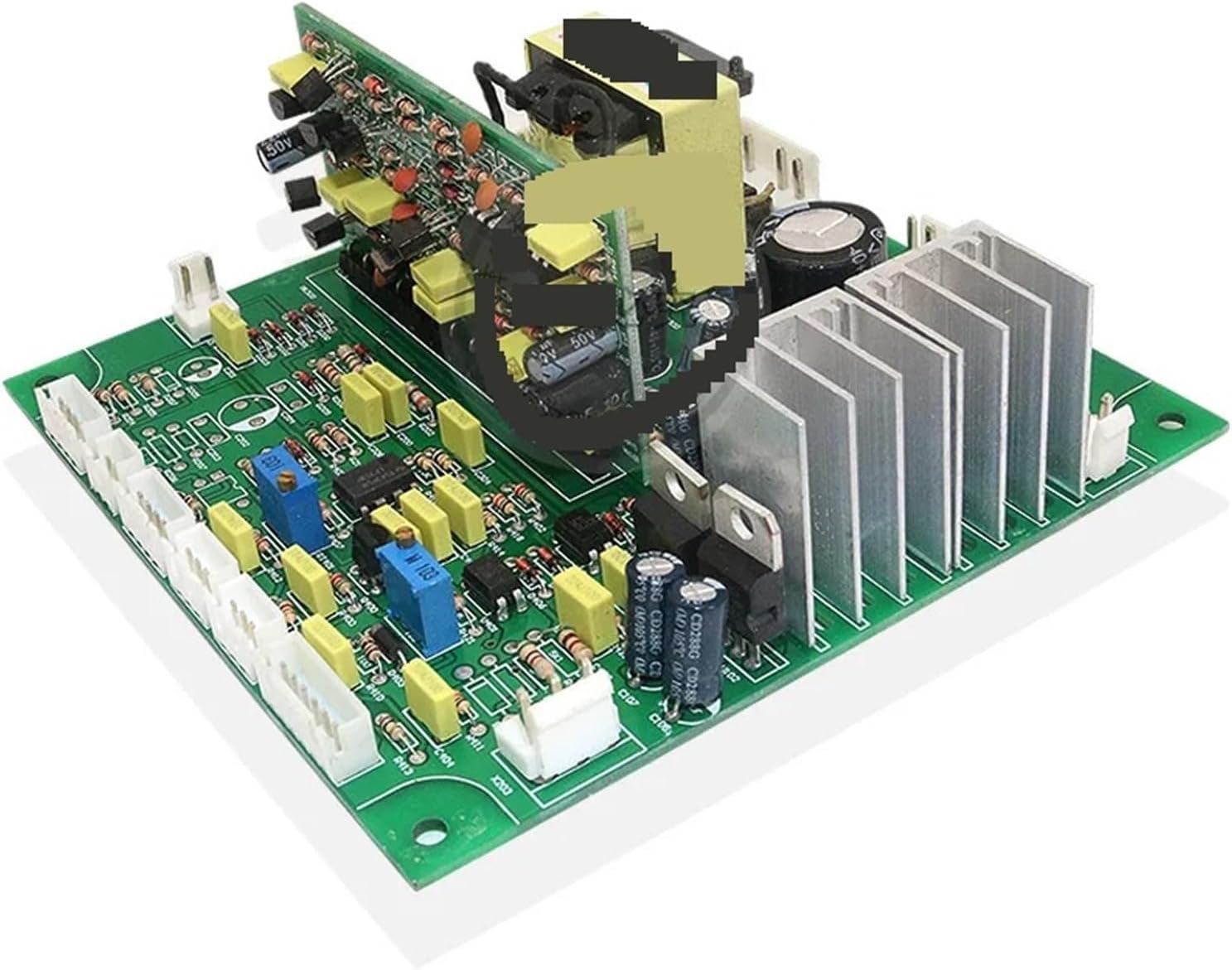
Figure 1: Overview of the TJGOPKUJ ZX7-400/500/630 Welding Machine Control Board. This image displays the green circuit board populated with various electronic components including capacitors, resistors, integrated circuits, connectors, and heat sinks for thermal management. The board features multiple white connectors along one edge for interfacing with other parts of the welding machine.
Key Components:
- Connectors: Multiple white multi-pin connectors are present for input/output signals and power connections within the welding machine system.
- Capacitors: Various electrolytic and ceramic capacitors are visible, essential for power filtering and signal coupling.
- Resistors and Potentiometers: Used for current limiting, voltage division, and adjustable settings (e.g., blue potentiometers for calibration).
- Integrated Circuits (ICs): Microchips responsible for processing control logic and managing welding parameters.
- Heat Sinks: Metal fins designed to dissipate heat from power components, ensuring stable operation.
- Transformers/Inductors: Components for power conversion and filtering.
4. Setup and Installation
The TJGOPKUJ ZX7-400/500/630 Welding Machine Control Board is designed as a replacement or upgrade component for compatible ZX7 series welding machines. Installation should only be performed by certified technicians.
- Preparation: Ensure the welding machine is completely powered off and unplugged from the main power supply. Allow sufficient time for any residual charge in capacitors to dissipate.
- Access: Open the welding machine casing to access the existing control board. Refer to the specific welding machine's service manual for instructions on accessing internal components.
- Removal of Old Board (if applicable): Carefully disconnect all cables and connectors from the old control board. Note the orientation and connection points for each cable. Remove any mounting screws or clips securing the old board.
- Installation of New Board:
- Align the new TJGOPKUJ control board with the mounting points within the welding machine chassis.
- Secure the board using the appropriate screws or fasteners. Do not overtighten.
- Reconnect all cables and connectors to their corresponding ports on the new control board. Ensure all connections are firm and correctly oriented. Double-check against the original setup or the welding machine's wiring diagram.
- Pre-Power Check: Before closing the casing and applying power, visually inspect all connections to ensure there are no loose wires, short circuits, or improperly seated components.
- Power On and Test: Close the welding machine casing. Connect the welding machine to a suitable power source and perform initial power-on tests according to the welding machine's operational guidelines. Monitor for any unusual behavior.
5. Operating Instructions
The TJGOPKUJ ZX7-400/500/630 Welding Machine Control Board functions as an internal component, managing the core operations of the welding machine. Its operation is integrated with the overall functionality of the welding equipment it is installed in.
- Integrated Functionality: This control board does not have external user controls. Its operation is governed by the welding machine's user interface and internal programming.
- Welding Parameters: The board processes signals related to welding current, voltage, arc stability, and other parameters set by the operator via the welding machine's control panel.
- Refer to Welding Machine Manual: For detailed instructions on operating your specific welding machine and adjusting welding parameters, please consult the user manual provided with your welding equipment.
- Monitoring: During operation, ensure the welding machine functions within its specified parameters. Any abnormal behavior may indicate an issue with the control board or other components.
6. Maintenance
Proper maintenance ensures the longevity and reliable performance of the control board and the welding machine.
- Regular Cleaning: Periodically, with the power disconnected, open the welding machine casing and gently clean the control board using compressed air to remove dust and debris. Ensure the air is dry and oil-free. Avoid using liquids or abrasive materials.
- Visual Inspection: During cleaning, inspect the board for any signs of damage, such as burnt components, swollen capacitors, loose connections, or corrosion.
- Environmental Control: Operate and store the welding machine in a clean, dry environment, free from excessive dust, moisture, and extreme temperatures.
- Professional Check: Consider periodic professional inspection of the welding machine, including its internal components like the control board, especially if used in demanding industrial environments.
7. Troubleshooting
This section provides general guidance for common issues. For complex problems, professional diagnosis and repair are recommended.
| Problem | Possible Cause | Solution |
|---|---|---|
| Welding machine does not power on. | Incorrect installation, loose power connection, external power supply issue. | Verify all power connections to the control board. Check the main power supply to the welding machine. Ensure the board is correctly seated. |
| Erratic welding performance. | Loose signal connections, component failure on the board, interference. | Inspect all signal cables connected to the board for secure fit. Ensure the welding environment is free from strong electromagnetic interference. |
| Overheating of the control board. | Insufficient ventilation, excessive dust accumulation, faulty components. | Ensure proper airflow within the welding machine. Clean dust from the board and heat sinks. If overheating persists, professional inspection is required. |
| No response from welding machine controls. | Control panel connection issue, board malfunction. | Check the connection between the control panel and the main board. If connections are secure, the board may require professional diagnosis. |
If troubleshooting steps do not resolve the issue, contact a qualified service technician or the manufacturer for assistance. Do not attempt unauthorized repairs.
8. Specifications
| Feature | Detail |
|---|---|
| Model | ZX7-400/500/630 Welding Machine Main Board |
| Brand | TJGOPKUJ |
| Type | Hand Tool Parts (Control Board) |
| Origin | Mainland China |
| Package Dimensions | 1.18 x 0.79 x 0.39 inches (30 x 20 x 10 mm approx.) |
| Item Weight | 3.49 ounces (99 Grams) |
| Power Plug Type | No Plug (Internal Component) |
| ASIN | B0DMW5TTS1 |
9. Warranty and Support
Specific warranty information for the TJGOPKUJ ZX7-400/500/630 Welding Machine Control Board is not provided in the product details. For warranty claims, technical support, or service inquiries, please contact the manufacturer, TJGOPKUJ, or your authorized distributor directly. Retain your purchase receipt as proof of purchase.
For further assistance, you may refer to the official website of TJGOPKUJ or contact their customer service department.