
Introduction
This manual provides detailed instructions for the setup, operation, and maintenance of your ciyeu EQ207 7-Band Equalizer. Please read this manual thoroughly before using the device to ensure proper functionality and to maximize your audio experience.

Figure 1: Front view of the ciyeu EQ207 7-Band Equalizer.
Product Features
- 7-Band Equalization: Provides precise control over audio frequencies (60Hz, 150Hz, 400Hz, 1KHz, 2.5KHz, 6.5KHz, 15KHz) for detailed sound shaping.
- Enhanced Sound Clarity: Adjust equalization bands to improve sound clarity and precision, optimizing audio output to personal preferences.
- Fine-Tuning Capability: Allows for precise adjustment of individual frequency bands to achieve desired audio quality.
- Versatile Application: Suitable for home entertainment systems, recording studios, and live performances, enabling personalized audio experiences.
- Preamplification: Features a Gain4580 classical amplifier providing 5 times amplification (14dB).
- Output Impedance: 600 Ohms.
Package Contents
Please check the package for the following items:
- 1 x ciyeu EQ207 7-Band Equalizer
- 1 x US Power Adapter (AC100-240V, DC12V output)
Safety Information
- Do not expose the device to water or excessive moisture.
- Avoid placing the device near heat sources or in direct sunlight.
- Use only the provided power adapter.
- Do not attempt to open or repair the device yourself. Refer all servicing to qualified personnel.
- Ensure proper ventilation around the unit during operation.
Product Overview
Familiarize yourself with the various inputs, outputs, and controls of the EQ207 equalizer.

Figure 2: Top view of the EQ207 with labeled frequency controls and main connections.
- 12V Supply: Power input port.
- RCA Inputs: Stereo audio input jacks.
- RCA Output: Stereo audio output jacks.
- Frequency Control Knobs (60Hz, 150Hz, 400Hz, 1KHz, 2.5KHz, 6.5KHz, 15KHz): Adjust the gain for each specific frequency band.
- Volume Knob: Master volume adjustment.

Figure 3: Angled view showing additional controls and ports.
- Power Switch: Turns the unit on or off.
- 3.5mm Input: Auxiliary audio input jack, supports 4-pole plugs.
- Headphone Output: 3.5mm jack for connecting headphones.
Setup and Connections
Follow these steps to connect your ciyeu EQ207 equalizer to your audio system.
- Power Connection: Connect the provided 12V power adapter to the '12V Supply' input on the equalizer and then plug it into a standard AC outlet.
- Audio Input:
- For RCA input: Connect your audio source (e.g., CD player, record player, mixer) to the 'RCA Inputs' using RCA cables.
- For 3.5mm input: Connect your audio source (e.g., smartphone, laptop) to the '3.5mm Input' using a 3.5mm audio cable.
- Audio Output: Connect the 'RCA Output' of the equalizer to your amplifier, powered speakers, or other audio receiving device using RCA cables.
- Headphone Connection (Optional): If desired, connect headphones to the 'Headphone Output' jack.

Figure 4: Example connection diagram showing a laptop connected to the EQ207, which then outputs to speakers and headphones.
Operating Instructions
Once connected, follow these steps to operate your EQ207 equalizer:
- Power On: Turn on the equalizer using the 'Power Switch'. The power indicator light will illuminate.
- Set Volume: Start with the 'Volume' knob set to a low level to prevent sudden loud sounds.
- Adjust Equalization Bands: Play audio through your system. Adjust the individual frequency control knobs (60Hz, 150Hz, 400Hz, 1KHz, 2.5KHz, 6.5KHz, 15KHz) to shape the sound according to your preference. Turning a knob clockwise increases the gain for that frequency band, while turning it counter-clockwise decreases it.
- Fine-Tune Volume: Once the desired equalization is set, adjust the 'Volume' knob to your preferred listening level.
- Headphone Use: If using headphones, adjust the main volume knob to control the headphone output level.
Maintenance
- Cleaning: Use a soft, dry cloth to clean the exterior of the unit. Do not use liquid cleaners or solvents.
- Storage: When not in use for extended periods, store the equalizer in a cool, dry place away from direct sunlight.
- Ventilation: Ensure that the ventilation openings are not blocked to prevent overheating.
Troubleshooting
| Problem | Possible Cause | Solution |
|---|---|---|
| No power | Power adapter not connected or faulty. | Ensure the power adapter is securely connected to the unit and a working power outlet. Check the power switch. |
| No sound output | Incorrect audio connections. Volume knob set too low. | Verify all audio cables are correctly connected to inputs and outputs. Increase the 'Volume' knob. Check the audio source and receiving device. |
| Distorted sound | Input signal too high. Equalization bands set too high. | Reduce the input volume from your audio source. Adjust the equalization band knobs to a lower setting. |
Specifications
| Feature | Detail |
|---|---|
| Model | EQ207 |
| Equalization Bands | 60Hz, 150Hz, 400Hz, 1KHz, 2.5KHz, 6.5KHz, 15KHz |
| Amplification | 5 times (14dB) |
| Output Impedance | 600 Ohms |
| Input Interfaces | RCA, 3.5mm (supports 4-pole plug) |
| Power Input | DC12V (AC100-240V adapter) |
| Plug Type | US Plug |
| Color | Black |
| Material | Iron |
| Dimensions (L x W x H) | 115 x 85 x 32 mm (4.53 x 3.35 x 1.26 inches) |
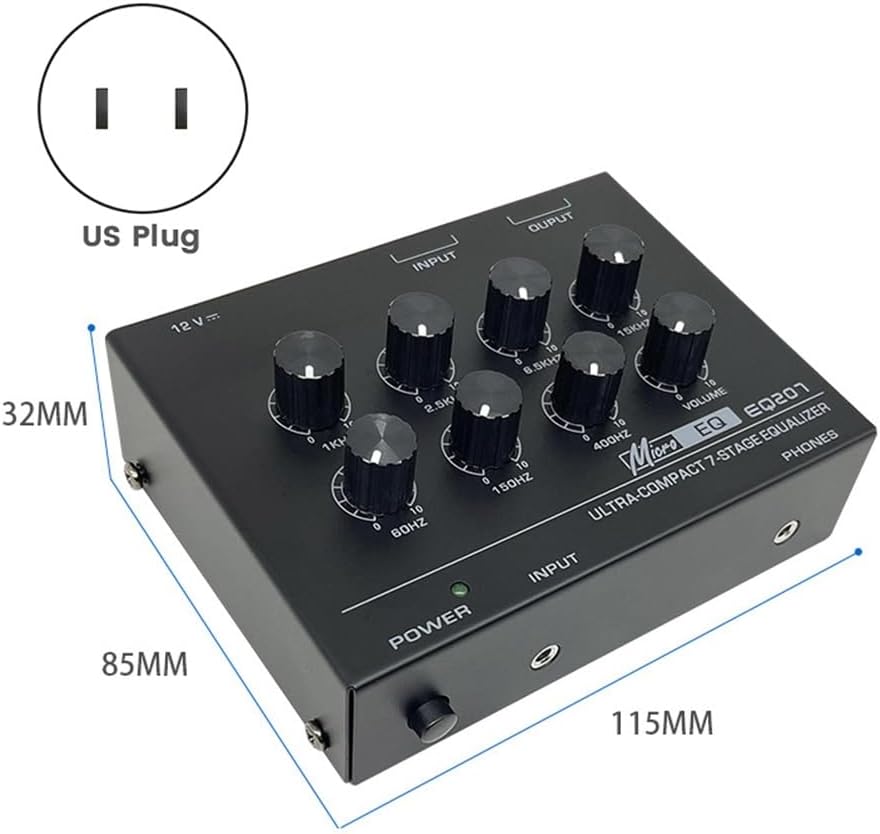
Figure 5: Dimensions of the EQ207 unit and included US power plug.
Warranty and Support
For warranty information and technical support, please refer to the documentation provided with your purchase or contact ciyeu customer service through their official channels. Keep your purchase receipt for warranty claims.