
POPCHOSE Y208 + M2
POPCHOSE Fabric Shaver Lint Remover User Manual
Models: Y208 & M2
Brand: POPCHOSE
1. Introduction
This manual provides detailed instructions for the safe and effective use of your POPCHOSE Fabric Shaver Lint Remover, models Y208 and M2. These devices are designed to efficiently remove lint, fuzz, and pills from various fabrics, restoring their appearance.
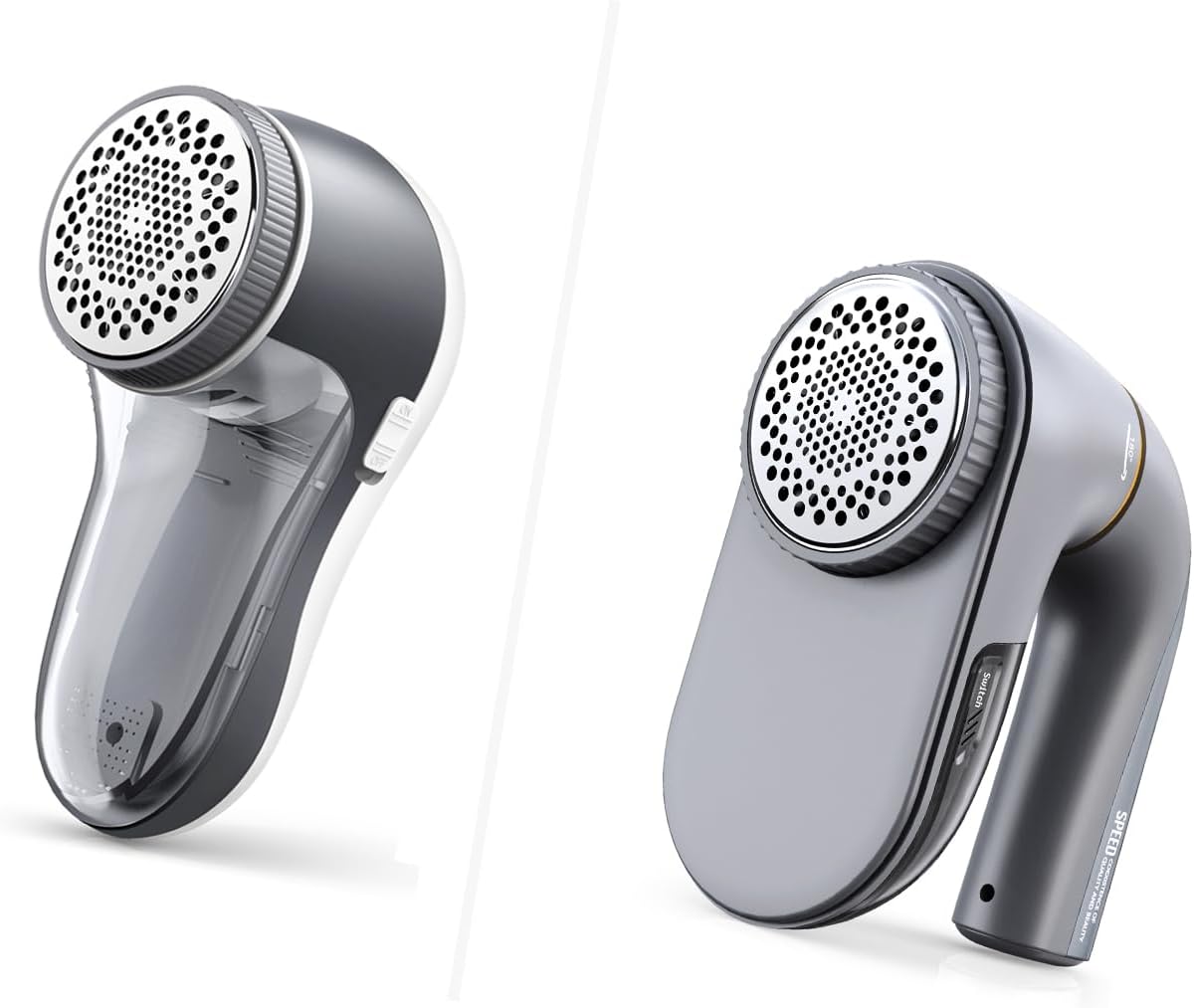
Figure 1.1: The POPCHOSE Fabric Shaver Lint Remover models Y208 (left) and M2 (right). Both models feature a comfortable grip and a protective mesh cover over the blades.
2. Product Components
Familiarize yourself with the main components of your fabric shaver:
- Shaver Body: The main housing containing the motor and battery.
- Blade Cover/Mesh: The perforated metal cover that protects the blades and allows lint to pass through.
- Rotating Blades: Internal blades that cut off lint and fuzz.
- Lint Container: A removable compartment that collects removed lint.
- On/Off Switch: Controls the power to the device.
- USB Charging Port: For recharging the internal battery.
- Protective Cover (Optional): An additional cover for delicate fabrics (included with Y208).
- Extra Blades: Replacement blades for continued performance.

Figure 2.1: Components of the Y208 model, including the main unit, two extra 6-leaf blades, and a protective cover for delicate fabrics.

Figure 2.2: The M2 model shown with its accessories, which include replacement blades and USB charging cables.
3. Setup and Charging
3.1 Initial Charge
Before first use, fully charge your fabric shaver. Connect the provided USB cable to the charging port on the device and plug the other end into a USB power source (e.g., wall adapter, power bank, laptop, car charger).
- The Y208 model features a 1200mAh battery, providing approximately 1.5-2 hours of continuous use.
- The M2 model features a 2500mAh battery, providing approximately 3 hours of continuous use.

Figure 3.1: Illustration demonstrating the extended battery life of the POPCHOSE 1200mAh battery (Y208) compared to a standard 500mAh battery.

Figure 3.2: An internal diagram of the M2 model highlighting its 2500mAh built-in battery and USB-C rechargeable capability, offering up to 3 hours of working time.
3.2 Blade Installation (if replacing)
Your fabric shaver comes with pre-installed blades. If you need to replace them, ensure the device is off and unplugged. Carefully twist off the blade cover, remove the old blades, and place the new 6-leaf blades securely onto the spindle. Reattach the blade cover by twisting it clockwise until it locks.
4. Operating Instructions
4.1 Preparing the Fabric
Lay the fabric flat on a hard, smooth surface. For garments, stretch the fabric taut to ensure a smooth surface for the shaver. Avoid using on loose threads or embellishments that could get caught.
4.2 Using the Fabric Shaver
- Turn on the device using the On/Off switch.
- For the M2 model, select the desired speed setting:
- 1st Gear (Gentle): Ideal for delicate fabrics such as socks, scarves, knits, sweaters, and jackets.
- 2nd Gear (Powerful): Suitable for more robust fabrics like sofas, furniture, coats, blankets, and bedding.
- Gently press the shaver head onto the fabric and move it in small, circular motions or back and forth. Do not apply excessive pressure.
- The 6-leaf blades spin at 9000 rotations per minute, efficiently removing lint.
- For delicate fabrics, especially with the Y208 model, consider attaching the protective cover to prevent snags and damage.
- Periodically check the lint container and empty it when full to maintain optimal performance.

Figure 4.1: Visual comparison highlighting the efficiency of the POPCHOSE 6-leaf blade system (left) over a standard 3-leaf blade system (right) for faster lint removal.

Figure 4.2: An illustration emphasizing the upgraded 9000 RPM motor for efficient lint removal, showing lint being drawn into the shaver.
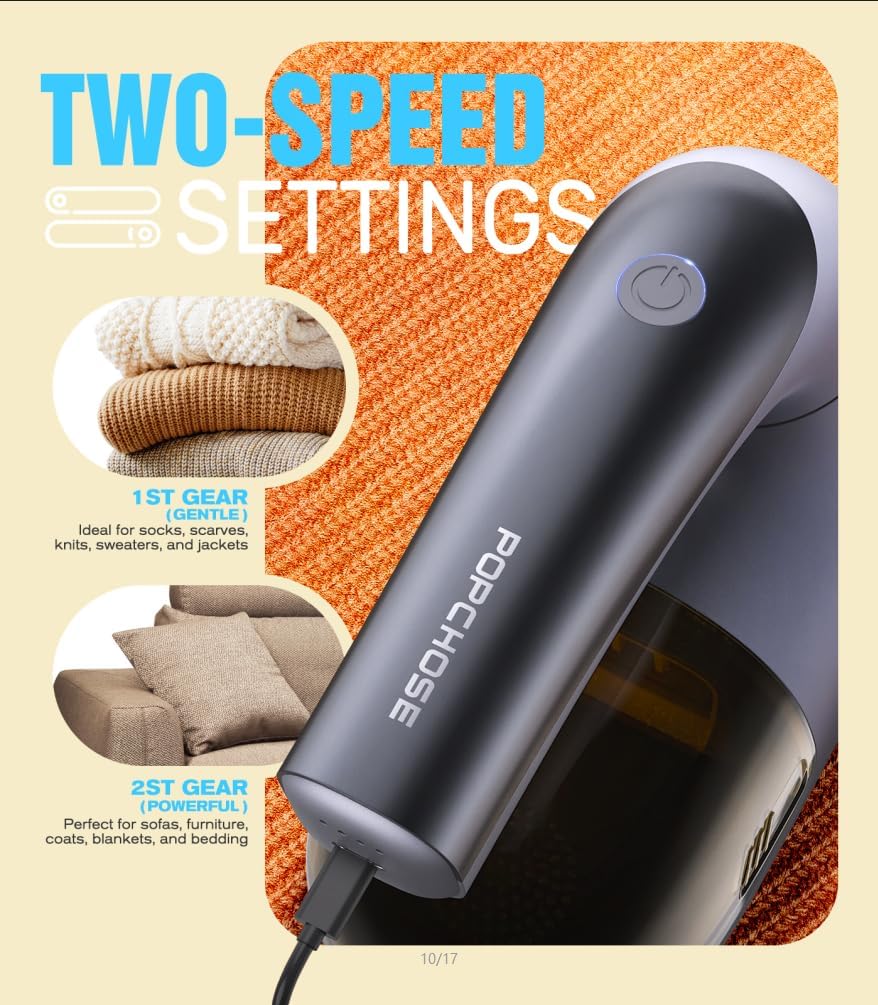
Figure 4.3: The M2 model's two-speed settings: 1st Gear (Gentle) for delicate items like socks and sweaters, and 2nd Gear (Powerful) for larger items like sofas and blankets.
5. Maintenance and Care
5.1 Cleaning the Lint Container
For optimal performance, empty the lint container regularly. Ensure the device is turned off before cleaning. The lint container is designed to be easily removed by sliding it off. Dispose of the collected lint and reattach the container securely.
5.2 Cleaning the Blades and Mesh
After removing the lint container, gently brush away any lint or debris from the blades and the inside of the mesh cover. A small cleaning brush may be included for this purpose. Do not use water or liquids to clean the electrical components.
5.3 Blade Replacement
Over time, the blades may become dull. Replace them with the provided extra blades to maintain cutting efficiency. Follow the instructions in Section 3.2 for blade installation.
6. Troubleshooting
| Problem | Possible Cause | Solution |
|---|---|---|
| Device does not turn on. | Battery is low or depleted. | Charge the device fully using the USB cable. |
| Poor lint removal performance. | Lint container is full; Blades are dull; Mesh cover is clogged. | Empty the lint container. Clean the blades and mesh. Replace blades if necessary. |
| Device stops during use. | Overheating protection activated; Battery depleted. | Turn off the device and let it cool down. Recharge the battery. |
| Unusual noise during operation. | Lint or debris caught in blades; Blades not properly installed. | Turn off and unplug. Carefully remove lint/debris. Ensure blades are securely installed. |
7. Product Specifications
| Feature | Detail |
|---|---|
| Brand | POPCHOSE |
| Models | Y208, M2 |
| Material | Plastic, Rubber |
| Color | White (Y208), Grey (M2) |
| Handle Material | Plastic |
| Operation Mode | Automatic |
| Blade Type | 6-Leaf Blades |
| Motor Speed | Up to 9000 Rotations Per Minute (RPM) |
| Battery Capacity (Y208) | 1200mAh (approx. 1.5-2 hours use) |
| Battery Capacity (M2) | 2500mAh (approx. 3 hours use) |
| Charging | USB Charging (USB-C for M2) |
| Included Accessories | Extra Blades (x2), Protective Cover (Y208), USB Charging Cable |

Figure 7.1: A comparative table outlining key features such as power supply, battery life, trimming time, weight, and removal results for the POPCHOSE upgraded shaver against other types of lint removal tools.
8. Warranty and Support
For any questions, concerns, or technical support regarding your POPCHOSE Fabric Shaver Lint Remover, please contact POPCHOSE customer service. Refer to your purchase documentation or the official POPCHOSE website for contact information and warranty details.
Website: POPCHOSE Official Store on Amazon
Related Documents - Y208 + M2
 |
POPCHOSE Handheld Steam Cleaner User Guide Operating instructions and safety guidelines for the POPCHOSE handheld steam cleaner, covering accessory detachment, water filling, and cleaning modes. |
 |
POPCHOSE Steam Cleaner Troubleshooting Guide Troubleshooting guide for the POPCHOSE Steam Cleaner, covering solutions for reduced steam, no steam, and leaking issues. |
 |
POPCHOSE Steam Cleaner User Guide User manual and usage guide for the POPCHOSE handheld steam cleaner, including tool descriptions, assembly instructions, and recommended cleaning applications. |
 |
Lenovo Y208 Magnetic Power Bank Specifications Detailed technical specifications for the Lenovo Y208 magnetic power bank, including dimensions, output capacity, and material composition. |
 |
Vimmk Portable Oral Irrigator User Manual Comprehensive user manual for the Vimmk Portable Oral Irrigator (Model Y208). Provides detailed instructions on setup, operation, cleaning, safety precautions, troubleshooting, and specifications. Content is available in English, German, French, Spanish, and Italian. |
 |
Vimmk Portable Oral Irrigator User Manual User manual for the Vimmk Portable Oral Irrigator, detailing its features, operation, and maintenance. This guide covers the device's specifications, usage instructions, and troubleshooting tips for effective dental hygiene. |
Ask a question about this manual
Ask about setup, troubleshooting, compatibility, parts, safety, or missing instructions. Manuals+ will review the question and use this page’s manual context to help answer it.