
1. Important Safety Information
Please read all instructions carefully before assembly and use. Retain this manual for future reference.
- Handle the cabinet with care, as it includes a glass mirror. Avoid dropping or bumping the unit.
- Wear protective gloves during assembly to prevent injury from sharp edges or glass.
- Do not place items that exceed the weight limit of 17 pounds (7.7 kg) on the shelves or in the cabinet.
- For optimal stability and safety, mount the cabinet on solid walls. Avoid mounting on drywall without proper anchors or studs.
- Two people are recommended to work together for installation to ensure safe handling and mounting.
- Ensure all electrical connections for the LED mirror are performed according to local electrical codes and safety standards. If unsure, consult a qualified electrician.
2. Package Contents
Verify that all components are present before beginning assembly.
- 1 x Wall Cabinet Unit
- 1 x Accessory Kit (includes hardware, screws, and small tools)
- 1 x Instruction Manual (this document)

Image: Overview of the MAHANCRIS WT2201 Wall Cabinet, showcasing the central LED mirror and side storage compartments.
3. Product Features
- 3-Color Adjustable LED Mirror: Features an 11.6"W x 14.8"H HD mirror with integrated LED lights.
- Diverse Storage: Two side shelves are adjustable at three levels. Behind the mirror, two compartments provide additional storage. Includes a towel bar.
- Space-Saving Design: Wall-mounted design (23.6"L x 6.7"W x 21.6"H) maximizes vertical space.
- Durable Construction: Made from high-quality engineered wood with waterproof panels and soft-close door stoppers.

Image: Close-up details highlighting the waterproof panels, door stoppers, removable towel bar, and the LED lighted mirror.
4. Setup and Installation
Follow these steps for proper assembly and wall mounting. Two individuals are recommended for installation.
- Unpack and Identify Parts: Carefully unpack all components. Refer to the included illustrated manual for a complete list of numbered parts and hardware.
- Assemble the Cabinet Frame: Follow the step-by-step diagrams in the separate instruction manual to assemble the main cabinet structure. Ensure all screws are tightened securely.
- Install Adjustable Shelves: Insert the shelf pins into the desired holes on the side panels. Place the adjustable shelves onto the pins. The shelves can be adjusted to three different levels (1.4 inches apart).
- Attach the LED Mirror Door: Carefully attach the mirror door to the cabinet using the provided hinges. Ensure the door opens and closes smoothly.
- Mount the Cabinet:
- Choose a solid wall location. Mark the desired mounting height and positions for the mounting plates/screws.
- Drill pilot holes as indicated in the manual. Use appropriate wall anchors if mounting into drywall (not included, but recommended for secure installation).
- Secure the mounting plates to the wall.
- With assistance, lift the cabinet and carefully align it with the wall mounting plates. Secure the cabinet to the wall using the provided wall screws.
- Connect LED Power: Plug the LED mirror's power cord into a suitable electrical outlet. Ensure the cable is routed safely and not pinched.
- Install Towel Bar: Attach the removable towel bar to the designated points at the bottom of the cabinet.
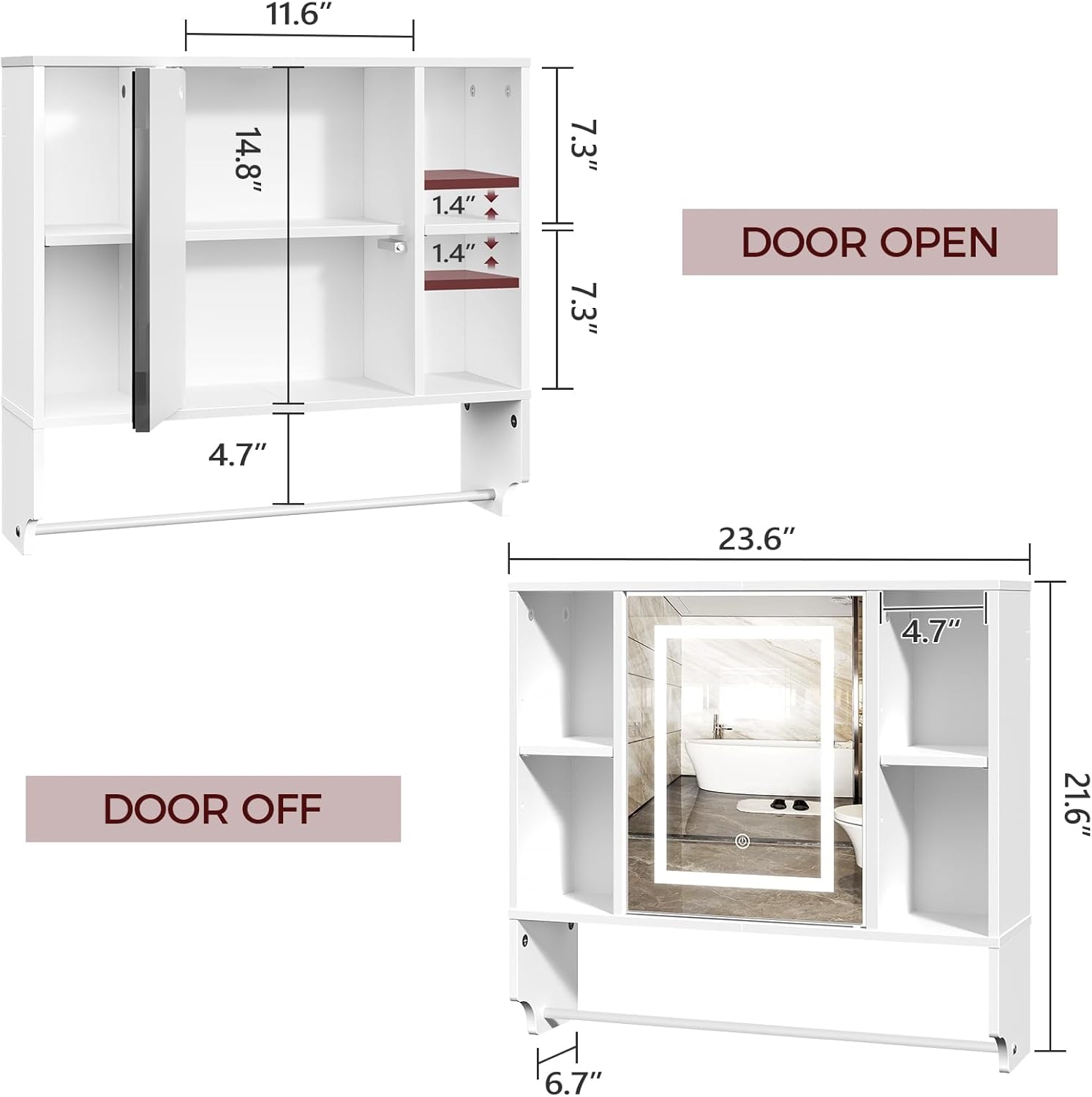
Image: Dimensional diagram of the cabinet, illustrating measurements for installation planning.

Image: Detail of the 3-level adjustable shelves, demonstrating flexibility for various item heights.
5. Operating Instructions
The LED mirror features touch controls for lighting adjustments.
- Power On/Off: Gently touch the power button icon on the mirror surface to turn the LED lights on or off.
- Change Light Color: With the lights on, gently press the power button icon repeatedly to cycle through the three available light colors:
- Natural Light
- Warm Light
- Cool Light
- Adjust Brightness: With the lights on, press and hold the power button icon to adjust the brightness. The brightness will gradually increase or decrease. Release the button when the desired brightness level is reached.
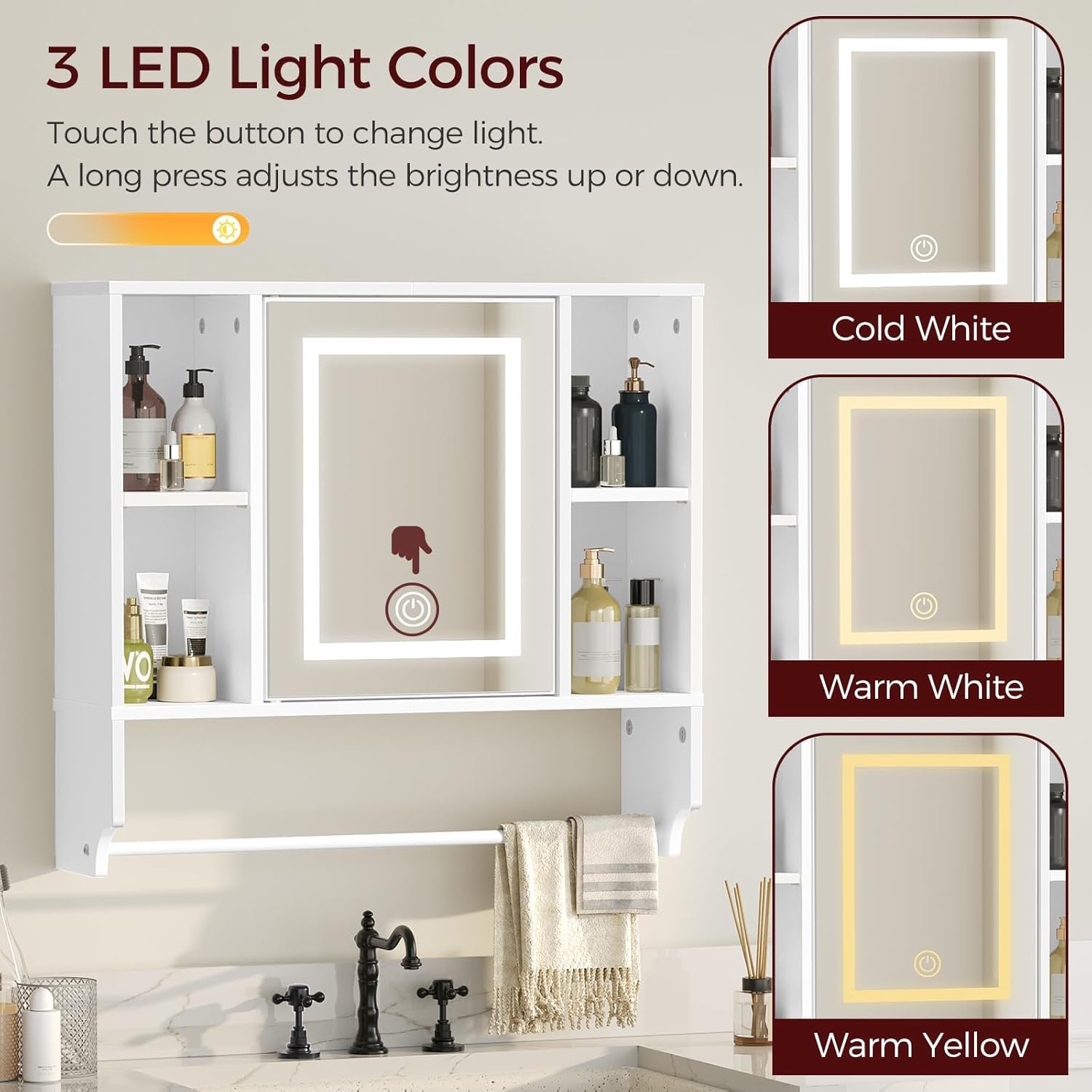
Image: Illustration of the three LED light color options and touch control functionality.
6. Maintenance
Proper care will extend the life and appearance of your cabinet.
- Cleaning the Cabinet: Wipe surfaces with a soft, damp cloth. Avoid abrasive cleaners or harsh chemicals that may damage the finish.
- Cleaning the Mirror: Use a standard glass cleaner and a lint-free cloth. Spray cleaner onto the cloth, not directly onto the mirror, to prevent liquid from seeping into the edges.
- Regular Checks: Periodically check all screws and connections to ensure they remain tight. Retighten if necessary.
- Moisture Control: While the panels are waterproof, avoid prolonged exposure to excessive moisture. Ensure adequate ventilation in the bathroom.
7. Troubleshooting
If you encounter issues with your MAHANCRIS WT2201 cabinet, refer to the following common solutions:
| Problem | Possible Cause | Solution |
|---|---|---|
| LED lights do not turn on. |
|
|
| LED lights are dim or inconsistent. |
|
|
| Cabinet feels unstable after mounting. |
|
|
8. Specifications
| Feature | Detail |
|---|---|
| Brand | MAHANCRIS |
| Model Name | WT2201 Wall Cabinet |
| Product Dimensions | 23.6"L x 6.7"W x 21.6"H (60cm L x 17cm W x 55cm H) |
| Mirror Dimensions | 11.6"W x 14.8"H |
| Color | White |
| Material | Engineered Wood, Glass |
| Mounting Type | Wall Mount |
| Number of Shelves | 2 (adjustable) |
| Weight Limit | 17 Pounds (7.7 kg) |
| Special Features | Adjustable Shelf, LED Lights (3 colors), Mirror Door, Removable Towel Bar |
| Assembly Required | Yes |
9. Warranty and Support
For warranty information and customer support, please refer to the documentation included with your purchase or visit the official MAHANCRIS brand store.