
Introduction
This manual provides essential instructions for the safe and efficient operation, setup, and maintenance of your Gidrox 10000W Tri-Fuel Portable Inverter Generator, Model GNV10000T. This generator is designed to provide reliable power using gasoline, propane, or natural gas, making it suitable for home backup, RV use, and various outdoor power needs. Please read this manual thoroughly before operating the generator.

Image: The Gidrox 10000W Tri-Fuel Portable Inverter Generator, showcasing its compact design and control panel.
Safety Information
Operating a generator safely is paramount. Always adhere to the following safety guidelines to prevent injury, property damage, or carbon monoxide poisoning.
- Carbon Monoxide (CO) Hazard: Generators produce carbon monoxide, an odorless, colorless, and deadly gas. Always operate the generator outdoors in a well-ventilated area, far away from windows, doors, and vents. Never operate it inside a home, garage, basement, crawl space, or other enclosed area. The generator is equipped with a built-in CO Sensor that will shut down the unit if carbon monoxide levels become too high.
- Fire Hazard: Fuel is highly flammable. Refuel only when the engine is off and cool. Do not smoke or allow open flames near the generator or fuel. Store fuel in approved containers in a well-ventilated area away from ignition sources.
- Electrical Shock Hazard: Never operate the generator in wet conditions. Ensure all electrical connections are dry and properly insulated. Do not connect the generator directly to your home's electrical system without a properly installed transfer switch by a qualified electrician. This unit is ATS Ready for safe automatic power transfer.
- Hot Surfaces: The generator engine and muffler become very hot during operation and remain hot for some time after shutdown. Avoid contact with hot surfaces to prevent burns.
- Low Oil Shutoff: The generator is equipped with a low oil shutoff feature to protect the engine from damage. Ensure the oil level is always within the recommended range before starting.
- Overload Protection: The generator includes overload protection to prevent damage to the unit and connected appliances. Do not exceed the generator's rated wattage.

Image: Diagram illustrating the Smart Power Features: CO Sensor for safety, ECO Mode for fuel efficiency and noise reduction, Low Oil Shutoff to prevent engine damage, and Overload Protection.
Setup
Before first use, perform the following setup steps:
- Unboxing and Inspection: Carefully remove the generator and all accessories from the packaging. Inspect for any shipping damage. Refer to the "Packaging Content" section to ensure all items are present.
- Add Engine Oil: The generator is shipped without engine oil. Place the generator on a level surface. Remove the oil fill cap/dipstick. Slowly add the recommended engine oil (0.36 gallons / 1.36 liters) until it reaches the upper mark on the dipstick. Do not overfill.
- Connect the Battery: Locate the battery compartment. Connect the positive (+) and negative (-) battery terminals as instructed in the quick start guide or on the battery itself. Ensure connections are secure.
- Add Fuel:
- Gasoline: Open the fuel tank cap and carefully pour fresh, unleaded gasoline into the tank (8.7 gallons capacity). Do not overfill. Secure the cap.
- Propane (LPG): Connect the provided LPG hose to a propane tank and to the generator's LPG inlet. Ensure all connections are tight.
- Natural Gas (NG): Connect the provided NG hose to a natural gas supply and to the generator's NG inlet. Ensure all connections are tight.

Image: Visual guide showing battery connection, engine oil fill, and fuel tank fill steps for easy setup.
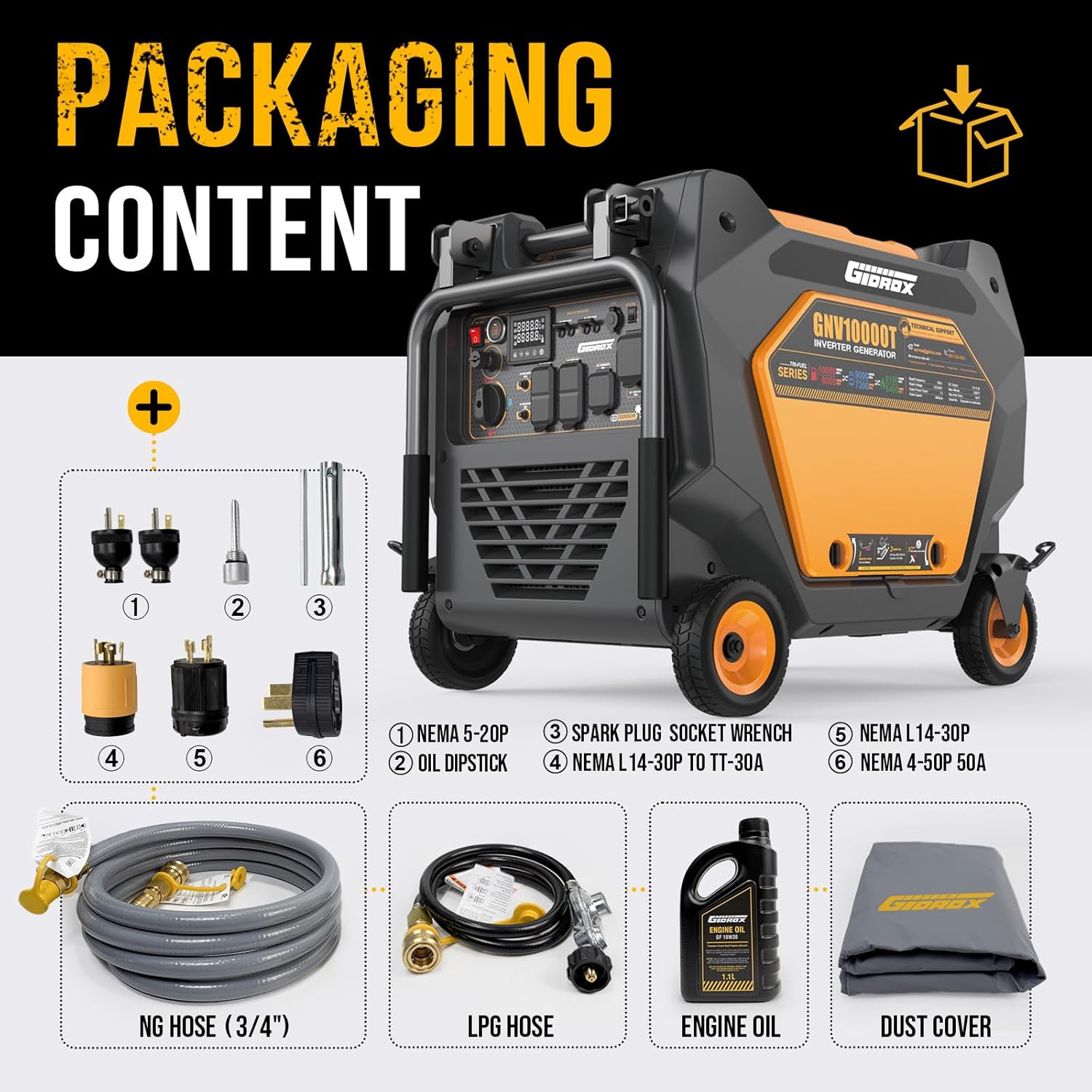
Image: Contents of the Gidrox generator package, including various plugs, oil dipstick, spark plug socket wrench, NG hose, LPG hose, engine oil, and dust cover.
Operating Instructions
Follow these steps to operate your Gidrox Tri-Fuel Inverter Generator:
- Placement: Ensure the generator is on a level surface outdoors, at least 20 feet away from any buildings, windows, or vents.
- Select Fuel Type: Use the rotary selector knob on the control panel to choose your desired fuel source: Gasoline, Propane (LPG), or Natural Gas (NG).
- Starting the Generator:
- Electric Start: Press and hold the "Engine Start/Stop" button on the control panel until the engine starts.
- Remote Start: Use the included remote key fob to start the generator from a distance.
- Manual Pull Start: In case of battery depletion, a manual pull cord is available (located behind a panel).
- ECO Mode: For lighter loads, activate the ECO Mode switch. This feature automatically adjusts engine speed to reduce fuel consumption and noise levels.
- Connecting Appliances: Once the generator is running and producing stable power, you can connect your appliances to the appropriate outlets. The generator features:
- 2x GFCI 120V 20A outlets
- 1x 120V/240V 30A L14-30R outlet
- 1x 50A 120V/240V 14-50R ultra outlet
- ATS Ready Functionality: For automatic home backup power, connect the generator to a compatible Automatic Transfer Switch (ATS) via the dedicated ATS port. Consult a qualified electrician for ATS installation.
- Monitoring: The built-in LCD screen displays real-time voltage, run time, and load level, allowing for easy monitoring of generator performance.
- Stopping the Generator: Disconnect all loads. Press and hold the "Engine Start/Stop" button until the engine shuts down. Close the fuel valve if using gasoline.

Image: Detailed diagram of the generator's control panel, labeling the engine start/stop switch, digital panel meter, circuit breakers, ATS switch, charging port, various AC outlets (120V 20A GFCI, 120V/240V 30A, 120V/240V 50A), inlet connect (LPG/NG), fuel switch, and ground. Also indicates CO Sensor, Low Oil Alarm, and ECO Mode indicators.

Image: The Gidrox generator connected to a home, illustrating its capability to provide whole home backup power via the 50A ultra outlet, powering appliances like heaters, refrigerators, and power tools.
Maintenance
Regular maintenance ensures the longevity and optimal performance of your generator. Always turn off the generator and allow it to cool before performing any maintenance.
- Check Oil Level: Before each use, check the engine oil level and add oil if necessary.
- Change Engine Oil: Refer to the maintenance schedule in the full manual for recommended oil change intervals.
- Air Filter: Inspect and clean the air filter regularly. Replace if damaged.
- Spark Plug: Inspect the spark plug periodically. Clean or replace as needed. The included tool kit contains a spark plug socket wrench.
- Fuel System: If storing the generator for an extended period, drain the gasoline fuel tank and carburetor, or use a fuel stabilizer to prevent fuel degradation.
- General Cleaning: Keep the generator clean and free of debris. Ensure cooling vents are unobstructed.
Troubleshooting
This section addresses common issues you might encounter. For more complex problems, contact customer support.
| Problem | Possible Cause | Solution |
|---|---|---|
| Generator will not start. | No fuel, incorrect fuel type selected, low oil level, battery not connected/charged, spark plug issue. | Ensure sufficient fuel, select correct fuel, check/add oil, connect/charge battery, inspect spark plug. |
| No power output. | Circuit breaker tripped, overload, ECO mode engaged with heavy load, faulty connection. | Reset circuit breakers, reduce load, disengage ECO mode for heavy loads, check connections. |
| Generator shuts down unexpectedly. | CO Sensor activated, low oil level, overload, overheating. | Move to well-ventilated area (if CO Sensor tripped), check/add oil, reduce load, allow to cool. |
| Excessive noise or vibration. | Loose components, generator on uneven surface, engine issue. | Check for loose parts, place on level surface, contact support if engine issue suspected. |
Specifications
Key technical specifications for the Gidrox GNV10000T Inverter Generator:
- Model Name: GNV10000T
- Brand: Gidrox
- Engine Type: 4-Stroke OHV, 499cc
- Fuel Type: Tri-Fuel (Gasoline, Propane, Natural Gas)
- Starting Wattage (Gasoline): 10,000 Watts
- Running Wattage (Gasoline): 8,000 Watts
- Starting Wattage (Propane): 9,000 Watts
- Running Wattage (Propane): 7,200 Watts
- Starting Wattage (Natural Gas): 8,100 Watts
- Running Wattage (Natural Gas): 6,480 Watts
- Fuel Tank Capacity (Gasoline): 8.7 Gallons
- Runtime (Gasoline, 25% Load): Up to 21 hours
- Noise Level: 65 dB (at 25% load)
- Total Harmonic Distortion (THD): <3%
- Outlets: 2x GFCI 120V 20A, 1x 120V/240V 30A L14-30R, 1x 50A 120V/240V 14-50R
- Special Features: CO Sensor, ECO Mode, Low Oil Shutoff, Overload Protection, Remote Start, ATS Ready
- Product Dimensions: 26"L x 29"W x 36"H
- Item Weight: 239 pounds

Image: Graphic illustrating the starting and running wattage for the Gidrox generator across gasoline, propane, and natural gas fuel types.
Warranty and Support
Gidrox provides comprehensive support for your generator:
- Warranty: Includes a 2-year limited warranty.
- Extended Coverage: An additional 1-year free extension is available upon product registration.
- Technical Support: Lifetime expert technical support is provided.
For warranty claims, technical assistance, or any questions, please refer to the contact information provided in your product registration materials or visit the official Gidrox website.

Image: Banner indicating 2 years warranty support plus 1-year extended coverage, with an image of customer service representatives.


