
YIIFELL BR08
YIIFELL Bluetooth 5.3 2-in-1 Transmitter Receiver User Manual
Model: BR08
Brand: YIIFELL
Introduction
This manual provides detailed instructions for the YIIFELL Bluetooth 5.3 2-in-1 Transmitter Receiver (Model BR08). This device functions as both a Bluetooth transmitter (TX) and a receiver (RX), allowing you to wirelessly stream audio to and from various devices. It supports Bluetooth 5.3 technology and aptX Low Latency for high-quality audio transmission with minimal delay, and can connect to two devices simultaneously.
Package Contents
- 1 x YIIFELL Bluetooth 5.3 2-in-1 Adapter (Model BR08)
- 1 x USB-C Charging Cable (typically included)
- 1 x 3.5mm Audio Cable (typically included)
- 1 x User Manual (this document)

Image: The YIIFELL Bluetooth 5.3 2-in-1 Adapter, showing its compact design with a 3.5mm jack and USB-C port.
Product Overview
The YIIFELL BR08 features a compact design with essential controls and indicators. Its bendable connector allows for flexible placement, even in tight spaces behind wall-mounted devices.
Image: Front view of the YIIFELL Bluetooth adapter, highlighting the main button, LED indicators for connected devices (1 and 2), and the USB-C charging port.
- 3.5mm Audio Jack: For connecting to audio sources (TX mode) or audio output devices (RX mode).
- Multi-function Button: Power on/off, play/pause, answer/reject calls, pairing.
- LED Indicators (1 & 2): Show connection status for two paired devices.
- USB-C Charging Port: For charging the internal battery.
- TX/RX Mode Switch: A small toggle switch on the side to select Transmitter or Receiver mode.

Image: The YIIFELL Bluetooth adapter connected to a device, demonstrating its flexible connector for use in confined spaces.
Setup
1. Charging the Device
Before first use, fully charge the YIIFELL BR08. Connect the provided USB-C charging cable to the device's USB-C port and the other end to a USB power source (e.g., computer USB port, USB wall adapter). The LED indicator will show charging status and turn off when fully charged. A full charge takes approximately 50 minutes.
2. Powering On/Off
- Power On: Press and hold the Multi-function Button for approximately 3 seconds until the LED indicator lights up.
- Power Off: Press and hold the Multi-function Button for approximately 3 seconds until the LED indicator turns off.
3. Selecting Operating Mode (TX/RX)
Locate the TX/RX switch on the side of the device. Slide the switch to the desired mode:
- TX (Transmitter) Mode: To send audio from a non-Bluetooth device (e.g., TV, PC) to Bluetooth headphones/speakers.
- RX (Receiver) Mode: To receive audio from a Bluetooth device (e.g., smartphone, tablet) and output it to a non-Bluetooth audio system (e.g., car stereo, wired speakers).
Operating Modes
Transmitter (TX) Mode
In TX mode, the BR08 transmits audio from a non-Bluetooth source to Bluetooth-enabled headphones or speakers.
- Set the mode switch to TX.
- Connect the BR08's 3.5mm audio jack to the audio output port of your source device (e.g., TV, PC, MP3 player) using a 3.5mm audio cable.
- Power on the BR08. It will automatically enter pairing mode (LED indicators may flash).
- Place your Bluetooth headphones or speaker into pairing mode.
- The BR08 will automatically search for and connect to your Bluetooth audio device. Once connected, the corresponding LED indicator (1 or 2) will turn solid blue.
- Dual Pairing (TX Mode): To connect a second pair of Bluetooth headphones/speakers, put the second device into pairing mode. Press the Multi-function Button on the BR08 once. The BR08 will search and connect to the second device. Both LED indicators (1 and 2) will be solid blue when two devices are connected.

Image: The YIIFELL adapter connected to a television in Transmitter (TX) mode, sending audio wirelessly to headphones. The TX mode switch is visible.
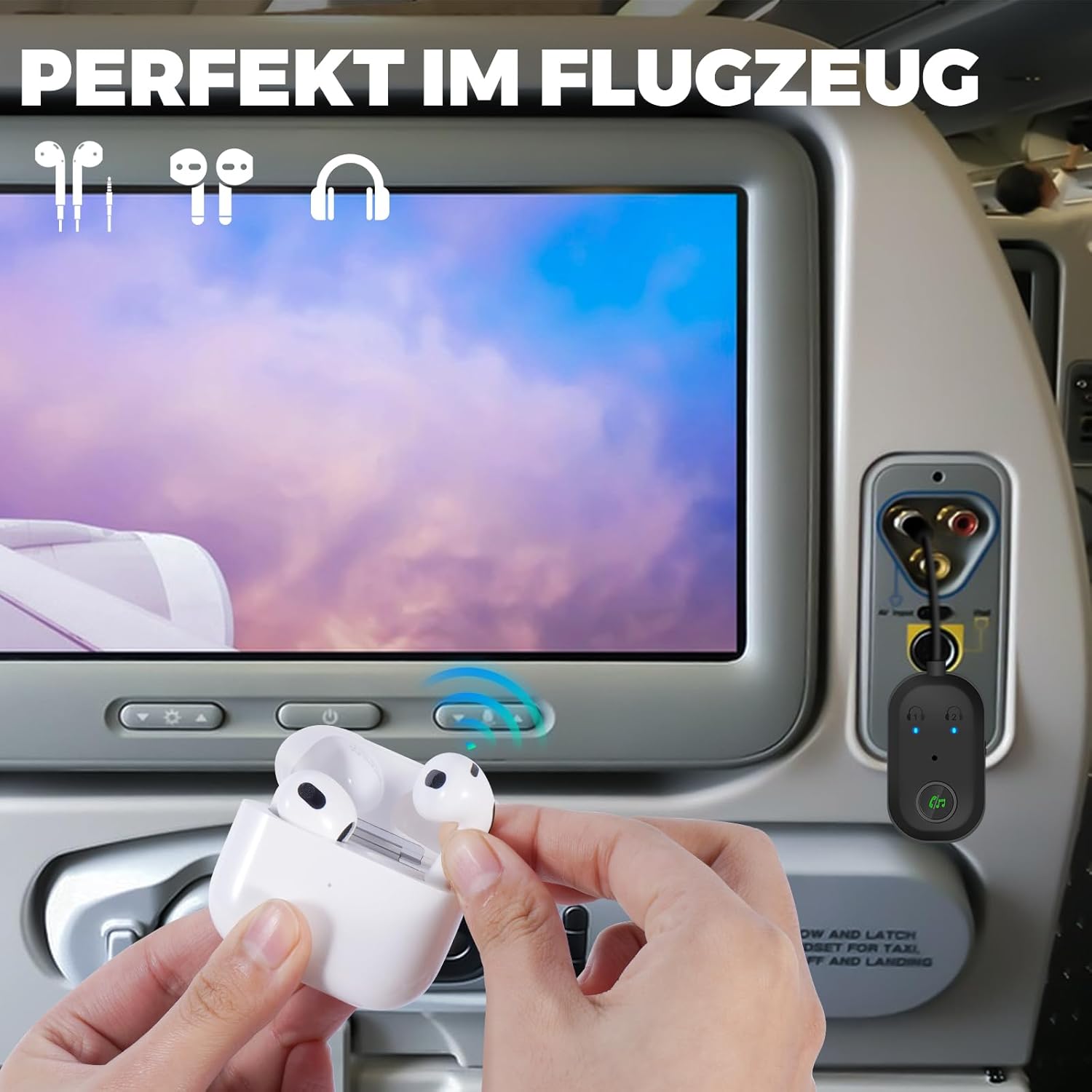
Image: The YIIFELL adapter connected to an airplane's audio jack, demonstrating its use in TX mode to connect AirPods for in-flight entertainment.
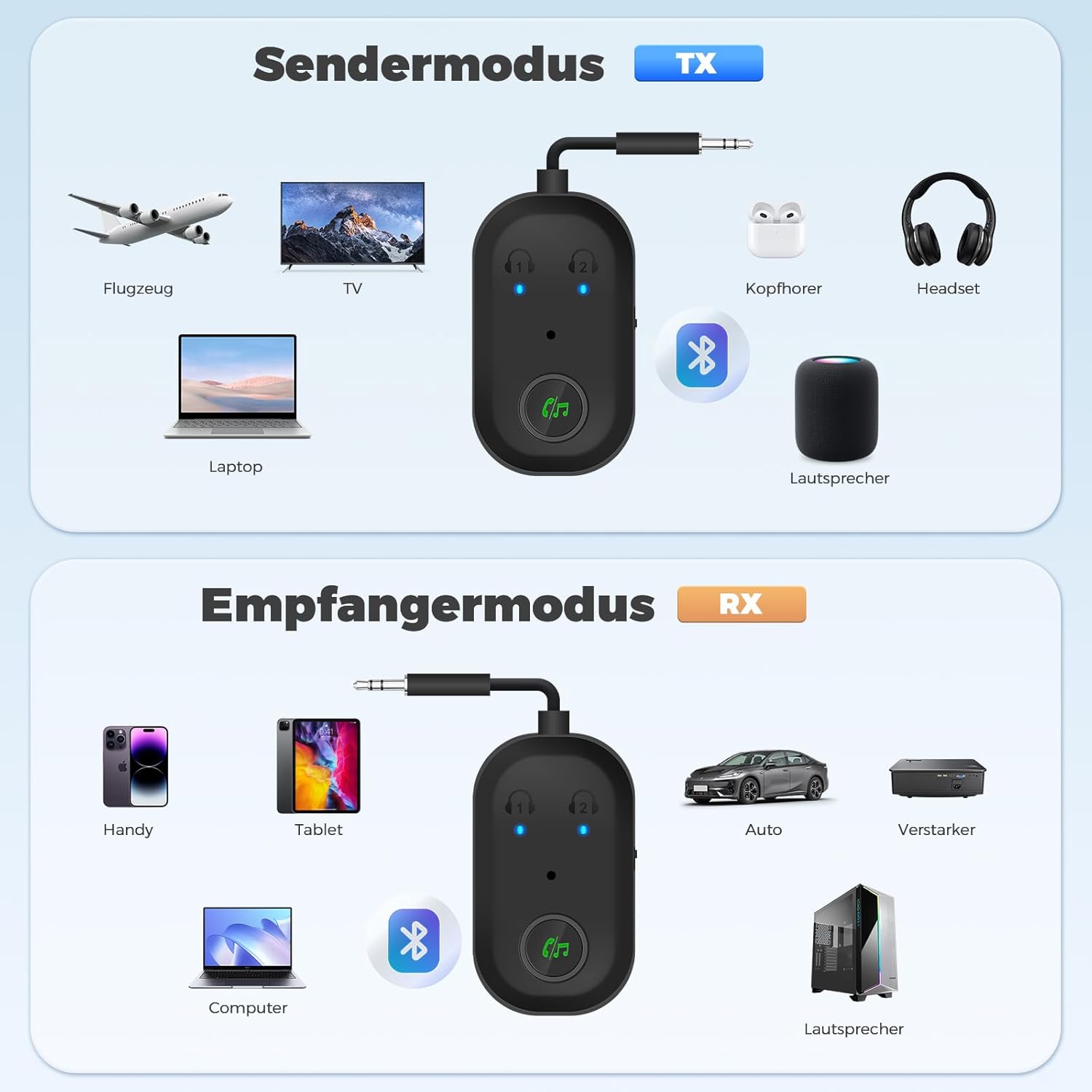
Image: A diagram illustrating various devices compatible with the adapter in both Transmitter (TX) and Receiver (RX) modes, showing connections to TVs, laptops, headphones, and speakers.
Receiver (RX) Mode
In RX mode, the BR08 receives audio from a Bluetooth-enabled device (e.g., smartphone) and outputs it to a non-Bluetooth audio system.
- Set the mode switch to RX.
- Connect the BR08's 3.5mm audio jack to the audio input port of your non-Bluetooth audio system (e.g., car stereo, wired speakers, amplifier) using a 3.5mm audio cable.
- Power on the BR08. It will automatically enter pairing mode (LED indicators may flash).
- On your Bluetooth-enabled device (smartphone, tablet), search for Bluetooth devices and select "BR08" from the list.
- Once connected, the corresponding LED indicator (1 or 2) will turn solid blue.
- Dual Pairing (RX Mode): To connect a second Bluetooth device, put the second device into pairing mode. Press the Multi-function Button on the BR08 once. The BR08 will search and connect to the second device. Both LED indicators (1 and 2) will be solid blue when two devices are connected.

Image: The YIIFELL adapter connected to a car stereo in Receiver (RX) mode, receiving audio wirelessly from a smartphone. The RX mode switch is visible.

Image: A couple sharing audio using two Bluetooth headphones simultaneously connected to the YIIFELL adapter, demonstrating its dual pairing capability.
Function Key Operations
The multi-function button on the YIIFELL BR08 provides several controls:
- Power On/Off: Press and hold for 3 seconds.
- Play/Pause: Short press (in RX mode, when playing music).
- Answer Call: Short press (in RX mode, during an incoming call).
- Reject Call: Long press for 2 seconds (in RX mode, during an incoming call).
- Hang Up Call: Short press (in RX mode, during a call).
- Switch to Earbud Mode (Private Call): Long press for 2 seconds during a call (in RX mode).
- Connect Second Device: Short press (in both TX and RX modes, after the first device is connected, to initiate pairing for a second device).
Battery Information
- Battery Capacity: 240 mAh
- Charging Time: Approximately 50 minutes for a full charge.
- Operating Time (RX Mode): Approximately 13 hours.
- Operating Time (TX Mode): Approximately 16 hours.
- Charging Indicator: LED will indicate charging status and turn off when fully charged. The device automatically enters pairing mode when charging.
Specifications
| Feature | Detail |
|---|---|
| Brand | YIIFELL |
| Model | BR08 |
| Bluetooth Version | 5.3 |
| Hardware Interface | 3.5mm Audio Jack, USB-C |
| Supported Audio Codecs | aptX Low Latency (inferred) |
| Operating Modes | Transmitter (TX), Receiver (RX) |
| Dual Pairing | Supports 2 devices simultaneously |
| Battery Capacity | 240 mAh (Lithium Ion) |
| Charging Time | Approx. 50 minutes |
| Operating Time (RX) | Approx. 13 hours |
| Operating Time (TX) | Approx. 16 hours |
| Compatible Devices | Laptop, Smart TV, Smartphone, Tablet, Car Audio, Wired Speakers, Headphones, AirPods |
| Item Weight | 40 g (0.04 Kilograms) |
| Package Dimensions | 12.6 x 7.1 x 2.7 cm |
Troubleshooting
- Device not powering on:
Ensure the device is fully charged. Connect it to a power source using the USB-C cable and allow it to charge for at least 10 minutes before attempting to power on again.
- Cannot pair with a Bluetooth device:
- Ensure the BR08 is in the correct mode (TX for transmitting, RX for receiving).
- Make sure the BR08 and your target Bluetooth device are both in pairing mode.
- Bring the devices closer together (within 1 meter).
- Turn off and on both devices, then try pairing again.
- Clear previous pairing records on your Bluetooth device if possible.
- No audio or poor audio quality:
- Check that all 3.5mm audio cables are securely connected.
- Ensure the volume on both the BR08 and the connected audio device/source is turned up.
- Verify that the BR08 is successfully paired and connected (solid blue LED).
- If in TX mode, ensure the audio source is playing sound through its 3.5mm output.
- If in RX mode, ensure your Bluetooth source device is playing audio and its volume is adequate.
- Reduce interference by moving away from other wireless devices (Wi-Fi routers, microwaves).
- Dual pairing issues:
After connecting the first device, ensure the second device is in pairing mode, then short press the Multi-function Button on the BR08 to initiate pairing for the second device.
Maintenance
- Keep the device dry. Do not expose it to moisture or liquids.
- Clean the device with a soft, dry cloth. Do not use harsh chemicals or abrasive cleaners.
- Store the device in a cool, dry place when not in use.
- Avoid extreme temperatures.
- Do not attempt to disassemble or repair the device yourself. This will void any warranty.
Warranty and Support
Specific warranty information for the YIIFELL BR08 is not provided in this document. Please refer to the retailer or your purchase documentation for warranty details. For technical support or further assistance, please contact YIIFELL customer service through their official channels or the retailer where the product was purchased.
Ask a question about this manual
Ask about setup, troubleshooting, compatibility, parts, safety, or missing instructions. Manuals+ will review the question and use this page’s manual context to help answer it.