Introduction
This instruction manual provides essential information for the safe and efficient operation, installation, and maintenance of your Frigidaire Gallery FGMIS5006AMZCOM Dual Zone Built-In Beverage Fridge. Please read this manual thoroughly before using the appliance and retain it for future reference.
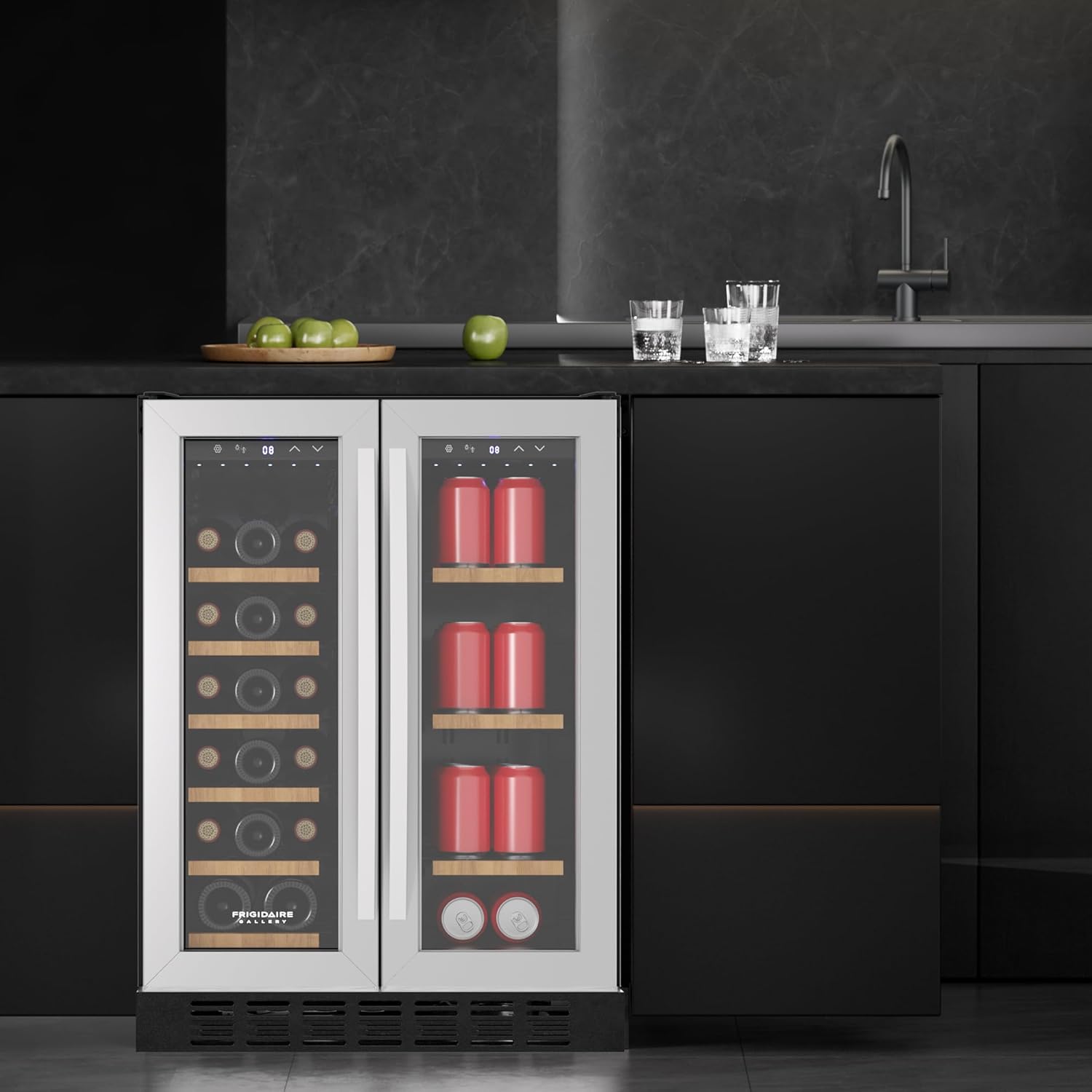
Your new beverage fridge is designed to store a variety of beverages, including wine bottles and cans, in two independently controlled temperature zones. Its built-in design and stainless steel finish offer both functionality and aesthetic appeal.
Important Safety Information
WARNING: To reduce the risk of fire, electric shock, or injury when using your appliance, follow these basic precautions:
- Read all instructions before using the appliance.
- Do not store or use gasoline or other flammable vapors and liquids in the vicinity of this or any other appliance.
- Ensure the appliance is properly grounded.
- Unplug the appliance before cleaning or performing any maintenance.
- Do not allow children to climb, stand, or hang on the shelves of the appliance.
- Keep ventilation openings, in the appliance enclosure or in the built-in structure, clear of obstruction.
- Do not use mechanical devices or other means to accelerate the defrosting process, other than those recommended by the manufacturer.
- Do not damage the refrigerant circuit.
- Do not use electrical appliances inside the food storage compartments of the appliance, unless they are of the type recommended by the manufacturer.
Proposition 65 Warning: This product can expose you to chemicals which are known to the State of California to cause cancer and birth defects or other reproductive harm. For more information go to www.P65Warnings.ca.gov.
Setup and Installation
Unpacking
Carefully remove all packaging materials, including foam and tape. Inspect the appliance for any damage. Keep packaging materials away from children. Remove any protective film from the stainless steel surfaces.
Location and Placement
This beverage fridge is designed for built-in installation. Ensure the chosen location meets the following requirements:
- Dimensions: The appliance dimensions are approximately 22.4"D x 23.4"W x 32.2"H. Allow adequate clearance for ventilation around the unit, especially at the front grille.
- Level Surface: Place the unit on a flat, level surface capable of supporting its weight (approximately 101.4 pounds when empty, more when full).
- Temperature: Avoid placing the unit in direct sunlight or near heat sources (e.g., oven, radiator). The ambient temperature should be between 60°F (16°C) and 90°F (32°C).
- Ventilation: Ensure the front grille is not obstructed to allow proper airflow for the cooling system.

Electrical Connection
Connect the appliance to a dedicated, grounded 110-120 Volt, 60 Hz, 15 Amp AC-only electrical outlet. Do not use an extension cord or adapter plug. Ensure the power cord is not pinched or damaged.
Handle Installation
The handle is included in the packaging. Align the handle with the pre-drilled holes on the door and secure it using the provided screws. Do not overtighten.
Leveling the Appliance
Adjust the leveling legs at the bottom of the unit to ensure it is stable and level. A level appliance operates more efficiently and prevents door alignment issues.
Operating Instructions
Initial Startup
After installation, allow the appliance to stand upright for at least 2-4 hours before plugging it in. This allows the refrigerant to settle. Once plugged in, allow the unit to cool for several hours before loading beverages.
Dual Zone Temperature Control
This beverage fridge features two independent temperature zones, allowing you to store different types of beverages at their optimal temperatures. The left zone is typically for wine bottles, and the right zone for cans.
- Temperature Adjustment: Use the digital control panels located at the top of each door to set the desired temperature for each zone. Refer to the display for current temperature readings.
- Recommended Temperatures:
- Wine (Left Zone): 45-65°F (7-18°C)
- Cans/Beverages (Right Zone): 35-50°F (2-10°C)


Loading Capacity and Shelves
The left zone can accommodate up to 18 standard wine bottles on its wooden shelves. The right zone can store up to 41 standard beverage cans. Arrange beverages to allow for proper air circulation.
The wooden shelves are designed for easy removal and adjustment to accommodate various bottle and can sizes. To remove a shelf, gently lift the front edge and pull it out.
Frost-Free Venting Process
The appliance features a frost-free air cooling system. This system automatically manages frost buildup, optimizing efficiency and minimizing the need for manual defrosting. Ensure the internal air vents are not blocked by beverages.
French Door Opening
The French door design allows each zone to be accessed independently. This improves accessibility and helps maintain stable temperatures in the unused zone.
Maintenance and Care
Cleaning
- Exterior: Clean the exterior surfaces, including the stainless steel doors and handles, with a mild detergent and a soft cloth. Avoid abrasive cleaners.
- Interior: Unplug the unit before cleaning. Wash the interior surfaces, shelves, and gaskets with a solution of mild detergent and warm water. Rinse thoroughly and dry completely before plugging the unit back in.
- Condenser Coils: Periodically clean the condenser coils located at the back or bottom of the unit to ensure efficient operation. Use a soft brush or vacuum cleaner.
Automatic Defrost
This appliance is equipped with an automatic defrost system. Frost that forms on the evaporator will melt during the off-cycle of the compressor and drain into a drip tray. This water then evaporates. No manual defrosting is typically required.
Power Interruption
In case of a power outage, keep the doors closed to maintain the internal temperature for as long as possible. Avoid opening the doors unnecessarily.
Vacation and Storage
For long periods of absence, unplug the unit, empty it, clean it thoroughly, and leave the doors slightly ajar to prevent odors and mold growth.
Troubleshooting Guide
Before contacting customer service, please refer to the following common issues and their potential solutions:
| Problem | Possible Cause | Solution |
|---|---|---|
| Appliance does not operate. | Not plugged in; circuit breaker tripped; power outage. | Ensure plug is secure; check circuit breaker; verify power supply. |
| Temperature is not cold enough. | Temperature setting too high; door opened too frequently; warm items added; poor ventilation. | Adjust temperature setting; minimize door openings; allow warm items to cool before loading; ensure proper ventilation. |
| Excessive noise. | Appliance not level; loose parts; normal compressor operation. | Level the appliance; check for loose components; some operational sounds are normal. |
| Door does not close properly. | Appliance not level; obstruction; door gasket dirty or damaged. | Level the appliance; remove obstructions; clean or replace door gasket. |
Specifications
| Feature | Detail |
|---|---|
| Brand | Frigidaire |
| Model Number | FGMIS5006AMZCOM |
| Capacity | 4 Cubic Feet (approx. 41 cans & 18 bottles) |
| Dimensions (D x W x H) | 22.4" x 23.4" x 32.2" |
| Item Weight | 101.4 Pounds |
| Installation Type | Built-In |
| Color | Stainless Steel |
| Voltage | 110 Volts |
| Defrost System | Automatic |
| Door Material | Stainless Steel & Glass |
| Shelf Type | Wood |
| Number of Doors | 2 (French Door) |
| Annual Energy Consumption | 300 Kilowatt Hours Per Year |
Warranty and Customer Support
Warranty Information
This Frigidaire Gallery appliance is covered by a manufacturer's warranty. Please refer to the warranty card included with your product or visit the official Frigidaire website for detailed terms and conditions. Retain your proof of purchase for warranty claims.
Customer Support
For technical assistance, service, or to order replacement parts, please contact Frigidaire customer support. Contact information can typically be found on the manufacturer's website or in the product registration materials.
When contacting support, please have your model number (FGMIS5006AMZCOM) and serial number ready.


