
MSI MPG B850 EDGE TI WIFI (Model: 7E62-001R)
MSI MPG B850 Edge TI WiFi Motherboard User Manual
Model: MPG B850 EDGE TI WIFI (7E62-001R)
1. Introduction
This user manual provides detailed instructions for the installation, operation, maintenance, and troubleshooting of your MSI MPG B850 Edge TI WiFi Motherboard. Designed for high-performance computing, this motherboard supports the latest AMD Ryzen 9000/8000/7000 series processors, DDR5 memory, and PCIe 5.0 connectivity, making it ideal for gaming, content creation, and professional applications.
Please read this manual thoroughly before proceeding with installation to ensure proper setup and to maximize the performance and longevity of your system.
2. Safety Information
Always observe the following safety precautions to prevent damage to the motherboard or injury to yourself:
- Always disconnect the power cord from the wall outlet before touching any component.
- Wear an anti-static wrist strap or frequently touch a grounded metal object (e.g., the computer case) to discharge static electricity before handling components.
- Handle components by their edges; avoid touching pins or circuitry.
- Keep the motherboard and components away from moisture and extreme temperatures.
- Ensure proper ventilation within your PC case to prevent overheating.
3. Package Contents
Verify that all items listed below are included in your motherboard package. If any item is damaged or missing, contact your retailer.
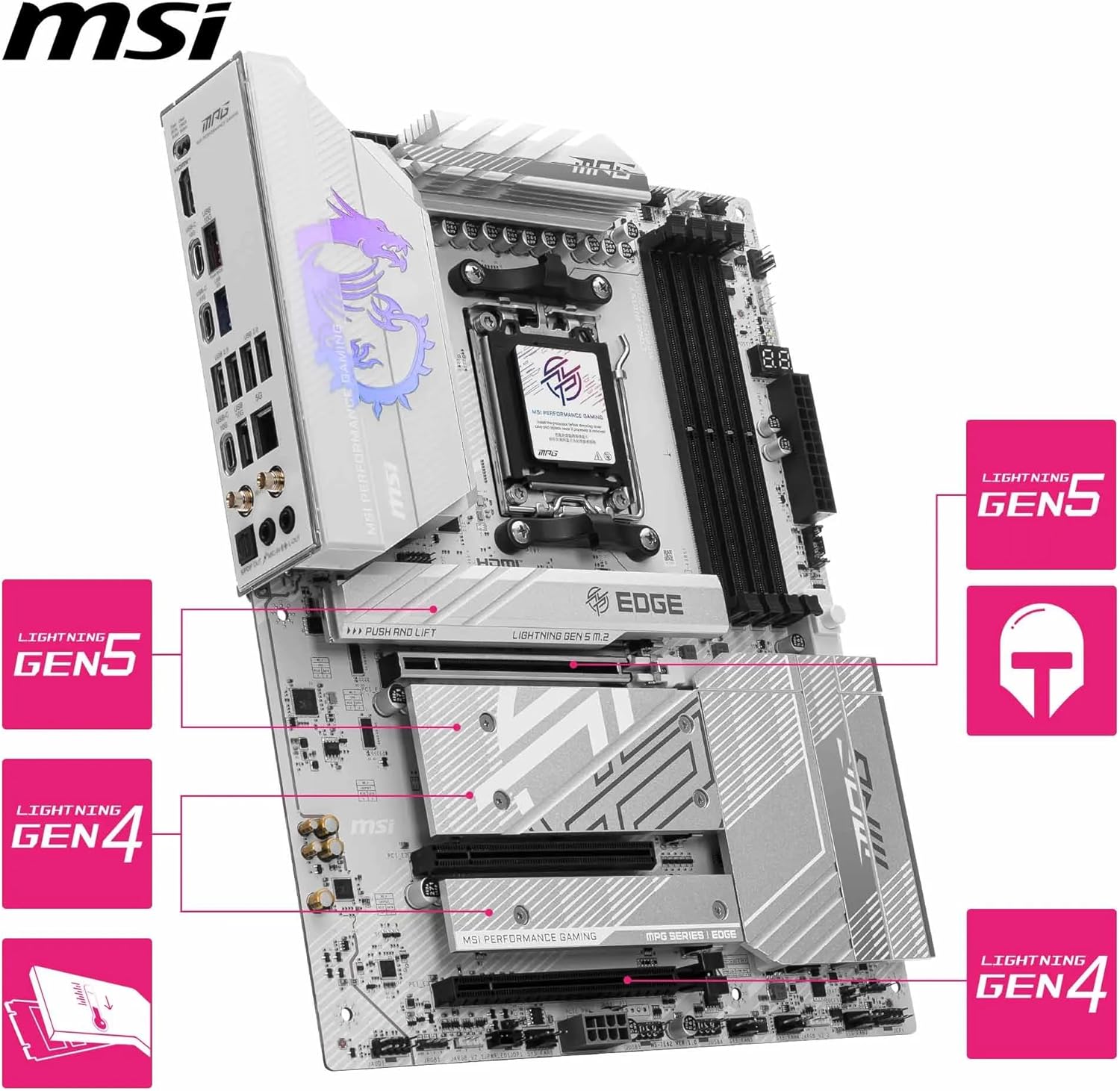
Image: Motherboard with various accessories.
- MSI MPG B850 Edge TI WiFi Motherboard
- SATA Cables
- Wi-Fi Antenna
- M.2 Screw/Standoff Set
- Quick Installation Guide
- Driver CD/USB Drive (if applicable)
4. Setup
4.1. Motherboard Layout
Familiarize yourself with the key components and connectors on your motherboard.

Image: Overhead view of the motherboard highlighting major components.
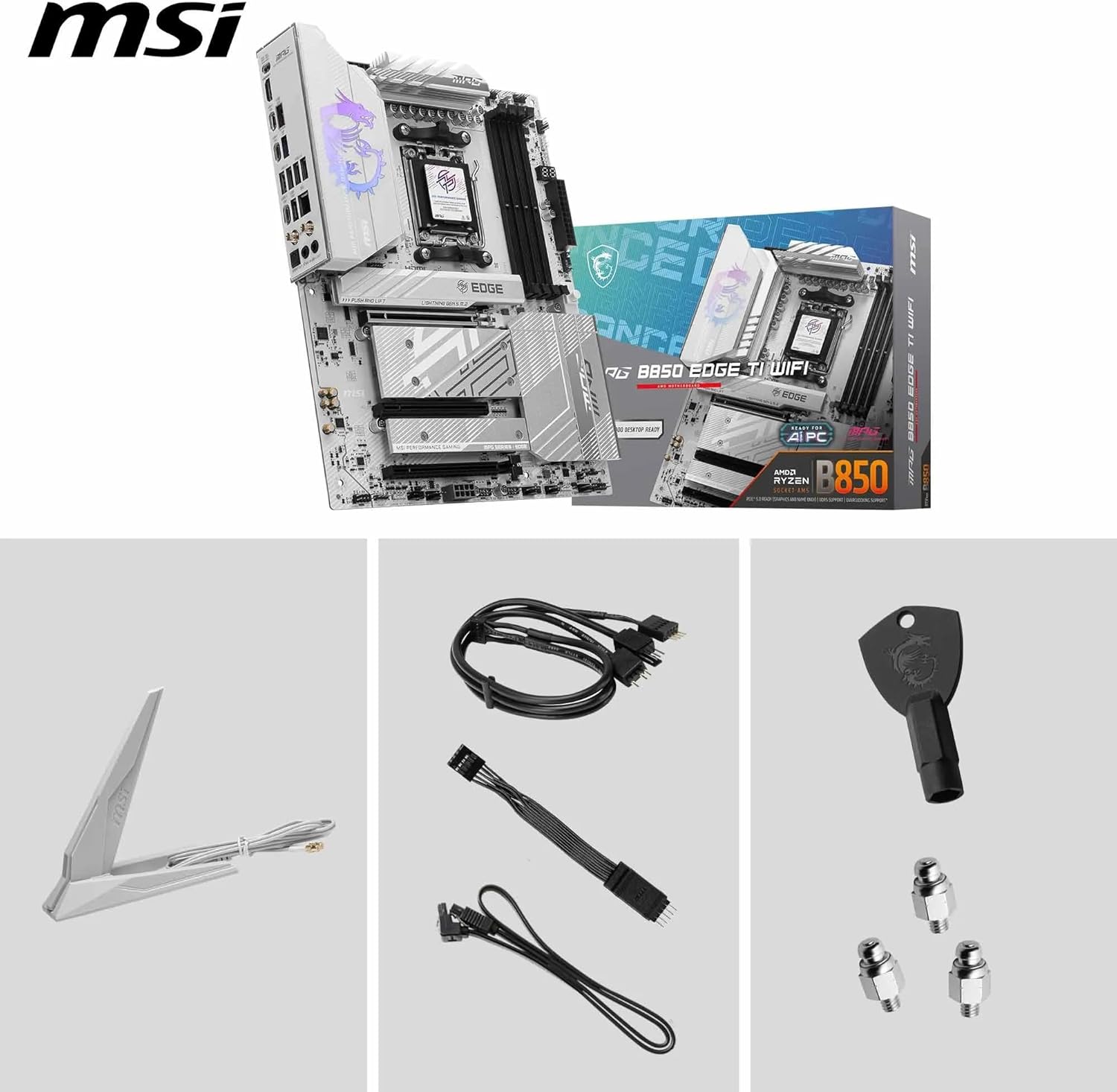
Image: Detailed view of the rear input/output ports.
- CPU Socket (AM5): For AMD Ryzen 9000/8000/7000 series processors.
- DDR5 DIMM Slots: Four slots supporting up to 256GB of DDR5 memory.
- PCIe 5.0 x16 Slot: Primary slot for graphics cards, featuring Steel Armor II for durability and an easy latch release button.
- M.2 Slots: Two M.2 Gen5 x4 slots (128Gbps) and two M.2 Gen4 slots (64Gbps/32Gbps) with Shield Frozr heatsinks and EZ M.2 Clips for tool-less installation.
- SATA Ports: For connecting SATA storage devices.
- Power Connectors: 24-pin ATX power and 8-pin + 4-pin CPU power connectors.
- Rear I/O Ports: Includes USB 2.0, USB 5Gbps, USB 10Gbps (Type-A and Type-C), 5Gbps LAN, Wi-Fi 7 antenna connectors, HDMI, and audio jacks.
- Debug LED: Provides diagnostic codes during boot-up.
4.2. Installation Steps
- Prepare the Case: Install the I/O shield (if not pre-attached) and standoffs in your PC case.
- Install the CPU: Open the AM5 socket lever, align the CPU triangle with the socket's triangle, gently place the CPU, and close the lever.
- Install the CPU Cooler: Follow the cooler manufacturer's instructions to install the CPU cooler.
- Install RAM: Open the clips on the DDR5 DIMM slots, align the memory module notch with the slot key, and press down firmly until the clips snap into place. Refer to your motherboard manual for recommended slot population order for dual-channel operation.
- Install M.2 SSDs: Unscrew the M.2 Shield Frozr heatsink. For the primary M.2 slot, use the EZ M.2 Clip to secure the SSD without screws. For other slots, use the provided M.2 screws and standoffs. Reattach the heatsink.
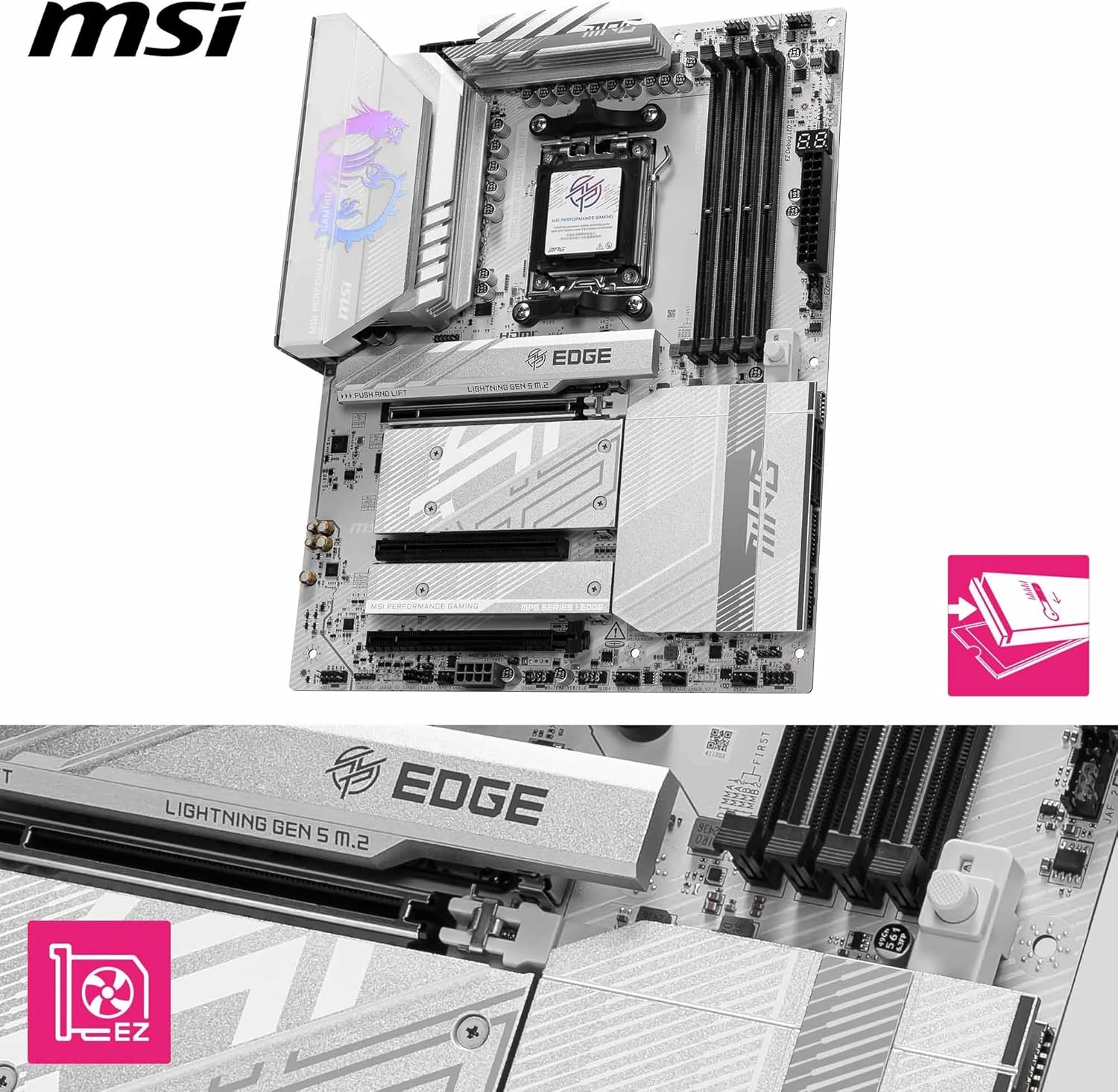
Image: Close-up of an M.2 slot showing the EZ M.2 Clip mechanism.

Image: Diagram illustrating the different M.2 Gen5 and Gen4 slots.
- Install Graphics Card: Open the retention clip on the PCIe 5.0 x16 slot. Insert the graphics card firmly until it clicks into place. The easy latch release button simplifies removal.
- Mount Motherboard: Carefully place the motherboard into the case, aligning it with the standoffs. Secure it with screws.
- Connect Power Supply: Connect the 24-pin ATX power cable and the 8-pin + 4-pin CPU power cables from your power supply to the motherboard.
- Connect Front Panel Cables: Connect the power button, reset button, HDD LED, and USB/audio headers from your case to the corresponding pins on the motherboard. Refer to the motherboard manual for pin assignments.
- Connect SATA Devices: Connect SATA data cables from your storage drives to the SATA ports on the motherboard.
- Install Wi-Fi Antenna: Screw the included Wi-Fi antenna onto the connectors on the rear I/O panel.
5. Operating
5.1. First Boot and BIOS/UEFI Setup
After assembling your system, connect a monitor, keyboard, and mouse. Power on the system. Press the DEL key during startup to enter the BIOS/UEFI setup utility. Here you can configure various system settings:
- Boot Order: Set the boot priority for your operating system drive.
- XMP/EXPO: Enable Extreme Memory Profile (XMP) or EXPO for optimal RAM performance.
- Fan Control: Adjust fan curves for system cooling.
- Overclocking: Advanced settings for CPU and memory overclocking.
5.2. Driver Installation
After installing your operating system, it is crucial to install the latest drivers for your motherboard components. You can find these on the MSI support website for your specific model or use the provided driver CD/USB drive.
- Chipset Drivers
- LAN Drivers
- Wi-Fi/Bluetooth Drivers
- Audio Drivers
- Graphics Card Drivers (from GPU manufacturer)
5.3. Software Utilities
MSI provides various software utilities to enhance your user experience, such as MSI Center for system monitoring, fan control, and RGB lighting customization.
6. Maintenance
Regular maintenance helps ensure the longevity and stable operation of your motherboard and PC system.
- Dust Removal: Periodically clean dust from inside your PC case, especially from fans and heatsinks, using compressed air.
- BIOS/UEFI Updates: Check the MSI website for the latest BIOS/UEFI versions. Updates can improve compatibility, stability, and performance. Use the BIOS Flashback feature for convenient updates without a CPU or RAM installed.
- Driver Updates: Keep your drivers updated to ensure optimal performance and compatibility with new software and hardware.
7. Troubleshooting
If you encounter issues, refer to the following common troubleshooting steps:
- No Power/No POST: Ensure all power cables (24-pin ATX, CPU 8-pin/4-pin) are securely connected. Check the power supply. Use the motherboard's debug LEDs to identify the component causing the issue.
- No Display: Verify that the graphics card is properly seated and connected to power. Ensure the monitor cable is connected to the graphics card (not the motherboard's integrated graphics ports, unless using an APU).
- System Instability/Crashes: Check RAM seating. Ensure CPU cooler is properly installed. Update BIOS/UEFI and drivers. Test components individually if possible.
- BIOS Reset: If you encounter issues after changing BIOS settings, clear the CMOS by either shorting the JBAT1 jumper or removing the CMOS battery for a few minutes.
- BIOS Flashback: If your system doesn't boot after a BIOS update or if you need to update for a new CPU, use the BIOS Flashback feature. Refer to the MSI website for detailed instructions on this process.
8. Specifications
| Feature | Specification |
|---|---|
| Brand | MSI |
| Model Name | MPG B850 EDGE TI WIFI |
| Model Number | 7E62-001R |
| CPU Socket | Socket AM5 |
| Compatible Processors | AMD Ryzen 9000, 8000, 7000 Series |
| Chipset | AMD B850 |
| Memory Technology | DDR5 |
| Max. Memory Capacity | 256 GB |
| Memory Speed (OC) | Up to 8400+ MHz |
| Graphics Interface | PCI Express 5.0 x16 |
| M.2 Slots | 2 x M.2 Gen5 x4 (128Gbps), 1 x M.2 Gen4 x4 (64Gbps), 1 x M.2 Gen4 x2 (32Gbps) |
| LAN | 5Gbps LAN |
| Wireless Connectivity | Wi-Fi 7, Bluetooth 5.4 |
| USB Ports (Rear) | USB 2.0, USB 5Gbps, USB 10Gbps (Type-A & Type-C) |
| Audio | 7.1 USB High Performance Audio with Audio Boost 5 |
| Dimensions | 30 x 15 x 5 cm |
| Weight | 650 g |
9. Warranty and Support
MSI products are covered by a limited warranty. For detailed warranty terms and conditions, please refer to the warranty card included with your product or visit the official MSI website. Keep your proof of purchase for warranty claims.
For technical support, driver downloads, and BIOS updates, please visit the official MSI support website:
You can also contact MSI customer service for further assistance.
Related Documents - MPG B850 EDGE TI WIFI (Model: 7E62-001R)
 |
MSI MPG B850M EDGE TI MAX WIFI Motherboard User Guide This user guide provides comprehensive instructions for installing and using the MSI MPG B850M EDGE TI MAX WIFI motherboard. It covers component identification, specifications, installation procedures, BIOS setup, and regulatory information for PC builders. |
 |
MSI MPG B650 EDGE WIFI Motherboard User Guide Comprehensive user guide for the MSI MPG B650 EDGE WIFI motherboard, detailing installation, specifications, and features for AMD Ryzen 7000 series processors. |
 |
MSI MPG B850I EDGE TI WIFI Motherboard User Guide Comprehensive user guide for the MSI MPG B850I EDGE TI WIFI motherboard, detailing installation, specifications, BIOS setup, and system compatibility for AMD Ryzen AM5 platforms. |
 |
MSI MAG B850 GAMING PLUS MAX WIFI Carte Mère : Guide d'utilisation et Spécifications Guide d'utilisation complet pour la carte mère MSI MAG B850 GAMING PLUS MAX WIFI. Découvrez l'installation, la configuration du BIOS, les spécifications techniques et les fonctions spéciales pour optimiser votre PC. |
 |
MSI MPG X870I EDGE TI EVO WIFI Motherboard User Guide Comprehensive user guide for the MSI MPG X870I EDGE TI EVO WIFI motherboard, detailing installation, specifications, features, and setup for the AMD AM5 platform. |
 |
MSI MPG B850M EDGE TI MAX WIFI 主機板使用手冊 MSI MPG B850M EDGE TI MAX WIFI 主機板的綜合使用手冊,涵蓋 AMD AM5 平台 的安裝、元件、技術規格、特色與疑難排解。提供詳細的組裝與設定指南。 |