
1. Introduction
Thank you for choosing the ADZERD Automatic Card Shuffler. This device is designed to provide efficient and quiet shuffling for various card games, supporting 1 to 2 decks. It features dual automatic and manual modes and is conveniently rechargeable via USB-C. Please read this manual carefully to ensure proper use and maintenance of your card shuffler.
2. Product Overview
2.1 Package Contents
- ADZERD Automatic Card Shuffler
- USB-C Charging Cable (not explicitly listed but implied by USB-C rechargeable)
2.2 Key Features
- Dual Shuffle Modes: Fully Automatic and Semi-Automatic operation.
- Universal Card Compatibility: Accommodates standard poker/blackjack cards, UNO, Mahjong, Bridge, Rummy, Skip-Bo, Phase 10, and other specialty cards.
- USB-C Rechargeable: Built-in 2000mAh battery for extended use.
- Low-Noise Operation: Operates at approximately 65dB for a quiet gaming experience.
- Compact & Lightweight Design: Easy to transport and store.
- Innovative Roller Design: Features intelligent sensors for smooth, jam-free shuffling and auto-stop functionality.
3. Setup
3.1 Initial Charging
Before first use, fully charge the card shuffler. Connect the provided USB-C cable to the device's USB-C charging port and to a suitable USB power source (e.g., wall adapter, computer USB port). The device will not operate while charging.
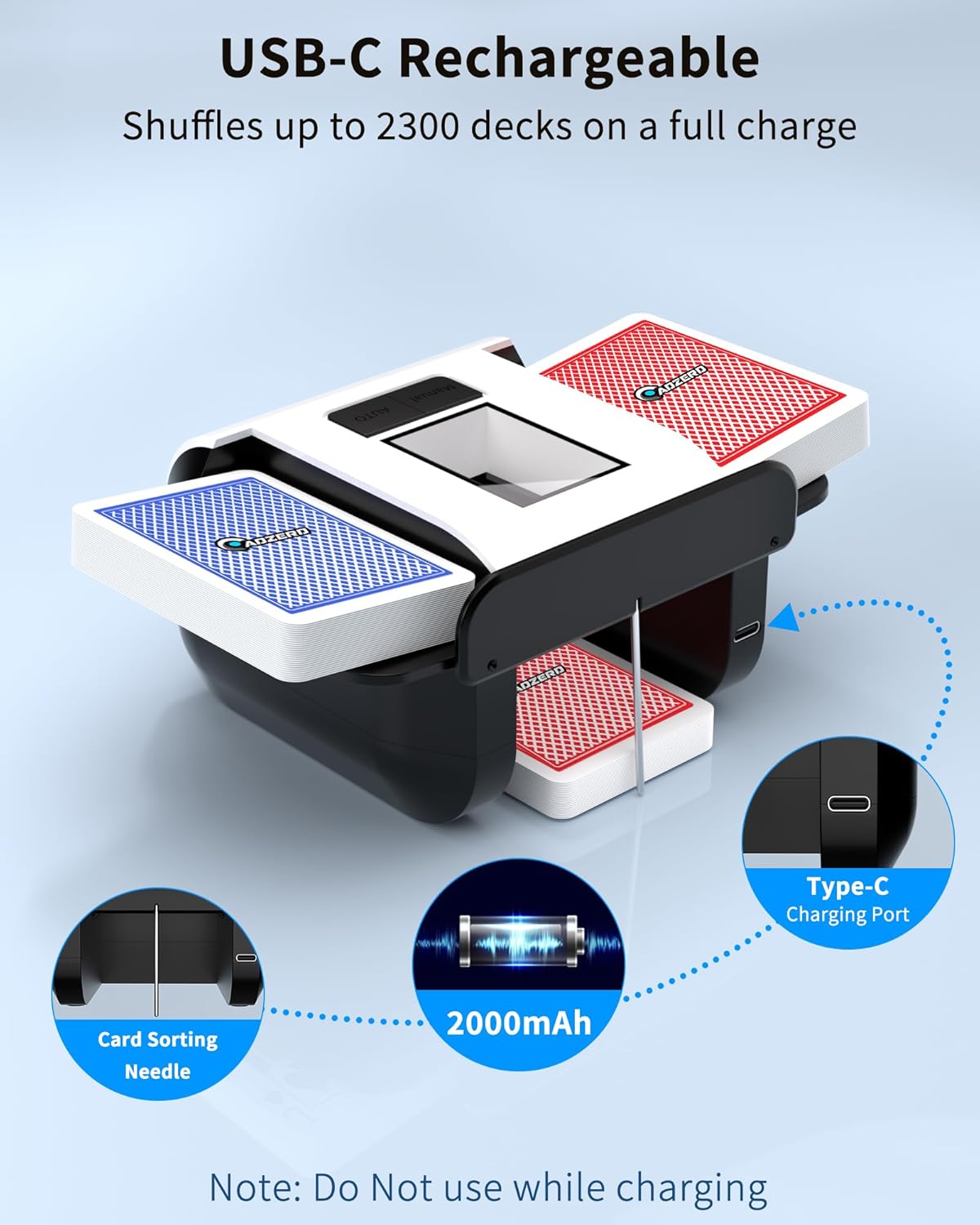
Image: The ADZERD Automatic Card Shuffler showing its USB-C charging port and indicating a 2000mAh battery capacity. A note states, "Do Not use while charging."
3.2 Card Placement
Ensure the shuffler is placed on a stable, flat surface. Open the card trays on both sides of the device. Place up to one deck of cards into each tray. The retractable card tray design accommodates various card sizes, including longer specialty cards.

Image: The card shuffler with its retractable wings extended, illustrating compatibility with different card dimensions for games like Regular, Texas Hold'em, Blackjack, Bridge, UNO, and Mahjong.
4. Operating Instructions
The ADZERD Automatic Card Shuffler offers two modes for shuffling:
4.1 Automatic Mode
- Place cards into both input trays.
- Press the "AUTO" button.
- The shuffler will automatically shuffle all cards until the process is complete.
4.2 Manual Mode
- Place cards into both input trays.
- Press and hold the "MANUAL" button.
- The shuffler will shuffle cards only while the button is held down. Release the button to stop shuffling.

Image: A detailed view of the shuffler's control panel, highlighting the "Manual" and "Auto" buttons and the internal roller mechanism designed for smooth shuffling of 1-2 decks.
4.3 Card Compatibility
The shuffler is designed to work with a wide range of card types, including standard playing cards (Poker, Blackjack, Bridge) and specialty game cards (UNO, Mahjong, Five Crowns, Skip-Bo, Phase 10). The retractable card trays adjust to accommodate different card lengths.
4.4 Low-Noise Operation
The device operates at approximately 65dB, which is comparable to a soft conversation, ensuring minimal disturbance during gameplay.

Image: The card shuffler being used on a table during a game, with a graphic indicating its 65dB noise level, positioned between 35dB (watering) and 75dB (laughing).
5. Maintenance
To ensure the longevity and optimal performance of your ADZERD Automatic Card Shuffler, follow these maintenance guidelines:
- Cleaning: Regularly wipe the exterior of the shuffler with a soft, dry cloth. Avoid using abrasive cleaners or solvents.
- Card Path: Periodically inspect the card input and output paths for any dust, debris, or card fragments that may accumulate. Use a soft brush or compressed air to gently clear any obstructions.
- Storage: When not in use, store the shuffler in a clean, dry place away from direct sunlight and extreme temperatures.
- Card Condition: Use clean, undamaged cards. Bent, sticky, or excessively worn cards can lead to jamming or uneven shuffling.
6. Troubleshooting
If you encounter issues with your card shuffler, refer to the following common problems and solutions:
- Shuffler does not turn on or operate:
- Ensure the device is fully charged. Connect it to a USB-C power source and allow it to charge. Remember, the shuffler does not operate while charging.
- Verify the USB-C cable is securely connected to both the shuffler and the power source.
- Cards are jamming or not shuffling smoothly:
- Check the condition of your cards. Bent, sticky, or damaged cards can cause jams. Use new or well-maintained cards.
- Ensure cards are properly aligned and not overfilled in the input trays. The shuffler supports up to 2 decks.
- Inspect the card path for any foreign objects or debris and clear them carefully.
- Uneven shuffling or cards left over:
- Ensure the shuffler is placed on a completely flat and stable surface. Uneven surfaces can affect the internal mechanism.
- Verify that the cards are evenly distributed in both input trays before starting the shuffle.
- For optimal randomization, consider running the shuffle cycle multiple times.
- Device is unusually loud:
- The shuffler is designed for low-noise operation (approx. 65dB). If it's significantly louder, check for any obstructions in the card path or internal mechanisms.
- Ensure the device is on a stable surface to prevent vibrations that might amplify sound.
7. Specifications
- Model: Automatic Card Shuffler B0DMT2J5YK
- Brand: ADZERD
- Dimensions: Approximately 6.6 x 4.7 x 3.1 inches (16.76 x 11.94 x 7.87 cm)
- Weight: 422 g
- Battery: 2000mAh Rechargeable (USB-C)
- Shuffles per Charge: Up to 2300 decks
- Noise Level: Approximately 65dB
- Capacity: 1-2 decks of cards
- Country of Origin: USA

Image: The compact and lightweight design of the ADZERD Automatic Card Shuffler, with its dimensions clearly labeled next to a smartphone for scale.
8. Warranty Information
For specific warranty terms and conditions, please refer to the documentation included with your purchase or contact ADZERD customer support directly. Warranty coverage typically includes defects in materials and workmanship under normal use.
9. Support
If you require further assistance or have questions not covered in this manual, please contact ADZERD customer support through the retailer's platform or the official ADZERD website. Please have your product model and purchase information ready when contacting support.


