
1. Introduction
This manual provides essential information for the safe and efficient operation of your BAIYITONGDA 8000W Pure Sine Wave Power Inverter. This device converts direct current (DC) from a battery source into alternating current (AC) for powering various electronic appliances. Please read this manual thoroughly before installation and use.
The inverter is designed for versatility, suitable for applications in homes, vehicles (cars, RVs), boats, and off-grid solar systems. It delivers a continuous output of 4000W and a peak power of 8000W, ensuring stable and reliable power for your devices.

Image: Various application scenarios for the power inverter, demonstrating its utility in different environments such as powering tools for logging, onboard a yacht, during camping, and in off-grid setups.
2. Safety Instructions
- Correct Voltage Matching: Ensure the inverter's input voltage (e.g., 12V, 24V, 48V, 60V, 72V) matches your battery's voltage. Mismatching voltages will damage the inverter. For example, a 12V inverter must only be used with a 12V battery.
- Connection Polarity: Always connect the positive (+) and negative (-) terminals correctly. Incorrect polarity will cause severe damage to the inverter and battery.
- Secure Connections: Tighten all positive and negative connections firmly. Loose connections can lead to overheating due to poor contact, posing a fire hazard.
- Avoid Overload: Do not exceed the inverter's continuous output power rating (4000W). For inductive loads (e.g., motors, refrigerators), select an inverter with a continuous output power 3 to 7 times higher than the device's rated power to account for surge requirements.
- Switch Off Before Connecting: Always ensure the inverter switch is in the 'OFF' position before connecting it to the battery or any load.
- Ventilation: Install the inverter in a well-ventilated area to prevent overheating.
- Environment: Avoid exposing the inverter to water, moisture, direct sunlight, or extreme temperatures.
3. Product Overview
The BAIYITONGDA 8000W Pure Sine Wave Power Inverter is designed for robust performance and reliability. It features a durable aviation aluminum alloy shell and incorporates advanced technology for stable power conversion.

Image: The main unit of the BAIYITONGDA 8000W Pure Sine Wave Power Inverter, highlighting its front panel with two AC outlets, a USB port, and an LCD screen, along with the power switch.
Key Features:
- Pure Sine Wave Output: Provides stable and clean power, suitable for sensitive electronics.
- High Efficiency: Conversion efficiency greater than 90% with low no-load loss.
- Multiple Output Ports: Equipped with 2 AC outlets, 1 AC terminal block, and 1 x 2.4A USB port.
- Smart LCD Display: Monitors battery input voltage, AC output voltage, output power, frequency, and temperature in real-time.
- Robust Construction: Aviation aluminum alloy cooling shell for durability and heat dissipation.

Image: Detailed view of the inverter's front panel, showcasing the LCD screen displaying operational parameters such as output voltage (225V), frequency (50Hz), input voltage (12.7V), load power (0W), and internal temperature (22°C). Also visible are the AC outlets, USB port, and power switch.
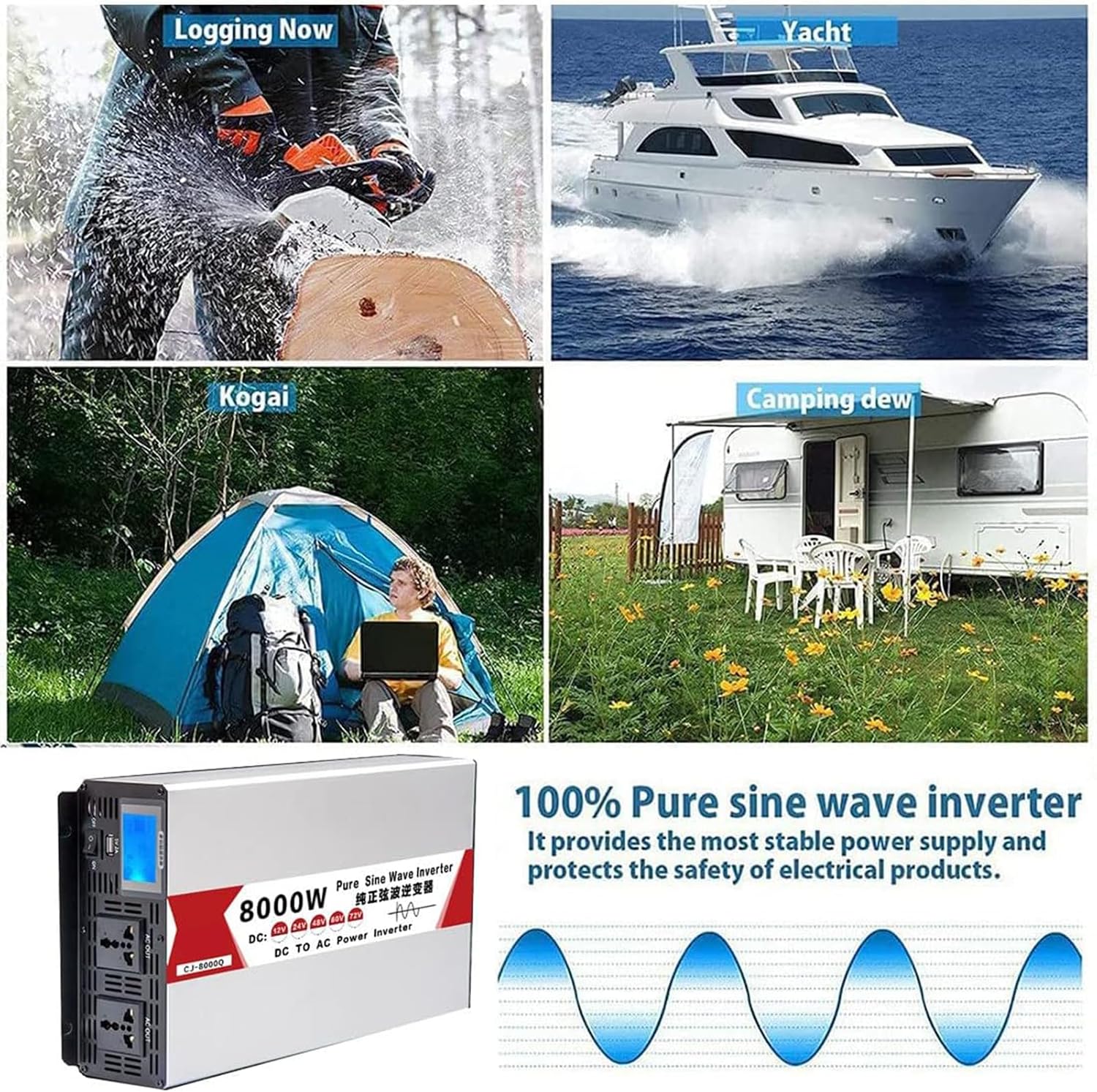
Image: Rear view of the inverter, illustrating the battery input terminals (red for positive, black for negative) and two integrated cooling fans for thermal management.
4. Specifications
| Feature | Description |
|---|---|
| Input Voltage (DC) | 12V / 24V / 48V / 60V / 72V (model dependent) |
| Output Voltage (AC) | 110V-120V (for 110V models) / 230V (for 230V models) |
| Peak Power | 8000W |
| Continuous Output Power | 4000W |
| Inverter Efficiency | >90% |
| Output Waveform | Pure Sine Wave |
| Material | Aluminum Magnesium Alloy Cooling Shell |
| Protections | Overload, Short Circuit, Overtemperature, Undervoltage/Overvoltage, Reverse Battery Protection (fuse tripped) |
| Additional Features | Automatic Voltage Regulation (AVR), Intelligent Power Management (IPM), Intelligent Fan Control (IFC) |
| USB Output | 1 x 2.4A USB port |
| Dimensions (Approx.) | 39.6 cm (L) x 21.6 cm (H) x 8 cm (W) |

Image: A visual representation of the inverter's physical dimensions, indicating a length of 39.6 cm, a height of 21.6 cm, and a width of 8 cm.
5. Setup and Installation
Follow these steps carefully to ensure proper and safe installation of your power inverter.
- Prepare for Connection: Before connecting the inverter, ensure the inverter switch is in the 'OFF' position.
- Connect Battery Cables: Connect the positive (+) cable (red) from the battery to the positive (+) terminal on the inverter. Connect the negative (-) cable (black) from the battery to the negative (-) terminal on the inverter. Ensure these connections are secure and the polarity is correct.
- Tighten Connections: Firmly tighten the fishtail clamp connections to the inverter's torsion connection posts and to the battery terminals. Loose connections can cause overheating.
- Connect Equipment: Once the inverter is securely connected to the battery, you can connect your AC equipment to the inverter's AC outlets or terminal block.
- Power On: Finally, turn the inverter switch to the 'ON' position. The LCD display will illuminate, showing operational status.

Image: A step-by-step visual guide for connecting the inverter. It shows connecting the positive and negative battery terminals to the inverter, then connecting an appliance (like a rice cooker) to the inverter, and finally turning on the inverter switch. A warning emphasizes switching off the inverter before connecting.
6. Operating Instructions
After successful installation, operating your inverter is straightforward:
- Power On: Flip the ON/OFF switch on the inverter to the 'ON' position. The LCD display will show the current input voltage, output voltage, load power, frequency, and internal temperature.
- Connect Appliances: Plug your AC appliances into the inverter's AC outlets. For higher power loads, use the AC terminal block if available.
- Monitor Performance: Regularly check the LCD display to monitor the inverter's performance and ensure it is operating within safe parameters. Pay attention to input voltage (battery level) and load power.
- USB Charging: Use the 2.4A USB port to charge compatible USB devices.
- Power Off: When finished, turn off all connected appliances, then switch the inverter to the 'OFF' position.
7. Protection Features
The BAIYITONGDA inverter is equipped with multiple protection mechanisms to safeguard both the inverter and your connected devices:
- Low Voltage Protection: Automatically shuts down the inverter if the input DC voltage drops below a safe operating level, preventing battery over-discharge.
- Over Voltage Protection: Protects the inverter from damage if the input DC voltage exceeds the maximum allowable level.
- Overload Protection: Shuts down the inverter if the connected load exceeds its continuous power rating.
- Short Circuit Protection: Prevents damage in case of a short circuit in the output wiring or connected appliance.
- Over Temperature Protection: Activates intelligent cooling fans and may shut down the inverter if internal temperatures become too high.
- Reverse Battery Protection: A fuse will trip to prevent damage if battery polarity is accidentally reversed.
- Full Load Alarm: Alerts the user when the inverter is operating near its maximum capacity.

Image: An infographic detailing the eight protective features of the inverter, including low voltage protection, front board overload, overload protection, full load alarm, short-circuit protection, thermal protection, over voltage protection, and input undervoltage alarm.
8. Maintenance
To ensure the longevity and optimal performance of your inverter, follow these maintenance guidelines:
- Keep Clean: Regularly clean the exterior of the inverter with a dry, soft cloth. Do not use liquid cleaners or solvents.
- Ventilation: Ensure the cooling vents are free from dust and obstructions to allow for proper airflow. The intelligent fan control system will manage internal temperature, but clear vents are crucial.
- Check Connections: Periodically inspect all electrical connections (battery terminals, output cables) to ensure they remain tight and free from corrosion.
- Storage: If storing the inverter for an extended period, disconnect it from the battery and store it in a cool, dry place.
9. Troubleshooting
If you encounter issues with your inverter, refer to the following common problems and solutions:
- No Output Power:
- Check if the inverter is switched ON.
- Verify battery connections are secure and correct polarity.
- Check battery voltage; if too low, recharge the battery.
- Ensure the load does not exceed the inverter's capacity.
- Check for tripped fuses (for reverse polarity protection).
- Inverter Shuts Down:
- Overload: Reduce the connected load.
- Low/High Voltage: Check battery voltage and charging system.
- Overheating: Ensure adequate ventilation; clear any obstructions from cooling vents. Allow the unit to cool down.
- Short Circuit: Disconnect all loads and check for short circuits in wiring or appliances.
- Abnormal Noise:
- Ensure the inverter is on a stable surface.
- Check if cooling fans are obstructed.
If problems persist after attempting these solutions, contact customer support.
10. Warranty and Support
For warranty information or technical support, please refer to the documentation provided at the time of purchase or contact BAIYITONGDA customer service directly. Ensure you have your product model number (66205731) and purchase details available when seeking support.