
Fricienc ME-HJWJL-080-EU
Fricienc AV-628BT Bluetooth Stereo Audio Amplifier User Manual
Model: ME-HJWJL-080-EU
1. Introduction
Thank you for choosing the Fricienc AV-628BT Bluetooth Stereo Audio Amplifier. This amplifier is designed to provide a high-quality audio experience for your home theater, karaoke, and general music listening needs. Featuring a 5.1 surround sound channel, 600W maximum power output, and versatile connectivity options, it delivers powerful and clear sound. Please read this manual carefully before operating the device to ensure proper use and to maximize its performance and lifespan.

Figure 1.1: Fricienc AV-628BT Bluetooth Stereo Audio Amplifier
This image shows the overall design of the Fricienc AV-628BT amplifier, highlighting its sleek black finish and front panel controls.
2. Product Features
- High-Fidelity Sound: Equipped with an upgraded audio processing chip, this amplifier offers low distortion, a wide frequency response, and rich dynamic power. Its analog components ensure true music restoration and Hi-Fi sound effects.
- Intuitive Visualization: The integrated LED screen dynamically displays working status, volume levels, and input signals. The user-friendly control panel allows for quick function access and adjustments.
- Remarkable Compatibility: Supports various external signal sources including SD card insertion, RCA audio input, AUX, USB interface, and dual microphone inputs. Features built-in FM radio and Bluetooth 5.0 reception for seamless connection with MP3 players, smartphones, and tablets.
- Durable Construction: Designed with multiple heat dissipation holes to prevent overheating during operation. Constructed from high-quality aluminum alloy for excellent corrosion protection and extended lifespan.
- Outstanding Performance: Boasts a 5.1 surround sound channel and a powerful maximum output of 600W, making it ideal for home theater systems, various speaker types, and karaoke setups. Delivers full and powerful sound for a high-quality audio experience.

Figure 2.1: High-Fidelity Sound Capabilities
This image illustrates the key aspects of the amplifier's high-fidelity sound, including an upgraded audio processing chip, low distortion (0.5%), wide frequency response range, and the use of analog components.
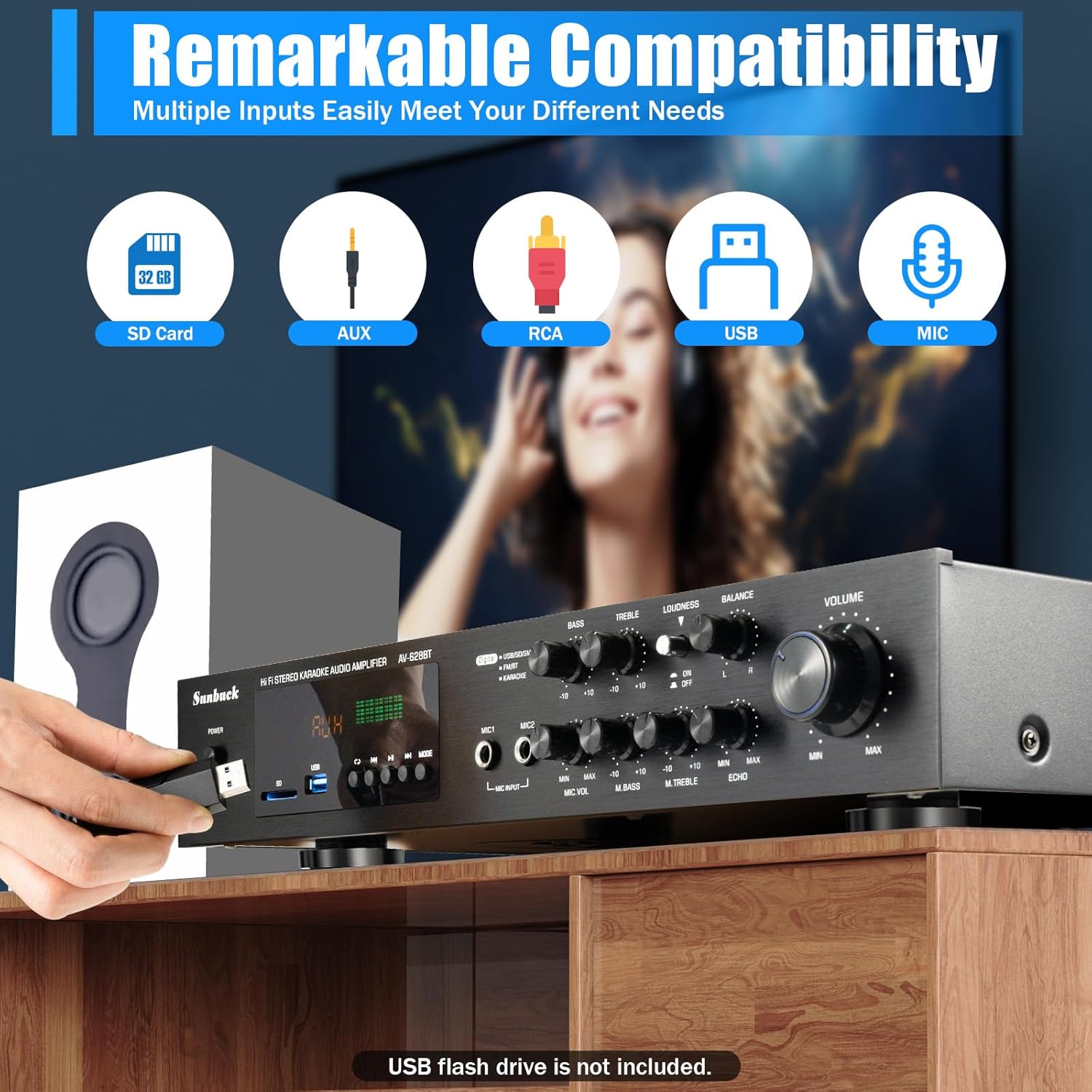
Figure 2.2: Versatile Input Options
This image highlights the amplifier's remarkable compatibility, showcasing its support for SD Card, AUX, RCA, USB, and Microphone inputs, allowing connection to various audio sources.
3. Package Contents
Please check the package carefully to ensure all items are present and in good condition:
- 1 x Fricienc AV-628BT Audio Amplifier
- 1 x Radio Antenna
- 1 x Remote Control
- 1 x English/Chinese User Manual
4. Product Layout and Controls
Familiarize yourself with the amplifier's front and back panels to understand its various controls and connection points.

Figure 4.1: Front and Back Panel Overview
This image provides a detailed diagram of both the front and back panels of the amplifier, labeling all buttons, knobs, and ports for easy identification.
4.1 Front Panel Controls
- Power Switch: Turns the amplifier on or off.
- SD Card Insertion: Slot for inserting an SD memory card.
- USB Interface: Port for connecting USB flash drives.
- Setting Button: Used for navigating menus or selecting modes.
- MIC Input (MIC1, MIC2): 6.35mm jacks for connecting microphones.
- MIC Volume Adjustment: Knob to control the volume of connected microphones.
- MIC Bass Adjustment: Knob to adjust the bass level for microphones.
- MIC Treble Adjustment: Knob to adjust the treble level for microphones.
- Echo Adjustment: Knob to control the echo effect for microphones.
- Music Volume Adjustment: Main knob to control the overall music volume.
- Balance Knob: Adjusts the balance between left and right audio channels.
- Loudness: Button to enhance bass and treble at low volumes.
- Music Treble Adjustment: Knob to adjust the treble level for music playback.
- Music Bass Adjustment: Knob to adjust the bass level for music playback.
4.2 Back Panel Connections
- RCA Input: Red and white RCA jacks for connecting external audio sources (e.g., DVD player, CD player).
- LINE Output: Audio output for connecting to other audio devices.
- Speaker Output (L/R): Terminals for connecting passive speakers (Left and Right channels).
- SR SL C Speaker Output: Terminals for connecting surround right, surround left, and center speakers (for 5.1 channel setup).
- FM ANT: Connector for the FM radio antenna.
- Power Line: Input for the power cable.
5. Setup Guide
Follow these steps to set up your Fricienc AV-628BT amplifier:
- Placement: Place the amplifier on a stable, flat surface with adequate ventilation. Ensure there is enough space around the unit for heat dissipation.
- Speaker Connection: Connect your passive speakers to the Speaker Output (L/R) terminals on the back panel. For a 5.1 channel setup, connect your surround and center speakers to the SR SL C Speaker Output terminals. Ensure correct polarity (+ to + and - to -).
- Audio Source Connection:
- RCA: Connect your audio source (e.g., DVD player, TV) to the RCA Input jacks using an RCA cable.
- AUX: Connect devices with a 3.5mm audio output to the AUX input (often shared with RCA or a dedicated 3.5mm jack, refer to Figure 4.1).
- USB: Insert a USB flash drive into the USB Interface.
- SD Card: Insert an SD card into the SD Card Insertion slot.
- Microphones: Connect microphones to the MIC Input jacks.
- FM Antenna Connection: Connect the included radio antenna to the FM ANT connector for improved FM radio reception.
- Power Connection: Ensure the amplifier's power switch is in the OFF position. Connect the power cable to the Power Line input on the back panel, then plug the other end into a suitable 220V AC power outlet.
6. Operating Instructions
6.1 Basic Operation
- Power On: Flip the Power Switch to the ON position. The LED display will light up.
- Select Input Source: Use the Setting Button on the front panel or the remote control to cycle through input sources (Bluetooth, USB, SD, RCA/AUX, FM). The selected source will be displayed on the LED screen.
- Adjust Volume: Rotate the large Music Volume Adjustment knob to set the desired listening volume.
- Adjust Tone: Use the Music Bass Adjustment and Music Treble Adjustment knobs to fine-tune the audio's bass and treble levels.
- Balance Adjustment: Use the Balance Knob to adjust the left/right channel balance if needed.
- Loudness Function: Press the Loudness button to enhance bass and treble at lower volume levels. Press again to deactivate.
6.2 Bluetooth Connectivity
- Select the Bluetooth input source on the amplifier. The LED display will show "BT" or a similar indicator.
- On your mobile device (smartphone, tablet, etc.), enable Bluetooth and search for available devices.
- Select "AV-628BT" or a similar name from the list of found devices.
- Once paired, you can play audio from your device through the amplifier. The effective Bluetooth range is approximately 10 meters (32.8 feet).
6.3 USB/SD Card Playback
- Insert your USB flash drive into the USB Interface or your SD card into the SD Card Insertion slot.
- The amplifier should automatically switch to USB or SD mode. If not, select the appropriate input source using the Setting Button.
- Use the playback controls (Play/Pause, Next/Previous Track) on the front panel or remote control to manage your music.
6.4 FM Radio Operation
- Ensure the FM antenna is properly connected.
- Select the FM radio input source.
- Use the tuning buttons on the front panel or remote control to scan for radio stations.
6.5 Karaoke Function
- Connect your microphones to the MIC Input jacks.
- Adjust the microphone volume using the MIC Volume Adjustment knob.
- Fine-tune the microphone's bass and treble using the MIC Bass Adjustment and MIC Treble Adjustment knobs.
- Add an echo effect using the Echo Adjustment knob for a more professional karaoke sound.

Figure 6.1: Remote Control and Knob Design
This image illustrates the practical design elements of the amplifier, including its stable anti-slip feet, the included remote controller (with an available range of over 6 meters), and the convenient knob design for easy operation.
7. Maintenance
Proper maintenance will ensure the longevity and optimal performance of your amplifier:
- Cleaning: Disconnect the power before cleaning. Use a soft, dry cloth to wipe the exterior of the amplifier. Do not use liquid cleaners or aerosol sprays, as they may damage the unit.
- Ventilation: Ensure that the ventilation holes on the amplifier are not blocked. Adequate airflow is crucial to prevent overheating.
- Storage: If storing the amplifier for an extended period, disconnect it from power and store it in a cool, dry place away from direct sunlight and extreme temperatures.
- Handling: Avoid dropping or subjecting the amplifier to strong impacts, which can damage internal components.

Figure 7.1: Thoughtful Design for Durability
This image highlights the amplifier's thoughtful design, emphasizing timely heat dissipation through vents and the use of corrosion-prevention materials, contributing to its durability and safe operation.
8. Troubleshooting
If you encounter issues with your amplifier, refer to the following common problems and solutions:
| Problem | Possible Cause | Solution |
|---|---|---|
| No power | Power cable not connected; Power outlet faulty; Power switch off | Check power cable connection; Try a different outlet; Ensure power switch is ON |
| No sound output | Incorrect input source selected; Speaker cables loose/incorrectly connected; Volume too low; Mute function active | Select correct input source; Check speaker connections and polarity; Increase volume; Deactivate mute if applicable |
| Distorted sound | Volume too high; Input source signal too strong; Speaker impedance mismatch | Reduce volume; Check input source level; Ensure speakers are within 4Ω-16Ω impedance range |
| Bluetooth connection issues | Device too far; Amplifier not in Bluetooth mode; Interference | Move device closer (within 10m); Select Bluetooth input; Reduce interference from other wireless devices |
| Remote control not working | Batteries dead/incorrectly inserted; Obstruction between remote and amplifier | Replace batteries; Ensure clear line of sight to amplifier's IR receiver |
If the problem persists after trying these solutions, please contact customer support.
9. Specifications
| Feature | Specification |
|---|---|
| Model Number | ME-HJWJL-080-EU |
| Material | Aluminum Alloy |
| Color | Black |
| Input Type | SD, USB, RCA/AUX, Bluetooth 5.0 |
| Output Type | Speaker |
| Control Methods | Manual / Remote Control |
| Distortion Rate | 0.5% (below rated power) |
| Surround Sound Channel | 5.1 Channels |
| Voltage | 220 V |
| Max. Power | 600 W |
| Rated Power | 200 W + 200 W |
| Impedance | 4Ω - 16Ω |
| RMS | 45 W + 45 W |
| Resolution | 38 dB |
| SNR (Signal-to-Noise Ratio) | 78 dB |
| Number of Mic Sockets | 2 |
| Bluetooth Range | ≤ 10 m (32.8 ft) |
| Remote Control Range | More than 6 m (19.7 ft) |
| Product Dimensions (L x W x H) | 42.7 x 28 x 6.6 cm (16.8 x 11 x 2.6 inches) |
| Net Weight | 3.4 kg (7.5 lbs) |
10. Warranty and Support
This Fricienc AV-628BT amplifier comes with a 2-year manufacturer's warranty from the date of purchase. This warranty covers defects in materials and workmanship under normal use.
The warranty does not cover:
- Damage caused by accident, abuse, misuse, flood, fire, earthquake, or other external causes.
- Damage caused by operating the product outside the permitted or intended uses described in this manual.
- Damage caused by service performed by anyone who is not an authorized service provider.
- Products or parts that have been modified to alter functionality or capability without the written permission of the manufacturer.
For warranty claims or technical support, please contact your retailer or the manufacturer's customer service. Please have your purchase receipt and product model number ready.
Ask a question about this manual
Ask about setup, troubleshooting, compatibility, parts, safety, or missing instructions. Manuals+ will review the question and use this page’s manual context to help answer it.