
1. Introduction
Welcome to the user manual for your MEUS RACING ME-10B 10-Channel 2.4GHz RC Transmitter and Receiver. This manual provides essential information for setting up, operating, maintaining, and troubleshooting your new RC system. Please read this manual thoroughly before use to ensure safe and optimal performance of your RC vehicle.
2. Product Overview
The MEUS RACING ME-10B is a versatile 10-channel 2.4GHz RC transmitter designed for a wide range of RC vehicles, including crawlers, cars, boats, and motorcycles. It features advanced technology for stable performance and user-friendly operation.
Key Features:
- Self-developed 2.4GHz Technology: Ensures stable performance and enhanced anti-interference capabilities.
- Fast Response Time: Achieves response times within 3 seconds, with a power amplifier extending control distance up to 300 meters on ground and 800 meters in air.
- 10 Channels: Includes throttle, steering handwheel, one 3-gear channel, two knob-channels, and five button-channels for flexible operations.
- Clear UI and Color Screen: Provides real-time parameter display for each channel at a glance.
- Comprehensive Functionality: Equipped with fail-safe, cruise control, low-voltage warning, and various customizable functions suitable for both beginners and experienced users.
- Coach Mode: Allows two transmitters to control one vehicle, with one priority transmitter, ideal for training or shared activities.
- User-friendly and Ergonomic Design: Features a lock function to prevent misoperation, 15-second auto-off, and is rechargeable. The 4-bearing structure wheel and anti-slip trigger with adjustable force and position ensure smooth and accurate control.
- All Terrains Available: Suitable for off-road and on-road use with various scale models (1/5, 1/8, 1/10, 1/18, 1/24).
What's in the Box:
- ME8B Transmitter and Receiver Kit
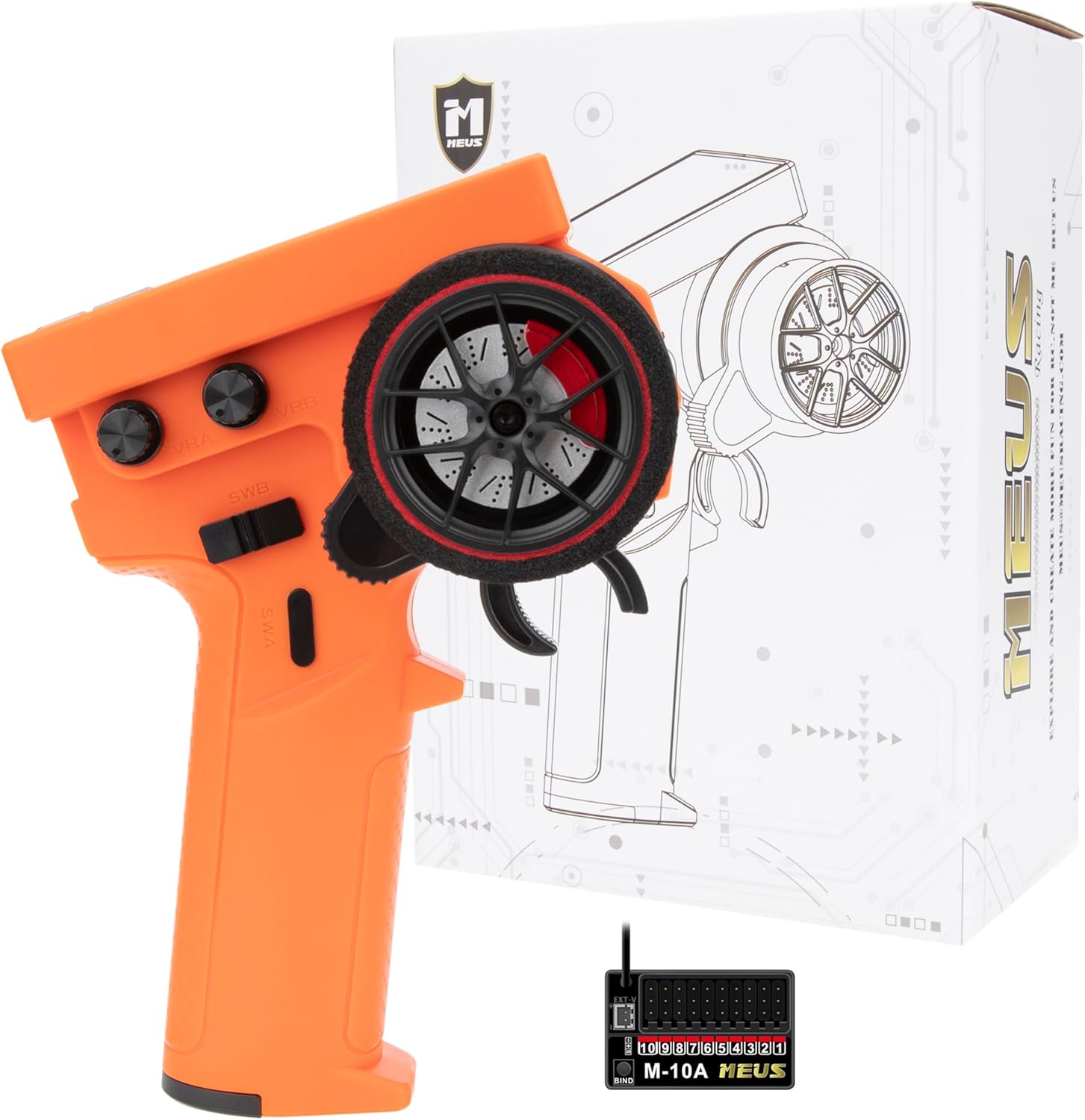
Figure 2.1: MEUS RACING ME-10B RC Transmitter and Receiver Kit (Orange version shown).

Figure 2.2: Overview of MEUS ME-10B key features including 3.15-inch color screen, 2.4GHz technology, Coach Mode, Cruise Control, Fail Safe, and 8 channels.
3. Setup
3.1 Battery Installation
The MEUS RACING ME-10B transmitter requires 1 AAA battery (included). Locate the battery compartment on the back of the transmitter, open it, insert the battery observing polarity, and close the compartment securely.
3.2 Initial Language Setting
Upon first use, or after a reset, the transmitter's display language might be set to Chinese. Follow these steps to change the language to English:
- Press the roller button to enter the settings interface.
- Navigate to the "System Setup" menu.
- Locate the "Language" option.
- Select "English" from the available options.
Video 3.1: This video demonstrates how to change the language setting from Chinese to English on the MEUS RACING ME-10B transmitter's display.
3.3 Binding the Receiver
To establish communication between the transmitter and receiver, a binding process is required. Refer to the detailed instructions provided in the receiver's specific manual or the transmitter's on-screen menu for the exact binding procedure. Typically, this involves putting both devices into binding mode and confirming the connection.
4. Operating Instructions
4.1 Basic Controls
- Steering Wheel: Controls the direction of your RC vehicle (left/right).
- Throttle Trigger: Controls the speed and direction (forward/reverse) of your RC vehicle. Pull for forward, push for reverse.

Figure 4.1: The ergonomic design of the MEUS ME-10B, highlighting the steering wheel and throttle trigger for one-hand operation.
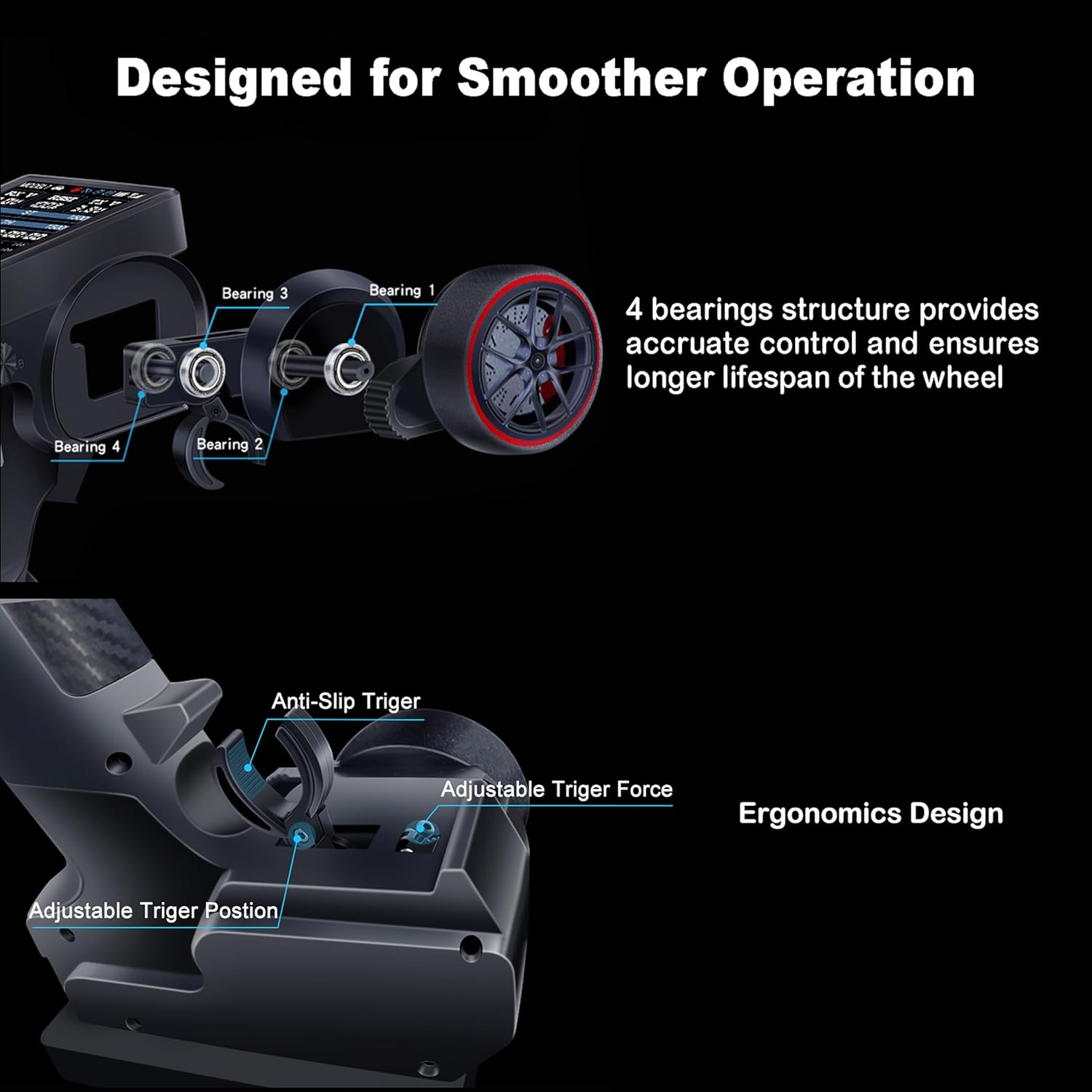
Figure 4.2: Illustration of the 4-bearing structure for accurate control and the adjustable anti-slip trigger for smoother operation.
4.2 Advanced Functions
4.2.1 Light Control (ME-01A 8CH Receiver)
The ME-10B transmitter, when paired with an ME-01A 8CH receiver, allows for advanced light control. The default settings for ports on the receiver are:
- No.1: Left turn signal
- No.2: Right turn signal
- No.3: Reversing light
- No.4: Headlight
- No.5: Parking light
- No.6: Flashing light
- No.7: Same voltage as receiver input
Specific light functions are controlled as follows:
- Parking Light: Throttle at mid-point.
- Right Turn Signal: Rotate the handwheel clockwise.
- Left Turn Signal: Rotate the handwheel anticlockwise.
- Reversing Light: Push the throttle trigger forward.
- Emergency Light: Rotate the handwheel clockwise three times from mid-point to max. position. Repeat to turn off.
- Headlight: Rotate the handwheel anticlockwise three times from mid-point to min. position. Repeat to turn off.
- Flashing Light: Rotate the handwheel twice from mid-point to max. position, then to min. position, and finally back to mid-point. Repeat to turn off.
You can customize these settings via the transmitter's menu:
- Press the roller button to enter the settings interface.
- Navigate to page 4, find "Control", and press the roller again to enter.
- Find "Car Light" and press the roller to enter.
- Here you can adjust settings for emergency light, headlight, and flashing light, including their assigned channels (e.g., Headlight at CH5, Emergency light at CH6, Flashing light at CH7 in the video demonstration).
Video 4.1: This video demonstrates how to use and configure the light control functions of the MEUS RACING ME-10B transmitter with an ME-01A 8CH receiver, including turn signals, reversing light, emergency light, headlight, and flashing light.
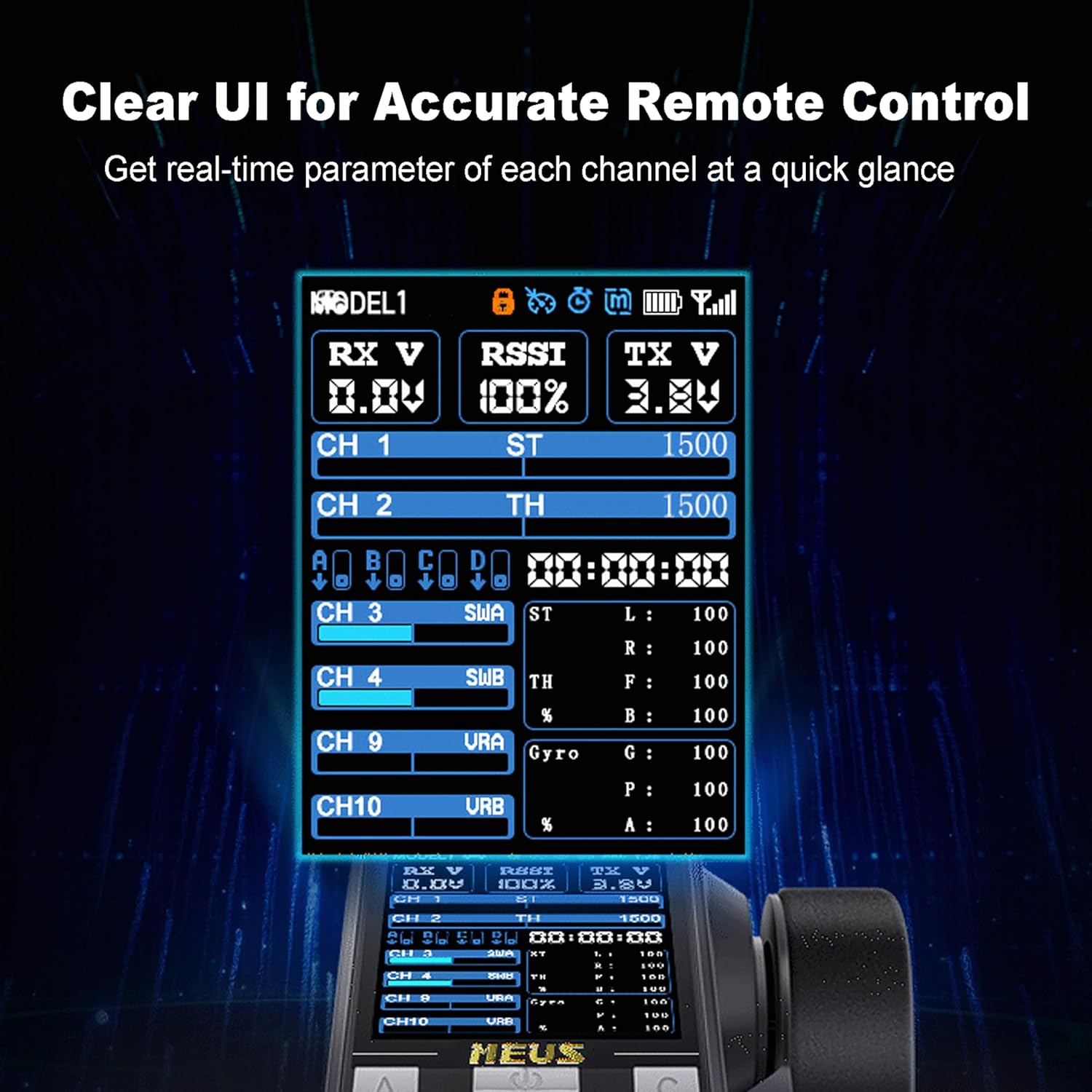
Figure 4.3: The clear UI and color screen of the MEUS ME-10B, showing real-time channel parameters and settings.
4.2.2 Coach Mode
The Coach Mode feature allows two ME-10B transmitters to control a single RC vehicle. One transmitter acts as the primary controller, while the other can be used for training or shared control, making it ideal for teaching new users or engaging in parent-child activities. Consult the transmitter's menu under "Training" for setup details.

Figure 4.4: An illustration depicting the Coach Mode, where two transmitters can control one RC car, facilitating training or shared driving experiences.
4.2.3 Channel Customization and Other Functions
The ME-10B offers extensive customization options for its 10 channels. You can remap channels and define button functions to suit your specific needs. Explore the "Remapping" and "Button Defin" sections within the transmitter's settings menu to configure these advanced options.

Figure 4.5: A comprehensive view of the MEUS ME-10B's menu system, showcasing various functions including Model Select, Channel, Mix Setup, Radio, System, Fine Tuning, Programme, Gyro Control, and Calibrations.
Additional functions such as Fail Safe, Cruise Control, and Low-Voltage Warning are integrated to enhance safety and control. Refer to the respective sections in the transmitter's menu for detailed configuration and usage.
5. Maintenance
- Cleaning: Use a soft, dry cloth to clean the transmitter and receiver. Avoid using harsh chemicals or solvents.
- Battery Care: The transmitter is rechargeable. Ensure to charge the battery regularly to maintain optimal performance. If storing for an extended period, charge the battery to approximately 50% to prolong its lifespan.
- Storage: Store the transmitter and receiver in a cool, dry place away from direct sunlight and extreme temperatures.
- Receiver Protection: The receiver is not designed to be waterproof. Avoid exposing it to water or high humidity. If operating in damp conditions, ensure adequate protection for the receiver.
6. Troubleshooting
- Transmitter Not Powering On: Check battery charge level and ensure it is correctly installed.
- No Response from Vehicle: Verify that the transmitter and receiver are properly bound. Check battery levels in both the transmitter and the RC vehicle. Ensure all connections are secure.
- Interference or Loss of Signal: Ensure you are operating within the specified range. Avoid areas with strong electromagnetic interference.
- Difficulty Navigating Menus: Some users have noted that the roller wheel for menu navigation can be sensitive. Practice gentle and precise movements. Refer to the manual's sections on specific functions for clarity.
- Language Issues: If the display is in an unfamiliar language, refer to Section 3.2 for instructions on changing the language to English.
- Receiver Damage from Water: As noted in user feedback, the receiver is not water-resistant. Any exposure to water can cause damage. Ensure the receiver is protected from moisture during operation.
7. Specifications
| Feature | Detail |
|---|---|
| Product Dimensions | 1 x 1 x 1 inches |
| Item Weight | 14 ounces |
| Country of Origin | China |
| ASIN | B0DMSQ6J36 |
| Item Model Number | MEUS-01-6011-12 |
| Manufacturer Recommended Age | 14 years and up |
| Batteries | 1 AAA batteries required (included) |
| Brand | MEUS RACING |
| Special Feature | Digital Display, Ergonomic, Lightweight |
| Color | Orange |
| Max Number of Supported Devices | 1 |
| Compatible Devices | RC Cars |
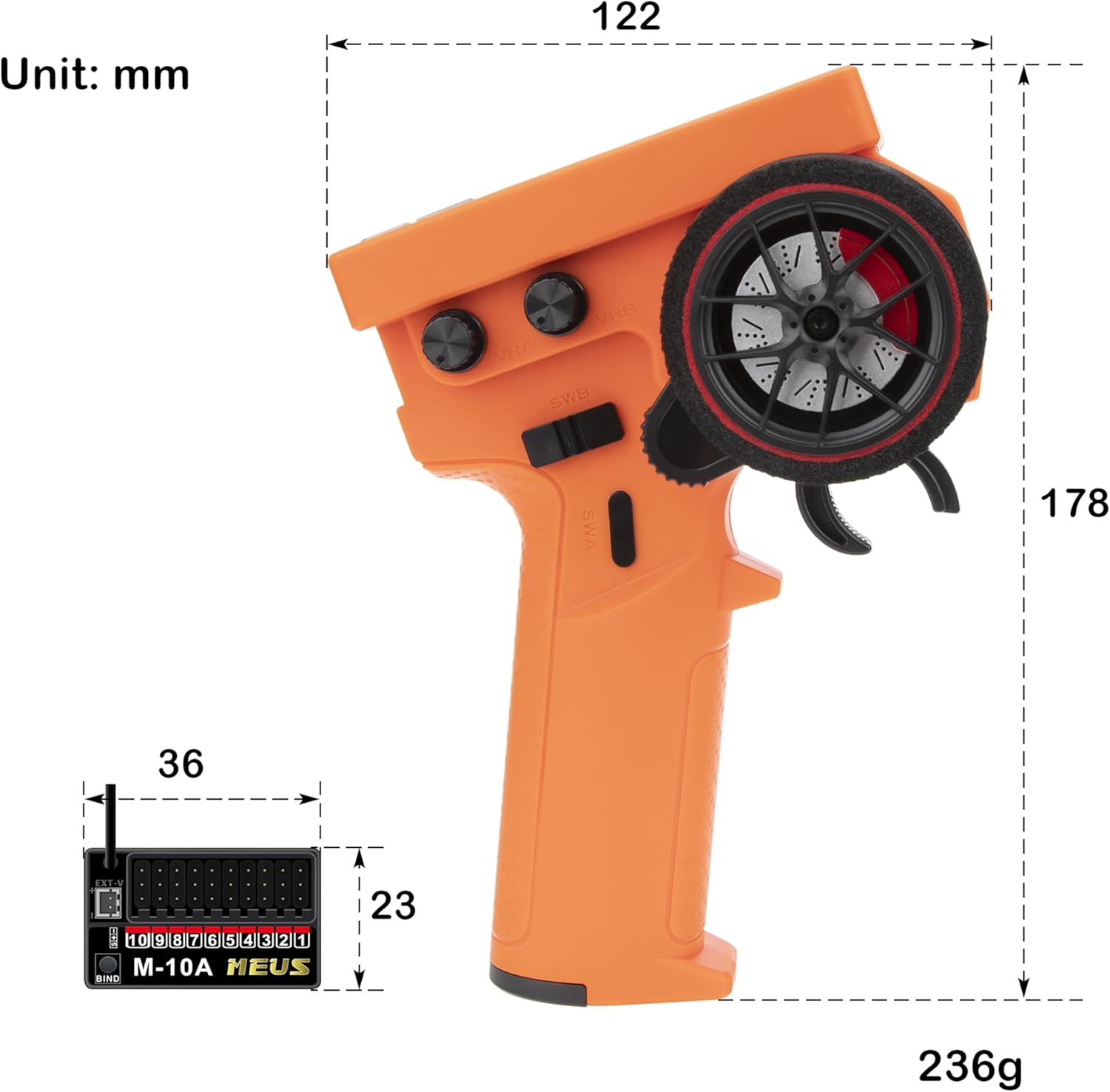
Figure 7.1: Technical drawing showing the dimensions of the MEUS ME-10B transmitter and its receiver in millimeters and grams.
8. Safety Information
- Age Recommendation: This product is recommended for users 14 years old and up.
- Supervision: Always operate RC vehicles under adult supervision, especially for younger users.
- Operating Environment: Operate your RC vehicle in open areas, away from people, pets, and obstacles. Avoid public roads, crowded places, and areas with potential hazards.
- Battery Safety: Use only the specified battery type. Do not short-circuit, disassemble, or expose batteries to extreme temperatures or fire. Dispose of batteries properly.
- Water Exposure: The receiver is not waterproof. Protect it from water and moisture to prevent damage.
- Modifications: Do not modify the transmitter or receiver. Unauthorized modifications may void the warranty and compromise safety.
9. Warranty and Support
For warranty information, technical support, or any inquiries regarding your MEUS RACING ME-10B RC Transmitter and Receiver, please contact MEUS RACING customer service directly. You can typically find contact information on the product packaging or through the official MEUS RACING store on Amazon: MEUS RACING Amazon Store.


