
Introduction
Thank you for choosing the PERFORMANCE GURU Professional Indoor Air Quality Monitor AK16. This device is designed to provide accurate and real-time measurements of various indoor air quality parameters, helping you maintain a healthier environment. This manual provides essential information on the setup, operation, and maintenance of your air quality monitor.
Product Overview
The AK16 is a versatile 9-in-1 air quality monitor capable of detecting multiple pollutants and environmental factors. It features a clear display for easy reading of measurements.
Key Features
- PM2.5 and PM10 detection
- Carbon Dioxide (CO2) detection
- Temperature and Humidity detection
- Formaldehyde (HCHO) detection
- Total Volatile Organic Compounds (TVOC) detection
- Time display
- Audible alarm for safety standards
Component Identification
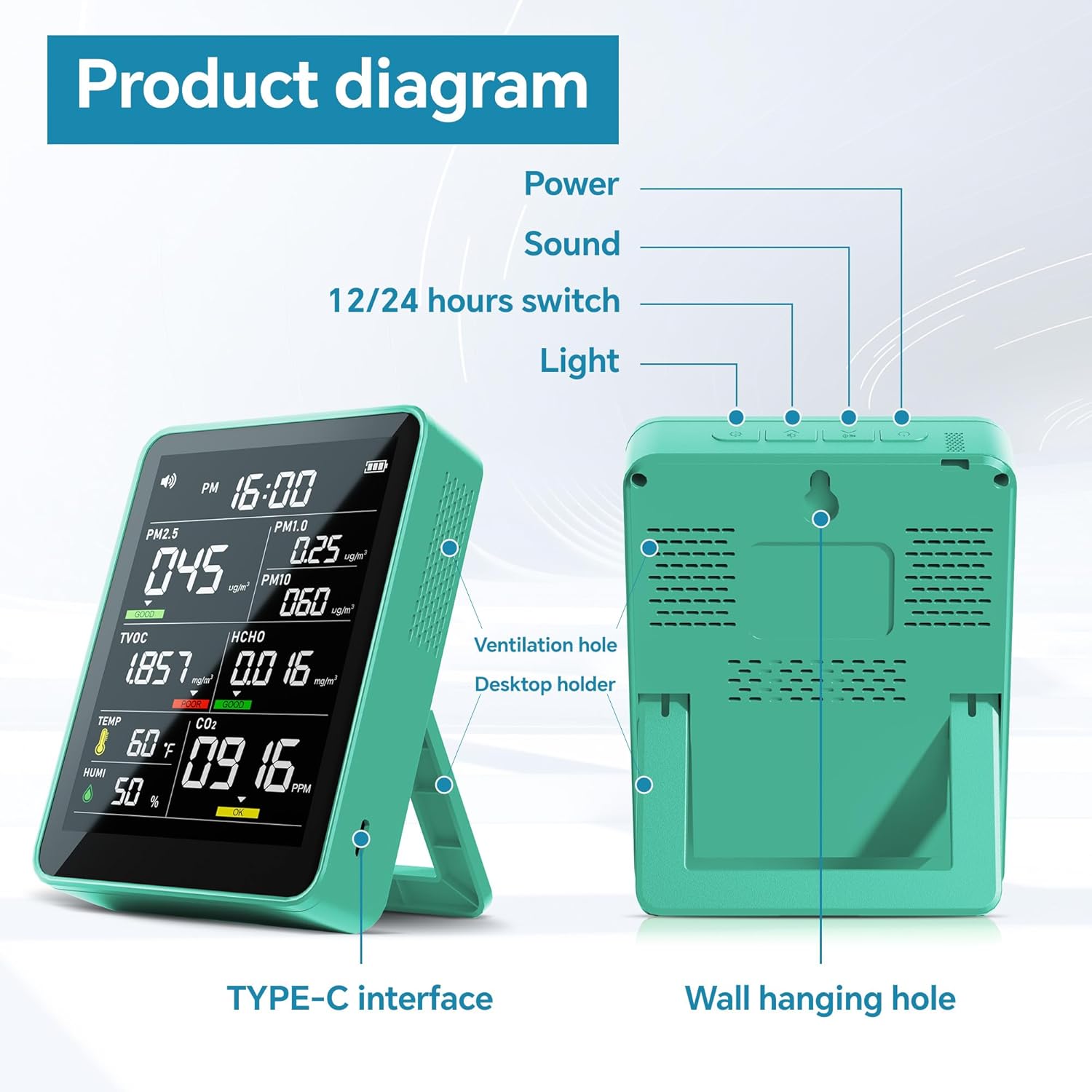
This image illustrates the various physical components of the AK16 monitor, including the power button, sound control, time format switch, display light control, ventilation holes for sensor operation, the integrated desktop holder, the USB Type-C charging port, and a wall hanging hole for flexible placement.

This image details the information presented on the monitor's display, including readings for PM2.5, PM1.0, PM10, TVOC, HCHO, Temperature, Humidity, and CO2, along with indicators for time, sound status, and battery level. Green, yellow, and red color codes indicate air quality status for various parameters.
Setup
First Use and Charging
The monitor is powered by a built-in Lithium Ion battery. Before first use, ensure the device is fully charged using the provided USB Type-C cable. Connect the cable to the TYPE-C interface on the device and a suitable USB power source.
Powering On/Off
To power on the device, press and hold the power button located on the top of the monitor. To power off, press and hold the power button again until the display turns off.
Operating Instructions
Understanding the Display
Once powered on, the monitor will begin taking readings and display them in real-time. The display shows values for PM2.5, PM1.0, PM10, TVOC, HCHO, Temperature, Humidity, and CO2. Color indicators (Green, Yellow, Red) provide a quick visual assessment of air quality levels for certain parameters.
Clearing Displayed Data
When using the monitor for the first time, or if you wish to reset the displayed data, press and hold the power button until you hear two distinct "beeps." This action will clear the current displayed data and initiate a fresh measurement cycle.
Time Display Adjustment
The monitor displays the current time. Use the 12/24 hours switch button (as indicated in the product diagram) to toggle between 12-hour and 24-hour time formats.
Air Quality Reference Table
Refer to the table below for a general understanding of air quality statuses based on detected gas levels. These guidelines help interpret the monitor's readings.

This table provides a reference for interpreting the air quality status (Good, Moderate, Poor) based on the measured concentrations of CO2, TVOC, HCHO, and PM2.5. Each category is associated with specific concentration ranges and a corresponding color indicator (Green, Yellow, Red).
Safety and Alarms
The AK16 monitor is equipped with an audible alarm system to alert users when air quality parameters exceed predefined safety standards. This feature acts as an early warning system.

This image demonstrates the monitor's siren warning feature. When air quality levels, such as TVOC or HCHO, exceed safe thresholds, the display will show a red warning, and an audible alarm will sound, prompting immediate attention to improve air quality.
The sound display icon on the screen indicates the status of the audible alarm. You can control the sound settings using the dedicated sound button on the device.
Maintenance
To ensure the longevity and accuracy of your air quality monitor, follow these maintenance guidelines:
- Cleaning: Gently wipe the device with a soft, dry cloth. Do not use abrasive cleaners or solvents, as these can damage the sensors or casing.
- Ventilation: Ensure the ventilation holes are not obstructed to allow for proper air circulation to the sensors.
- Storage: Store the monitor in a cool, dry place away from direct sunlight and extreme temperatures when not in use.
- Battery Care: Recharge the battery regularly to maintain its health, especially if the device will not be used for an extended period.
Troubleshooting
If you encounter issues with your air quality monitor, consider the following:
- No Display/Device Not Turning On: Ensure the battery is charged. Connect the device to a power source and try turning it on again.
- Inaccurate Readings: Perform a data clear by pressing and holding the power button until two beeps are heard. Ensure the device is placed in an area with good air circulation and away from direct sources of pollution or strong drafts.
- Alarm Sounds Frequently: Check the air quality reference table to understand the levels triggering the alarm. Improve ventilation in the area if pollutant levels are high.
- Display Issues: If the display is dim, check the light button setting.
Specifications
| Feature | Specification |
|---|---|
| Part Number | AK16 |
| Power Source Type | Battery Powered |
| Item Package Quantity | 1 |
| Batteries Included? | Yes |
| Batteries Required? | Yes |
| Battery Cell Type | Lithium Ion |
| Weight | 227 g |
| Length | 2.83 inches |
| Width | 4.33 inches |
| Height | 10.63 inches |
| Item Model Number | AK16 |
| Product Dimensions | 7.19 x 11 x 27 cm; 226.8 g |
| ASIN | B0DMSMR24Q |
| Batteries | 1 Lithium Ion batteries required. (included) |
| Date First Available | 22 April 2025 |
| Brand | PERFORMANCE GURU |
| Power Source | Battery Powered |
| Item Weight | 227 g |
| Alarm | Audible |
| UPC | 717701252132 |
Warranty and Support
Specific warranty details and direct support contact information are not provided within this manual. Please refer to the product packaging or the retailer's website for warranty claims and customer support inquiries.