
Introduction
Thank you for choosing the YITAHOME 52-inch Black Ceiling Fan with Light. This manual provides detailed instructions for the safe installation, operation, and maintenance of your new ceiling fan. Please read this manual thoroughly before installation and keep it for future reference.
Important Safety Information
WARNING: To reduce the risk of fire, electric shock, or personal injury, always follow these basic precautions:
- Read all instructions carefully before installing and operating the fan.
- Ensure all electrical connections comply with local codes, ordinances, and the National Electrical Code (NEC).
- All wiring must be performed by a qualified electrician.
- Disconnect power at the main circuit breaker before working on the fan.
- The fan must be mounted to a ceiling joist or support structure capable of supporting a minimum of 35 lbs (15.9 kg).
- Do not bend the blade holders during installation, balancing, or cleaning.
- Keep hands clear of the fan blades when the fan is operating.
- Do not operate the fan if any part is damaged.
- This fan is designed for indoor use only.
Package Contents
Verify that all components listed below are included in your package:
- Ceiling Fan Motor Assembly
- Fan Blades (3)
- Remote Control and Receiver
- Downrods (4.5 inches and 12 inches)
- Mounting Bracket
- Canopy
- Light Kit Assembly
- Hardware Pack (screws, washers, wire nuts)
- Instruction Manual
Setup and Installation
Proper installation is crucial for the safe and efficient operation of your ceiling fan. If you are unsure about any steps, consult a qualified electrician.
1. Prepare for Installation
- Turn off power at the circuit breaker.
- Ensure the mounting location can support the fan's weight.
- Gather necessary tools (screwdriver, wire strippers, ladder, etc.).
2. Install Mounting Bracket
Secure the mounting bracket to the ceiling junction box. Ensure it is firmly attached to a structural beam.
3. Assemble Downrod and Motor
Choose the appropriate downrod (4.5 inches or 12 inches) for your ceiling height. Feed the motor wires through the downrod and secure the downrod to the motor assembly.

Image: Mounting options for the ceiling fan, illustrating both vertical (4.5-inch downrod) and slanted (12-inch downrod, up to 15-degree tilt) installations.
4. Hang Fan Assembly
Carefully lift the fan motor assembly and hang it on the mounting bracket hook (if available) or have someone assist you while making electrical connections.
5. Electrical Connections
Connect the fan's electrical wires to the house wiring according to the wiring diagram provided in the separate wiring guide. Ensure all connections are secure with wire nuts.
6. Attach Fan Blades
Securely attach the three fan blades to the motor housing using the provided screws. Ensure all screws are tightened.
7. Install Light Kit
Connect the light kit wires to the fan motor assembly wires and secure the light kit to the bottom of the fan motor housing.
8. Secure Canopy
Slide the canopy up to the ceiling and secure it to the mounting bracket with the provided screws, ensuring all wiring is neatly tucked inside.
Operating Instructions
Your YITAHOME ceiling fan is controlled by the included remote control. Ensure batteries are installed correctly in the remote.

Image: The YITAHOME ceiling fan installed, demonstrating remote control functionality.
Remote Control Functions:

Image: Detailed view of the remote control, highlighting buttons for various fan and light functions.
- Power On/Off: Press the power button to turn the fan on or off.
- Fan Speed (1-6): Use buttons 1 through 6 to adjust the fan speed. Level 1-2 is ideal for sleeping or reading, Level 3-4 for general comfort or parties, and Level 5-6 for fitness or sports activities.
- Light On/Off: Press the light bulb button to turn the light on or off.
- Light Color Temperature: Press the "Light CCT" button to cycle through 3000K (Warm White), 4500K (Clear White), and 6000K (Cool White) color temperatures.
- Forward/Reverse Rotation: Press the forward/reverse button to change the direction of the fan blades.
- Summer Mode (Downdraft): Blades rotate counter-clockwise, pushing cool air down.
- Winter Mode (Updraft): Blades rotate clockwise, pulling warm air up.
- Timer Modes: Set the fan to turn off automatically after 1, 2, 4, 8, or 12 hours.
- Natural Wind Mode: Activates a varying fan speed to simulate a natural breeze.
- Sleep Mode: The fan will automatically cycle through wind speeds 1-3 to provide a comfortable sleeping environment.

Image: Visual guide for recommended fan speed levels based on activity.

Image: Demonstration of the adjustable light color temperatures (Warm White, Clear White, Cool White).

Image: Explanation of summer (downdraft) and winter (updraft) fan modes.
Video Demonstration:
Video: A brief demonstration of the YITAHOME ceiling fan's features and operation.
Maintenance
Regular maintenance ensures the longevity and optimal performance of your ceiling fan.
- Cleaning: Periodically clean the fan blades and motor housing with a soft, damp cloth. Do not use abrasive cleaners or solvents.
- Tighten Screws: Check all screws on the fan blades and mounting hardware annually to ensure they are secure.
- Lubrication: The DC motor is permanently lubricated and does not require additional oiling.
- Light Kit: If the LED light fails, contact customer support for assistance. Do not attempt to replace the LED module yourself.
Troubleshooting
If you experience issues with your ceiling fan, refer to the following common problems and solutions:
| Problem | Possible Cause | Solution |
|---|---|---|
| Fan does not start | No power to the fan; Loose wire connections; Remote control issues. | Check circuit breaker; Verify all wire connections are secure; Replace remote batteries; Re-pair remote if necessary. |
| Fan is noisy | Loose screws; Blades unbalanced; Motor housing rubbing. | Tighten all blade and mounting screws; Check for bent blades; Ensure canopy is not touching the ceiling. |
| Light does not work | Loose wire connection; Faulty LED module. | Check light kit wiring connections; Contact customer support for LED module replacement. |
| Remote control not working | Dead batteries; Remote not paired. | Replace batteries; Follow remote pairing instructions (refer to separate remote manual if provided). |
Specifications
| Feature | Detail |
|---|---|
| Brand | YITAHOME |
| Model Number | MAYIHIDtYe |
| Size | 52 inches |
| Number of Blades | 3 |
| Color | Black |
| Motor Type | DC Motor |
| Number of Speeds | 6 |
| Light Type | Integrated LED |
| Color Temperature | Adjustable (3000K, 4500K, 6000K) |
| Control Method | Remote Control |
| Timer Modes | 1H, 2H, 4H, 8H, 12H |
| Downrod Lengths | 4.5 inches, 12 inches |
| Sloped Ceiling Support | Up to 15 degrees |
| Noise Level | 35 Decibels (Quiet Operation) |
| Wattage | 22 watts |
| Product Dimensions | 52"D x 52"W x 20"H |
| Item Weight | 16.3 Pounds |
| Indoor/Outdoor Use | Indoor |
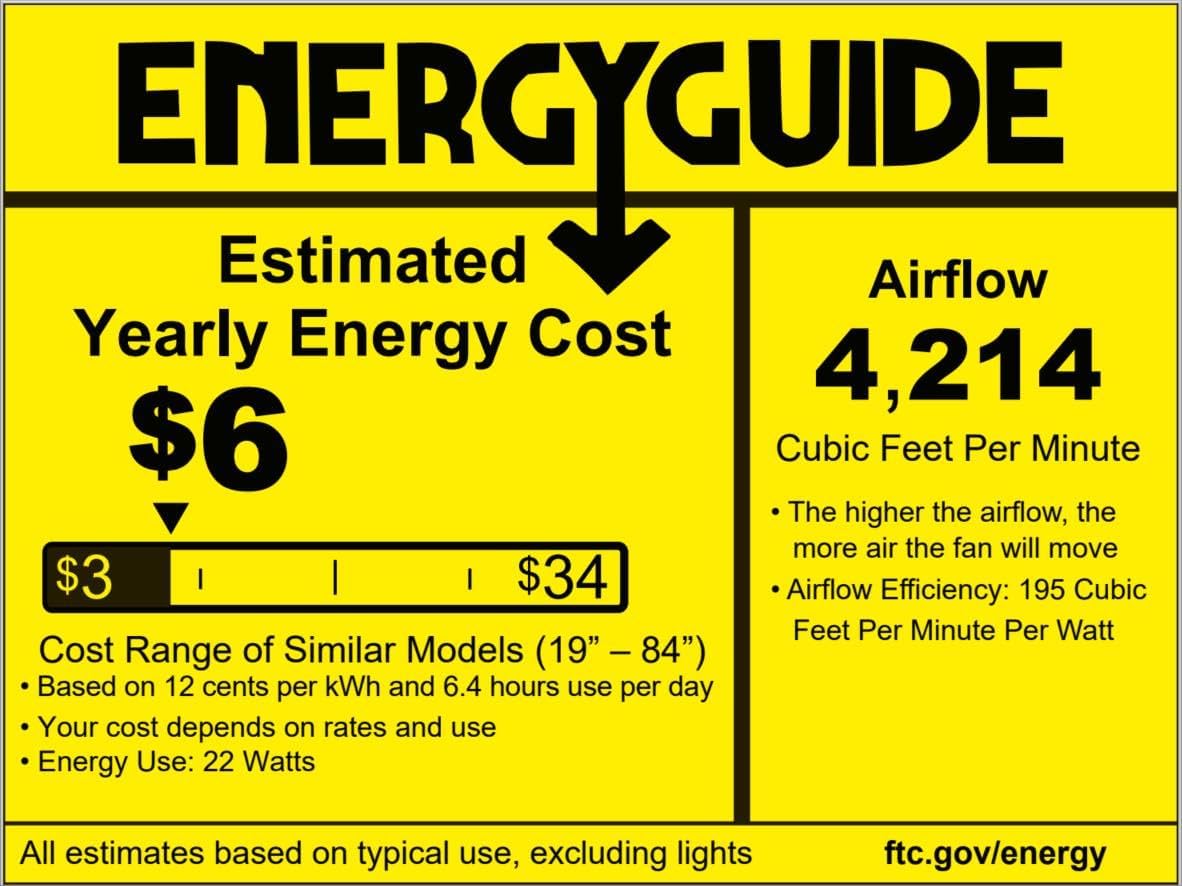
Image: EnergyGuide label providing estimated yearly energy cost and airflow information.
Warranty and Support
YITAHOME products are designed for quality and durability. For specific warranty details, please refer to the warranty card included with your purchase or visit the official YITAHOME website.
If you encounter any issues or have questions regarding your YITAHOME ceiling fan, please contact our customer support team:
- Email: [Insert Customer Support Email Here]
- Phone: [Insert Customer Support Phone Number Here]
- Website: www.yitahome.com
Please have your model number (MAYIHIDtYe) and purchase date ready when contacting support.