
mifo FiiTii S
mifo FiiTii S Noise Cancelling Bluetooth Earbuds User Manual
Model: FiiTii S | Brand: mifo
Introduction
Thank you for choosing the mifo FiiTii S Noise Cancelling Bluetooth Earbuds. These advanced earbuds feature an AMOLED touchscreen smart charging case, Bluetooth 5.4 connectivity, IPX7 waterproofing, and a built-in MP3 player with preloaded relaxing audio. Designed for comfort and superior sound quality, the FiiTii S earbuds are perfect for music, meditation, and stress relief.
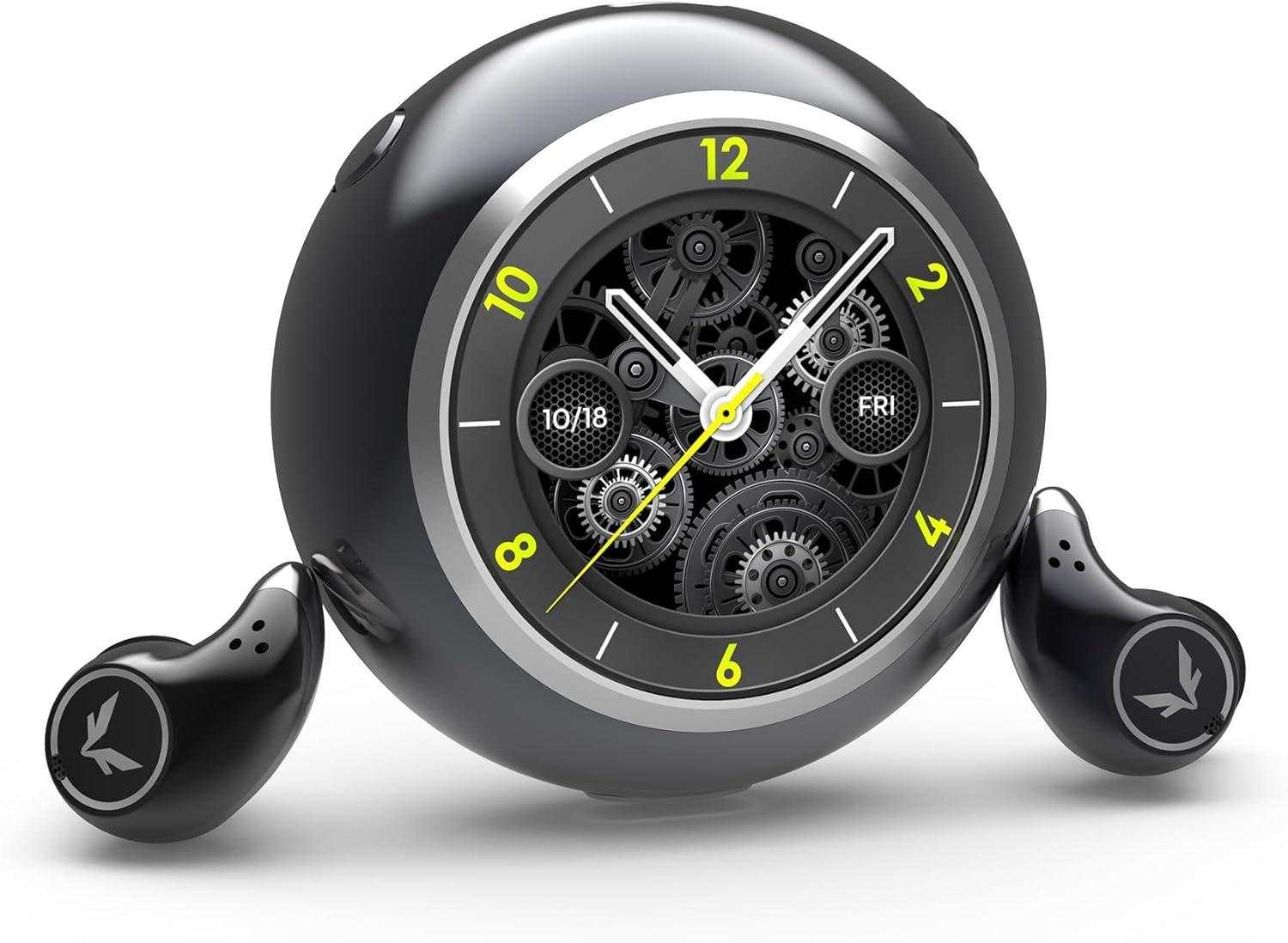
Image: The mifo FiiTii S earbuds with their unique spherical smart charging case, featuring a clock display.
What's in the Box
Please check the package contents to ensure all items are present:
- FiiTii S Earbuds (1 pair)
- Smart Charging Case (1)
- Ear Cushions (3 pairs - various sizes)
- Charging and Data Transfer Cable (1)
- User Manual (this document)

Image: The mifo FiiTii S earbuds securely placed within their open charging case.
Setup Guide
1. Initial Charging
Before first use, fully charge the FiiTii S charging case and earbuds. Place the earbuds into the charging case. Connect the provided charging cable to the case and a USB power source. The charging case has a 600 mAh battery capacity and takes approximately 1.5 hours to fully charge.
2. Selecting Ear Tips
For optimal sound quality and comfort, choose the ear tips that best fit your ear canal. The package includes three different sizes of ear cushions. A snug fit is crucial for effective noise cancellation and audio performance.
3. Bluetooth Pairing
The FiiTii S earbuds utilize Bluetooth 5.4 for faster and more stable connectivity. They are compatible with iOS, Android, and all devices with Bluetooth connectivity.
- Ensure the earbuds are in the charging case and the case is open.
- On your device (smartphone, tablet, etc.), go to Bluetooth settings and enable Bluetooth.
- Select "FiiTii S" from the list of available devices to pair.
- Once paired, the earbuds will automatically connect to your device when removed from the case.

Image: The FiiTii S earbuds can connect to both a phone and the charging case for audio playback. Note: Only one device can be connected at a time; disconnect the other when switching.

Image: Visual representation of Bluetooth 5.4 technology, highlighting faster, more stable, and lower consumption connectivity.
Operating Instructions
Charging Case Controls

Image: Diagram showing the left and right buttons on the charging case and their functions.
- Power On: Press and hold the left button for 3 seconds.
- Shutdown: Press and hold the left + right buttons for 3 seconds.
- Play/Pause Music: Click the left button.
- Previous Song: Double left click.
- Next Song: Double right click.
- Turning the screen on/off: Click the right button.
Earbud Touch Controls

Image: Diagram illustrating touch controls on the left and right earbuds.
- Answer/Hangup Phone Call: Double tap left/right earbud.
- Noise Cancellation Modes: Press left/right earbud for 3 seconds to cycle through Strong Noise Cancellation, Mild Noise Cancellation, and Transparency Mode.
- Volume Down: Tap left earbud 1 time.
- Volume Up: Tap right earbud 1 time.
- Previous Song: Triple tap left earbud.
- Next Song: Triple tap right earbud.
- Low Latency Mode: Tap left/right for 5 times.
- Sleep Mode (Headphones not connected to device): Press simultaneously for 2 seconds on the left + right ear.
Active Noise Cancellation (ANC) and Transparency Mode
The FiiTii S earbuds feature advanced six-microphone Active Noise Cancellation (ANC) technology, offering three distinct modes:
- Strong Noise Cancellation: Maximizes noise reduction for immersive listening.
- Mild Noise Cancellation: Provides a balanced level of noise reduction.
- Transparency Mode: Allows you to hear your surroundings clearly without removing the earbuds. This is useful for awareness in busy environments.
Cycle through these modes using the earbud touch controls as described above.

Image: A person enjoying music with the earbuds, illustrating the effect of 6-mic smart noise cancellation for clear and quiet listening.

Image: Two people interacting, demonstrating the transparency mode feature that allows users to hear the world around them without removing their earbuds.

Image: Detailed diagram showing the placement and function of the six microphones for noise cancellation, including feedforward, ear canal, and call microphones.
Built-in MP3 Player and Preloaded Audio
The charging case features 8GB of built-in storage, allowing you to download audiobooks and music directly from your computer. This enables independent playback without needing your phone.
The charging case also comes preloaded with beginner-friendly meditation audios, breathing exercises, soothing wooden fish sounds, and white noise, designed to enhance focus, reduce anxiety, relieve stress, and improve sleep quality.

Image: Four-panel image showcasing the multi-functionality of the charging case: Breathing Training, MP3 Player, Pomodoro Timer, and White Noise.

Image: Illustration of the 8GB memory and built-in player, indicating support for MP3, WMA, WAV, FLAC, and AMR audio formats.
Official Product Video
Video: An official product video titled "FiiTii S Sleep Meditation Wireless Headphones" by YY Morul, demonstrating key features such as one-button lid release, HiFi sound quality, 6-mic ANC, compact design for side sleeping, dual connectivity (phone and case), built-in meditation and white noise audio, and IPX7 waterproofing. (Duration: 0:36)
Maintenance
Water Resistance
The FiiTii S earbuds are IPX7 professional-grade water resistant, meaning they are built to withstand rain and sweat. This makes them suitable for workouts and outdoor activities. Note: The charging case is NOT waterproof. Avoid exposing the charging case to water or excessive moisture.

Image: The mifo FiiTii S earbuds being splashed with water, demonstrating their IPX7 water resistance.
Cleaning and Storage
Regularly clean your earbuds and charging case to maintain optimal performance and hygiene. Use a soft, dry, lint-free cloth. Do not use abrasive cleaners or solvents. Store the earbuds in their charging case when not in use to protect them and keep them charged.
Troubleshooting
If you encounter any issues with your mifo FiiTii S earbuds, please refer to the following common solutions:
- Earbuds not pairing or connecting:
- Ensure both earbuds are fully charged.
- Place both earbuds back into the charging case, close the lid, wait a few seconds, then open the lid again.
- On your device, "forget" or "unpair" the "FiiTii S" from your Bluetooth settings, then attempt to pair again.
- Restart your Bluetooth device.
- One earbud not working:
- Ensure both earbuds are charged.
- Place both earbuds in the case and close the lid. Open after a few seconds. This often re-syncs them.
- Perform a factory reset if available (refer to specific instructions in the full user guide if provided).
- Poor sound quality or low volume:
- Check the ear tip fit. An improper seal can significantly affect sound quality and bass.
- Clean any debris from the earbud nozzles.
- Ensure your device's volume is turned up.
- Move closer to your connected device to avoid interference.
- Charging case not charging:
- Try a different charging cable and power adapter.
- Ensure the charging port is clean and free of debris.
For more detailed troubleshooting or persistent issues, please refer to the full user guide PDF available online or contact mifo customer support.
Specifications
| Feature | Detail |
|---|---|
| Model Name | FiiTii S |
| Brand | mifo |
| Noise Control | Active Noise Cancellation (ANC) |
| Connectivity Technology | Wireless (Bluetooth 5.4) |
| Bluetooth Range | 12 Meters |
| Water Resistance Level | IPX7 (Earbuds only) |
| Control Type | Touch Control |
| Audio Driver Type | Planar Magnetic Driver |
| Frequency Range | 20Hz - 20,000Hz |
| Impedance | 16 Ohm |
| Carrying Case Battery Capacity | 600 Milliamp Hours |
| Carrying Case Battery Charging Time | 1.5 Hours |
| Built-in Storage | 8GB (for MP3 playback) |
| Material | Plastic, Metal |
| Item Weight | 6.4 ounces |
Warranty and Support
For warranty information and customer support, please refer to the official mifo website or the contact details provided with your purchase. You can also find the official User Guide (PDF) at this link.
If you require further assistance, please contact mifo customer service directly.