
1. Introduction
Thank you for choosing the LIVELYGLOW Small Makeup Vanity Desk with Lighted Mirror. This manual provides essential information for the assembly, operation, and maintenance of your new vanity desk. Please read these instructions carefully before beginning assembly or use to ensure safe and proper functionality.
This compact vanity desk features a Smart LED Mirror with adjustable lighting, multiple storage options including two drawers and open shelves, and a sturdy design. Its dimensions are 23.62" W x 15.74" D x 53.93" H, making it suitable for various spaces.

Image: The LIVELYGLOW Small Makeup Vanity Desk in pink, featuring a lighted mirror, two drawers, and open shelving.
2. Safety Information
Please observe the following safety precautions:
- Assembly may require tools and careful handling to avoid injury.
- Always unplug and allow electrical components (mirror light) to cool before handling or cleaning.
- Keep electrical components away from water to prevent electric shock.
- Avoid overloading power strips if using one for the mirror light.
- Ensure all screws and fasteners are securely tightened during assembly to maintain stability.
3. Package Contents
Before assembly, verify that all components are present and undamaged. Refer to the included parts list in your physical package for exact quantities. Typical components include:
- Main desk panels (top, side, bottom, back)
- Drawer components (fronts, sides, backs, bottoms)
- Shelving units
- Smart LED Mirror
- Assembly hardware (screws, dowels, cam locks, drawer slides)
- Assembly tools (basic screwdriver, hex key - a personal screwdriver is recommended for ease)
4. Setup and Assembly
Assembly is required for this vanity desk. Follow the step-by-step instructions provided in your product packaging. The process is designed for minimal effort, but careful attention to detail is crucial for stability and proper function.
4.1. Preparation
- Clear a spacious, clean area for assembly.
- Lay out all parts and hardware, comparing them against the package contents list.
- Gather necessary tools: a Phillips head screwdriver (preferably a full-sized one, not the small one often included), and a hammer (for dowels). A power drill with appropriate bits may expedite the process for some screws.
4.2. Assembly Steps (General Overview)
- Assemble the Base Structure: Connect the side panels to the bottom shelf and the main desk surface using the provided hardware. Ensure all connections are tight.
- Install Drawers: Attach drawer slides to the desk frame and assemble the drawer boxes. Insert the assembled drawers into the slides. Ensure drawer rails face the correct direction for smooth operation.
- Attach Shelving Unit: Secure the upper shelving unit to the main desk surface.
- Mount the Mirror: Carefully attach the Smart LED Mirror to the designated area on the desk. Connect the power cable for the mirror.
- Final Checks: Verify all screws and fasteners are secure. Gently test the stability of the desk.
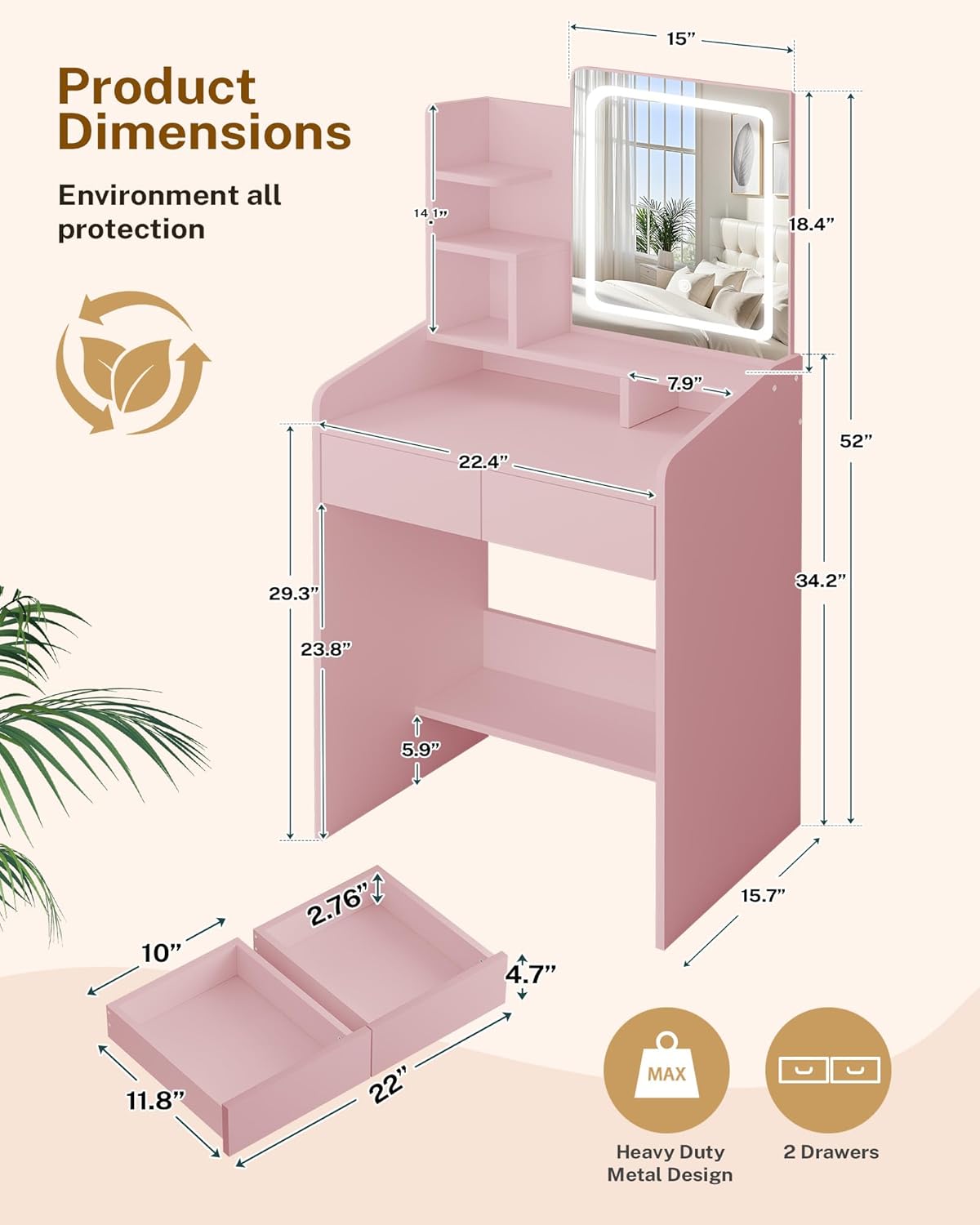
Image: Detailed product dimensions, including overall height (52"), width (23.62"), depth (15.74"), and drawer measurements.

Image: An overhead view illustrating the various storage compartments, including two drawers, three open shelves on the left, and an additional open shelf at the bottom right.

Image: Close-up details highlighting the curved side design to prevent items from falling, the smooth metal slide rails for drawers, and the double drawer system with clear partitions for organization.
5. Operating Instructions: Smart LED Mirror
The integrated Smart LED Mirror offers customizable lighting to suit your needs.
5.1. Power On/Off and Light Mode Selection
- Locate the touch-sensitive control panel on the mirror surface.
- Tap the power icon (⏻) to turn the mirror light on or off.
- With the light on, tap the power icon again to cycle through the three distinct lighting modes: Warm White (3000K), Natural White (4000K), and Cool White (6000K).
5.2. Brightness Adjustment (Stepless Dimming)
- While the mirror light is on, long press the power icon (⏻).
- The brightness will gradually increase or decrease. Release your finger when the desired brightness level is reached.

Image: Visual guide demonstrating the three color temperature options (Cool White, Natural White, Warm White) and the touch control for adjusting brightness by long-pressing the power icon.

Image: A close-up view of the Smart LED Mirror, highlighting the touch control icon for easy operation of the lighting features.
6. Maintenance
To ensure the longevity and appearance of your LIVELYGLOW vanity desk, follow these simple maintenance guidelines:
- Cleaning the Surface: The desk surface is designed to be virtually maintenance-free and waterproof. Simply wipe away dust and stains gently with a dry cloth. For stubborn marks, a slightly damp cloth followed by a dry cloth can be used. Avoid abrasive cleaners or harsh chemicals.
- Mirror Care: Clean the mirror surface with a soft, lint-free cloth and a glass cleaner. Do not spray cleaner directly onto the mirror; instead, apply it to the cloth first. Ensure the mirror is unplugged before cleaning.
- Hardware Check: Periodically check all screws and fasteners to ensure they remain tight. Re-tighten if necessary to maintain the desk's stability.
- Avoid Excessive Weight: Do not place excessively heavy items on the shelves or desk surface to prevent damage or instability.
7. Troubleshooting
If you encounter any issues with your vanity desk, refer to the following common problems and solutions:
- Mirror Light Not Working:
- Ensure the power cable is securely plugged into both the mirror and a functional power outlet.
- Check if the outlet is receiving power by testing it with another device.
- Gently tap the touch control button to ensure it registers the input.
- Desk Feels Unstable/Wobbly:
- Re-check all assembly screws and fasteners. Tighten any loose connections.
- Ensure the desk is placed on a flat, even surface.
- Verify that all components were assembled according to the instructions, especially the dual-support system of the cabinet and robust plate design.
- Drawers Do Not Slide Smoothly:
- Ensure the drawer slides are installed correctly and are aligned.
- Check for any obstructions within the drawer slides.
- Verify that the drawer boxes are assembled squarely.
8. Specifications
| Feature | Detail |
|---|---|
| Brand | LIVELYGLOW |
| Model Number | LV-Square new-vc |
| Product Dimensions (Overall) | 23.62" W x 15.74" D x 53.93" H (15.74 x 23.62 x 53.93 inches) |
| Item Weight | 46.3 pounds |
| Color | Pink |
| Frame Material | Engineered Wood |
| Assembly Required | Yes |
| Product Care Instructions | Wipe with Dry Cloth |
| UPC | 793466208478 |
| Mirror Type | Smart LED Mirror (14.6" x 17.4") |
| Lighting Modes | Warm White (3000K), Natural White (4000K), Cool White (6000K) |
| Dimming | Stepless Dimming |
| Storage | 2 Drawers, 3 Open Shelves, 1 Large Bottom Bag Rack |
9. Warranty and Support
LIVELYGLOW provides a warranty that ensures your satisfaction and peace of mind. For specific warranty details, please refer to the documentation included with your purchase or visit the official LIVELYGLOW website.
For technical support, missing parts, or any questions regarding your LIVELYGLOW Small Makeup Vanity Desk, please contact our customer service team:
- Website: Visit the LIVELYGLOW Store on Amazon
- Email: [Insert Customer Service Email Here, if available]
- Phone: [Insert Customer Service Phone Number Here, if available]
When contacting support, please have your model number (LV-Square new-vc) and purchase information readily available.


