
Pawfly Pawfly-CW2585-EU
Pawfly Aquarium LED Light (Model Pawfly-CW2585-EU)
User Manual
Introduction
This manual provides detailed instructions for the installation, operation, and maintenance of your Pawfly Aquarium LED Light. This full-spectrum LED light is designed to enhance your aquatic environment with various lighting modes, including 24/7 natural simulation, D/N mode, and customizable DIY settings. Please read this manual thoroughly before use to ensure proper function and longevity of the product.
Safety Information
- Always disconnect the power supply before performing any maintenance or installation.
- Ensure the power cord and adapter are not damaged. Do not use if damaged.
- This product is designed for indoor aquarium use only.
- Do not attempt to disassemble or modify the light.
- Keep out of reach of children.
- The light is IP68 waterproof and can be fully submerged. However, the power adapter and controller are not waterproof and must be kept dry.

Image: The Pawfly Aquarium LED Light fully submerged in water, illustrating its IP68 waterproof design, which allows for complete submersion without damage or electrical leakage.
Package Contents
Please check the package for the following items:
- Pawfly Aquarium LED Light
- Power Adapter
- Remote Controller (integrated with power cord)
- Suction Cups for mounting
- Velcro strips for mounting
Setup
Follow these steps to install your Pawfly Aquarium LED Light:
- Choose Mounting Method: The light can be installed using either the provided suction cups or Velcro strips.
- Suction Cup Installation: Attach the suction cups to the ends of the light fixture. Press the suction cups firmly onto a clean, smooth surface inside your aquarium. Ensure they are securely fastened.
- Velcro Strip Installation: Peel off the protective backing from one side of the Velcro strips and attach them to the light fixture. Peel off the backing from the other side and attach the light to a desired location on the aquarium glass (e.g., under the hood or on the side).
- Positioning: Position the light to achieve optimal illumination for your aquarium. The light is fully submersible, allowing for flexible placement.
- Connect Power: Connect the power adapter to the light's controller and then plug the adapter into a suitable power outlet. Ensure the controller remains outside the water.

Image: Installation methods for the Pawfly Aquarium LED Light, featuring practical Velcro strips for flexible attachment and strong suction cups for secure placement on smooth aquarium surfaces.
Operating Instructions
The Pawfly Aquarium LED Light features an integrated remote controller for easy operation. Refer to the diagram below for button functions.

Image: Detailed view of the remote control for the Pawfly Aquarium LED Light, illustrating buttons for brightness adjustment, time setting, D/N mode, 24/7 full spectrum mode, and various single light effects.
Controller Functions:
- Brightness/Time Buttons (+ / -):
- Short Press: Increase (+) or decrease (-) brightness. There are 10 adjustable brightness levels.
- Long Press: Set the starting hour (+) or minute (-) for DIY mode.
- Daytime Mode (D Timer): Adjust the duration of daylight to 6 hours, 8 hours, or 10 hours.
- Night Mode (N Timer): Adjust the duration of moonlight to 2 hours, 3 hours, or 4 hours.
- 24/7 Full Spectrum Mode: Activates an automatic cycle simulating natural changes from sunrise, sunset, and moonlight throughout the day. The light starts automatically at 6:00 AM and turns off at 10:00 PM.
- Single Light Mode & On/Off (M / Power Button):
- Short Press 'M': Cycle through single light effects and RGB modes (S-01 to S-09).
- Press Power Button: Turn the light On/Off.
Understanding 24/7 Natural Mode:
This mode mimics a natural day-night cycle, providing optimal conditions for your aquatic life. The light intensity and color temperature gradually change:
- 06:00 AM: Orange Light (Sunrise simulation)
- 08:00 AM - 01:00 PM: White Light (Daylight peak)
- 01:00 PM - 06:00 PM: White Light (Daylight)
- 06:00 PM - 10:00 PM: Blue Light (Sunset and Moonlight simulation)
- 10:00 PM: Light turns off.

Image: Visual representation of the 24/7 Natural Mode, showing the gradual transition of light from orange (sunrise) to white (daylight) and blue (sunset/moonlight), designed to energize fish and simulate natural conditions.
Maintenance
- Cleaning: Regularly wipe the light fixture with a soft, damp cloth to remove algae or mineral deposits. Ensure the power is disconnected before cleaning. Do not use abrasive cleaners.
- Power Cord: Periodically inspect the power cord and adapter for any signs of damage.
- Storage: If storing the light for an extended period, clean it thoroughly and store it in a dry, cool place.
Troubleshooting
| Problem | Possible Cause | Solution |
|---|---|---|
| Light does not turn on. | No power, loose connection, damaged adapter. | Check power outlet. Ensure all connections are secure. Inspect adapter for damage. |
| Remote control not responding. | Controller malfunction. | Ensure the controller is not wet. Try unplugging and replugging the power. |
| Light modes not changing. | Incorrect button press, temporary glitch. | Refer to "Operating Instructions" for correct button usage. Unplug and replug the power to reset. |
Specifications
| Feature | Detail |
|---|---|
| Model Number | Pawfly-CW2585-EU |
| Dimensions | 7.3 x 74 x 4.6 cm (28 inches length) |
| Weight | 327 Grams |
| Material | Glass, Aluminum |
| Light Source Type | LED (Full Spectrum: 6500K White, 450-495nm Blue, 495-570nm Green, 620-750nm Red) |
| Color Rendering Index (CRI) | 97 |
| Power | 14 W |
| Waterproof Rating | IP68 (Light fixture only) |
| Power Supply | Corded Electric, ETL-certified adapter |
| Control Method | Integrated Remote Control |
| Energy Efficiency Class | F (View EPREL Data for PSTL-27.4) |

Image: Technical specifications of the Pawfly Submersible Tube Light, including its length (28 inches / 71 cm), width, height, Color Rendering Index (CRI) of 97, and power consumption of 14 Watts.

Image: Illustration of the full spectrum light provided by the Pawfly LED, designed to imitate natural light for healthy aquatic life growth, alongside a spectral waveband graph and a visual comparison of high versus poor color rendering in an aquarium setting.
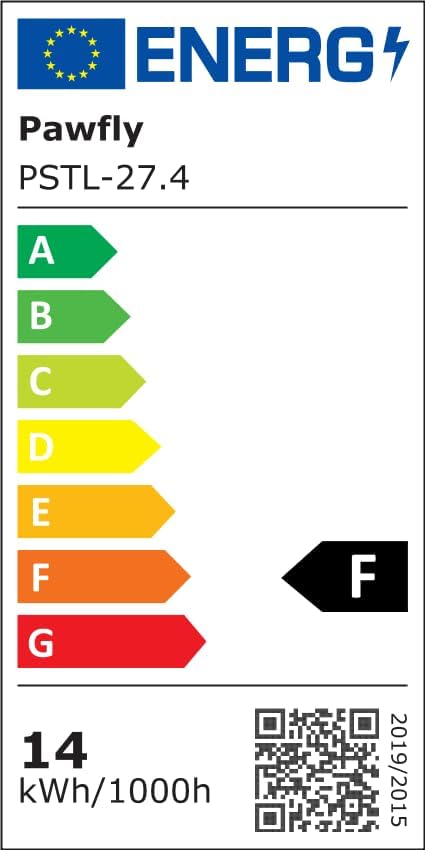
Image: EU Energy Label for the Pawfly Aquarium LED Light, indicating an energy efficiency class of F and an energy consumption of 14 kWh per 1000 hours.
Warranty and Support
For warranty information and customer support, please refer to the manufacturer's official website or contact your retailer. Keep your purchase receipt as proof of purchase.
Related Documents - Pawfly-CW2585-EU
 |
Pawfly Aquarium Light User Manual and FCC Warning User manual for the Pawfly Aquarium Light, detailing controller button functions, app control interface, light control settings, power-off memory, and default spectrum settings. Includes important safety instructions and an FCC warning. |
Ask a question about this manual
Ask about setup, troubleshooting, compatibility, parts, safety, or missing instructions. Manuals+ will review the question and use this page’s manual context to help answer it.