Introduction
Thank you for purchasing the Kenwood DMX5523S 7-inch Display Audio System. This manual provides essential information for the safe and efficient use of your new device. The DMX5523S offers advanced features including wireless Apple CarPlay and Android Auto, wireless mirroring, a high-resolution WSVGA capacitive touch panel, and compatibility with steering wheel remote controls, enhancing your in-car entertainment and connectivity experience.

Figure 1: Kenwood DMX5523S 7-inch Display Audio System
Important Safety Information
Always prioritize safety. Improper installation or operation can lead to accidents or injury. Ensure professional installation for optimal performance and safety. Do not operate the unit in a way that distracts you from driving. Keep the volume at a level that allows you to hear outside sounds.
Package Contents
Please check that all items are included in the package:
- Kenwood DMX5523S Main Unit
- Power Cable
- USB Extension Cable
- Microphone
- Mounting Hardware
- User Manual (this document)
Installation
Installation of this product requires technical expertise. It is highly recommended to have the unit installed by a qualified professional to ensure correct wiring and functionality. Refer to the separate installation manual for detailed wiring diagrams and mounting instructions.
Initial Setup
Upon first power-on, the unit will guide you through initial setup steps:
- Language Selection: Choose your preferred display language.
- Time and Date: Set the current time and date. This can often be synchronized automatically via GPS or connected smartphone.
- Radio Region: Select your geographical region for correct radio frequency tuning.
- Bluetooth Pairing: Follow the on-screen prompts to pair your smartphone via Bluetooth for hands-free calling and audio streaming.
Operating Instructions
1. Wireless Apple CarPlay and Android Auto
The DMX5523S supports wireless connection to Apple CarPlay and Android Auto, allowing seamless integration of your smartphone's features directly onto the display audio unit. This enables convenient access to navigation, music, communication, and other apps.
- Ensure your smartphone's Wi-Fi and Bluetooth are enabled.
- On the DMX5523S, select the Apple CarPlay or Android Auto icon.
- Follow the on-screen instructions to pair your smartphone.
- Once connected, you can use compatible apps for navigation, music playback, making calls, and sending messages directly from the unit's display.

Figure 2: Android Auto Interface

Figure 3: Apple CarPlay Interface
Video 1: Kenwood DMX5523S Wireless CarPlay, Android Auto, and Voice Control Overview. This video demonstrates the seamless wireless connectivity for smartphone integration and the convenience of voice commands.
2. Wireless Mirroring
The wireless mirroring function allows you to display your smartphone screen directly on the DMX5523S monitor. This is ideal for viewing video content or other applications not natively supported by CarPlay or Android Auto.
- Install the 'MirrorAPP+' application on your iPhone or Android smartphone.
- Connect your smartphone to the DMX5523S via Wi-Fi.
- Once connected, your smartphone screen will be mirrored on the display audio unit. You can also operate your smartphone from the DMX5523S touch screen.
- Note: Due to copyright protection, some video content may not be mirrored.

Figure 4: Wireless Mirroring Functionality
3. Voice Control
Utilize voice commands through Siri (for iPhone) or Google Assistant (for Android) to control various functions without taking your hands off the steering wheel. This enhances driving safety and convenience.
- Activate Siri or Google Assistant by pressing the voice button on the unit or steering wheel, or by saying the wake word (e.g., "Hey Siri" or "Ok Google").
- Speak your command clearly, such as "Navigate to [destination]" or "Play [song name]".
- The system will process your command and execute the requested action.
4. WSVGA Capacitive Touch Panel
The DMX5523S features a high-quality WSVGA (1024x600 pixels) capacitive touch panel. This display provides crisp, clear visuals and offers smooth, responsive touch operation, similar to a smartphone or tablet.

Figure 5: WSVGA Display Quality
5. Steering Remote Control Compatibility
For vehicles equipped with steering wheel audio controls, the DMX5523S can be integrated to allow control of basic functions such as volume adjustment, track skipping, and mode selection directly from your steering wheel. This feature requires proper wiring during installation.
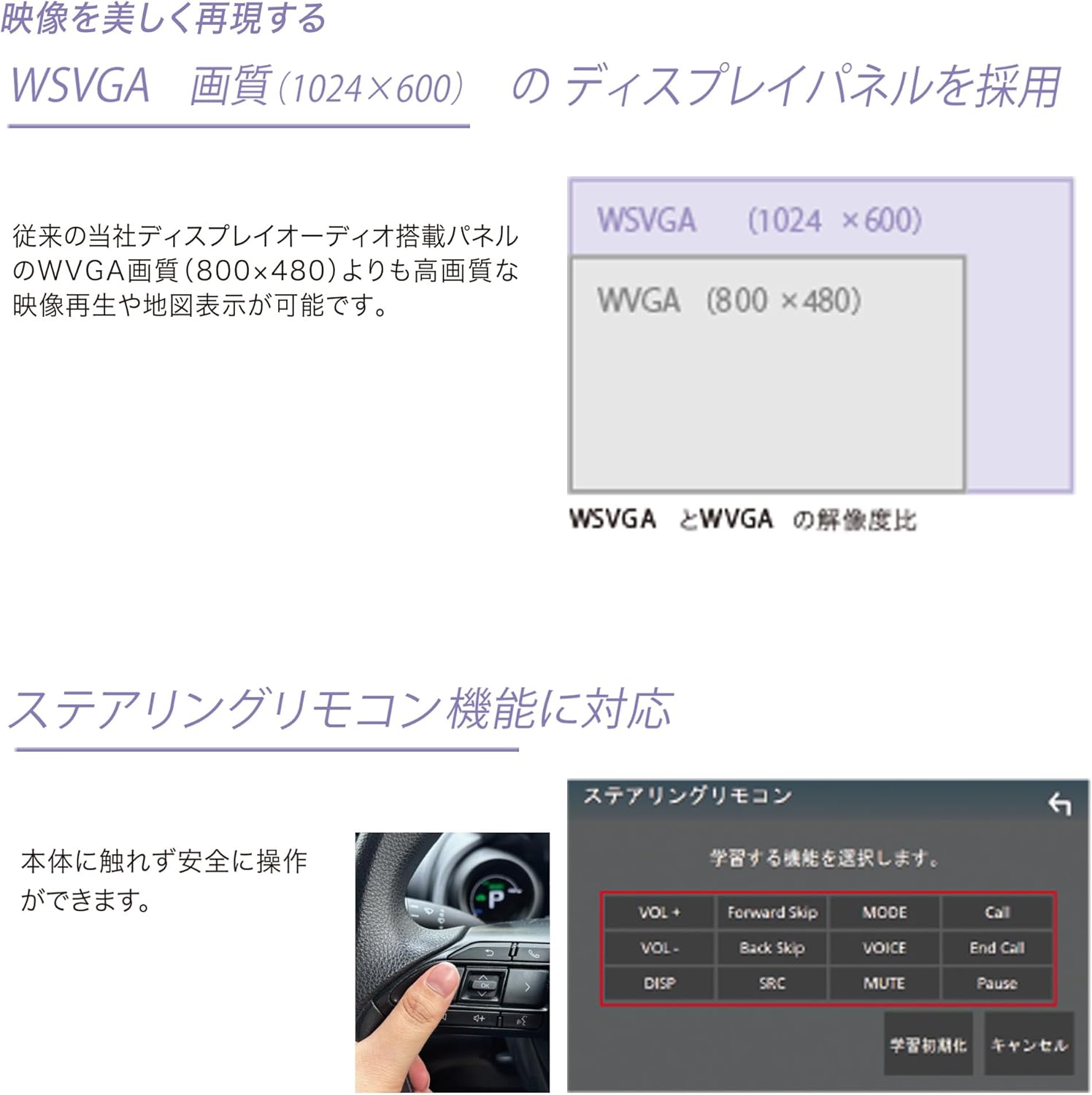
Figure 6: Steering Wheel Remote Control
6. Bluetooth Connectivity
The built-in Bluetooth module allows for hands-free calling and wireless audio streaming from your smartphone or other Bluetooth-enabled devices. Ensure your device is paired with the DMX5523S for these functions.
Maintenance
To ensure the longevity and optimal performance of your DMX5523S, follow these maintenance guidelines:
- Cleaning the Display: Use a soft, dry cloth to gently wipe the screen. For stubborn smudges, slightly dampen the cloth with water or a screen-safe cleaner. Avoid abrasive materials or harsh chemicals.
- Software Updates: Periodically check the Kenwood website for firmware updates. Keeping your unit's software up-to-date ensures the latest features and bug fixes.
- General Care: Avoid exposing the unit to extreme temperatures, direct sunlight for prolonged periods, or excessive moisture.
Troubleshooting
If you encounter issues with your DMX5523S, refer to the table below for common problems and their solutions. If the problem persists, contact Kenwood customer support.
| Problem | Possible Cause | Solution |
|---|---|---|
| No Power | Loose power connection, blown fuse. | Check power cables and fuse. Consult installer if necessary. |
| No Sound | Volume too low, incorrect audio source, speaker wiring issue. | Increase volume, select correct audio source, check speaker connections. |
| Smartphone not connecting to CarPlay/Android Auto | Wi-Fi/Bluetooth off, incompatible phone, app not installed/updated. | Ensure Wi-Fi/Bluetooth are on, update phone OS/apps, restart phone and unit. |
| Touch screen unresponsive | Temporary software glitch. | Restart the unit. If problem persists, contact support. |
Specifications
Below are the technical specifications for the Kenwood DMX5523S:
| Feature | Detail |
|---|---|
| Manufacturer | Kenwood |
| Model Number | DMX5523S |
| Package Dimensions | 22.9 x 18.8 x 16.2 cm |
| Item Weight | 1.3 Kilograms |
| Special Features | Android Auto, Apple CarPlay, Built-in Bluetooth, Screen Mirroring, Touch Screen |
| Connectivity Technology | Bluetooth, USB |
| Controller Type | Remote Control |
| Compatible Devices | Smartphones |
| HDMI Ports Total | 7 (Note: This likely refers to internal processing channels, not physical ports) |
| Connector Type | USB |
| Audio Output Mode | Stereo, Surround |
| Surround Sound Channel Configuration | 5.1 |
| Video Encoding | H.264, H.265/HEVC |

Figure 7: Feature Comparison Table (DMX5523S vs. DDX5020SR)
Warranty and Support
The Kenwood DMX5523S comes with a 1-year manufacturer's warranty from the date of purchase. This warranty covers defects in materials and workmanship under normal use. Please retain your proof of purchase for warranty claims.
For technical support, troubleshooting assistance, or warranty service, please visit the official Kenwood website or contact your local Kenwood authorized dealer. You can find contact information and FAQs on the Kenwood support page: www.kenwood.com/cs/ce/


