1. Product Overview
The Lazzanto Nightstand with Charging Station is a modern bedside table designed to enhance your bedroom with both style and functionality. It features a sturdy construction, ample storage, and an integrated power hub for convenient device charging.

Image: Front view of the Lazzanto Nightstand with Charging Station, showcasing its white finish, two fabric drawers, open shelf, and integrated charging area with a device.
Key Features:
- Modern Design: Blends seamlessly with various bedroom decors.
- Integrated Charging Station: Features 2 AC outlets, 2 USB-A ports, and 1 USB-C port for convenient charging of multiple devices.
- Removable Power Hub: The charging station can be installed on the front or back of the nightstand for flexible placement.
- Ample Storage: Includes two fabric drawers and an open shelf for organizing personal items, books, and decor.
- Durable Construction: Crafted from sturdy particle board and metal frame for stability and longevity.
- Adjustable Footpads: Ensures stability on uneven surfaces and protects floors from scratches.
- Easy Assembly: Designed for straightforward and quick setup.
2. Safety Instructions
Please read and understand all safety instructions before assembly and use. Failure to follow these instructions may result in injury or damage to the product.
- Electrical Safety:
- Do not overload the electrical outlets. Ensure the total power consumption of connected devices does not exceed the nightstand's rated capacity (125V 12A).
- Do not expose the charging station to water or excessive moisture.
- Do not attempt to disassemble or repair the charging station. Contact qualified personnel for service.
- Ensure the power cord is not pinched or damaged during assembly or use.
- Stability:
- Always place the nightstand on a flat, stable surface.
- Distribute weight evenly on the tabletop and within drawers. Do not exceed the maximum weight capacities.
- Utilize the included anti-tip kit to secure the nightstand to a wall, especially if children or pets are present. This helps prevent accidental tipping.
- General Use:
- Keep small parts and packaging materials away from children during assembly.
- Do not stand or climb on the nightstand.
- Avoid placing hot items directly on the surface without protection.

Image: Detailed view highlighting the adjustable footpads, robust metal frame, reliable anti-tip kit, and sturdy drawer pulls of the nightstand.
3. Package Contents
Before beginning assembly, please verify that all parts listed below are present and undamaged. If any parts are missing or damaged, do not proceed with assembly and contact customer support.
- Top Panel (1)
- Bottom Panel (1)
- Side Frames (2)
- Back Panel (1)
- Fabric Drawers (2)
- Charging Station Unit (1)
- Adjustable Footpads (4)
- Assembly Hardware (screws, bolts, Allen wrench, etc.)
- Anti-Tip Kit (1)
- Instruction Manual (this document)
4. Assembly and Setup
Assembly typically takes 0.5-1 hour for most adults. Follow the steps carefully. A Phillips head screwdriver (not included) may be required in addition to the provided tools.
- Unpack and Identify Parts: Carefully remove all components from the packaging. Lay them out on a clean, soft surface to prevent scratches. Refer to the parts list to ensure all items are present.
- Assemble the Frame: Attach the side frames to the top and bottom panels using the provided hardware. Ensure all connections are secure but do not overtighten until the frame is fully assembled.
- Install Back Panel: Secure the back panel to the assembled frame.
- Install Charging Station: The charging station is removable and can be installed on either the front or back side of the nightstand's open shelf. Slide the charging unit into the designated slot until it clicks securely into place.
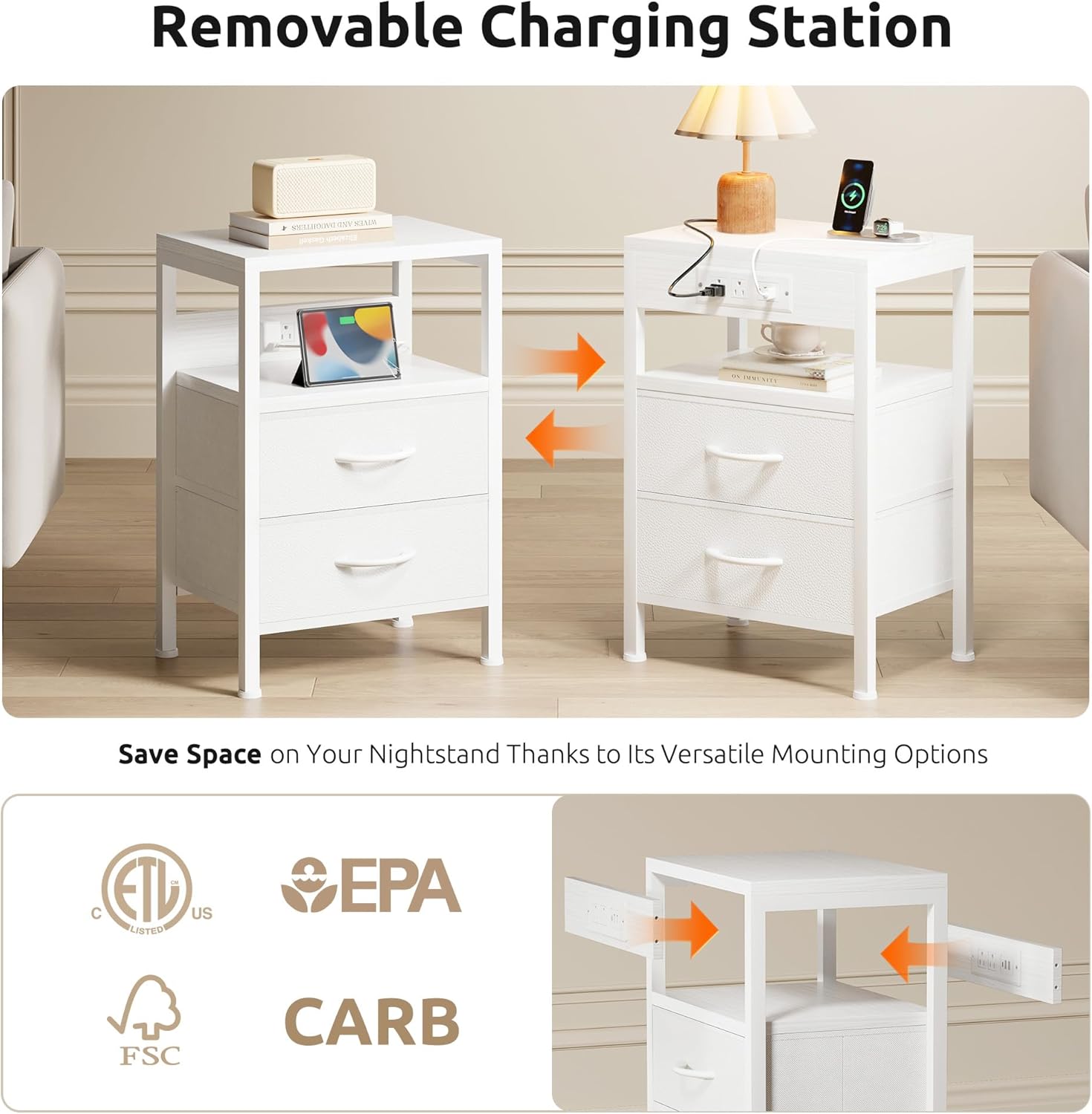
Image: Illustration showing the removable charging station being inserted into the nightstand, with arrows indicating flexible installation on either side.
- Attach Adjustable Footpads: Screw the adjustable footpads into the bottom of each leg. Adjust them as needed to ensure the nightstand is level and stable on your floor.
- Insert Fabric Drawers: Fold and assemble the fabric drawers according to their individual instructions. Slide the assembled drawers into their respective slots in the nightstand frame.
- Secure with Anti-Tip Kit: For added safety, especially in homes with children or pets, attach the anti-tip kit to the back of the nightstand and secure it to a wall stud following the kit's specific instructions.
- Final Check: Once assembled, gently shake the nightstand to ensure all connections are tight and it is stable.
5. Operating Instructions
5.1 Using the Charging Station
The integrated charging station provides convenient power access for your electronic devices.
- Power Connection: Plug the nightstand's power cord into a standard 125V AC wall outlet.
- AC Outlets: Use the two 125V 12A AC outlets for devices like lamps, alarm clocks, or laptops.
- USB Ports:
- USB-A Ports (2): Provides 5V-3A output. Suitable for charging smartphones, tablets, and other USB-A powered devices.
- USB-C Port (1): Provides 5V-3A output. Suitable for charging modern smartphones, tablets, and other USB-C powered devices.
- Charging Speeds: Single-port USB-C charging supports up to 20W Max. Two-port USB-A charging supports up to 18W Max.
- Device Compatibility: The charging station is designed to charge a wide range of devices including phones, tablets, laptops, and lamps.

Image: Diagram illustrating the types of devices that can be charged (phones, tablets, laptops, lamps) and the power specifications for the AC outlets, USB-A, and USB-C ports.
5.2 Storage Utilization
The nightstand offers versatile storage options to keep your bedside area tidy.
- Wide Tabletop: Use the top surface for lamps, alarm clocks, decorative items, or frequently accessed personal belongings. The tabletop has a capacity of up to 50 lbs (22.68 kg).
- Open Storage Shelf: The open shelf below the tabletop is ideal for organizing books, headphones, small speakers, or other items you want to keep easily accessible.

Image: Close-up view of the nightstand's open storage shelf, showing it used for books and headphones, with a dimension label of 5.5 inches height.
- Fabric Drawers: The two fabric drawers provide hidden storage for personal items, valuables, or anything you wish to keep out of sight. Each drawer has a capacity of up to 15 lbs (6.8 kg).

Image: Overhead view of the nightstand showing a wide tabletop with decor and open drawers revealing stored items, highlighting the generous space.
6. Maintenance
Proper care will help maintain the appearance and longevity of your Lazzanto Nightstand.
- Cleaning: Wipe the surfaces with a damp cloth. Avoid using harsh chemicals, abrasive cleaners, or polishes that may damage the finish.
- Spills: Immediately wipe up any spills to prevent staining or damage to the wood and fabric components.
- Dusting: Regularly dust the nightstand with a soft, dry cloth.
- Drawer Care: The fabric drawers can be spot cleaned with a mild detergent and water if necessary. Allow them to air dry completely before reinserting.
- Electrical Components: Ensure the charging station and power cord are kept clean and free of dust. Do not attempt to clean the electrical ports with liquids.
7. Troubleshooting
If you encounter any issues with your nightstand, refer to the following common problems and solutions:
| Problem | Possible Cause | Solution |
|---|---|---|
| Nightstand is wobbly/unstable. | Uneven floor; loose assembly hardware. | Adjust the footpads until the nightstand is level. Tighten all assembly screws. Ensure the anti-tip kit is properly installed if applicable. |
| Charging station is not working. | Power cord not plugged in; wall outlet not active; overloaded circuit; faulty device cable. | Ensure the power cord is securely plugged into a live wall outlet. Test the wall outlet with another device. Reduce the number of devices connected. Try a different charging cable for your device. |
| Drawers do not slide smoothly. | Improper drawer assembly; obstruction; overloaded drawer. | Ensure the fabric drawers are correctly assembled and inserted. Check for any obstructions inside the drawer slots. Do not exceed the drawer's weight capacity. |
8. Specifications
Detailed specifications for the Lazzanto Nightstand with Charging Station:
| Feature | Detail |
|---|---|
| Model Number | NST-CS12-WT |
| Dimensions (D x W x H) | 29.7 cm x 40.4 cm x 59.2 cm (11.7 in x 15.9 in x 23.3 in) |
| Item Weight | 5.67 kg (12.5 lbs) |
| Material | Engineered Wood (Particle Board), Metal Frame, Fabric Drawers |
| Color | White |
| Tabletop Capacity | Up to 22.68 kg (50 lbs) |
| Drawer Capacity (each) | Up to 6.8 kg (15 lbs) |
| Power Outlets | 2 x AC Outlets (125V 12A) |
| USB Ports | 2 x USB-A (5V-3A), 1 x USB-C (5V-3A) |
| USB-C Single Port Output | 20W Max |
| USB-A Two Port Output | 18W Max |
| Power Cable Length | 4.9 ft (approx. 1.5 meters) |
| Special Features | Adjustable Leg, Charging Station, Easy Assembly, Storage, USB Port, Anti-Tip Kit |

Image: Visual representation of the nightstand's dimensions (height, width, depth) and weight capacities for the tabletop and drawers, along with power cable length.
9. Warranty and Support
Lazzanto is committed to providing high-quality products. While specific warranty details are not provided in this manual, please retain your proof of purchase for any warranty claims.
For technical support, missing parts, or any questions regarding your Lazzanto Nightstand, please contact the retailer or manufacturer directly through their official website or customer service channels. Provide your model number (NST-CS12-WT) and purchase details for faster assistance.
You can often find contact information on the product packaging or the brand's official website: Lazzanto Brand Page on Amazon