
SogesSleep 10FJYC-LOFT-T-CP
SogesSleep Twin Loft Bed Instruction Manual
Model: 10FJYC-LOFT-T-CP
1. Introduction
Thank you for choosing the SogesSleep Twin Loft Bed. This manual provides essential information for the safe assembly, operation, and maintenance of your new loft bed. Please read all instructions carefully before beginning assembly and keep this manual for future reference.

Image 1.1: The SogesSleep Twin Loft Bed, featuring an integrated desk, shelves, and a charging station.
2. Important Safety Information
Your safety is our top priority. Please adhere to the following safety guidelines:
- Always use a 4-6 inch mattress with this loft bed.
- Ensure the top of the mattress is at least 5 inches from the edge of the guardrail. This is crucial for preventing falls.
- Securely attach the bed to the wall using the provided anti-tip nails for added stability and security. Failure to do so may result in serious injury.
- Do not allow children under 6 years of age on the upper bunk.
- Periodically check and ensure that all connections and fasteners are tight.
- Do not use substitute parts. Contact the manufacturer for replacement parts.

Image 2.1: Illustration of the recommended mattress height, ensuring at least 5 inches of guardrail clearance above the mattress surface.

Image 2.2: Detail of the anti-toppling device, which must be securely fixed to the wall for enhanced stability.
3. Product Overview
The SogesSleep Twin Loft Bed is designed to maximize space efficiency, offering a comfortable sleeping area above a functional workstation. It includes a triangular desk, monitor stand, integrated charging station, and convenient storage shelves.

Image 3.1: Key features of the loft bed, highlighting the computer desk, hanger hook, storage shelf, silent clips, angle code, and anti-toppling device.

Image 3.2: The top bunk features a 12-inch full-length and enclosed guardrail for enhanced safety during sleep.
4. Setup & Assembly
Assembly of the SogesSleep Twin Loft Bed is required. Please ensure all parts are present before beginning. It is recommended to assemble the bed with at least two adults.
4.1. Before You Begin
- Clear a spacious area for assembly.
- Identify all components and hardware using the provided parts list (not included in this manual, refer to your product packaging).
- Keep children and pets away from the assembly area.
4.2. Assembly Steps (General Guidelines)
- Assemble the main frame components, ensuring all connections are secure but not fully tightened until the entire frame is together.
- Attach the ladder and guardrails to the upper bunk frame.
- Install the desk and monitor stand components.
- Integrate the charging station into the designated desk area.
- Install the storage shelves.
- Once all components are in place, fully tighten all fasteners.
- Crucially, install the anti-toppling device by securely fixing the bed to the wall.

Image 4.1: Key structural components including the square tube ladder for easy climbing, metal slats for mattress support, and buckle design for simplified installation.

Image 4.2: Demonstrates the heavy-duty square tube structure, non-slip pads for floor protection, and the anti-toppling device for enhanced stability.
5. Operating Instructions
5.1. Using the Charging Station
The integrated charging station provides convenient power access for your devices. It includes 2 power sockets, 1 USB port, and 1 Type-C port.
- Plug the charging station's power cord into a standard wall outlet.
- Connect your electronic devices (e.g., gaming gear, tablet, printer, phone) to the appropriate ports.
- Ensure devices are compatible with the output specifications (125V/2A for AC outlets, 5V/2.1A for USB and Type-C ports).

Image 5.1: Detailed view of the built-in multifunctional charging station, showing its power sockets, USB, and Type-C ports for convenient device charging.

Image 5.2: The computer desk area, showcasing the integrated charging station in use with various electronic devices.
5.2. Utilizing the Desk and Shelves
The L-shaped desk provides a spacious area for work or study, while the monitor stand elevates your screen for ergonomic viewing. The integrated shelves offer convenient storage for books, decor, or other items.

Image 5.3: A user comfortably working at the integrated desk, demonstrating the functionality of the monitor stand and desk space.
6. Maintenance
Regular maintenance will help prolong the life of your loft bed.
- Cleaning: Wipe down metal and MDF surfaces with a soft, damp cloth. Avoid harsh chemicals or abrasive cleaners that could damage the finish.
- Fastener Check: Periodically (e.g., every 3-6 months) check all bolts, screws, and connections to ensure they are tight. Re-tighten as necessary.
- Anti-Tip Device: Verify that the anti-toppling device remains securely attached to the wall.
- Weight Limits: Do not exceed the recommended weight limits for the bed or desk.
7. Troubleshooting
If you encounter any issues with your SogesSleep Twin Loft Bed, refer to the following common problems and solutions:
| Problem | Possible Cause | Solution |
|---|---|---|
| Bed feels wobbly or unstable. | Loose fasteners; Anti-tip device not installed or loose. | Ensure all bolts and screws are fully tightened. Install or re-secure the anti-toppling device to the wall. |
| Charging station not working. | Not plugged in; Device not compatible; Overload. | Check if the charging station's power cord is securely plugged into a live outlet. Verify device compatibility. Avoid overloading the outlets. |
| Mattress slides on the slats. | Mattress not properly sized; Slats not holding mattress. | Ensure you are using a twin-size mattress. The fixed slats and raised sides are designed to hold the mattress in place. If issues persist, contact customer service. |
8. Specifications
Detailed specifications for the SogesSleep Twin Loft Bed:
| Feature | Detail |
|---|---|
| Size | Twin |
| Product Dimensions (L x W x H) | 78"L x 39.4"W x 72.8"H |
| Under-bed Clearance | 59.8" |
| Special Features | Monitor Stand, Charging Station (2 AC outlets, 1 USB port, 1 Type-C port), Safety Guardrail, Ladder, Storage Shelves |
| Color | Black |
| Finish Type | Unfinished (Metal frame is painted) |
| Included Components | Slat, Desk, Shelves, Charging Station |
| Compatible Mattress Size | Twin (Recommended 4-6 inch height) |
| Assembly Required | Yes |
| Item Weight | 88 pounds |
| Model Number | 10FJYC-LOFT-T-CP |
| UPC | 765037797384 |
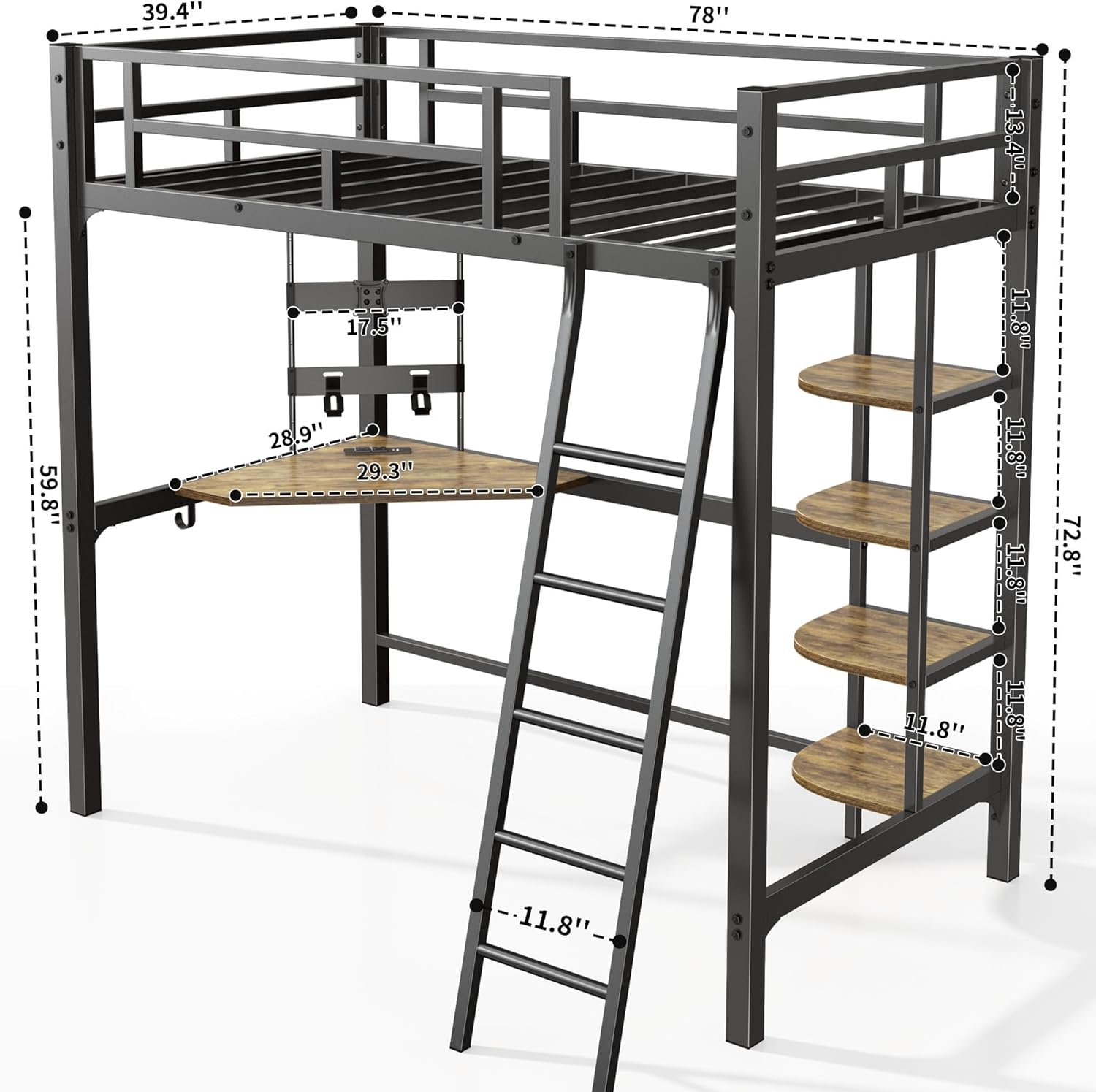
Image 8.1: Comprehensive diagram illustrating the dimensions of the loft bed, including overall length, width, height, and clearances.
9. Warranty & Support
9.1. Warranty Information
For specific warranty details, please refer to the warranty card included with your product packaging or contact SogesSleep customer service directly. Protection plans may be available for purchase separately.
9.2. Customer Support
If you have any questions, concerns, or require assistance with your SogesSleep Twin Loft Bed, please do not hesitate to contact our customer service team. We are committed to providing a comfortable shopping experience and will respond to inquiries within 24 hours.
For support, please visit the SogesSleep Store on Amazon or refer to the contact information provided in your product packaging.
Ask a question about this manual
Ask about setup, troubleshooting, compatibility, parts, safety, or missing instructions. Manuals+ will review the question and use this page’s manual context to help answer it.