
1. Introduction
The eletechsup SMLDB11 PRO Version Schumann Resonance Ultra-Low Pulse Square Wave Solfeggio Frequency Generator is an advanced signal generator designed to produce a continuously adjustable frequency range from 0.01Hz to 300KHz, with a default output of 7.83Hz (Schumann Resonance frequency). This upgraded version utilizes a high-speed integrated circuit for precise and stable signal generation. It is capable of generating sine waves and can be tuned to specific solfeggio frequencies.
This manual provides detailed instructions for the setup, operation, and maintenance of your SMLDB11 generator to ensure optimal performance and longevity.
2. Safety Information
- Ensure the power supply is DC 5V. Using an incorrect voltage may damage the device. The device includes over-current and over-voltage protection.
- Do not expose the device to moisture, extreme temperatures, or direct sunlight.
- Avoid dropping or subjecting the device to strong impacts.
- Do not attempt to disassemble or modify the device. Repairs should only be performed by qualified personnel.
- Keep out of reach of children.
3. Package Contents
Please check the package contents upon receipt to ensure all items are present:
- 1x eletechsup SMLDB11 PRO Version Schumann Resonance Ultra-low Frequency Pulse wave Generator
- 1x USB power cable

Figure 3.1: The SMLDB11 Schumann Resonance Generator and its included USB power cable.
4. Product Overview
The SMLDB11 features a compact design with an integrated PCB antenna and an LCD display for easy operation. Key components are highlighted below:

Figure 4.1: Annotated diagram showing the main components of the SMLDB11 generator, including the large-size Schumann wave signal transmitting antenna, LCD backlight switch, 3.5mm audio output port, signal test ports (Square(inv), Square, SIN, GND), DC 5V power interface, and the LCD display with backlight.
- Large-size Schumann wave signal transmitting antenna: Integrated PCB coil for signal transmission.
- LCD Backlight Switch: Toggles the backlight of the LCD display.
- 3.5mm audio output port: For connecting to external audio devices or amplifiers.
- Signal test ports: Includes Square (inverted), Square, Sine (SIN), and Ground (GND) for direct signal output.
- DC 5V Power Interface: Standard DC5.5*2.1/2.5 jack for power input.
- LCD display with backlight: Shows current frequency and input prompts.
- Keypad: Numeric keys (0-9), OK, and SET buttons for frequency input and setting.
5. Setup
- Power Connection: Connect the provided USB power cable to the DC 5V power interface on the SMLDB11. Plug the other end of the USB cable into a compatible 5V USB power source (e.g., a USB wall adapter, computer USB port, or power bank).
- Initial Power-On: Once powered, the LCD display will light up (if the backlight switch is ON) and typically show the default frequency of 7.83Hz.
- Optional Audio Output: If you wish to connect the generator to an external audio system or amplifier, use a 3.5mm audio cable (not included) to connect the 3.5mm audio output port on the SMLDB11 to your desired audio input.
6. Operating Instructions
6.1. Adjusting Frequency
The SMLDB11 allows for continuous frequency adjustment from 0.01Hz to 300KHz. To change the output frequency:
- Enter Frequency: Use the numeric keypad to directly input the desired frequency. For example, to set 7.83Hz, press [7][.][8][3]. To set 100KHz, press [1][0][0][0][0][0].
- Confirm Setting: After entering the frequency, press the [OK] button to confirm and apply the new setting. The display will update to show the new active frequency.
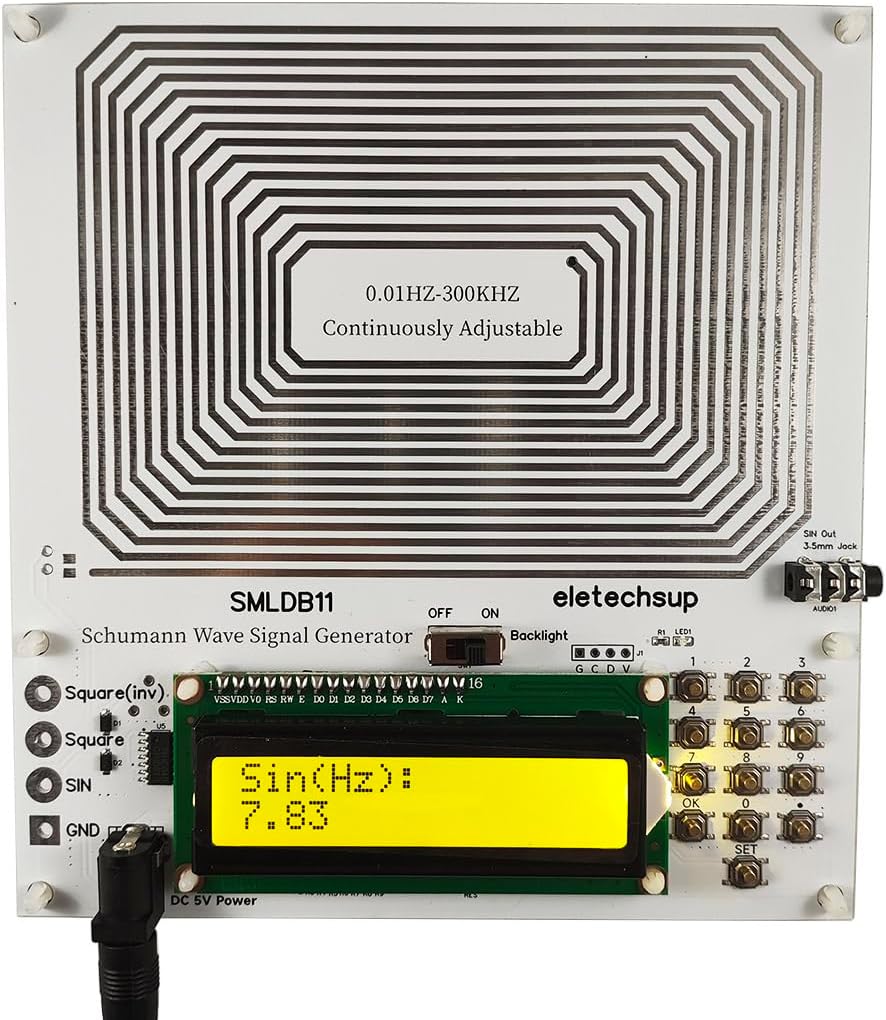
Figure 6.1: The LCD display showing the default 7.83Hz frequency.
Video 6.1: Demonstration of adjusting the frequency on the SMLDB11 generator, showing the input process and the resulting waveform on an oscilloscope.
6.2. Solfeggio Frequencies
The SMLDB11 can be set to various solfeggio frequencies by inputting the specific values:
- 396.00Hz
- 417.00Hz
- 528.00Hz
- 639.00Hz
- 741.00Hz
- 852.00Hz
- 963.00Hz
6.3. Applications
The Schumann Resonance Generator can be utilized in various environments:
- Audio-visual spaces: To enhance the sound field and overall audio-visual experience.
- Bedrooms: To aid in relaxation, soothe nerves, and potentially assist with insomnia.
- Offices: To promote relaxation and improve work efficiency.
- Creative spaces: To stimulate creative inspiration.
- Spiritual/Meditation spaces: For resting body and mind during tea ceremonies, spiritual practices, or realization.
7. Maintenance
- Cleaning: Use a soft, dry cloth to clean the device. Do not use liquid cleaners or abrasive materials.
- Storage: Store the device in a cool, dry place away from direct sunlight and extreme temperatures when not in use.
- Handling: Handle the device with care to avoid damage to the PCB or components.
8. Troubleshooting
| Problem | Possible Cause | Solution |
|---|---|---|
| Device does not power on. | No power supply or faulty cable. | Check USB cable connection. Ensure power source is active and providing 5V. Try a different USB cable or power source. |
| Display is blank. | Backlight switch is OFF or power issue. | Check the LCD Backlight Switch. If still blank, refer to "Device does not power on" solution. |
| Frequency does not change after input. | [OK] button not pressed or invalid input. | Ensure you press the [OK] button after entering the desired frequency. Verify the input frequency is within the 0.01Hz-300KHz range. |
| No audio output. | Incorrect cable connection or external audio device issue. | Check the 3.5mm audio cable connection. Ensure the external audio device is powered on and set to the correct input. |
9. Specifications
| Feature | Detail |
|---|---|
| Model | SMLDB11 |
| Output Waveform | Sine wave (also Square wave via test points) |
| Power Supply Interface | DC5.5*2.1/2.5 |
| Supply Voltage | DC 5V (with over-current/over-voltage protection) |
| Rated Power Consumption | <=1W |
| Default Frequency | 7.83Hz (Schumann Resonance) |
| Adjustment Range | 0.01Hz ~ 300KHz (Continuously Adjustable) |
| Signal Voltage Amplitude | 3V (with output protection) |
| PCB Board Size | 150*140*18MM |
| Weight | 110g |
10. Warranty and Support
For any questions, technical support, or warranty claims, please contact eletechsup customer service. Refer to your purchase documentation for specific warranty terms and contact information.
Manufacturer Contact Information: EMCONRTOL
For more information regarding Schumann Resonance, please consult reliable scientific resources or perform an online search for "Schumann Resonance".


