
1. Introduction
Thank you for choosing the DAYETTE AP301 H14 True HEPA Air Purifier. This device is designed to improve indoor air quality by effectively removing airborne particles and odors. Please read this manual thoroughly before operation to ensure proper use, maintenance, and safety.

Figure 1.1: The DAYETTE AP301 Air Purifier in a home setting, designed to blend with decor while purifying air.
2. Important Safety Instructions
To reduce the risk of fire, electric shock, or injury, please follow these precautions:
- Always unplug the air purifier before moving it, opening the grille, changing filters, or performing any maintenance.
- Do not operate the unit if the power cord or plug is damaged. Contact customer support for assistance.
- Keep the power cord away from heated surfaces.
- Do not use the air purifier in wet or damp environments, such as bathrooms.
- Ensure the unit is placed on a firm, level surface.
- Do not block air inlets or outlets. Maintain at least 6 inches (15 cm) clearance from walls and furniture.
- This appliance is not intended for use by persons (including children) with reduced physical, sensory, or mental capabilities, or lack of experience and knowledge, unless they have been given supervision or instruction concerning use of the appliance by a person responsible for their safety.
- Children should be supervised to ensure that they do not play with the appliance.
- Do not insert fingers or foreign objects into the air inlets or outlets.
- Do not use attachments not recommended by the manufacturer.
3. Product Overview
The DAYETTE AP301 is a high-efficiency air purifier designed for large rooms, featuring advanced H14 True HEPA filtration and smart air quality monitoring.
3.1 Key Features
- High-Efficiency Air Purification: 360° air intake technology purifies spaces up to 2200 sq ft once per hour, or 440 sq ft five times per hour (Air Volume: 300 CFM).
- H14 True HEPA Filtration: Combines a Pre-Filter, H14 True HEPA Layer, and High-Efficiency Activated Carbon Filter to capture 99.997% of airborne particles as small as 0.1 microns, including dust, smoke, pollen, odors, and pet dander.
- Smart Air Quality Sensor: Built-in PM2.5 sensor provides real-time air quality readings with a color-coded indicator (blue/very good, green/good, yellow/moderate, red/polluted) and automatically adjusts fan speed in Auto Mode.
- Quiet Operation: Features 4 fan speeds and 2 modes (Sleep Mode & Auto Mode). Sleep Mode operates as low as 22 dB for an ultra-quiet environment.
- User-Friendly Controls: Touch control panel with 1-12 hour timer and child-safe lock function.
- Certified Safe: FCC certified, ETL Listed, CARB approved, and 100% OZONE FREE.
3.2 Components

Figure 3.1: Front view of the DAYETTE AP301 Air Purifier.
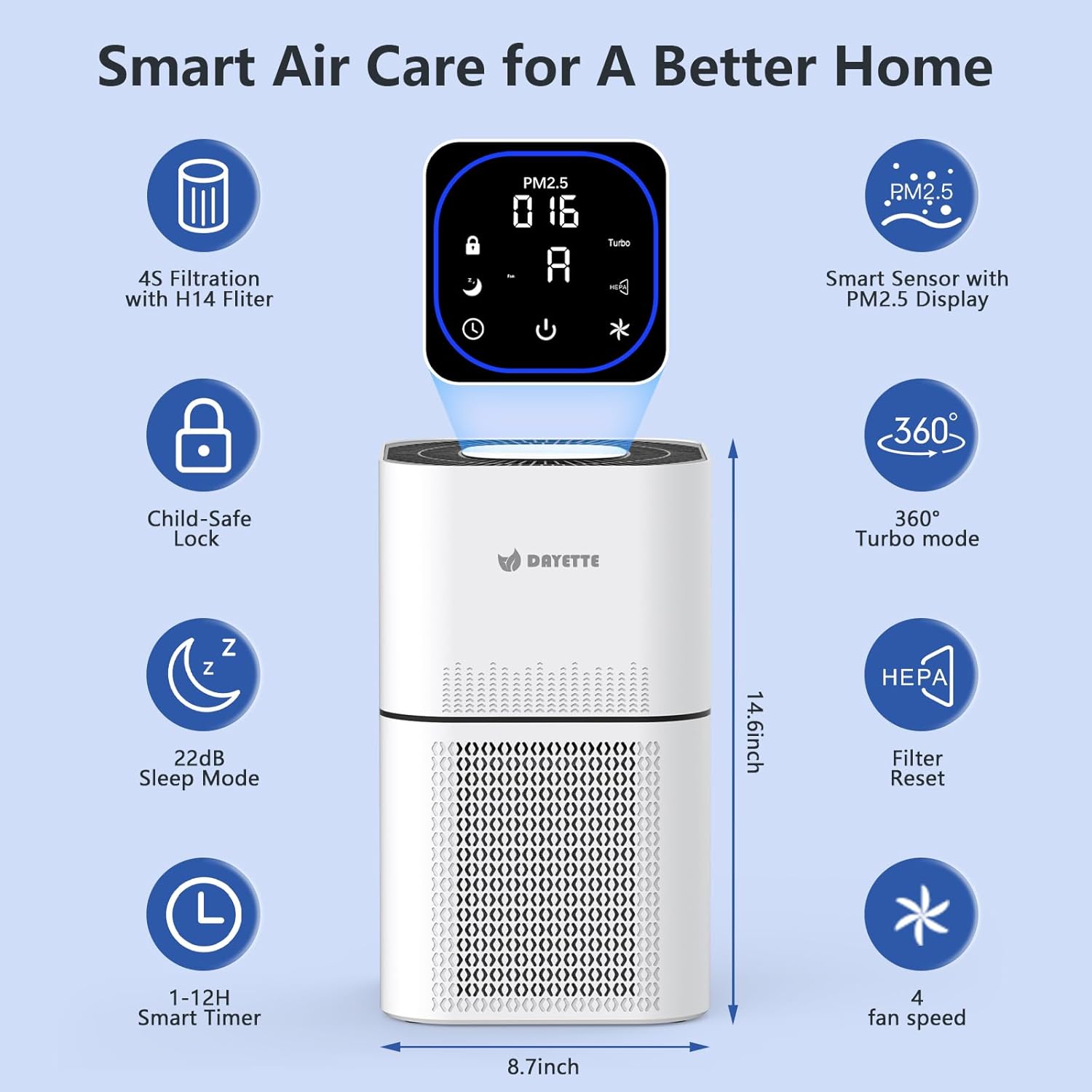
Figure 3.2: Top control panel with touch buttons and digital display.

Figure 3.3: Diagram illustrating the 4-stage filtration system: Pre-Filter Layer, H14 True HEPA Layer, Activated Carbon Layer, and Net Filter.

Figure 3.4: Visual comparison highlighting the superior filtration capabilities of the H14 True HEPA filter over standard H13 filters.
4. Setup
Follow these steps to set up your DAYETTE AP301 Air Purifier:
- Unpack the Unit: Carefully remove the air purifier from its packaging.
- Remove Filter Packaging: Before first use, the filter inside the unit is wrapped in plastic for protection. Turn the unit upside down, twist the base cover counter-clockwise to unlock, and remove the filter. Remove all plastic packaging from the filter.
- Reinstall Filter: Place the unwrapped filter back into the unit, ensuring it is seated correctly. Replace the base cover and twist clockwise to lock it securely.
- Position the Purifier: Place the air purifier on a flat, stable surface. Ensure there is at least 6 inches (15 cm) of space around all sides for optimal airflow.
- Connect Power: Plug the power adapter into the air purifier and then into a standard electrical outlet.

Figure 4.1: Illustration of how to access and remove the filter for packaging removal or replacement.
Video 4.1: Official product video demonstrating the features and filter installation process of the DAYETTE Air Purifier.
5. Operating Instructions
The DAYETTE AP301 features an intuitive touch control panel. Here's how to operate it:
5.1 Power On/Off
- Press the Power Button () to turn the unit on or off.
5.2 Fan Speed Adjustment
- Press the Fan Speed Button () to cycle through 4 fan speeds (1, 2, 3, Turbo).
5.3 Modes
- Auto Mode: Press the Auto Mode Button () to activate. The unit will automatically adjust fan speed based on real-time PM2.5 air quality readings.
- Sleep Mode: Press the Sleep Mode Button () for quiet operation (as low as 22 dB) and dimmed display lights, ideal for nighttime use.
5.4 Timer Function
- Press the Timer Button () to set the operating time for 1 to 12 hours. The unit will automatically turn off after the set time.
5.5 Child Lock
- Press and hold the Child Lock Button () for 3 seconds to activate or deactivate the child lock. This prevents accidental changes to settings.
5.6 Air Quality Indicator
The PM2.5 sensor provides real-time air quality feedback via a color-coded light:
- Blue: Very Good Air Quality (0-35 µg/m³)
- Green: Good Air Quality (36-75 µg/m³)
- Yellow: Moderate Air Quality (76-115 µg/m³)
- Red: Polluted Air Quality (>116 µg/m³)

Figure 5.1: The air purifier displaying real-time PM2.5 levels and adjusting fan speed in Auto Mode.

Figure 5.2: The air purifier operating quietly in Sleep Mode in a bedroom environment.

Figure 5.3: Illustration of the air purifier's effective coverage area in various room sizes, demonstrating its high-efficiency air changes.
6. Maintenance
Regular maintenance ensures optimal performance and extends the lifespan of your air purifier.
6.1 Filter Replacement
The air purifier is equipped with a filter replacement reminder. When the filter indicator light illuminates, it's time to replace the filter. The AP301 uses a 4-stage H14 True HEPA filter.
- Unplug the air purifier.
- Turn the unit upside down and twist the base cover counter-clockwise to unlock.
- Remove the old filter.
- Insert a new DAYETTE AP301 H14 True HEPA filter (ensure plastic packaging is removed).
- Replace the base cover and twist clockwise to lock.
- Plug in the unit. Press and hold the Filter Reset button (usually part of the power button or a dedicated icon) for 3-5 seconds to reset the filter life indicator.

Figure 6.1: A new DAYETTE AP301 H14 True HEPA replacement filter.
6.2 Washable Pre-Filter
The pre-filter layer is washable and reusable. Regular cleaning helps extend the life of the main HEPA filter.
- Unplug the air purifier and remove the filter as described above.
- Gently separate the pre-filter from the main filter (if applicable, or clean the outer mesh of the main filter).
- Rinse the pre-filter under running water. Use a soft brush if necessary to remove accumulated dust and debris.
- Allow the pre-filter to air dry completely before reassembling. Do not place a damp filter back into the unit.
6.3 Specialized Filters
DAYETTE offers various replacement filters tailored to specific needs:
- Pet Allergy Filter: Designed to specifically target pet dander and associated odors.
- Toxin Absorber Filter: Enhanced to reduce urban pollution effects and absorb various toxins.
- Smoke Remover Filter: Optimized for rapidly reducing wildfire smoke pollution and other smoke particles.

Figure 6.2: Specialized Pet Allergy Filter for enhanced pet dander removal.

Figure 6.3: Specialized Toxin Absorber Filter for reducing urban pollution.

Figure 6.4: Specialized Smoke Remover Filter for effective smoke particle reduction.
7. Troubleshooting
If you encounter issues with your air purifier, refer to the following common problems and solutions:
| Problem | Possible Cause | Solution |
|---|---|---|
| Unit does not turn on | Not plugged in; Power outlet malfunction; Filter not installed correctly or plastic not removed. | Check power cord connection; Try a different outlet; Ensure filter plastic is removed and filter is securely locked in place. |
| Poor airflow or purification | Blocked air inlets/outlets; Dirty filter; Filter needs replacement. | Ensure no obstructions; Clean or replace filters as needed. |
| Unusual noise | Unit not on a level surface; Foreign object inside; Filter not installed correctly. | Place on a flat surface; Unplug and check for obstructions; Reinstall filter. |
| Air quality indicator always red/yellow | High levels of pollutants; Sensor dirty. | Allow more time for purification; Gently clean the PM2.5 sensor opening with a dry cotton swab. |
8. Specifications
| Feature | Detail |
|---|---|
| Model Number | AP301 |
| Product Dimensions (D x W x H) | 8" x 8" x 14" (20.3 cm x 20.3 cm x 35.6 cm) |
| Item Weight | 7 Pounds (3.17 kg) |
| Power Source | Corded Electric |
| Rated Wattage | 36 watts |
| Control Method | Touch |
| Filter Type | H14 True HEPA (4-Stage Filtration) |
| Effective Floor Area | Up to 2200 Square Feet (purified once per hour) |
| Noise Level | As low as 22 Decibels (in Sleep Mode) |
| Particle Retention Size | 0.1 Micrometer (99.997% efficiency) |
| Special Features | 1-12H Timer, Auto Mode, 22dB Sleep Mode, Filter Replacement Reminder, PM2.5 Air Quality Sensor, Child Lock |
| Certifications | FCC, ETL Listed, CARB Approved, CE Certified, 100% Ozone Free |
| Included Components | 1 x True H14 HEPA 4-Stage Original Filter (Pre-Installed) |
9. Warranty and Support
For warranty information, please refer to the documentation included with your product at the time of purchase. For technical support, replacement parts, or any inquiries, please contact DAYETTE customer service. Contact details are typically provided in the product packaging or on the official DAYETTE website.


