
1. Introduction
The YONGNUO BR-G1 is a versatile Bluetooth remote controller designed for use with various cameras and camcorders. It provides wireless control over essential functions such as shutter release, video recording, and zoom, enhancing your photography and videography experience. This manual will guide you through the setup, operation, and maintenance of your BR-G1 remote controller.
2. Product Features
The BR-G1 remote controller offers a range of features for convenient camera operation:
- Multi-Brand Compatibility: Supports four major camera brands (Canon, Nikon, Sony, Fujifilm).
- Dual Camera Control: Capable of controlling two cameras simultaneously.
- Zoom Adjustment: Provides support for zoom functions on compatible lenses.
- Extended Range: Offers a remote control distance of over 10 meters.
- Photo & Video Functions: Supports both still photography and video recording.
- Two-Stage Shutter: Features a two-stage shutter button for focus and capture, with one-click video shooting.
- Long Battery Life: Approximately one year of battery life.
- Advanced Shooting Modes: Supports Bulb shooting and continuous shooting.

Image: Overview of the YONGNUO BR-G1's key features, including multi-brand support, dual camera control, zoom, and extended range.
3. Package Contents
Please check the package contents upon opening to ensure all items are present:
- YONGNUO BR-G1 Bluetooth Remote Controller
- User Manual
- Warranty Card
- Product Qualification Certificate
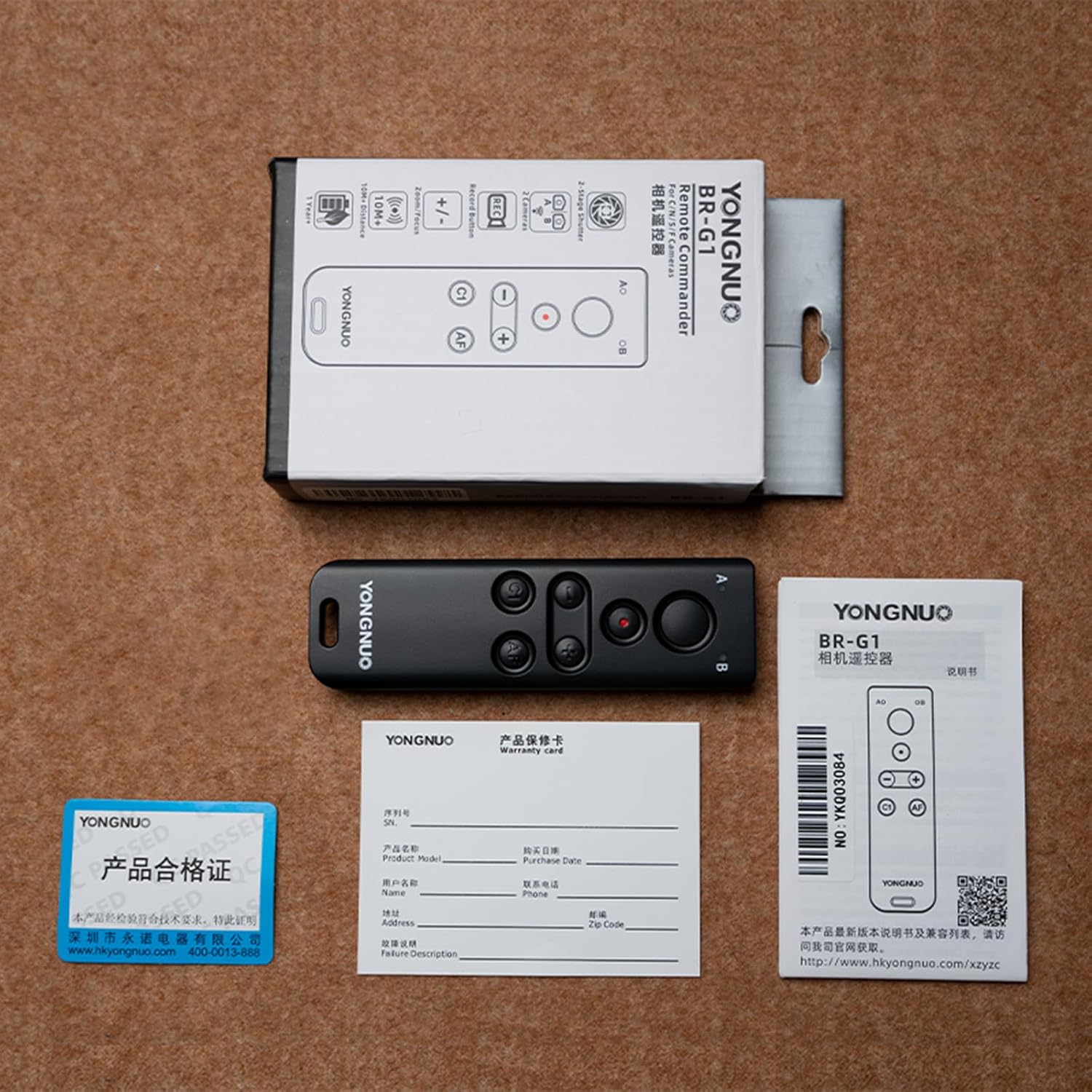
Image: The YONGNUO BR-G1 remote controller, its packaging, user manual, warranty card, and qualification certificate.
4. Component Identification

Image: Front view of the BR-G1 remote, showing the main shutter button, zoom controls, C1, AF, and A/B selection buttons.

Image: Side view of the BR-G1 remote, highlighting the A/B channel selection switch and the ON/OFF power switch.

Image: Back view of the BR-G1 remote, showing the battery compartment cover and product information label.
5. Setup
5.1. Battery Installation
- Locate the battery compartment cover on the back of the remote controller.
- Rotate the cover counter-clockwise to open it.
- Insert a CR2032 battery, ensuring the positive (+) side faces upwards.
- Replace the cover and rotate it clockwise to secure.
5.2. Powering On/Off
Slide the ON/OFF switch located on the side of the remote to the "ON" position to power on the device. Slide it to "OFF" to power off.
5.3. Bluetooth Pairing
To connect the BR-G1 to your camera:
- Ensure the BR-G1 is powered on.
- On your camera, navigate to the Bluetooth settings menu.
- Select "Pairing" or "Add Device" and choose the BR-G1 from the list of available devices.
- Confirm the pairing on both the camera and the remote if prompted.
- Once paired, the remote is ready for use.
Note: Refer to your camera's instruction manual for specific Bluetooth pairing procedures.
6. Operating Instructions
6.1. Button Functions
The BR-G1 features several buttons with functions that may vary slightly depending on your camera brand. Below is a general guide:
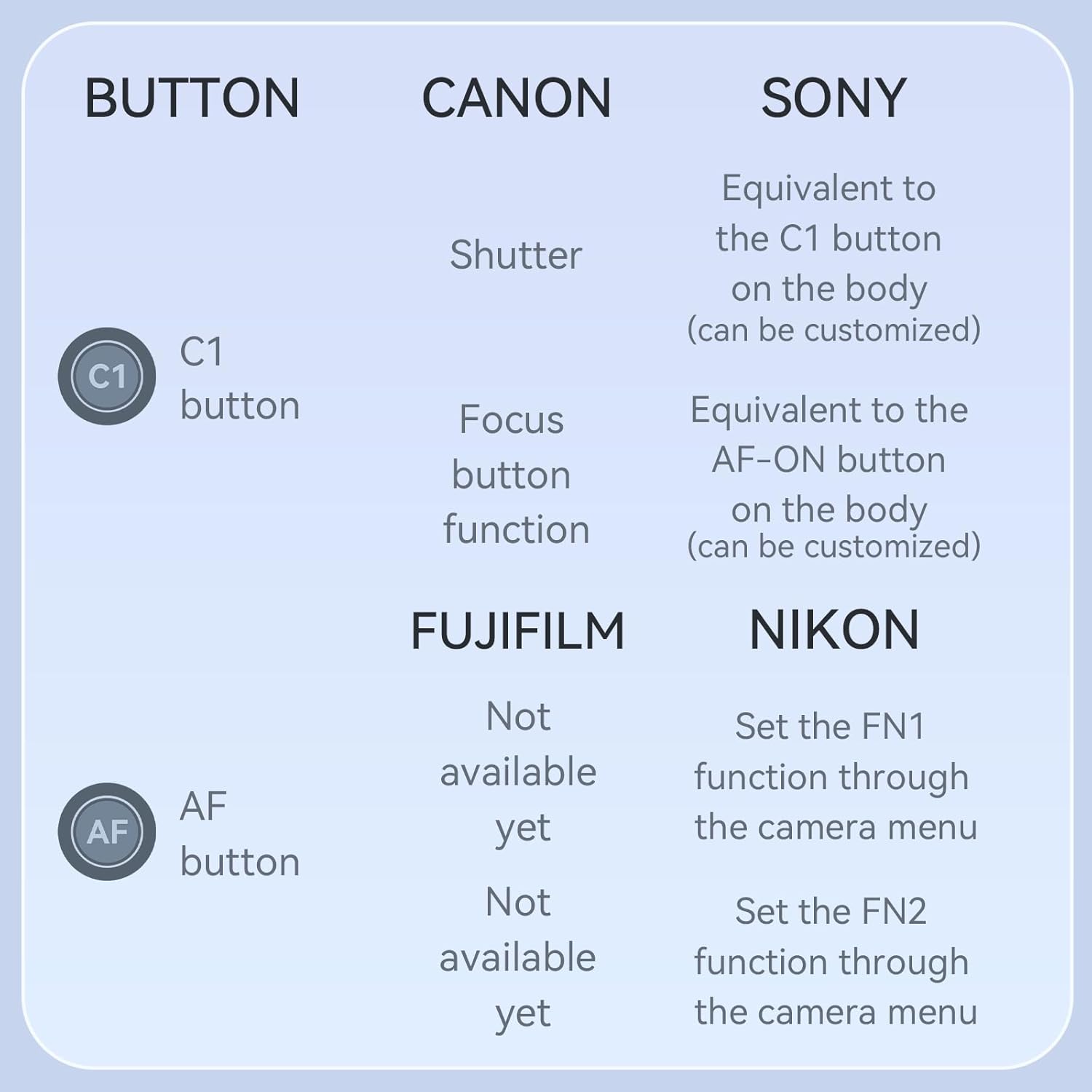
Image: A table illustrating the functions of the C1 and AF buttons across different camera brands: Canon, Sony, Fujifilm, and Nikon.
- Main Shutter Button: Press halfway to focus, fully press to take a photo. In video mode, press to start/stop recording.
- Zoom Buttons (+/-): Controls the zoom function on compatible power zoom lenses.
- C1 Button:
- Canon: Shutter
- Sony: Equivalent to the C1 button on the camera body (customizable).
- Fujifilm: Focus button function.
- Nikon: Not available yet.
- AF Button:
- Canon: Focus button function.
- Sony: Equivalent to the AF-ON button on the camera body (customizable).
- Fujifilm: Not available yet.
- Nikon: Set the FN1 function through the camera menu.
- A/B Switch: Selects between two paired cameras (Channel A or Channel B) for controlling multiple devices.
6.2. Controlling Multiple Cameras
The BR-G1 can control two cameras simultaneously. Pair each camera to a different channel (A or B) following the Bluetooth pairing instructions. Use the A/B switch on the side of the remote to select which camera you wish to control.
7. Maintenance
- Keep the remote controller dry. Do not expose it to moisture or rain.
- Clean the remote with a soft, dry cloth. Do not use harsh chemicals or abrasive cleaners.
- Avoid extreme temperatures. Store the device in a cool, dry place.
- If not using the remote for an extended period, remove the battery to prevent leakage.
8. Troubleshooting
| Problem | Possible Cause | Solution |
|---|---|---|
| Remote not powering on. | Battery is dead or incorrectly installed. | Check battery orientation, replace battery if necessary. Ensure ON/OFF switch is in "ON" position. |
| Cannot pair with camera. | Bluetooth is off on camera, remote is too far, or already paired to another device. | Ensure camera Bluetooth is enabled. Move remote closer to camera. Unpair from other devices if applicable. Restart both devices and try pairing again. |
| Remote functions not working. | Incorrect camera settings, remote not properly paired, or camera not compatible. | Verify camera settings for remote control. Re-pair the remote. Check camera compatibility with BR-G1. Ensure correct A/B channel is selected. |
| Zoom function not working. | Lens does not support power zoom, or camera settings prevent remote zoom. | Ensure you are using a power zoom lens. Check camera menu for remote zoom settings. |
9. Specifications
| Model Name | BR-G1 |
| Brand | YONGNUO |
| Connectivity Technology | Bluetooth |
| Maximum Range | 10 Meters |
| Compatible Devices | Camcorder, Camera (Canon, Nikon, Sony, Fujifilm) |
| Max Number of Supported Devices | 2 |
| Controller Type | Button Control |
| Button Quantity | 6 |
| Color | Black |
| Product Dimensions | 7.87 x 2.54 x 10.41 cm |
| Item Weight | 60 g (0.06 Kilograms) |
| Power Source | CR2032 Battery (approx. 1 year life) |
10. Warranty and Support
The YONGNUO BR-G1 Bluetooth Remote Controller comes with a standard manufacturer's warranty. Please refer to the included warranty card for specific terms and conditions, including warranty period and coverage details.
For technical support, troubleshooting assistance, or warranty claims, please contact YONGNUO customer service through their official website or the contact information provided on your warranty card.