1. Product Overview
The COSTWAY 190 PPD Commercial Dehumidifier is designed for effective humidity control in large areas such as basements, crawl spaces, construction sites, and warehouses. This robust unit features a high dehumidification capacity, an integrated pump for continuous drainage, and user-friendly controls for efficient operation.

Figure 1: Front-side view of the COSTWAY Commercial Dehumidifier.

Figure 2: Examples of versatile usage in commercial and industrial environments, including construction sites, water damage restoration, warehouses, basements, crawl spaces, and workshops.
2. Safety Instructions
Please read all safety instructions carefully before operating the dehumidifier to prevent injury or damage to the unit.
- Ensure the power supply matches the specifications of the unit (115V/60Hz).
- Do not operate the dehumidifier with a damaged power cord or plug.
- Keep the unit away from heat sources, flammable materials, and water.
- Always unplug the dehumidifier before cleaning, maintenance, or moving.
- Do not block the air inlet or outlet. Maintain adequate clearance around the unit for proper airflow.
- This appliance is not intended for use by persons (including children) with reduced physical, sensory or mental capabilities, or lack of experience and knowledge, unless they have been given supervision or instruction concerning use of the appliance by a person responsible for their safety.
- Children should be supervised to ensure that they do not play with the appliance.
3. Package Contents
Verify that all components are present and undamaged upon unpacking.
- 1 x Commercial Dehumidifier
- 1 x Drain Hose (26.2 ft)
- 1 x Instruction Manual
4. Product Features
- High Dehumidification Capacity: 190 PPD (95℉, 90% RH) suitable for areas up to 9000 sq. ft.
- Built-in Pump for Auto Drainage: Automatically drains collected water through a 26.2 ft hose with a 16 ft vertical lift capability.
- Hassle-free Operation: Features a 0-24H timer, 10%-90% humidity setting range, memory restart, auto turn on/off, and auto defrost function.
- Intuitive Digital Display: For easy monitoring of humidity levels and settings.
- Enhanced Durability: Crafted from heavy-duty rotational molded housing for commercial and industrial use.
- Superior Mobility: Equipped with a collapsible handle and 2 large wheels for easy movement.
- User-friendly Details: Includes 2 non-slip carrying handles, a removable and washable MERV-8 filter, and 2 straps for cord and hose organization.

Figure 3: User-friendly details including non-slip carrying handles, removable and washable MERV-8 filter, and straps for organizing the power cord and drain hose.

Figure 4: Demonstrating the ease of movement with the collapsible handle and large, sturdy wheels.
5. Setup
5.1 Positioning the Dehumidifier
- Place the dehumidifier on a level, stable surface.
- Ensure there is at least 12 inches (30 cm) of clear space around all sides of the unit for proper air circulation.
- Avoid placing the unit near heat sources or in direct sunlight.
5.2 Connecting the Drain Hose
The dehumidifier features a built-in pump for continuous drainage. Connect the provided drain hose for automatic water removal.
- Locate the drain outlet on the unit.
- Attach the quick connector of the 26.2 ft drain hose to the drain outlet. Ensure it is securely fastened to prevent leaks.
- Direct the other end of the drain hose to a suitable drainage point, such as a floor drain, sink, or bucket. The pump can lift water up to 16 ft vertically.
- Ensure the hose is not kinked or obstructed, which could impede drainage.

Figure 5: Illustration of connecting the drain hose using the quick connector for continuous drainage.
5.3 Power Connection
- Plug the power cord into a grounded 115V/60Hz electrical outlet.
- Do not use extension cords or adapters.
6. Operating Instructions
6.1 Control Panel Overview
The dehumidifier features an intuitive digital display and touch buttons for easy control.

Figure 6: Detailed view of the control panel, showing the digital display for humidity and temperature, along with control buttons for power, settings, and timer.
- Power Button: Turns the unit on or off.
- Up/Down Buttons: Adjust humidity settings or timer duration.
- Mode/Setting Button: Cycles through different modes or confirms settings.
- Timer Button: Sets the 0-24 hour timer for delayed start or stop.
- Display: Shows current humidity, set humidity, and other operational indicators.
6.2 Initial Operation
- Press the Power button to turn on the dehumidifier.
- The display will show the current room humidity.
- Use the Up/Down buttons to set your desired humidity level (range: 10% - 90% RH). The unit will operate until the set humidity is reached.
6.3 Timer Function
The timer function allows you to set a delayed start or stop time for the dehumidifier.
- Press the Timer button.
- Use the Up/Down buttons to set the desired delay time in hours (0-24 hours).
- The unit will automatically turn on or off after the set time.
6.4 Auto Defrost Function
The dehumidifier is equipped with an auto defrost function. If frost builds up on the evaporator coils, the unit will automatically enter defrost mode to melt the frost, ensuring efficient operation. During defrost, the compressor may temporarily stop, and the fan may continue to run.
7. Maintenance
Regular maintenance ensures optimal performance and extends the lifespan of your dehumidifier.
7.1 Cleaning the Air Filter
The MERV-8 filter should be cleaned regularly, typically every 2-4 weeks depending on usage and air quality.
- Unplug the dehumidifier from the power outlet.
- Locate the air filter access panel (refer to Figure 3).
- Remove the filter.
- Clean the filter with a vacuum cleaner or wash it gently with warm, soapy water. Rinse thoroughly.
- Allow the filter to air dry completely before reinstalling. Do not use a dryer or direct heat.
- Reinsert the dry filter and close the access panel.
7.2 Cleaning the Exterior
- Wipe the exterior of the unit with a soft, damp cloth.
- Do not use abrasive cleaners, solvents, or harsh chemicals.
7.3 Storage
- If storing the unit for an extended period, ensure it is clean and dry.
- Drain any remaining water from the hose.
- Wrap the power cord and drain hose using the integrated straps for neat storage.
- Store in a cool, dry place, away from direct sunlight and extreme temperatures.
8. Troubleshooting
Refer to this section for common issues and their solutions. If the problem persists, contact customer support.
| Problem | Possible Cause | Solution |
|---|---|---|
| Dehumidifier does not turn on. | No power supply; Power cord not plugged in; Circuit breaker tripped. | Ensure unit is plugged into a live outlet; Check circuit breaker; Try a different outlet. |
| Unit is running but not collecting water. | Room humidity is too low; Temperature is too low (below 41°F/5°C); Air filter is clogged; Air inlet/outlet blocked. | Check room humidity; Ensure ambient temperature is within operating range; Clean the air filter; Clear any obstructions. |
| Water leaks from the unit. | Drain hose not properly connected; Drain hose is kinked or blocked. | Ensure drain hose is securely attached; Straighten the drain hose and clear any blockages. |
| Unit frequently enters defrost mode. | Low ambient temperature; High humidity. | This is normal operation in cooler, humid conditions. Ensure proper ventilation. |
| Unit is noisy. | Unit not on a level surface; Fan obstruction; Loose parts. | Place on a level surface; Check for foreign objects in fan; Contact customer support if noise persists. |
9. Specifications
Technical specifications for the COSTWAY 190 PPD Commercial Dehumidifier.
| Attribute | Value |
|---|---|
| Model Name | ES10403US-YE |
| Color | Yellow |
| Material | LLDPE |
| Product Dimensions (L x W x H) | 24.5" x 14" x 20" (62.2 cm x 35.6 cm x 50.8 cm) |
| Power Source | 115V/60Hz |
| Rated Input Power | 590W |
| Rated Input Current | 5.3A |
| Dehumidification Capacity (95℉, 90% RH) | 190 Pints/Day |
| Dehumidification Capacity (86℉, 60% RH) | 150 Pints/Day |
| Dehumidification Capacity (80℉, 60% RH) | 90 Pints/Day |
| Dehumidification Capacity (65℉, 60% RH) | 50 Pints/Day |
| Max Coverage Area | 9000 Sq.Ft |
| Airflow Rate | 412 CFM |
| Adjustable Humidity Range | 10% - 90% RH |
| Power Cord Length | 26 ft (7.9 m) |
| Drain Hose Length | 26.2 ft (8 m) |
| Drainage Vertical Height | 16 ft (4.9 m) |
| Net Weight | 80.5 lbs (36.5 kg) |
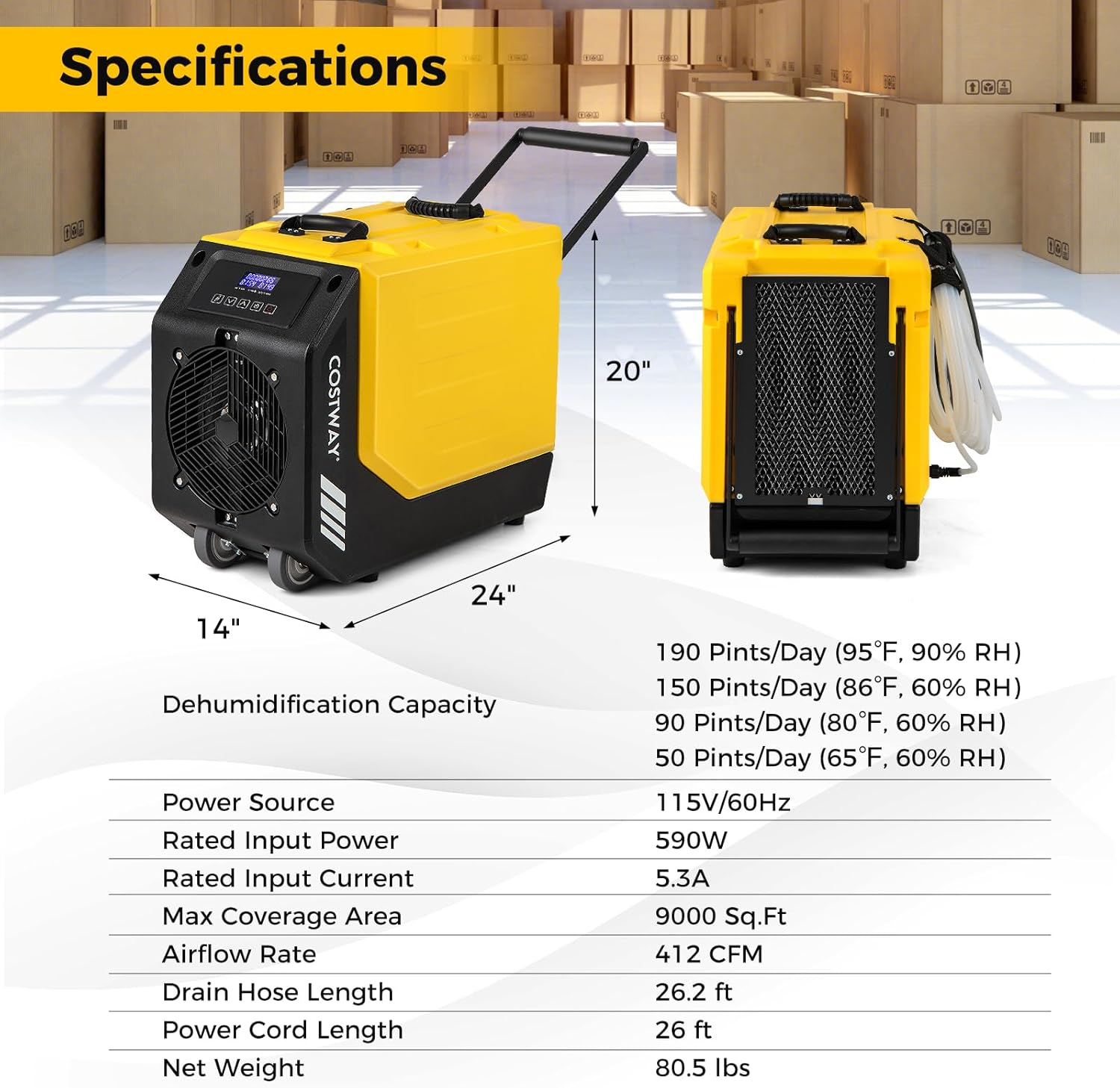
Figure 7: Visual representation of product dimensions and a summary of key specifications.
10. Warranty and Customer Support
For warranty information, technical assistance, or any questions regarding your COSTWAY dehumidifier, please contact COSTWAY customer support. Refer to the contact information provided with your purchase or visit the official COSTWAY website.
Website: www.costway.com


