
1. Introduction
Thank you for purchasing the EVICIV 22-inch 2K QLED Portable Monitor. This manual provides detailed instructions for setting up, operating, and maintaining your new monitor. Please read this manual thoroughly before use to ensure proper functionality and to maximize your viewing experience.
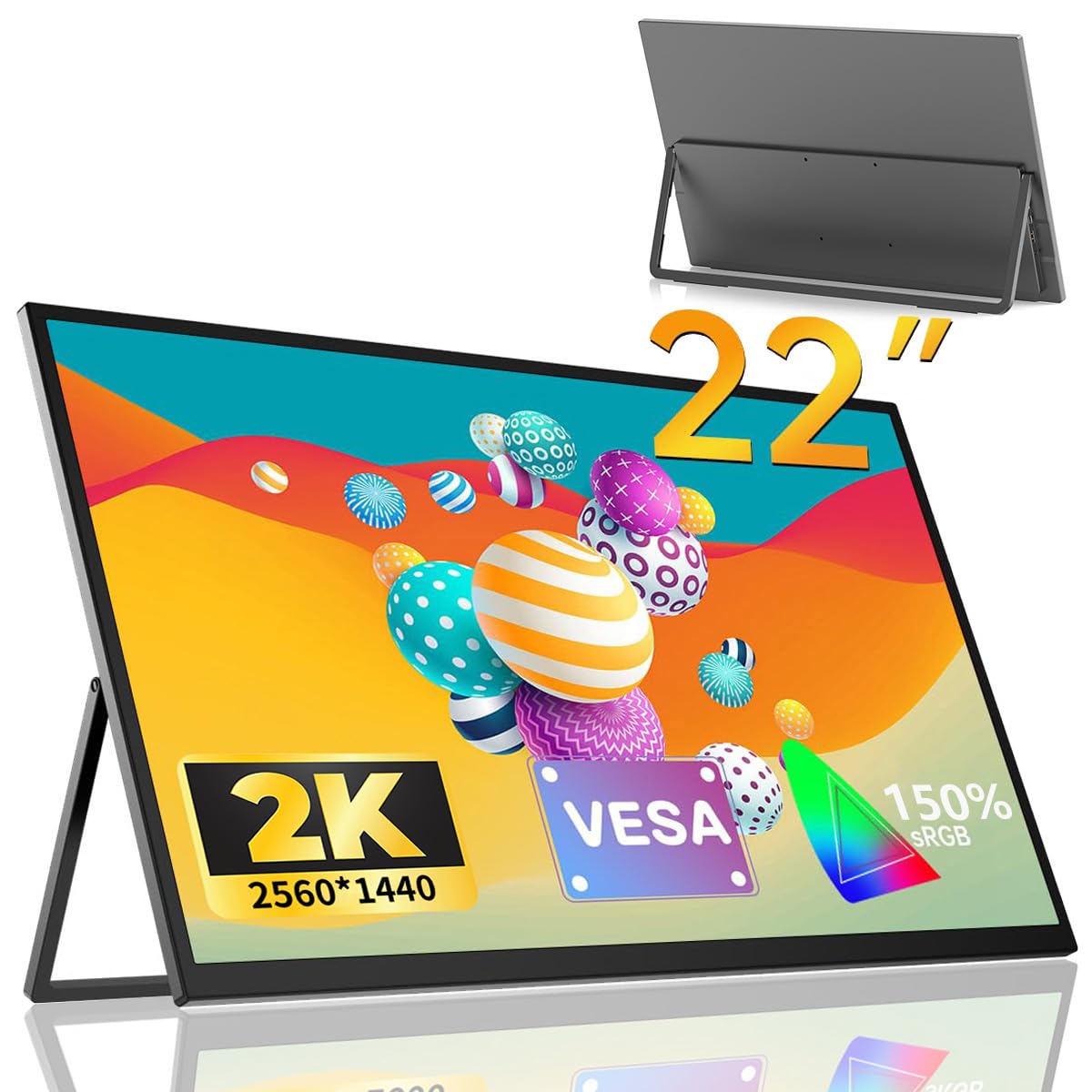
The EVICIV 22-inch 2K QLED Portable Monitor, showcasing its sleek design and integrated stand.
2. Product Features
- Innovative 22-inch Portable Design: Designed for efficient telework, this 22-inch mobile monitor weighs approximately 1647g. Its slim profile, with bezels of only 5mm on the top and sides, maximizes the display area for a near-bezel-less experience.
- High-Resolution 2K Display: The EV2201 supports 2K (2560x1440 pixels), offering twice the pixel count of Full HD. The non-glare IPS panel covers 150% sRGB, displaying approximately 16.77 million colors with deep, accurate reproduction. A 178-degree wide viewing angle ensures consistent image quality from any perspective.
- Integrated Stand & Wall Mount Support: Features a smart integrated stand that adjusts from 0-180 degrees, supporting both vertical and horizontal orientations. It is also VESA wall mount compatible (75x75mm, M4x4mm screws) for flexible installation.
- Wide Connectivity & Gaming Optimization: Equipped with Mini HDMI, two full-featured Type-C ports, a 3.5mm headphone jack, and an OTG (Micro USB) port for peripherals. Compatible with laptops, desktops, smartphones, PS3/PS4, XBOX ONE, Wii, and Switch. Offers 60Hz high-speed response for smooth gaming and action content.
- Multiple Modes & Quality Assurance: Supports various display modes including extended, duplicate, and portrait. Built-in speakers provide audio output. The product is certified to safety standards and undergoes 100% inspection before shipment.

The EVICIV 22-inch 2K QLED Portable Monitor delivers stunning visuals with its high resolution and QLED technology, ensuring a rich and immersive viewing experience.

Experience a superb visual journey with the 2K IPS panel, offering 150% sRGB wide color gamut, 1000:1 contrast ratio, 300 Nits brightness, HDR support, blue light reduction, and FreeSync compatibility.
3. Package Contents
Please check that all items are present and in good condition upon unpacking.
- 22-inch 2K Mobile Monitor x1
- USB-C to USB-C Cable x2
- PD 30W Power Adapter x1
- Mini HDMI to HDMI Cable x1
- User Manual x1
4. Setup Instructions
4.1 Initial Setup
- Place the monitor on a stable, flat surface.
- Adjust the integrated stand to your desired viewing angle.
- Connect the monitor to a power source using the provided PD 30W Power Adapter and a USB-C cable.
4.2 Connecting to Devices
The monitor supports various devices via its versatile ports:
- USB Type-C (Full-featured): For devices with a full-featured USB-C port (supporting DisplayPort Alternate Mode and Power Delivery), connect with a single USB-C to USB-C cable for both video and power.
- Mini HDMI: For devices with an HDMI output, use the provided Mini HDMI to HDMI cable for video. You will also need to connect the monitor to a power source via one of the USB-C ports.
- OTG Port (Micro USB): Connect a mouse or keyboard to this port for enhanced control when using the monitor with compatible devices.
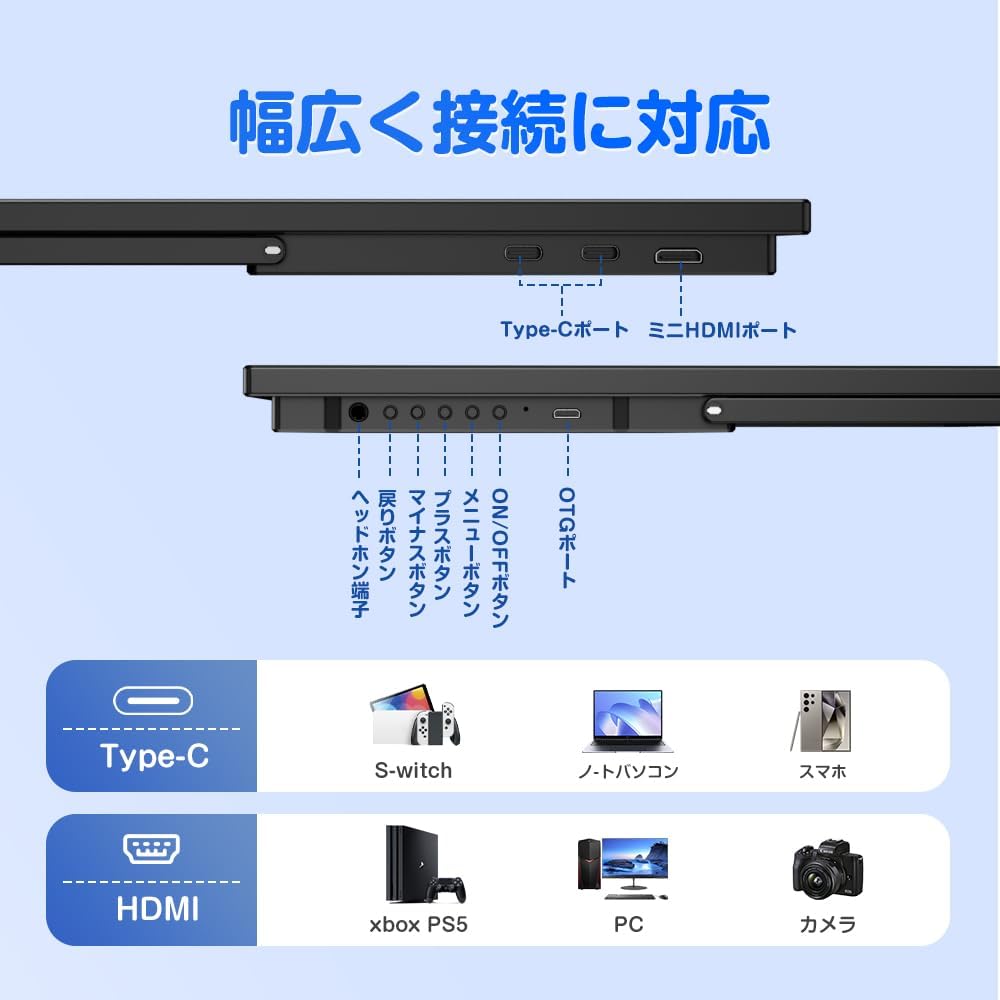
An overview of the monitor's versatile connectivity options, including two full-featured Type-C ports, a Mini HDMI port, a 3.5mm headphone jack, and an OTG (Micro USB) port for peripherals.

Expand your smartphone screen: Connect your smartphone or PC with a single Type-C cable (DP ALT MODE compatible) for a larger display. A power adapter is recommended for stable operation due to varying power consumption.
5. Operating Instructions
5.1 On-Screen Display (OSD) Menu
The OSD menu allows you to adjust various monitor settings. Use the buttons on the side of the monitor to navigate and select options.
- Power Button: Press to turn the monitor on/off.
- Menu Button: Press to open the OSD menu.
- Up/Down Buttons: Navigate through menu options or adjust values.
- Exit Button: Exit the OSD menu.
5.2 Display Modes
The monitor supports several display modes to suit your needs:
- Extended Mode: Expands your desktop across both your primary device and the portable monitor, providing more screen real estate for multitasking.
- Duplicate Mode: Mirrors the display of your primary device onto the portable monitor, ideal for presentations or sharing content.
- Portrait Mode: Allows the monitor to be used in a vertical orientation, beneficial for reading documents, coding, or browsing long web pages.

Boost your productivity by extending your PC screen with the 22-inch portable monitor, allowing you to view reference materials while working and minimize errors.

Enjoy an immersive gaming experience by easily connecting the monitor to PS4/5, Xbox, or other game consoles, providing high-quality visuals anywhere.
6. Mounting Options
6.1 Integrated Stand
The monitor features a robust integrated metal stand that allows for angle adjustments from 0 to 180 degrees. This provides stability and flexibility for both horizontal and vertical screen orientations. The stand is equipped with four non-slip rubber feet.

The monitor features an integrated stand that allows for 0-180 degree angle adjustments, providing flexible viewing options for various tasks.

The smart integrated stand, made of strong metal, provides a stable angle even in portrait orientation, minimizing the risk of tipping. It also features four non-slip rubber feet.
6.2 VESA Wall Mount
The monitor is VESA compatible, allowing it to be mounted on a monitor arm or wall mount bracket. The wall mount hole dimensions are 75x75mm, and the recommended screw specification for attachment is M4x4mm.

The monitor supports VESA mounting (75x75mm) for flexible setup with monitor arms, allowing for both horizontal and vertical screen orientations.

The monitor supports VESA arm attachment for desktop setups and can also be wall-mounted using its four mounting holes, offering versatile placement options.
6.3 Safety Guidelines for Placement
For optimal comfort and safety, position the monitor at eye level or slightly below. Avoid placing the monitor at an upward viewing angle, especially with large monitors, as this can put excessive strain on the stand and increase the risk of tipping.

Important safety advice: Position the monitor at eye level or slightly below. Avoid upward viewing angles, especially with large monitors, as this can put excessive strain on the stand and risk tipping.
7. Maintenance
To ensure the longevity and optimal performance of your monitor, follow these maintenance guidelines:
- Cleaning the Screen: Gently wipe the screen with a soft, lint-free cloth. For stubborn smudges, lightly dampen the cloth with water or a screen-cleaning solution. Avoid using harsh chemicals or abrasive materials.
- General Care: Keep the monitor away from direct sunlight, excessive heat, and moisture. Do not place heavy objects on the monitor. When transporting, use appropriate protective packaging.
8. Troubleshooting
If you encounter any issues with your monitor, please refer to the following common problems and solutions:
| Problem | Possible Cause | Solution |
|---|---|---|
| No display/"No Signal" message | Incorrect input source selected, loose cable connection, insufficient power. | Check cable connections (USB-C, HDMI). Ensure the correct input source is selected in the OSD menu. Verify the monitor is receiving adequate power from the adapter or connected device. |
| Flickering screen or unstable image | Faulty cable, power fluctuations, incompatible resolution/refresh rate. | Try a different cable. Ensure the power adapter is securely connected. Adjust the resolution and refresh rate on your connected device to match the monitor's specifications. |
| No sound from speakers/headphone jack | Volume too low, audio output not selected, faulty audio cable. | Increase monitor volume via OSD. Ensure your device's audio output is set to the monitor. Check headphone connection. |
| Monitor does not power on | No power, faulty power adapter/cable. | Ensure the power adapter is plugged into a working outlet and securely connected to the monitor. Try a different power outlet or USB-C cable if available. |
If the problem persists after trying these solutions, please contact EVICIV customer support for further assistance.
9. Specifications
| Feature | Specification |
|---|---|
| Brand | EVICIV |
| Model Number | EV2201 |
| Screen Size | 22 Inches |
| Resolution | 2560 x 1440 Pixels (QHD Wide 1440p) |
| Display Type | QLED, IPS LCD Panel |
| Screen Surface | Non-Glare |
| Aspect Ratio | 16:9 |
| Contrast Ratio | 1000:1 |
| Refresh Rate | 60 Hz |
| Response Time | 2 ms |
| Brightness | 300 cd/m² |
| Color Gamut | 150% sRGB |
| Viewing Angle | 178 Degrees |
| HDR Technology | HDR |
| Adaptive Sync | FreeSync |
| Connectivity | Mini HDMI x1, Full-featured USB Type-C x2, 3.5mm Headphone Jack, Micro USB (OTG) |
| Built-in Speakers | Yes |
| VESA Mount | 75x75mm |
| Product Dimensions (D x W x H) | 1.8 x 49.1 x 28.2 cm |
| Product Weight | 1.65 kg |
| Power Consumption | 16 Watts |

This image illustrates the compact dimensions (491mm width, 282mm height, 18mm thickness) and lightweight design (1647g) of the 22-inch portable monitor, ideal for enhancing work efficiency alongside a laptop.
10. Warranty and Support
Your EVICIV 22-inch 2K QLED Portable Monitor (Model EV2201) comes with a 1-year manufacturer's warranty from the date of purchase.
This warranty covers manufacturing defects and ensures that the product meets the technical standards regulated by the Electrical Appliance and Material Safety Act. In the unlikely event of an initial defect or malfunction during the warranty period, please contact EVICIV customer support for assistance.
For technical support, troubleshooting, or warranty claims, please refer to the contact information provided with your product documentation or visit the official EVICIV website.

This large portable monitor is significantly lighter and more compact than conventional 20-inch monitors, making it easy to carry for use at home or on the go.


