
Generico Beyond 3 Plus
Generico Nuovo Beyond 3 Plus Smart Watch User Manual
Model: Beyond 3 Plus
Introduction
The new Generico Beyond 3 Plus is an advanced smartwatch designed to enhance your daily life with its comprehensive features. It boasts a vibrant 1.78-inch AMOLED display, integrated GPS for precise activity tracking, and built-in Amazon Alexa for smart voice control. With the ability to make and receive calls directly from your wrist and a water resistance rating of 3 ATM, this smartwatch is built for both convenience and durability. This manual provides essential information on setting up, operating, maintaining, and troubleshooting your device.

Figure 1: Front view of the Generico Nuovo Beyond 3 Plus Smart Watch, showcasing its sleek design and vibrant display.
Setup Guide
1. Unboxing and Initial Charge
Carefully remove all components from the packaging. The box should contain the Smartwatch and a Charging Cable. Before first use, fully charge your smartwatch. Connect the charging cable to the charging port on the back of the watch and plug the USB end into a compatible power adapter (not included) or a computer's USB port. The watch display will indicate charging status.
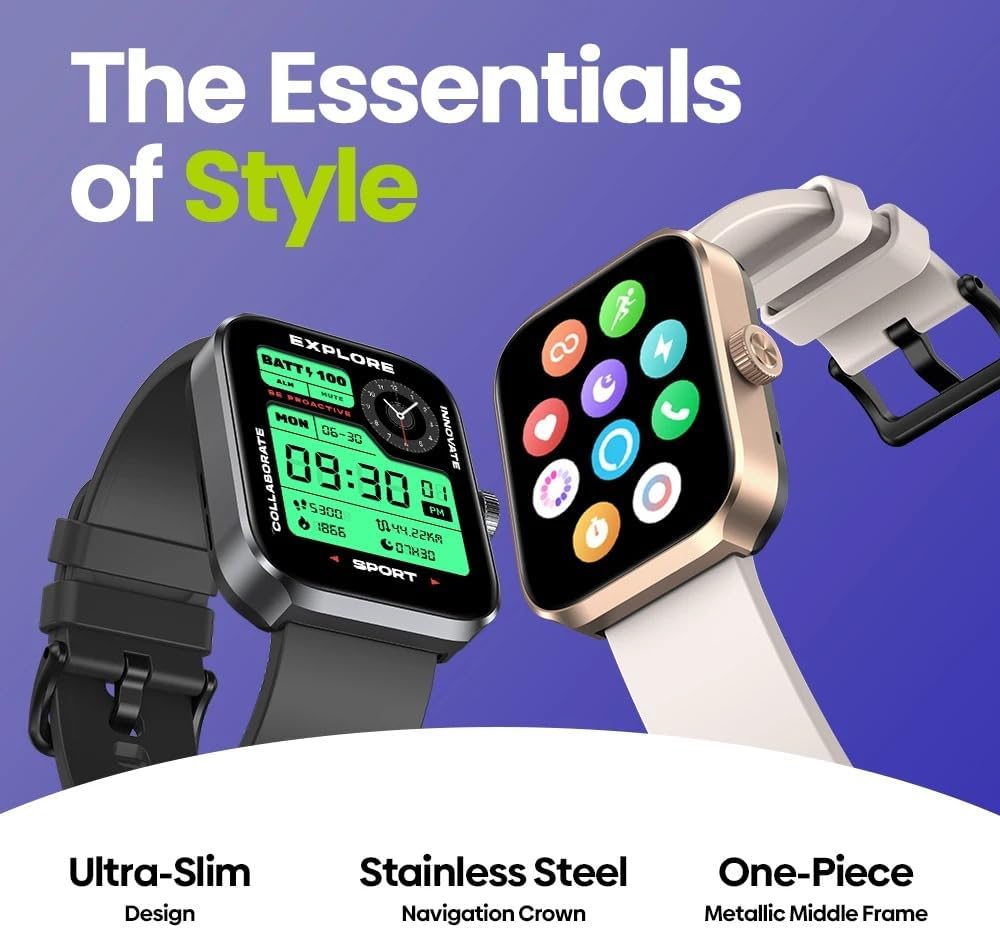
Figure 2: The Generico Beyond 3 Plus Smart Watch in black and gold variants, emphasizing its stylish design and metallic frame.
2. Pairing with Your Smartphone
- Download the Fitbeing app from your smartphone's app store (available for iOS and Android).
- Ensure Bluetooth is enabled on your smartphone.
- Open the Fitbeing app and follow the on-screen instructions to create an account or log in.
- In the app, select 'Add Device' or 'Pair New Device' and choose 'Beyond 3 Plus' from the list of available devices.
- Confirm the pairing request on both your smartphone and the smartwatch.
Operating Instructions
1. Display and Navigation
The Beyond 3 Plus features a 1.78-inch AMOLED touchscreen display, offering vivid colors and sharp clarity. Navigate through menus by swiping left, right, up, or down on the screen. The physical crown on the side can be rotated to scroll through lists and pressed to select items or return to the home screen.

Figure 3: Detailed view of the smartwatch's 1.78-inch AMOLED display, highlighting its clarity and vibrant colors.
2. Key Features
Amazon Alexa Integration
With built-in Amazon Alexa, you can use voice commands to check the weather, set alarms, control smart home devices, and more. Ensure your watch is connected to your smartphone and the Fitbeing app is running in the background for Alexa functionality.
Call Functionality
The smartwatch allows you to make and receive phone calls directly from your wrist. When a call comes in, you can answer or reject it from the watch. To make a call, access the dialer or contact list on your watch.
GPS and Activity Tracking
The integrated GPS accurately tracks your outdoor activities, including running, cycling, and walking. The watch supports over 60 sports modes, providing detailed metrics such as distance, pace, calories burned, and heart rate. All data is synchronized with the Fitbeing app for comprehensive analysis.

Figure 4: The smartwatch's fitness capabilities, including built-in GPS and water resistance, suitable for various sports activities.
3. Using the Fitbeing App
The Fitbeing app is your central hub for managing your smartwatch data. It provides detailed insights into your health metrics (heart rate, sleep, blood oxygen), activity history, and allows for customization of watch faces and settings. The app is compatible with Strava and Apple Health for data synchronization.

Figure 5: Overview of the Fitbeing app interface, demonstrating its various data tracking and customization features.
Maintenance and Care
1. Water Resistance
The Beyond 3 Plus is water-resistant up to 3 ATM. This means it can withstand splashes, rain, and brief immersion in shallow water. It is suitable for activities like hand washing and light swimming. However, it is not recommended for diving, high-pressure water activities, or hot showers/saunas as steam can damage the seals.
2. Cleaning
To clean your smartwatch, gently wipe the screen and body with a soft, lint-free cloth. For stubborn smudges, slightly dampen the cloth with water. Avoid using harsh chemicals, abrasive materials, or strong detergents, as these can damage the watch's finish and seals.
3. Battery Care
To maximize battery life, avoid exposing the watch to extreme temperatures. Charge the watch regularly, but avoid leaving it fully charged or fully discharged for extended periods. If storing the watch for a long time, charge it to about 50%.
Troubleshooting
Common Issues and Solutions
- Watch not turning on/charging: Ensure the charging cable is securely connected to both the watch and the power source. Try a different USB port or power adapter. If the battery is completely drained, it may take a few minutes for the charging indicator to appear.
- Bluetooth connection issues: Make sure Bluetooth is enabled on your smartphone and the watch. Restart both devices. Unpair and re-pair the watch through the Fitbeing app. Ensure the watch is within the Bluetooth range of your phone.
- GPS accuracy problems: Ensure you are in an open area with a clear view of the sky for optimal GPS signal reception. Allow the watch a few moments to acquire a satellite signal before starting an activity.
- Alexa not responding: Check your internet connection on your smartphone. Ensure the Fitbeing app is open and running in the background. Verify that Alexa is properly configured within the Fitbeing app settings.
- Screen unresponsive: Try restarting the watch by pressing and holding the physical crown for several seconds until it powers off, then power it back on.
Technical Specifications
| Feature | Specification |
|---|---|
| Brand | Generico |
| Model Name | Beyond 3 Plus |
| Display Size | 1.78 Inches |
| Display Type | AMOLED |
| Memory Capacity | 128 MB |
| Operating System | Fitbeing |
| Battery Capacity | 450 mAh |
| Water Resistance | 3 ATM |
| Connectivity | Bluetooth, GPS |
| Compatible Devices | Smartphone |
| Special Features | AMOLED Display, Amazon Alexa, GPS, Phone Calls |
| Input Interface | Touchscreen |
Warranty Information
This Generico Nuovo Beyond 3 Plus Smart Watch is covered by a standard manufacturer's warranty. Please refer to the warranty card included in your product packaging or visit the official Generico website for detailed terms and conditions regarding warranty coverage, duration, and claims process. Keep your proof of purchase for any warranty claims.
Customer Support
For further assistance, technical support, or inquiries regarding your Generico Nuovo Beyond 3 Plus Smart Watch, please contact Generico customer support. Contact information can typically be found on the product packaging, the official Generico website, or within the Fitbeing app's 'Help' or 'Support' section.
Related documentsBeyond 3 Plus

Ask a question about this manual
Ask about setup, troubleshooting, compatibility, parts, safety, or missing instructions. Manuals+ will review the question and use this page’s manual context to help answer it.