
air31
Headset Sports ANC TWS Wireless Earbuds User Manual
Model: air31 | Brand: Generic
Introduction
Thank you for choosing the Headset Sports ANC TWS Wireless Earbuds. This manual provides detailed instructions on how to set up, operate, maintain, and troubleshoot your new earbuds. Please read this manual carefully before use to ensure optimal performance and longevity of your device.
These earbuds feature Active Noise Cancellation (ANC), a waterproof design, built-in microphone, and true wireless stereo connectivity, making them ideal for mobile phone use, gaming, sports, and professional applications.
What's in the Box
Upon unboxing, please ensure all items are present:
- Headset Sports ANC TWS Wireless Earbuds
- Protective Case
- User Manual (this document)
- Charging Cable
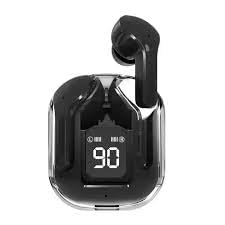
Image: The Headset Sports ANC TWS Wireless Earbuds shown inside their protective charging case. The case features a digital display indicating battery levels, currently showing "90".
Setup Guide
1. Initial Charging
Before first use, fully charge the earbuds and their protective case. Connect the charging cable to the case's charging port and a compatible USB power source. The digital display on the case will indicate the charging status and battery percentage.
2. Pairing with Your Device
- Ensure the earbuds are in the charging case and the case has sufficient power.
- Open the charging case lid. The earbuds will automatically enter pairing mode, indicated by a flashing LED light on the earbuds (specific color/pattern may vary).
- On your mobile device (smartphone, tablet, computer), go to the Bluetooth settings.
- Search for new devices. You should see "TWS Wireless Earbuds" or a similar name (e.g., "air31") appear in the list of available devices.
- Select the earbuds from the list to connect. Once connected, a voice prompt will confirm the connection, and the LED light on the earbuds will stop flashing.
- If prompted for a passcode, enter "0000" (four zeros).
Note: The earbuds will automatically reconnect to the last paired device when taken out of the case, if Bluetooth is enabled on the device.
Operating Instructions
Touch Controls
The earbuds feature touch-sensitive controls for various functions. The exact location of the touch sensor is typically on the outer surface of each earbud.
| Action | Function |
|---|---|
| Single Tap (Left/Right) | Play/Pause Music, Answer/End Call |
| Double Tap (Right) | Next Track |
| Double Tap (Left) | Previous Track |
| Triple Tap (Left/Right) | Activate Voice Assistant (Siri, Google Assistant) |
| Long Press (Left/Right, 2 seconds) | Toggle ANC (Active Noise Cancellation) On/Off |
| Long Press (Left/Right, 3 seconds during call) | Reject Incoming Call |
Note: Specific touch control functions may vary slightly based on firmware version. Refer to the quick start guide included in your packaging for any specific variations.
Active Noise Cancellation (ANC)
The earbuds are equipped with Active Noise Cancellation technology to reduce ambient noise. To activate or deactivate ANC, perform a long press (approximately 2 seconds) on either earbud until you hear an audible confirmation.
Wearing the Earbuds
Gently insert each earbud into your ear canal. Adjust the angle until it feels secure and comfortable. A proper fit is crucial for optimal sound quality and effective noise cancellation.
Maintenance and Care
- Cleaning: Regularly clean the earbuds and charging case with a soft, dry, lint-free cloth. Do not use abrasive cleaners, alcohol, or chemical solvents.
- Water Resistance: The earbuds are waterproof. However, avoid prolonged submersion in water. Dry them thoroughly before placing them back in the charging case to prevent damage to the charging contacts.
- Storage: When not in use, store the earbuds in their charging case to protect them and keep them charged. Store in a cool, dry place away from direct sunlight and extreme temperatures.
- Battery Care: To prolong battery life, avoid fully discharging the earbuds and case frequently. Charge them regularly, even if not in daily use.
Troubleshooting
| Problem | Possible Cause | Solution |
|---|---|---|
| Earbuds not pairing | Low battery; Out of range; Already paired to another device; Pairing mode not active. | Charge earbuds and case; Move closer to device; Disconnect from other devices; Ensure case lid is open and earbuds are flashing. |
| No sound from one earbud | Low battery; Earbud not properly seated in case for charging; Connection issue. | Ensure both earbuds are charged; Place both earbuds back in case, close lid, then reopen; Re-pair with device. |
| ANC not working effectively | Improper fit; ANC not activated. | Adjust earbuds for a snug fit; Long press earbud to toggle ANC on. |
| Charging case not charging | Faulty cable/adapter; Dirty charging port. | Try a different USB cable and power adapter; Clean charging port gently with a dry cotton swab. |
| Poor sound quality | Improper fit; Earbuds dirty; Source audio quality. | Adjust fit; Clean earbud grilles; Try different audio source. |
Resetting the Earbuds
If you experience persistent issues, a factory reset may resolve them. The exact reset procedure can vary, but typically involves:
- Place both earbuds back into the charging case.
- Press and hold a button on the case or earbuds (refer to specific product instructions if available, otherwise try holding for 10-15 seconds) until the indicator lights flash rapidly or change color, signifying a reset.
- Remove the earbuds from your device's Bluetooth paired list ("Forget Device").
- Re-pair the earbuds as per the "Setup Guide" section.
Product Specifications
| Model Name | TWS Wireless Earbuds (air31) |
| Brand | Generic |
| Noise Control | Active Noise Cancellation (ANC) |
| Connectivity Technology | True Wireless Stereo (Bluetooth) |
| Features | Waterproof, Microphone, Noise Cancelling |
| Ear Placement | In Ear |
| Form Factor | In Ear |
| Impedance | 30 Ohm |
| Color | Black |
| Item Weight | 0.15 Kilograms (5.3 ounces) |
| Package Dimensions | 3.94 x 3.94 x 1.97 inches |
| Manufacturer | NAKI |
| Country of Origin | China |
| ASIN | B0DML3WFHS |
Warranty and Support
For warranty information and technical support, please refer to the documentation provided with your purchase or contact the seller directly. Keep your proof of purchase for warranty claims.
Manufacturer: NAKI
For further assistance, please visit the product page on Amazon.com or contact the seller "Alessio toys".
Related Documents - air31
 |
AIR31 Bluetooth Headphones User Guide and FCC Compliance Instructions for using Shenzhen YunhuixiangTech Co., Ltd AIR31 Bluetooth Headphones, including pairing, touch controls, charging, and FCC compliance information. |
 |
Aivituvin AIR 29 Pet Enclosure Instruction Manual and Assembly Guide This instruction manual provides detailed assembly steps for the Aivituvin AIR 29 pet enclosure. It includes a list of required tools, hardware, and parts. The manual also guides users on combining the AIR 29 enclosure with various chicken coops, including models AIR27, AIR31, and AIR32, detailing different configuration options. |
 |
FCC Attestation Letter for Air31 Bluetooth Headphones (2BHS7-AIR31) Attestation letter from Shenzhen YunhuixiangTech Co., Ltd to the FCC confirming that the Air31 Bluetooth headphones (FCC ID: 2BHS7-AIR31) are not considered 'covered' equipment. |
 |
Shenzhen Taiwei Electronics Letter of Authorization for TWS Earphones (Models M10, M20, etc.) Official Letter of Authorization from Shenzhen Taiwei Electronics Co., Ltd, authorizing LGAI Technological Center S.A. for FCC certification of TWS earphones, including models M10, M20, M25, and others. FCC ID: 2BEFI-M10. |
 |
FCC Part 15C Test Report for Shenzhen Taiwei Electronics Co., Ltd. TWS Earphones (Model M10) This FCC Part 15C test report details the compliance testing for Shenzhen Taiwei Electronics Co., Ltd.'s TWS earphones, model M10 (FCC ID: 2BEFI-M10). It includes results for conducted emissions, radiated emissions, band edge emissions, bandwidth, and antenna requirements, performed by Shenzhen DL Testing Technology Co., Ltd. |
 |
Just Magic: Comprehensive Product Catalog - Electronics, Accessories, Toys Discover the extensive product range from Just Magic, a leading manufacturer and supplier. This catalog features smartwatches, Bluetooth devices, projectors, mobile accessories, kids' toys, home appliances, and more. Find detailed descriptions and specifications for all products. |
Ask a question about this manual
Ask about setup, troubleshooting, compatibility, parts, safety, or missing instructions. Manuals+ will review the question and use this page’s manual context to help answer it.