
Product Overview
The imagitarium EX-FIL 30 Hang-On-Back Filter provides continuous water purification for your aquarium. It utilizes chemical, mechanical, and biological filtration to maintain a healthy aquatic environment. This filter is designed for 20 to 30-gallon aquariums.
The chemical filtration uses coconut carbon media, which is an effective alternative to traditional coal carbon. For optimal water quality, it is recommended to select a filter that can cycle your aquarium's water volume approximately six times per hour. This rate may vary based on the specific needs of your aquatic life, with slower flow for delicate species and higher flow for marine setups.
Key Features
- Adjustable footing for secure placement on framed and frameless 20 to 30-gallon aquariums.
- Includes a biological filter cartridge and a coconut carbon filter cartridge for comprehensive filtration.
- Adjustable water flow valve to customize water circulation.
- Adjustable height water inlet to accommodate varying water levels.
- Optional water inlet sponge pre-filter for enhanced debris removal.
- Rated for 150-250 Gallons Per Hour (GPH).
Setup Instructions
Before initial use, carefully follow these steps to ensure proper installation and function of your EX-FIL 30 filter.
- Unpack and Inspect: Carefully remove all components from the packaging. Inspect all parts for any damage or breakage. If any parts are damaged, do not proceed with assembly and contact customer support.
- Initial Cleaning: Rinse all filter parts with clean, fresh water. Wipe down components with a soft, clean towel. Do not use soaps or detergents.
- Install Filter Cartridges: Insert the biological filter cartridge and the coconut carbon filter cartridge into their designated slots within the filter housing. Ensure they are seated correctly.
- Attach Water Inlet Tube: Connect the water inlet tube to the filter body. Adjust its height as needed to ensure the intake is submerged in the aquarium water.
- Optional Pre-Filter Sponge: If desired, attach the optional water inlet sponge pre-filter to the bottom of the water inlet tube. This helps prevent larger debris from entering the filter and protects small fish or invertebrates.
- Position on Aquarium: Hang the filter on the back of your aquarium. Adjust the footing to ensure the filter is level and stable on both framed and frameless tanks.
- Prime the Filter: Before plugging in the filter, fill the filter reservoir with water from your aquarium. This primes the pump and prevents it from running dry, which can cause damage and noise. Continue filling until water begins to flow out of the filter's output spout.
- Connect Power: Once the filter is primed and securely in place, plug the power cord into a grounded electrical outlet. The filter should begin operating immediately.

Figure 1: Diagram illustrating the filter's adjustable water flow valve, adjustable height water inlet, biological and coconut carbon filter cartridges, optional water inlet sponge pre-filter, and adjustable footing. Dimensions are also shown.

Figure 2: The imagitarium EX-FIL 30 Hang-On-Back Filter shown with the optional sponge pre-filter installed on the intake tube.

Figure 3: The imagitarium EX-FIL 30 Hang-On-Back Filter without the sponge pre-filter, showing the standard intake tube.
Operating Instructions
Once installed and primed, the EX-FIL 30 filter operates continuously to maintain water quality. Adjustments can be made to optimize performance.
- Water Flow Adjustment: Use the adjustable water flow valve located on the filter to increase or decrease the water flow rate. Turn the valve clockwise to reduce flow and counter-clockwise to increase flow. Adjust according to the needs of your aquarium inhabitants.
- Continuous Operation: For optimal water quality, the filter should run 24 hours a day, 7 days a week. Intermittent operation can disrupt the biological filtration process.
- Monitoring Performance: Regularly observe the water clarity and the filter's output. A decrease in flow or cloudy water may indicate that the filter cartridges need cleaning or replacement.
Maintenance
Regular maintenance is crucial for the longevity and efficient operation of your imagitarium EX-FIL 30 filter. Always unplug the filter from the power outlet before performing any maintenance.
- Unplug Filter: Disconnect the filter's power cord from the electrical outlet.
- Remove Filter Cartridges: Carefully remove the biological and coconut carbon filter cartridges from the filter housing.
- Clean Filter Housing: Rinse the filter housing and impeller assembly with clean aquarium water or dechlorinated tap water. Avoid using tap water directly on biological media as chlorine can harm beneficial bacteria.
- Cartridge Maintenance:
- Biological Cartridge: Gently rinse the biological cartridge in old aquarium water (removed during a water change) to preserve beneficial bacteria. Do not clean excessively.
- Coconut Carbon Cartridge: The coconut carbon cartridge should be replaced approximately every 2-4 weeks, or as needed, to maintain effective chemical filtration.
- Clean Pre-Filter Sponge (if used): If you are using the optional sponge pre-filter, remove it from the intake tube and rinse it thoroughly in old aquarium water.
- Reassemble and Restart: Reinsert the cleaned or new filter cartridges and sponge pre-filter (if applicable). Reassemble the filter, ensuring all parts are securely in place. Prime the filter by filling it with aquarium water before plugging it back in.
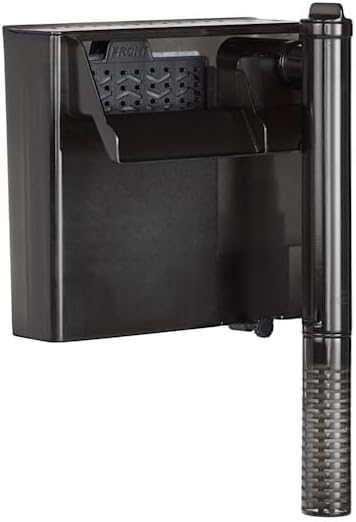
Figure 4: A close-up view of the imagitarium filter cartridge, which contains both mechanical and chemical (coconut carbon) filtration media.

Figure 5: The optional sponge pre-filter, designed to attach to the water inlet tube to prevent larger debris from entering the main filter.
Troubleshooting
If you encounter issues with your EX-FIL 30 filter, refer to the common problems and solutions below.
| Problem | Possible Cause | Solution |
|---|---|---|
| Filter is not running or has low flow. |
|
|
| Filter is noisy. |
|
|
| Water is cloudy despite filter running. |
|
|
Specifications
| Feature | Detail |
|---|---|
| Model | EX-FIL 30 |
| Brand | imagitarium |
| Recommended Aquarium Size | 20 to 30 Gallons |
| Flow Rate | 150-250 GPH (Gallons Per Hour) |
| Filtration Type | Mechanical, Chemical (Coconut Carbon), Biological |
| Item Weight | 1.62 Pounds (0.73 kg) |
| Dimensions (approx.) | 7.4 inches (W) x 7 inches (H) |
| First Available Date | November 9, 2024 |
Warranty and Support
For warranty information, technical support, or to purchase replacement parts, please contact imagitarium customer service. Keep your purchase receipt as proof of purchase.
Contact information for imagitarium can typically be found on the product packaging or the official imagitarium website.