
1. Introduction
This manual provides detailed instructions for the safe and effective use of the LCWLYOBM YH-800 Switch Tester. The YH-800 is a versatile detection instrument designed to test photoelectric, proximity, and magnetic switches, operating at 24V with a 0.5A capacity. Please read this manual thoroughly before operation to ensure proper functionality and to prevent damage to the device or connected components.
2. Safety Precautions
- Always read and understand all instructions before operating the device.
- Ensure the power supply connected to the tester is a stable 24V DC and does not exceed 0.5A. Incorrect voltage or current can damage the device.
- Do not attempt to disassemble, modify, or repair the YH-800 tester. Refer all servicing to qualified personnel.
- Keep the device dry and away from moisture, liquids, and extreme temperatures.
- Use the tester only for its intended purpose of detecting photoelectric, proximity, and magnetic switches.
- Always disconnect power before making or changing connections to prevent electrical shock or damage.
3. Product Overview
The YH-800 is a compact and efficient tool for verifying the operation of various industrial switches. It features clear indicator lights for power status, switch connection, and output modes (PNP/NPN).
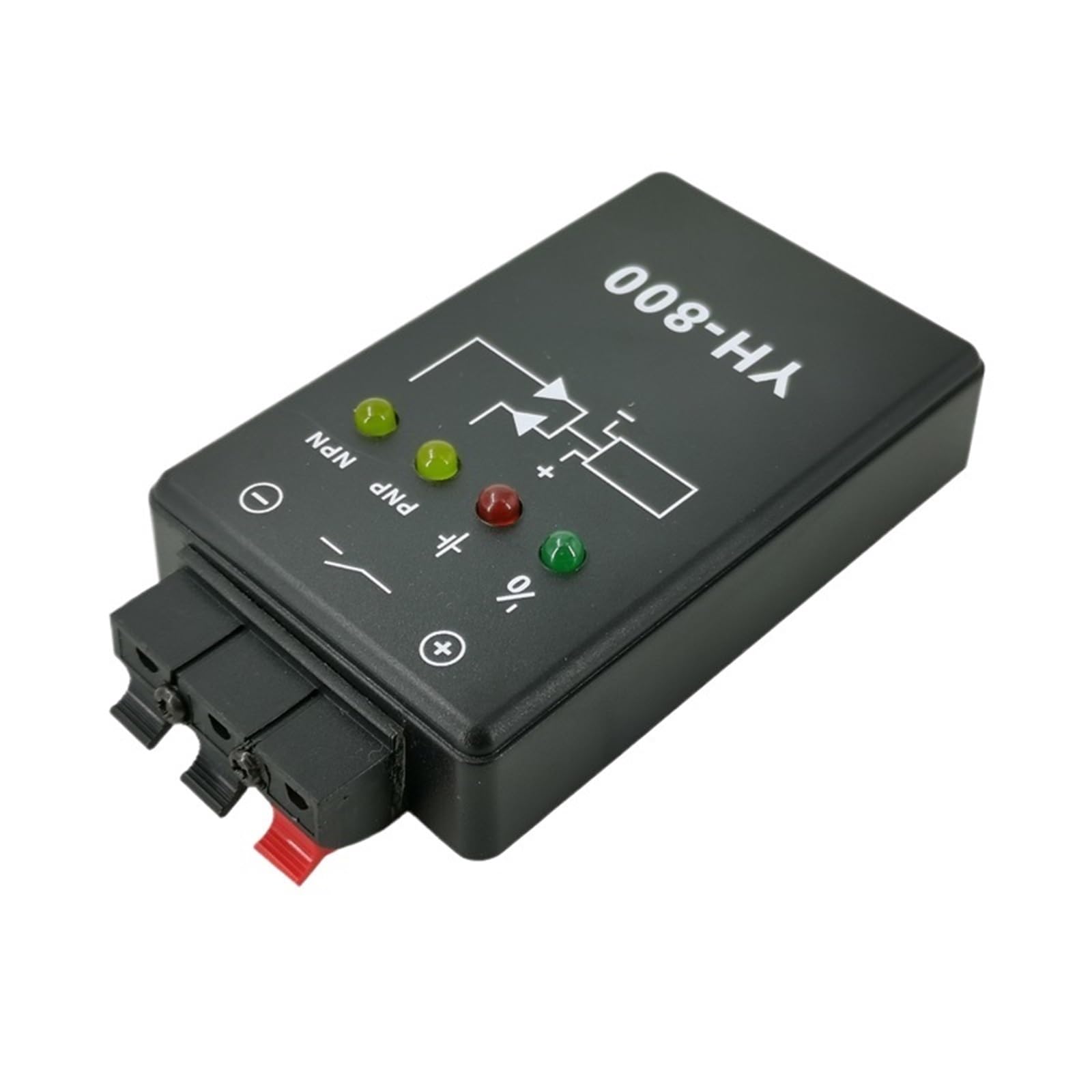
Figure 3.1: YH-800 Switch Tester Component Diagram
This diagram illustrates the key components and connection points of the YH-800 tester. It shows the output terminal at the top, with clearly marked positive (red) and negative (blue) terminals for power input. Below these are indicator lights: a red light for low power, a green light for switch connection, and two yellow lights indicating PNP mode output and NPN mode output respectively.
4. Technical Specifications
- Model: YH-800
- Brand: LCWLYOBM
- Input Voltage: 24V DC
- Output Current: 0.5A
- Detection Types: Photoelectric Switch, Proximity Switch, Magnetic Switch
- Item Weight: 50 Grams
- Dimensions: Approximately 93mm (Length) x 60mm (Width) x 23mm (Height)

Figure 4.1: YH-800 Switch Tester Dimensions
This image provides a visual representation of the YH-800 tester's physical dimensions, indicating a length of 93mm, a width of 60mm, and a height of 23mm.
5. Setup and Connection
Follow these steps to properly set up and connect your YH-800 Switch Tester:
- Identify Terminals: Locate the positive (red) and negative (blue) terminals on the top of the tester, as well as the output terminal.
- Power Connection: Connect a stable 24V DC power supply to the positive (red) and negative (blue) terminals. Ensure correct polarity.
- Switch Connection: Connect the switch you intend to test to the appropriate input terminals of the YH-800. The wiring configuration will depend on the specific switch type (photoelectric, proximity, or magnetic) and its output type (PNP or NPN). Refer to the switch's own documentation for its wiring diagram.
- Output Monitoring (Optional): If you wish to monitor the tester's output, connect a suitable monitoring device to the tester's output terminal.
- Power On: Once all connections are secure, apply power to the 24V DC supply.
6. Operating Instructions
The YH-800 provides visual feedback through its indicator lights to help you determine the status and type of switch operation.
6.1. Power Indicator
The red light on the tester indicates the power status. If the red light is off or flickering, it suggests a low power condition or an issue with the 24V DC power supply. Ensure a stable and sufficient 24V DC power source is connected.
6.2. Switch Connection Indicator
The green light illuminates when a switch is successfully connected and detected by the YH-800. If this light does not turn on, verify the switch's wiring and ensure the switch itself is functional.
6.3. PNP Mode Testing
When testing a PNP (Positive-Negative-Positive) type switch, the yellow light labeled "PNP" will illuminate upon activation of the switch. This indicates that the switch is operating correctly in PNP mode.
6.4. NPN Mode Testing
When testing an NPN (Negative-Positive-Negative) type switch, the yellow light labeled "NPN" will illuminate upon activation of the switch. This confirms the switch is functioning as an NPN type.
Always ensure that the switch being tested matches the expected output type (PNP or NPN) for accurate results. The YH-800 simplifies the verification process by providing clear visual cues for each mode.
7. Maintenance
To ensure the longevity and reliable performance of your YH-800 Switch Tester, follow these simple maintenance guidelines:
- Cleaning: Keep the device clean by wiping it with a soft, dry cloth. Do not use abrasive cleaners or solvents.
- Storage: Store the tester in a cool, dry place, away from direct sunlight, dust, and corrosive environments.
- Handling: Avoid dropping the device or subjecting it to strong impacts, which can damage internal components.
- No User-Serviceable Parts: The YH-800 contains no user-serviceable parts. Do not attempt to open the casing.
8. Troubleshooting
If you encounter issues with your YH-800 Switch Tester, refer to the following troubleshooting guide:
- No Power Indicator (Red Light Off):
- Check the 24V DC power supply connection. Ensure it is securely plugged in and providing the correct voltage.
- Verify the power supply itself is functional.
- No Switch Connection Indicator (Green Light Off):
- Inspect the wiring between the switch and the YH-800 tester. Ensure all connections are correct and secure.
- Test the switch independently if possible, to confirm it is functional.
- Ensure the switch type (photoelectric, proximity, magnetic) is compatible with the tester.
- Incorrect Mode Indicator (PNP/NPN Yellow Light):
- Confirm the actual output type of the switch being tested (PNP or NPN).
- Verify the switch's wiring matches the expected configuration for its output type.
- Inaccurate Readings or Intermittent Operation:
- Ensure the 24V DC power supply is stable and free from fluctuations.
- Check all wiring for loose connections or damage.
- Ensure the operating environment is free from excessive electrical noise or interference.
9. Warranty and Customer Support
For warranty information, technical assistance, or customer support regarding your LCWLYOBM YH-800 Switch Tester, please contact your original retailer or the manufacturer directly. Please retain your purchase receipt as proof of purchase may be required for warranty claims.