
XINJISHIMIN C124103102D01(jin14+zhijia)
XINJISHIMIN Replacement Remote Control User Manual
Model: C124103102D01(jin14+zhijia)
Introduction
This user manual provides comprehensive instructions for the XINJISHIMIN Replacement Remote Control, designed for seamless compatibility with HY300, HY300PRO, HY320mini, and HY320 Mini Projectors. Please read this manual thoroughly before use to ensure proper operation and longevity of your device.
Product Overview

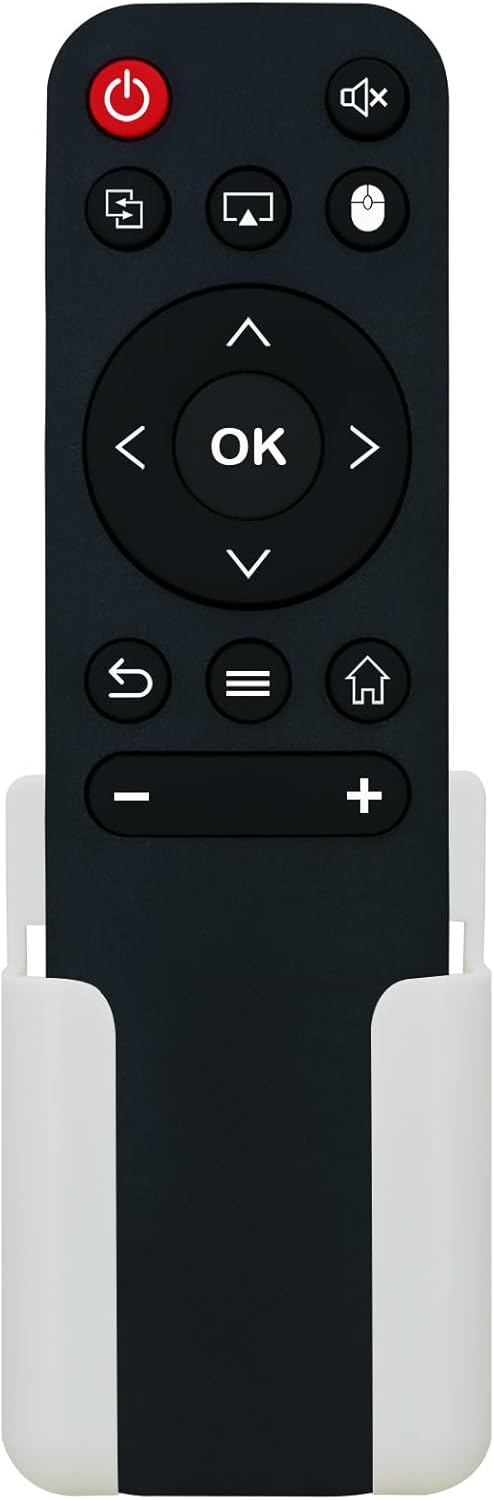


The XINJISHIMIN Replacement Remote Control is a compact, black remote designed for specific mini projector models. It features essential control buttons and comes with a white wall mounting bracket for convenient storage. The remote operates on two AAA 1.5V batteries (not included).
Setup
1. Battery Installation
- Locate the battery compartment on the back of the remote control.
- Slide the battery compartment cover downwards to open it.
- Insert two AAA 1.5V batteries, ensuring the correct polarity (+ and -) as indicated inside the compartment.
- Slide the battery compartment cover back into place until it clicks securely.
Note: Batteries are not included with the remote control. Please use new, high-quality AAA batteries for optimal performance.
2. Initial Pairing (No Programming Needed)
This replacement remote control is designed for immediate use with compatible HY300, HY300PRO, HY320mini, and HY320 Mini Projectors. No programming or complex pairing procedures are required. Simply insert the batteries, and the remote should function directly with your projector.
Operating Instructions
Familiarize yourself with the buttons on your remote control:
| Button Icon/Label | Function | Description |
|---|---|---|
 Power (Red Button) Power (Red Button) | Power On/Off | Press to turn the projector on or off. |
| Mute | Mute/Unmute Audio | Toggles the audio output of the projector on or off. |
| Input Source | Select Input Source | Cycles through available input sources (e.g., HDMI, USB, AV). |
| Screen Mirroring | Activate Screen Mirroring | Initiates the screen mirroring function for compatible devices. |
| Mouse Mode | Toggle Mouse Pointer | Activates or deactivates the on-screen mouse pointer for navigation. |
| Directional Pad (Up/Down/Left/Right) & OK | Navigation & Selection | Use directional arrows to navigate menus and the OK button to confirm selections. |
| Back/Return | Go Back | Returns to the previous screen or menu. |
| Menu | Access Menu | Opens the projector's main menu or context-sensitive menu. |
| Home | Go to Home Screen | Returns to the projector's main home interface. |
| Volume Down (-) | Decrease Volume | Reduces the audio volume. |
| Volume Up (+) | Increase Volume | Increases the audio volume. |
Point the remote control directly at the projector's IR receiver for optimal response.
Maintenance
Cleaning
- Wipe the remote control with a soft, dry cloth.
- Do not use liquid cleaners, aerosols, or abrasive cleaning agents, as these can damage the remote's surface or internal components.
Battery Replacement
- Replace batteries when the remote's response becomes sluggish or stops working.
- Always replace both AAA batteries at the same time.
- Remove batteries if the remote will not be used for an extended period to prevent leakage.
Storage
- Store the remote control in a cool, dry place, away from direct sunlight and extreme temperatures.
- Utilize the provided wall mounting bracket for secure and convenient storage, preventing misplacement or damage.
Troubleshooting
| Problem | Possible Cause | Solution |
|---|---|---|
| Remote is not responding. |
|
|
| Some buttons are not working. |
|
|
| Remote works intermittently. |
|
|
Specifications
- Model: C124103102D01(jin14+zhijia)
- Brand: XINJISHIMIN
- Compatible Projectors: HY300, HY300PRO, HY320mini, HY320 Mini Projector
- Power Source: 2 x AAA 1.5V Batteries (not included)
- Dimensions: 7.72 x 3.35 x 1.38 inches (Package Dimensions)
- Item Weight: 1.44 ounces
- Special Feature: Includes Wall Mounting Bracket
Warranty and Support
For information regarding warranty coverage or technical support, please refer to the documentation provided with your original projector or contact the XINJISHIMIN customer service directly. As this is a replacement remote, specific warranty terms may vary. Keep your purchase receipt for any warranty claims.
For further assistance, please visit the official XINJISHIMIN support website or contact their customer service department.
Related Documents - C124103102D01(jin14+zhijia)
 |
Smart HD IP Camera Quick Start Guide Quick start guide for the Smart HD IP Camera (Model EXFQS12B44G) by Huizhou Enxun Zhijia Electronic Technology Co., Ltd. Includes setup instructions, LED indicator status, button operations, and regulatory compliance information. |
 |
Yi Zhijia Quotation Sheet for 1.25-8P Connector (3071900000375) Official quotation sheet from Shenzhen Yizhijia Electronics Co., Ltd. for part number 3071900000375, a 1.25-8P ultra-thin flat adhesive gold-plated connector. Includes pricing, terms, and conditions. |
Ask a question about this manual
Ask about setup, troubleshooting, compatibility, parts, safety, or missing instructions. Manuals+ will review the question and use this page’s manual context to help answer it.